


Introduction
In complex business processes, clarity of responsibility is just as critical as the sequence of tasks. BPMN Pools and Lanes, commonly known as Swimlanes, provide the visual framework necessary to define who does what. For Agile teams, who often operate in cross-functional environments, swimlanes are not just diagramming elements; they are tools for identifying handoffs, reducing bottlenecks, and ensuring that every stakeholder—from customers to internal departments—understands their role in the value stream.
This guide explores the foundational concepts of Pools and Lanes, demonstrates their practical application in Agile contexts, and highlights how Visual Paradigm’s AI-driven tooling can accelerate the creation of these essential diagrams.
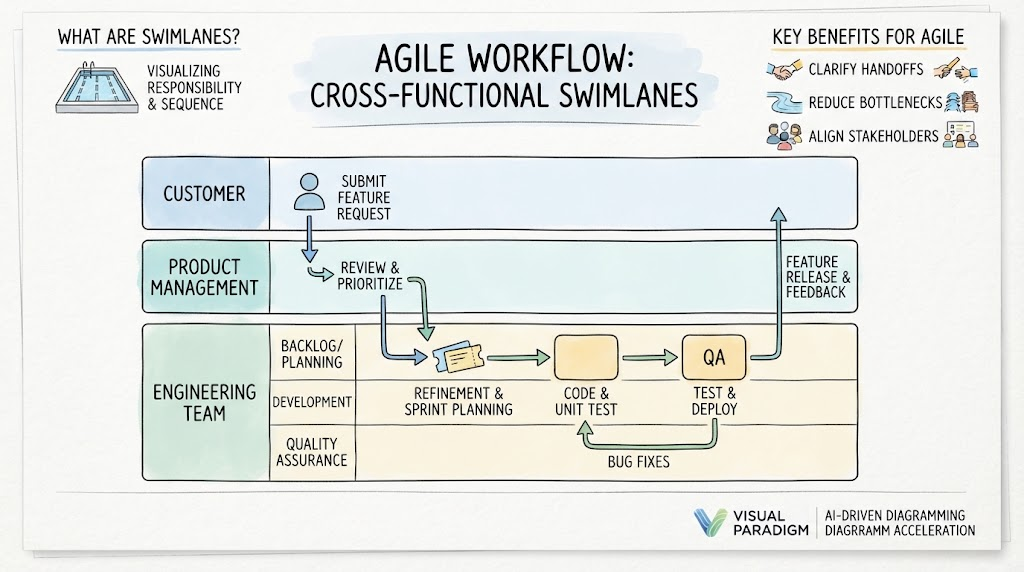
1. Understanding the Foundation: Pools vs. Lanes
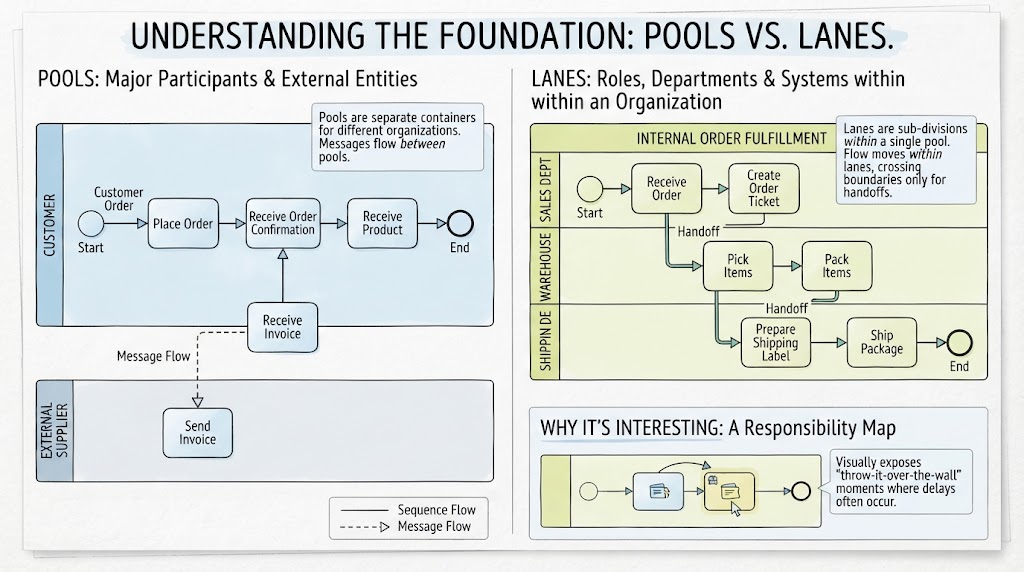
Before diving into examples, it is crucial to distinguish between the two structural elements of swimlanes:
-
Pools: Represent major participants in a process, typically different organizations or external entities. A pool acts as a container for the entire process flow of that participant. Messages flow between pools.
-
Lanes: Sub-divisions within a Pool. They represent specific roles, departments, or systems within that single organization. Flow moves within lanes, crossing boundaries only when handoffs occur.
Why it’s Interesting: Swimlanes transform a simple flowchart into a responsibility map. They visually expose “throw-it-over-the-wall” moments where delays often occur.
2. Usage Cases for Agile Teams
Agile methodologies emphasize collaboration and rapid delivery, but they still require clear process definitions, especially for integration points and compliance. Here is how Agile teams can leverage Swimlanes:
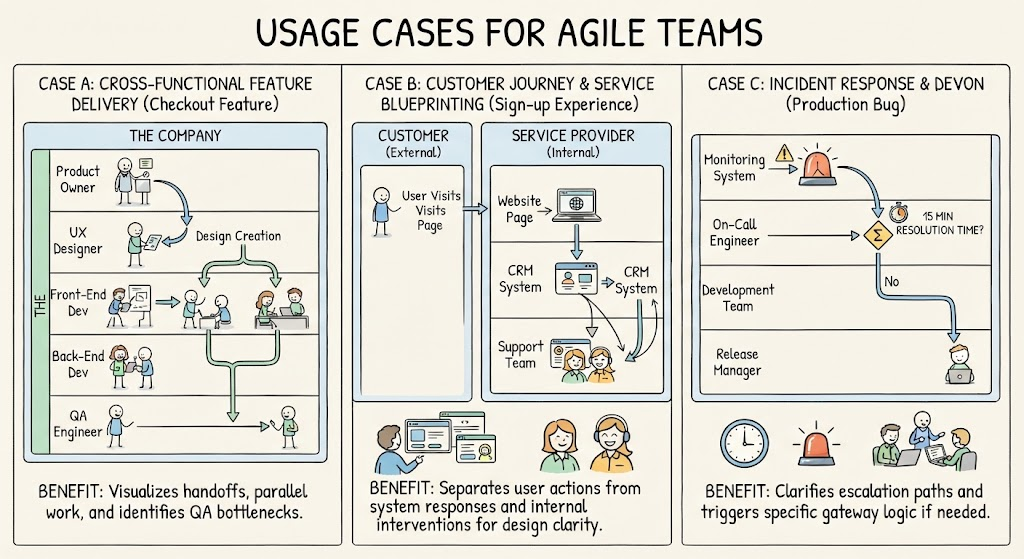
Case A: Cross-Functional Feature Delivery
-
Scenario: An Agile squad is delivering a new checkout feature.
-
Swimlane Application:
-
Pool: The Company.
-
Lanes: Product Owner, UX Designer, Front-End Dev, Back-End Dev, QA Engineer.
-
Benefit: Visualizes the handoff from design to development and the parallel work streams of front-end and back-end teams. It helps identify if QA is being bottlenecked by late code commits.
-
Case B: Customer Journey & Service Blueprinting
-
Scenario: Mapping the end-to-end experience of a user signing up for a service.
-
Swimlane Application:
-
Pool 1: Customer (External).
-
Pool 2: Service Provider (Internal).
-
Lanes in Pool 2: Website, CRM System, Support Team.
-
Benefit: Clearly separates user actions from system responses and internal support interventions, ensuring the team designs for both usability and operational efficiency.
-
Case C: Incident Response & DevOps
-
Scenario: Defining the workflow for handling a production bug.
-
Swimlane Application:
-
Lanes: Monitoring System, On-Call Engineer, Development Team, Release Manager.
-
Benefit: Clarifies escalation paths. If the On-Call Engineer cannot resolve it in 15 minutes, the flow crosses into the Development Team lane, triggering a specific gateway logic.
-
3. Practical Example: Order Fulfillment Process
Let’s look at a classic example to illustrate the structure.
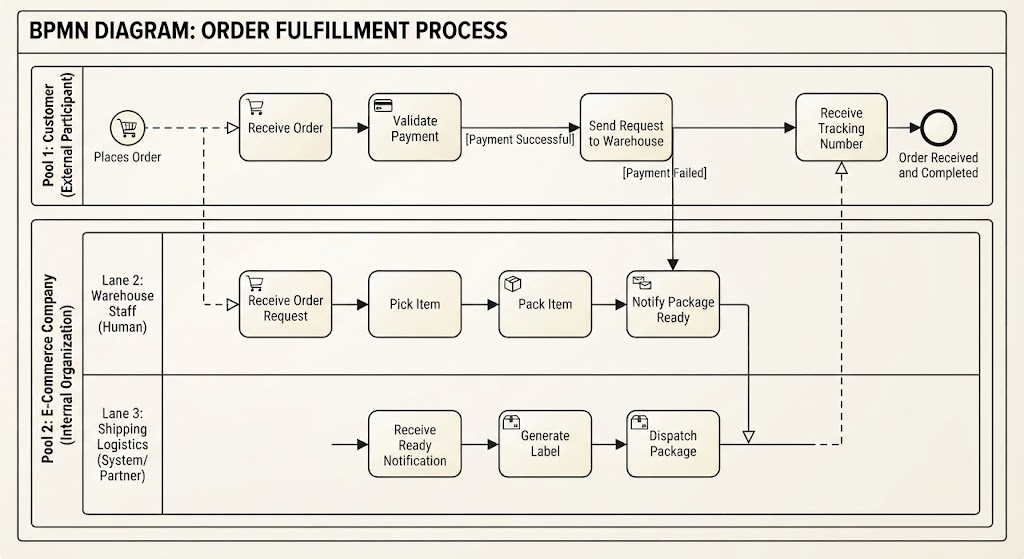
Process: Order Fulfillment
Participants: Customer, Sales Department, Warehouse, Shipping Partner.
| Element | Role in Diagram |
|---|---|
| Pool 1 | Customer (External Participant) |
| Pool 2 | E-Commerce Company (Internal Organization) |
| Lane 1 | Sales System (Automated) |
| Lane 2 | Warehouse Staff (Human) |
| Lane 3 | Shipping Logistics (System/Partner) |
Flow Logic:
-
Customer Lane: Places Order (Start Event).
-
Message Flow: Order details sent to Sales System Lane.
-
Sales System Lane: Validates Payment (Task). If successful, sends request to Warehouse Staff Lane.
-
Warehouse Staff Lane: Picks and Packs Item (Task).
-
Handoff: Package ready notification sent to Shipping Logistics Lane.
-
Shipping Logistics Lane: Generates Label and Dispatches (Task).
-
Message Flow: Tracking number sent back to Customer Lane.
4. Why Visual Paradigm? Recommended Tooling Features
Creating complex multi-pool diagrams manually can be tedious. Visual Paradigm offers specific features that make this process efficient and intelligent.
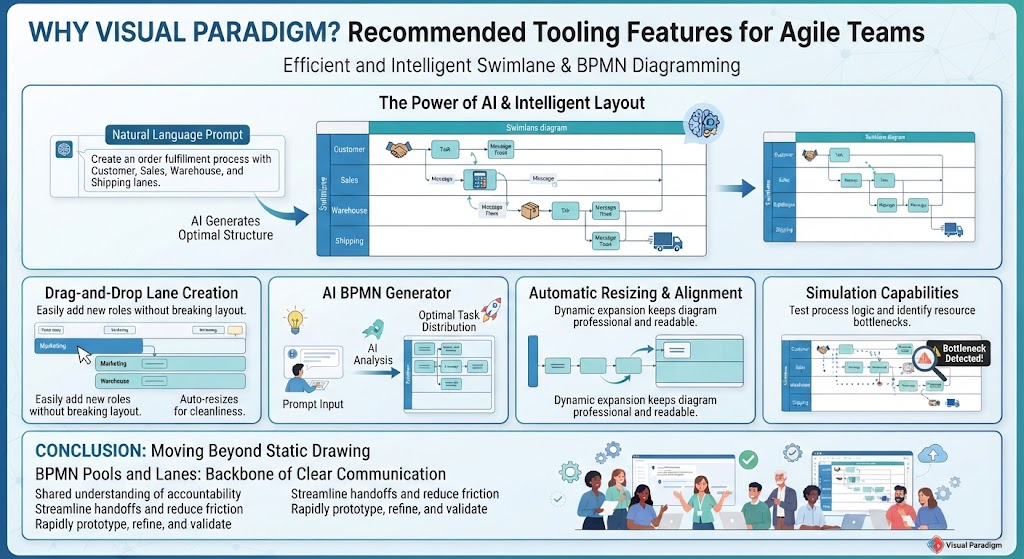
Key Features for Swimlanes:
-
Drag-and-Drop Lane Creation: Easily add new roles or departments without breaking the existing layout. The tool automatically resizes adjacent elements to maintain cleanliness.
-
AI BPMN Generator: Perhaps the most powerful feature for Agile teams. You can describe the process in natural language, and the AI will suggest the optimal distribution of tasks across pools and lanes.
-
Example Prompt: “Create an order fulfillment process with Customer, Sales, Warehouse, and Shipping lanes.”
-
-
Automatic Resizing & Alignment: As you add tasks to a lane, the swimlane expands dynamically, ensuring your diagram remains professional and readable.
-
Simulation Capabilities: Test the process logic. See if tokens get stuck in a specific lane, indicating a resource bottleneck.
The AI Angle: Optimal Lane Distribution
Visual Paradigm’s AI doesn’t just draw boxes; it understands context. By analyzing role descriptions, the AI can suggest:
-
Which tasks belong in which lane based on standard industry practices.
-
Where message flows (cross-pool) should replace sequence flows (within-pool) to adhere to BPMN 2.0 standards.
Conclusion
BPMN Pools and Lanes are more than just visual containers; they are the backbone of clear communication in complex processes. For Agile teams, they provide a shared understanding of accountability, helping to streamline handoffs and reduce friction between cross-functional members.
By leveraging Visual Paradigm, teams can move beyond static drawing. With AI-assisted generation and intelligent layout tools, you can rapidly prototype, refine, and validate your process models, ensuring that your Agile workflows are not just fast, but also clearly defined and responsibly owned.
Reference Resources: Visual Paradigm Tooling
- AI BPMN Diagram Generator: Professional BPD Tool: Explains how to generate BPMN diagrams from text using AI in the Visual Paradigm desktop application.
- Comprehensive Guide to BPMN, Visual Paradigm Tooling, AI, and Ecosystem: Covers BPMN fundamentals and the ecosystem, with practical AI-generated BPMN examples like employee onboarding.
- How to Create BPMN Business Process Diagrams in Visual Paradigm: A step-by-step tutorial on drawing BPMN diagrams manually, including creating pools, lanes, tasks, gateways, and using simulation features.
- BPMN Tutorial: Visual Paradigm Tooling, AI Chatbot & Ecosystem: Details the AI Chatbot capabilities for generating and refining diagrams via conversational commands.
- AI Business Process Diagram Generator Update: Highlights the AI BPMN generator’s ability to produce complex, multi-pool diagrams from simple text prompts.
- Mastering Business Process Modeling: A Complete Guide to BPMN and AI: A comprehensive guide on BPMN basics and using the AI generator to create diagrams from natural language descriptions.
- Creating Your First BPMN Diagram in Visual Paradigm: A beginner-friendly tutorial covering essential BPMN concepts like events, gateways, and swimlanes, with practical tips.
- BPMN 2.0 Business Process Modeling Beginner’s Guide: Offers a step-by-step guide for beginners, including AI prompt strategies for effective BPMN generation.
- How to Draw BPMN Diagram?: A visual tutorial on using Visual Paradigm’s resource catalog to efficiently draw BPMN diagrams and add gateways and events.
- Mastering BPMN: A Comprehensive Tutorial with Visual Paradigm, AI Chatbot, and Ecosystem: Discusses how the AI chatbot enables rapid, iterative BPMN modeling through plain language commands.