


Introduction
In the world of Business Process Model and Notation (BPMN), events start processes, tasks execute work, but gateways dictate the logic. They are the decision points that determine how a process flows, branches, merges, or waits. For Agile teams striving for clarity and efficiency, understanding the nuances between Exclusive, Parallel, Inclusive, and Event-Based gateways is not just about drawing correct diagrams—it’s about capturing the true intelligence of your business operations.
This guide explores these four critical gateway types, illustrating their practical usage in Agile environments with real-world examples. We will also highlight how Visual Paradigm, particularly its AI-driven tooling, transforms the complex task of process modeling into an intuitive, conversational experience, allowing teams to focus on logic rather than syntax.
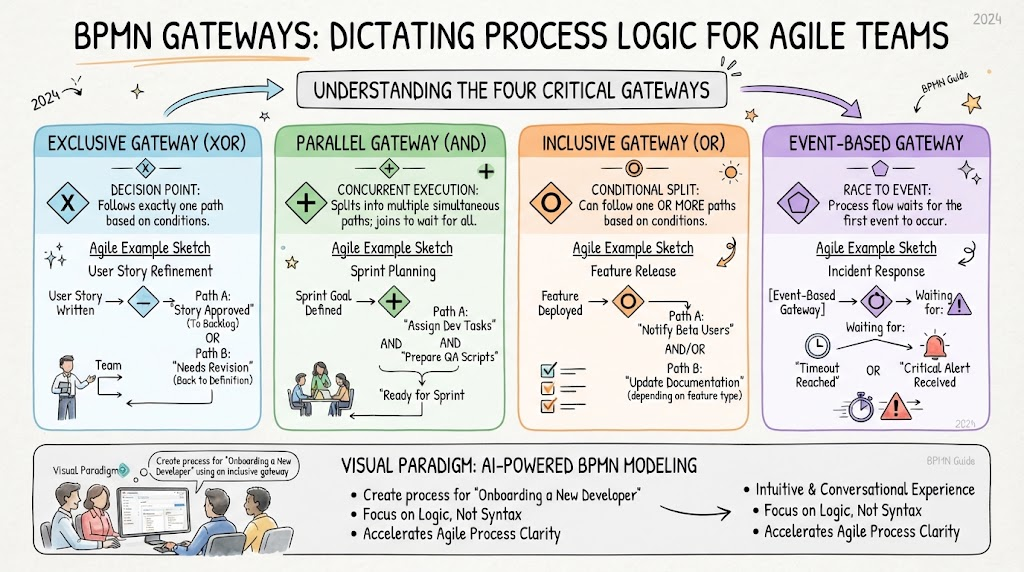
1. Exclusive Gateway (XOR)
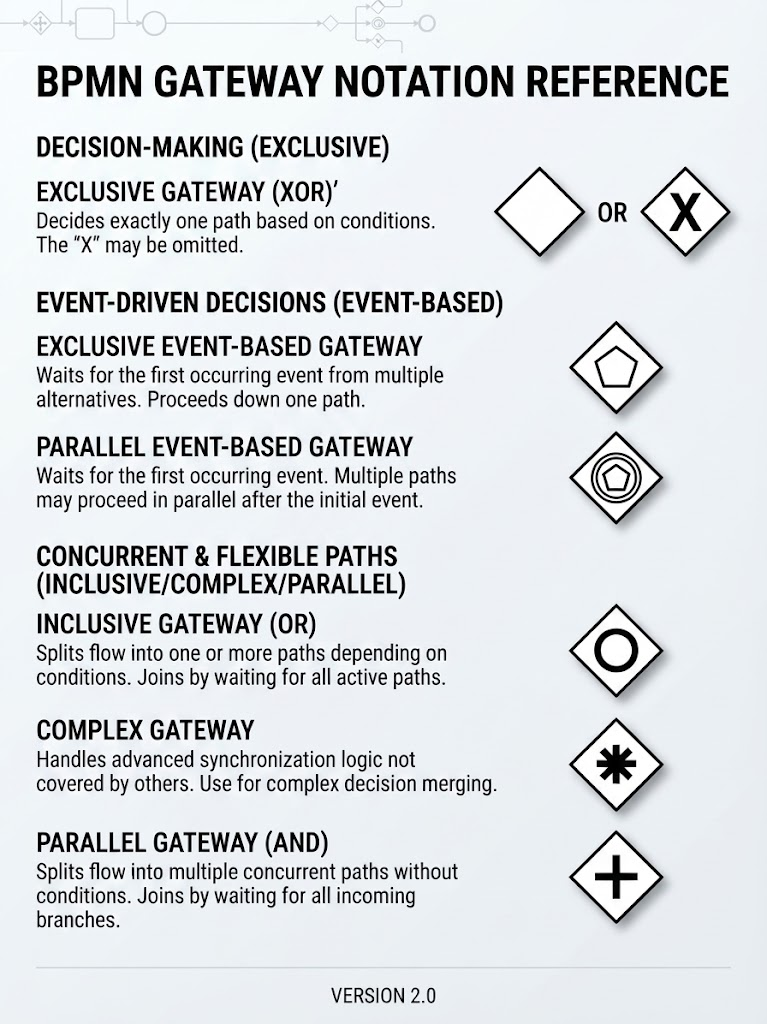
Symbol: A diamond with an “X” inside (or often just a plain diamond in many tools).
Logic: “One Path Only.” Based on a condition, exactly one outgoing sequence flow is taken.
Why it’s Interesting
It represents classic if/then/else logic. It is the most common gateway and is essential for modeling decisions where outcomes are mutually exclusive.
Agile Usage Case: Loan Approval Process
-
Scenario: A fintech startup is building a new loan approval feature.
-
Process: After a user submits an application, the system evaluates the credit score.
-
Gateway Logic:
-
If Credit Score > 700: Flow to “Auto-Approve.”
-
If Credit Score < 500: Flow to “Auto-Reject.”
-
If 500 <= Credit Score <= 700: Flow to “Manual Review.”
-
-
Agile Benefit: Clearly defines acceptance criteria for developers. The team knows exactly what conditions trigger which user story path.
2. Parallel Gateway (AND)
Symbol: A diamond with a “+” inside.
Logic: “All Paths Simultaneously.” It splits the flow into multiple concurrent paths or merges multiple concurrent paths back into one. No conditions are evaluated; all outgoing flows are activated.
Why it’s Interesting
It models true concurrency. It’s crucial for identifying bottlenecks and opportunities for parallel processing to reduce cycle time.
Agile Usage Case: Employee Onboarding
-
Scenario: An HR tech company is streamlining its onboarding workflow.
-
Process: Once a candidate accepts the offer, several independent tasks must begin.
-
Gateway Logic:
-
Split: Trigger “IT Setup” (laptop provisioning), “HR Paperwork” (contract signing), and “Team Intro” (schedule meeting) at the same time.
-
Merge: Wait for all three tasks to complete before moving to “First Day Orientation.”
-
-
Agile Benefit: Helps the team visualize dependencies. Developers can build these modules independently (parallel sprints) knowing they only need to sync at the merge point.
3. Inclusive Gateway (OR)
Symbol: A diamond with a “O” or circle inside.
Logic: “One or More Paths.” Based on conditions, one or more outgoing sequence flows are taken. It allows for flexible branching where multiple conditions can be true simultaneously.
Why it’s Interesting
It handles complex real-world scenarios where decisions aren’t mutually exclusive. It’s more flexible than the Exclusive Gateway but more controlled than the Parallel Gateway.
Agile Usage Case: Insurance Claim Processing
-
Scenario: An insurance company is digitizing its claims handling.
-
Process: A claim is submitted for a car accident.
-
Gateway Logic:
-
Condition A: Is there vehicle damage? -> Yes: Trigger “Repair Estimate.”
-
Condition B: Was anyone injured? -> Yes: Trigger “Medical Review.”
-
Condition C: Is liability disputed? -> Yes: Trigger “Legal Assessment.”
-
Note: A single claim could trigger just A, just B, A+B, or all three.
-
-
Agile Benefit: Prevents over-engineering. Instead of creating complex nested Exclusive Gateways, the team models the natural flexibility of the business rule.
4. Event-Based Gateway
Symbol: A diamond with a thin border, containing event icons (e.g., message, timer, signal).
Logic: “Wait for Something to Happen.” The process path is determined by which event occurs first. It’s used for modeling reactive processes.
Why it’s Interesting
It shifts the focus from data-based decisions to time- or trigger-based decisions. It’s essential for modeling timeouts, cancellations, or external triggers.
Agile Usage Case: Order Fulfillment with Timeout
-
Scenario: An e-commerce platform wants to improve customer experience during payment.
-
Process: After the user clicks “Checkout,” the system waits for a response.
-
Gateway Logic:
-
Path 1: Payment Confirmation Message received -> Proceed to “Ship Order.”
-
Path 2: Timer Event (30 minutes elapsed) -> Proceed to “Cancel Order & Notify User.”
-
-
Agile Benefit: Clarifies edge cases. Developers know exactly how long to wait and what fallback mechanism to implement, reducing ambiguity in sprint planning.
Why Visual Paradigm Tooling?
Visual Paradigm stands out as a recommended tool for Agile teams due to its seamless integration of traditional BPMN modeling with cutting-edge AI capabilities. Here’s why it helps:
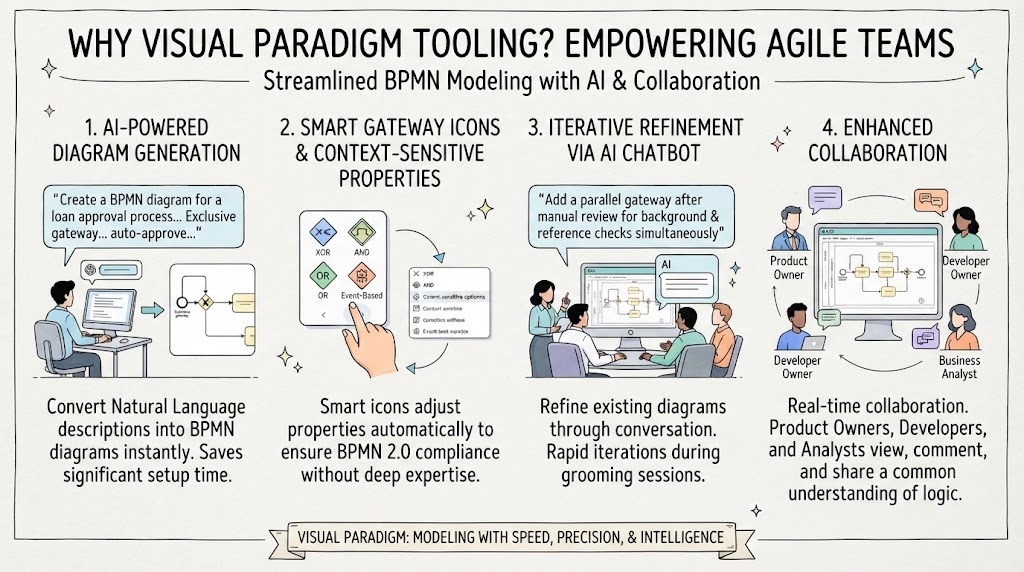
1. AI-Powered Diagram Generation
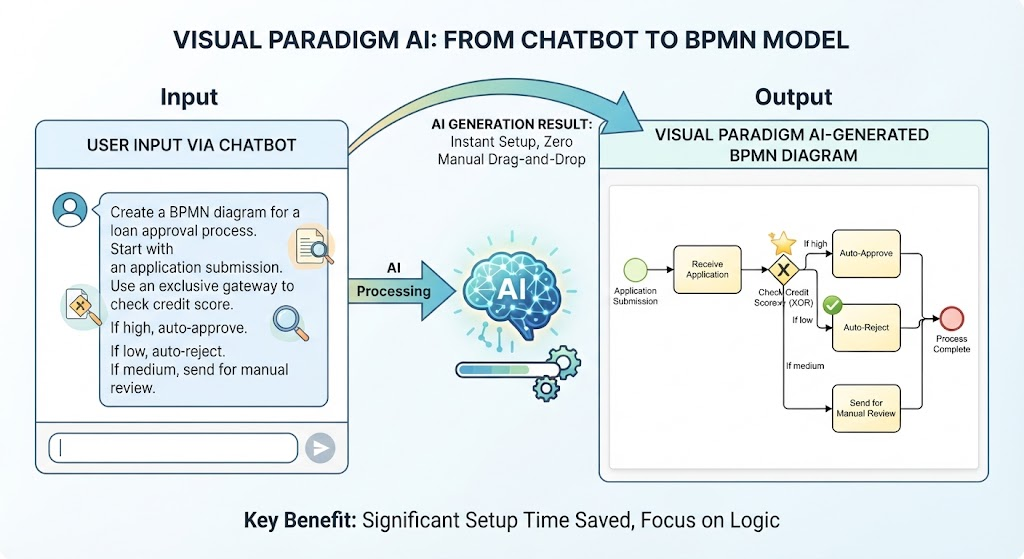
Instead of manually dragging and dropping shapes, you can describe your process in natural language.
-
Example Prompt: “Create a BPMN diagram for a loan approval process. Start with an application submission. Use an exclusive gateway to check credit score. If high, auto-approve. If low, auto-reject. If medium, send for manual review.”
-
Result: Visual Paradigm’s AI generates the initial diagram, including the correct Exclusive Gateway, saving significant setup time.
2. Smart Gateway Icons & Context-Sensitive Properties
Visual Paradigm provides smart icons that automatically adjust their properties based on the type of gateway selected. This reduces errors and ensures BPMN 2.0 compliance without requiring deep expertise in the notation standard.
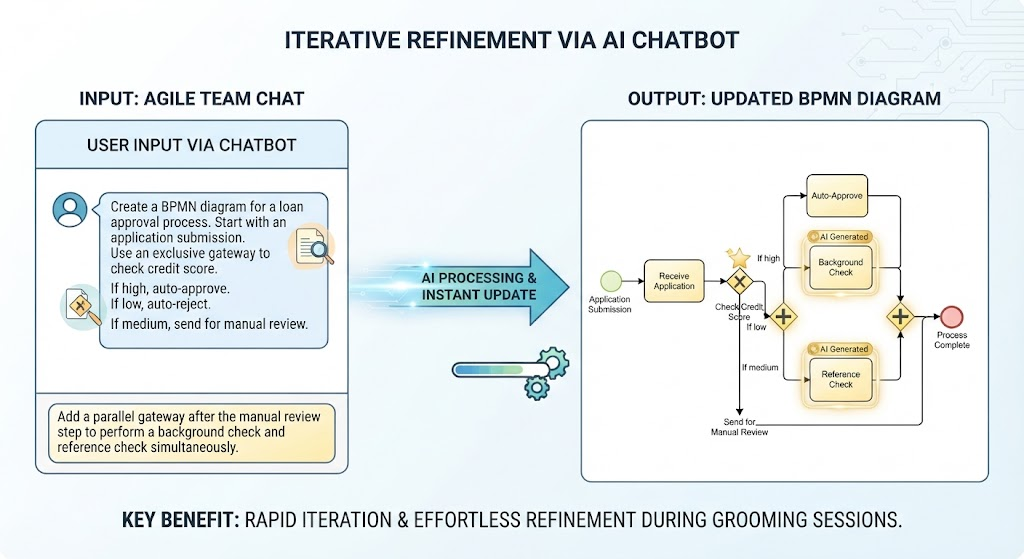
3. Iterative Refinement via AI Chatbot
Agile processes evolve. With Visual Paradigm’s AI Chatbot, you can refine existing diagrams through conversation.
-
Example Command: “Add a parallel gateway after the manual review step to perform a background check and reference check simultaneously.”
-
Result: The AI updates the diagram instantly, allowing the team to iterate rapidly during grooming sessions.
4. Enhanced Collaboration
The tool supports real-time collaboration, allowing product owners, developers, and business analysts to view and comment on the same process model. This ensures everyone shares a common understanding of the decision logic.
Conclusion
Gateways are the brain of your BPMN diagrams. Choosing the right type—Exclusive for clear decisions, Parallel for concurrency, Inclusive for flexible combinations, and Event-Based for reactive triggers—is crucial for accurate process modeling. For Agile teams, this clarity translates directly into better-defined user stories, fewer misunderstandings, and faster delivery.
By leveraging Visual Paradigm’s AI-driven tooling, teams can bypass the steep learning curve of BPMN syntax. The ability to generate and refine diagrams using natural language allows Agile practitioners to focus on what matters most: the business logic and value delivery. Whether you’re mapping a simple approval flow or a complex multi-system integration, Visual Paradigm empowers you to model with speed, precision, and intelligence.
Suggested Article Title
“Decoding Process Logic: A Guide to BPMN Gateways for Agile Teams Using Visual Paradigm AI”
Reference Resources: Visual Paradigm Tooling
- AI BPMN Diagram Generator: Professional BPD Tool: Explains how to generate BPMN diagrams from text using AI in the Visual Paradigm desktop application.
- Comprehensive Guide to BPMN, Visual Paradigm Tooling, AI, and Ecosystem: Covers BPMN fundamentals and the ecosystem, with practical AI-generated BPMN examples like employee onboarding.
- How to Create BPMN Business Process Diagrams in Visual Paradigm: A step-by-step tutorial on drawing BPMN diagrams manually, including creating pools, lanes, tasks, gateways, and using simulation features.
- BPMN Tutorial: Visual Paradigm Tooling, AI Chatbot & Ecosystem: Details the AI Chatbot capabilities for generating and refining diagrams via conversational commands.
- AI Business Process Diagram Generator Update: Highlights the AI BPMN generator’s ability to produce complex, multi-pool diagrams from simple text prompts.
- Mastering Business Process Modeling: A Complete Guide to BPMN and AI: A comprehensive guide on BPMN basics and using the AI generator to create diagrams from natural language descriptions.
- Creating Your First BPMN Diagram in Visual Paradigm: A beginner-friendly tutorial covering essential BPMN concepts like events, gateways, and swimlanes, with practical tips.
- BPMN 2.0 Business Process Modeling Beginner’s Guide: Offers a step-by-step guide for beginners, including AI prompt strategies for effective BPMN generation.
- How to Draw BPMN Diagram?: A visual tutorial on using Visual Paradigm’s resource catalog to efficiently draw BPMN diagrams and add gateways and events.
- Mastering BPMN: A Comprehensive Tutorial with Visual Paradigm, AI Chatbot, and Ecosystem: Discusses how the AI chatbot enables rapid, iterative BPMN modeling through plain language commands.