


Introduction
Business processes often involve multiple people, departments, systems, and decisions. When these processes are documented only in written procedures or spreadsheets, it can be difficult to understand how work moves from one step to the next, who is responsible, and what happens when conditions change. Business Process Model and Notation (BPMN) helps solve this problem by providing a standardized visual language for describing business workflows. With BPMN, organizations can represent activities, events, decisions, responsibilities, communications, and outcomes in a single diagram.
Business processes are often difficult to understand when they exist only as written procedures, emails, or informal conversations. Different teams may interpret the same process differently, responsibilities may be unclear, and delays can be difficult to identify. Business Process Model and Notation, commonly known as BPMN, provides a visual way to describe how work is performed. With BPMN, teams can represent activities, decisions, events, responsibilities, and communication in a standardized process diagram.
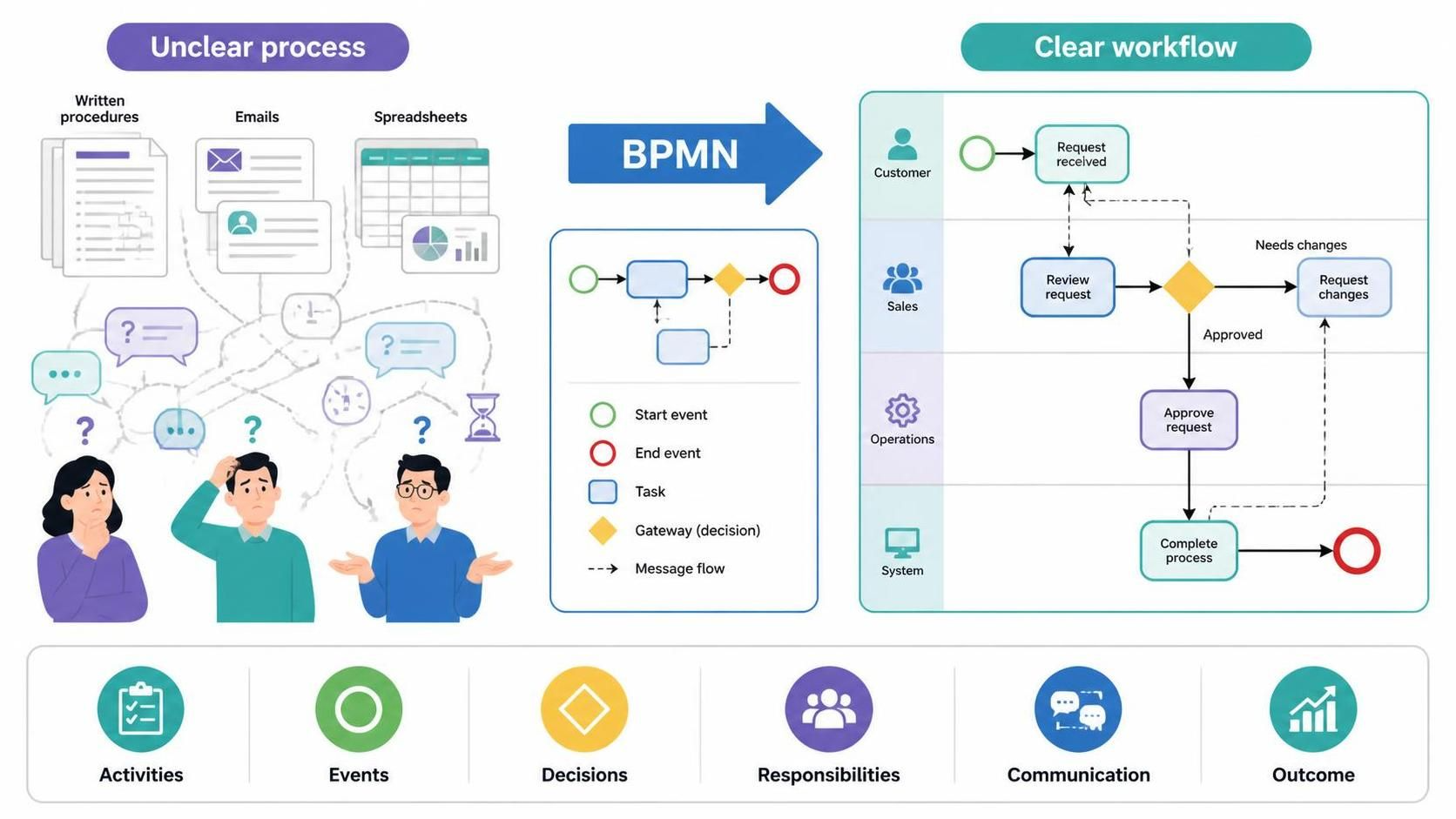
This beginner’s guide introduces the essential BPMN concepts and explains how to create process diagrams using Visual Paradigm Online’s BPMN tool. It also explores how the paid AI-assisted feature can help generate an initial BPMN model from a plain-language process description, making it easier to move from an idea or written procedure to a structured visual workflow.
What Is BPMN?
BPMN is a standardized notation for modeling business processes. It uses familiar visual symbols to show:
-
What starts a process
-
Which activities must be completed
-
Who performs each activity
-
Where decisions occur
-
How different participants communicate
-
What brings the process to an end
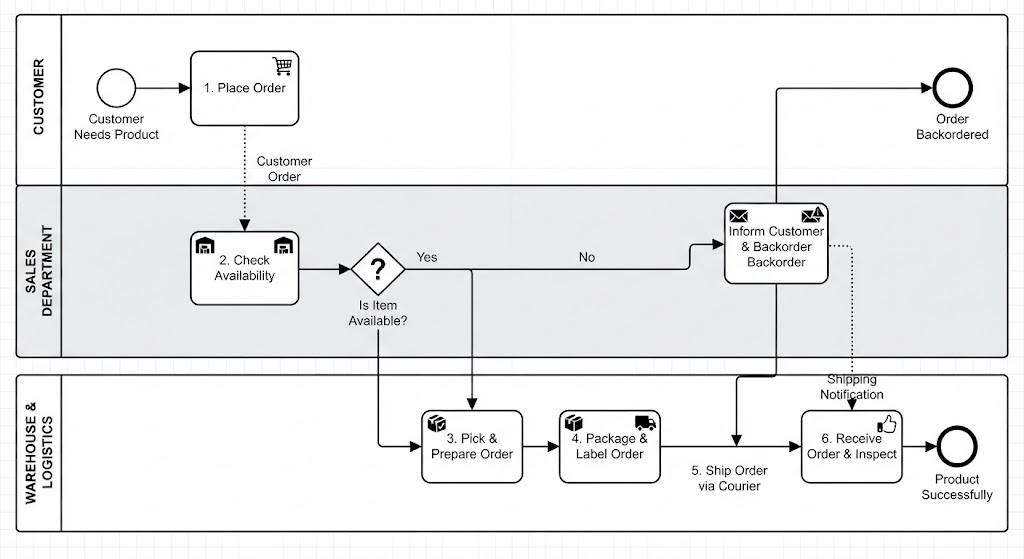
For example, an order fulfillment process might include these steps:
-
A customer places an order.
-
The sales department checks product availability.
-
The warehouse prepares the order.
-
The shipping department delivers the package.
-
The customer receives the order.
A BPMN diagram turns this written sequence into a visual model that business users, analysts, developers, and managers can discuss together.
Why Use BPMN?
BPMN is useful because it creates a shared language for describing business processes. Instead of relying on long paragraphs or inconsistent flowcharts, teams can use recognized symbols and structures.
Common benefits include:
-
Better communication: Business and technical teams can discuss the same visual model.
-
Clearer responsibilities: Pools and lanes show who performs each activity.
-
Process analysis: Diagrams help reveal bottlenecks, unnecessary steps, and duplicated work.
-
Documentation: BPMN provides a consistent way to record current and proposed processes.
-
Automation planning: Detailed BPMN models can serve as a foundation for workflow and system automation.
-
Change management: Teams can compare the current process with a redesigned future-state process.
BPMN is especially valuable when a process involves several departments, systems, approval stages, or possible outcomes.
The Main BPMN Elements
BPMN diagrams are built from several core element types.
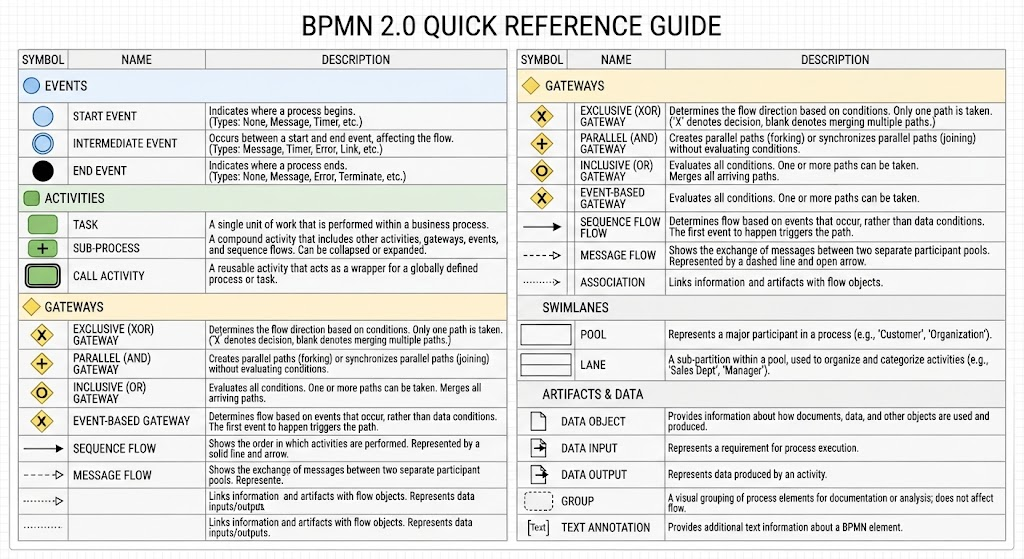
Events
Events represent something that happens during a process. They can trigger, interrupt, or complete a process.
The three main event types are:
-
Start event: Shows where the process begins.
-
Intermediate event: Occurs during the process.
-
End event: Shows where the process finishes.
For example, “Order received” may be a start event, while “Payment timeout” could be an intermediate timer event. “Order completed” may be an end event.
Activities
Activities represent work that must be performed. The simplest activity is a task.
Examples include:
-
Review order
-
Approve request
-
Send invoice
-
Verify customer information
-
Pack product
-
Update database
A group of related activities can be represented as a sub-process. Sub-processes help keep a high-level diagram simple while allowing detailed steps to be modeled separately.
Gateways
Gateways control how the process branches or merges. They are usually shown as diamond-shaped symbols.
A gateway can represent:
-
A decision
-
Parallel work
-
Multiple possible routes
-
Synchronization between paths
For example, after checking inventory, the process may follow one of two paths:
-
If the product is available, continue to shipping.
-
If the product is unavailable, notify the customer and cancel the order.
This is commonly modeled with an exclusive gateway. Other gateway types support parallel activities, inclusive decisions, and event-based routing.
Sequence Flows
Sequence flows show the order in which activities, events, and gateways occur. They are represented by solid arrows.
A basic process might look like this:
Start → Receive Order → Check Inventory → Prepare Shipment → End
Sequence flows normally connect elements within the same pool.
Pools and Lanes
Pools and lanes show responsibility.
A pool usually represents an organization, company, customer, supplier, or other independent participant. A lane divides a pool into roles, departments, teams, or systems.
For example, an order process might contain these lanes:
-
Customer
-
Sales Department
-
Warehouse
-
Shipping Department
This makes it easy to see which participant performs each task.
Message Flows
Message flows represent communication between separate participants. They are shown with dashed lines and an envelope symbol.
Examples include:
-
A customer sends an order to a company.
-
A company sends a confirmation to a customer.
-
A supplier sends a delivery notice to a warehouse.
A message flow is different from a sequence flow. A sequence flow shows the order of work within a participant, while a message flow shows communication between participants.
Data Objects and Annotations
Data objects show information used or produced by activities.
Examples include:
-
Purchase order
-
Customer application
-
Invoice
-
Approval form
-
Delivery receipt
Text annotations can add explanations without changing the process logic. They are useful for documenting business rules, assumptions, or additional guidance.
A Simple BPMN Example: Order Fulfillment
Consider this process:
A customer places an order. The sales department checks whether the product is available. If the product is unavailable, sales informs the customer and ends the process. If the product is available, the warehouse prepares the order and shipping delivers it.
Use Visual Paradigm AI Chatbot:
The process can be represented conceptually as:
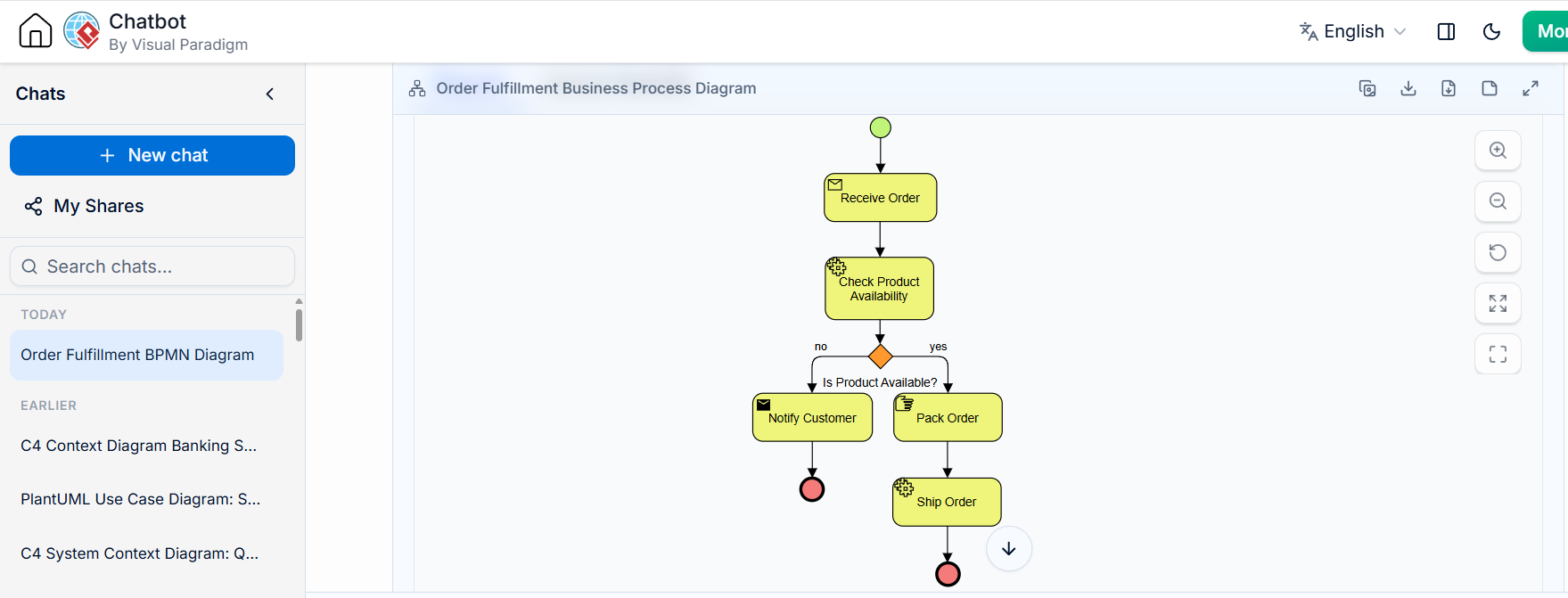
A BPMN diagram would typically use:
-
A start event for receiving the order
-
Tasks for checking availability, notifying the customer, packing, and shipping
-
An exclusive gateway for the availability decision
-
Separate end events for cancellation and delivery
-
Lanes for the customer, sales team, warehouse, and shipping team
The diagram is more useful than a simple list because it shows both the flow of work and the responsibilities associated with each step.
Creating a BPMN Diagram with Visual Paradigm Online
Visual Paradigm Online provides a browser-based diagramming environment that can be used to create and edit BPMN diagrams. Its drag-and-drop editor allows users to place BPMN elements on a canvas, connect them, and organize them into pools and lanes.
A typical workflow is:
-
Open the Visual Paradigm Online diagram editor.
-
Create a new BPMN or Business Process Diagram.
-
Add pools and lanes for the main participants.
-
Place a start event.
-
Add tasks in the order they occur.
-
Insert gateways where decisions or parallel activities occur.
-
Connect the elements with sequence flows.
-
Add message flows where participants communicate.
-
Add data objects or annotations where clarification is needed.
-
Review the process with stakeholders.
-
Export or share the completed diagram.
The free BPMN tool is suitable for learning BPMN, documenting straightforward workflows, and creating initial process diagrams. More advanced project, collaboration, modeling, or AI-assisted capabilities may depend on the selected Visual Paradigm plan.
Using the AI-Assisted BPMN Feature
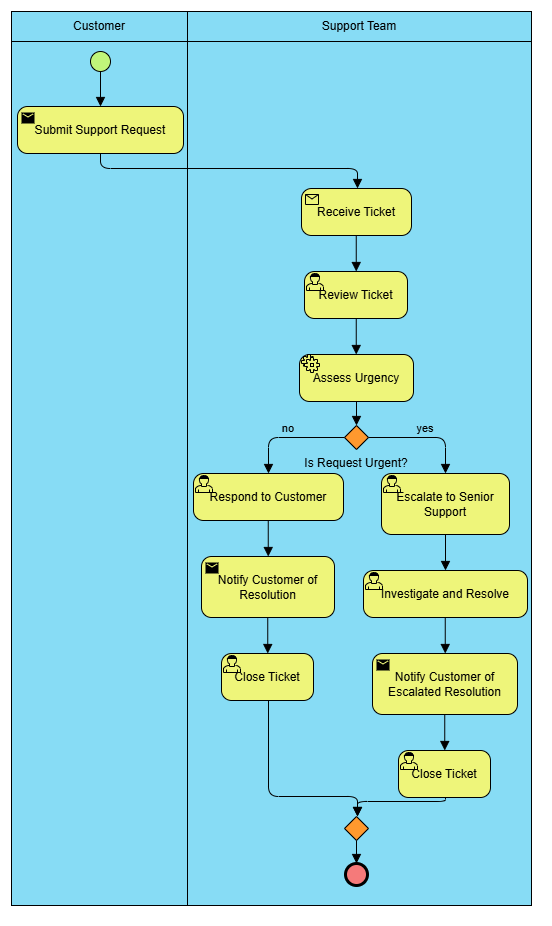
Visual Paradigm also offers an AI-assisted BPMN generation feature as a paid capability. It can transform a plain-language process description into an editable BPMN diagram. The AI analyzes the narrative to identify participants, activities, decisions, and process flow.
For example, instead of drawing every element manually, you could provide a description such as:
The customer submits a support request. The support agent reviews the request. If the issue is urgent, the agent escalates it to the technical team. Otherwise, the agent responds directly. The customer receives a resolution message and the ticket is closed.
The AI-generated diagram may identify:
-
Customer and support-team lanes
-
A start event for receiving the request
-
Tasks for reviewing and responding
-
An exclusive gateway for determining urgency
-
An escalation path
-
An end event for closing the ticket
The generated model should be treated as a starting point rather than a final process definition. Business rules, exceptions, responsibilities, and terminology should be reviewed by a process owner or business analyst.
Generated by Visual Paradigm AI Chatbot:
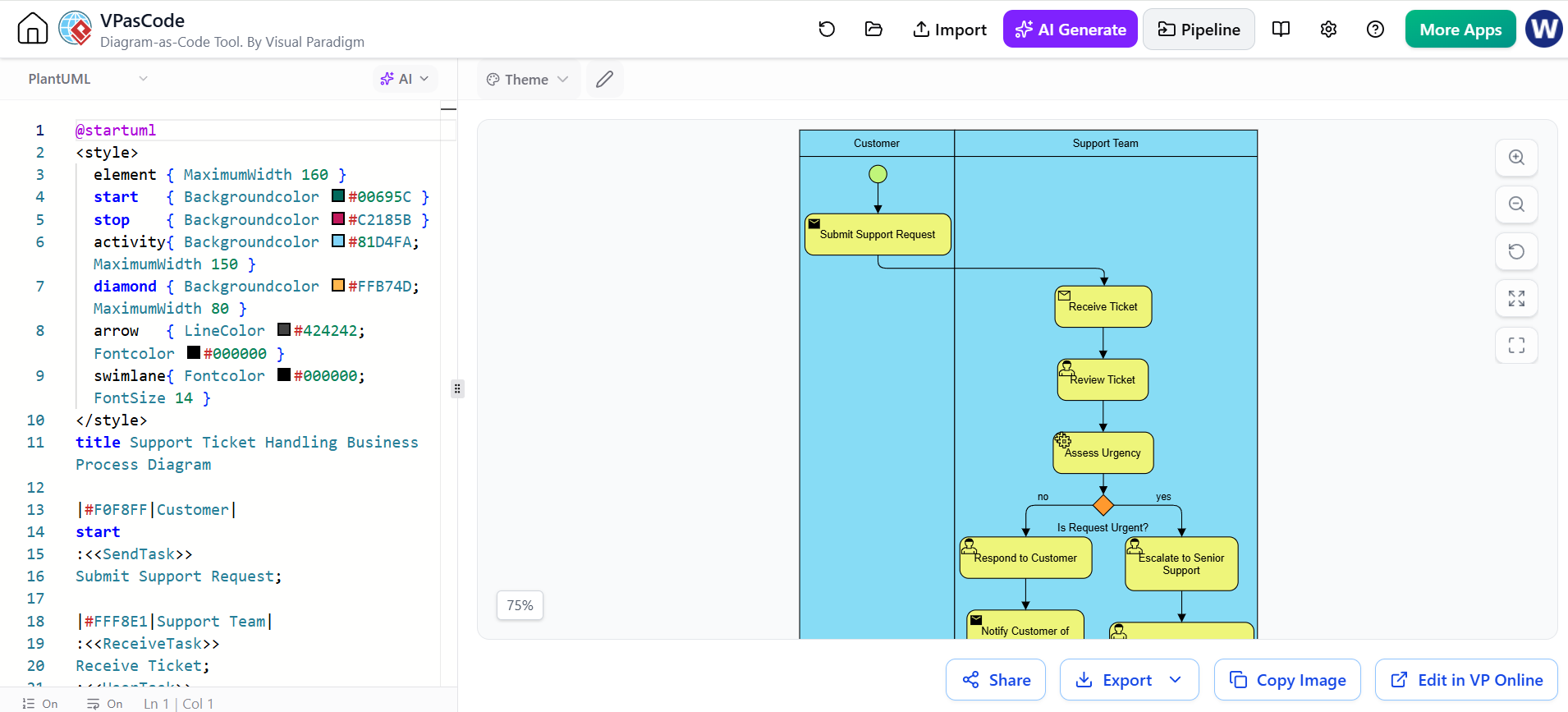
Send the Result to Visual Paradigm VPasCode Editor:
How to Write an Effective AI Prompt
A clear process description produces a more useful initial diagram. Include:
-
The participants or roles
-
The activities in chronological order
-
Decision conditions
-
Possible outcomes
-
Messages exchanged between participants
-
Exceptions or escalation paths
A weak prompt might be:
Describe an employee onboarding process.
A stronger prompt would be:
Human Resources creates a new employee record and sends an onboarding checklist to the hiring manager. The hiring manager confirms the start date. If documents are missing, Human Resources requests them from the employee. If all documents are complete, IT creates the employee account and prepares a laptop. The employee attends orientation, and Human Resources closes the onboarding case.
The second prompt provides actors, actions, conditions, and outcomes, giving the AI more information to use when creating the diagram.
Free BPMN Modeling and Paid AI Assistance
The two approaches serve different purposes.
| Capability | Visual Paradigm Online BPMN tool | AI-assisted BPMN feature |
|---|---|---|
| Create BPMN elements manually | Yes | Yes, through generated output |
| Learn BPMN notation | Excellent | Useful, but requires review |
| Model a simple workflow | Yes | Yes |
| Generate a first draft from text | No or limited | Yes |
| Control every modeling decision | Yes | Yes after editing |
| Identify roles and gateways automatically | Manual | AI-assisted |
| Best for | Learning, documentation, and precise modeling | Rapid exploration and initial diagram creation |
The free editor gives you direct control over the diagram. The paid AI feature can reduce the time required to create a first draft, especially when the process is complex or when the starting point is a written procedure.
Important BPMN Modeling Practices
Good BPMN diagrams are not necessarily the ones with the most symbols. They are the ones that communicate the process clearly.
Follow these practices:
-
Start with a clear process scope.
-
Give each task a verb-based name, such as “Review Application.”
-
Use lanes only when responsibility matters.
-
Label gateway conditions clearly.
-
Keep the main diagram at a manageable level of detail.
-
Use sub-processes for complex groups of activities.
-
Distinguish internal process flow from external communication.
-
Use separate end events when outcomes have different meanings.
-
Review the diagram with the people who perform the process.
-
Validate AI-generated diagrams against the actual business procedure.
Avoid placing every exception, system detail, and business rule into a single diagram. A layered approach is usually easier to understand: begin with a high-level process, then create detailed diagrams for important sub-processes.
BPMN Is a Communication Tool
BPMN is more than a collection of diagram symbols. It is a way to make business processes visible and discussable.
A well-designed BPMN diagram can help a team answer questions such as:
-
Where does the process begin?
-
Who is responsible for each activity?
-
What happens when a decision has multiple outcomes?
-
Which departments or systems exchange information?
-
Where could delays or errors occur?
-
Which activities might be automated?
-
What should happen when an exception occurs?
Visual Paradigm Online’s free BPMN editor provides a practical way to create these models manually, while its paid AI-assisted feature can accelerate the creation of an initial diagram from a written process description. Used together, they support a workflow in which AI helps with drafting and human reviewers provide business judgment, correction, and approval.
Key Takeaways
-
BPMN visually represents business processes.
-
Events show what happens, activities show the work, and gateways show decisions or parallel paths.
-
Pools and lanes clarify responsibilities.
-
Sequence flows show process order, while message flows show communication between participants.
-
Visual Paradigm Online can be used to create BPMN diagrams in a browser.
-
The paid AI-assisted feature can generate an editable BPMN draft from plain-language process descriptions.
-
AI-generated diagrams should always be reviewed and refined by people who understand the real process.
Conclusion
BPMN provides a clear and standardized way to understand, document, and improve business processes. By combining events, activities, gateways, flows, pools, and lanes, teams can visualize how work moves from start to finish and identify who is responsible at each stage.
Visual Paradigm Online makes BPMN modeling accessible through its browser-based free tool, which is useful for learning, documenting workflows, and creating process diagrams manually. Its paid AI-assisted feature can further accelerate the modeling process by turning written business descriptions into editable BPMN drafts.
Whether you create diagrams manually or begin with an AI-generated model, the most important step is to validate the result with the people involved in the process. When used thoughtfully, BPMN can improve communication, support process analysis, and provide a strong foundation for workflow automation and continuous improvement.