


Introduction
Agile methodologies thrive on adaptability, collaboration, and rapid delivery. However, as teams scale or tackle complex enterprise workflows, the lack of structured process visualization can lead to ambiguity, misaligned expectations, and technical debt. Business Process Model and Notation (BPMN) 2.0 offers a standardized, visual language that bridges the gap between business stakeholders and technical developers.
For Agile teams, integrating BPMN into sprint planning isn’t about creating heavy, upfront documentation. Instead, it’s about using lightweight, iterative process models to clarify user stories, identify dependencies, and simulate workflow efficiency before code is written. This guide explores how Agile teams can leverage BPMN within their sprint cycles, with a focus on Visual Paradigm as a recommended tooling ecosystem to streamline this integration.
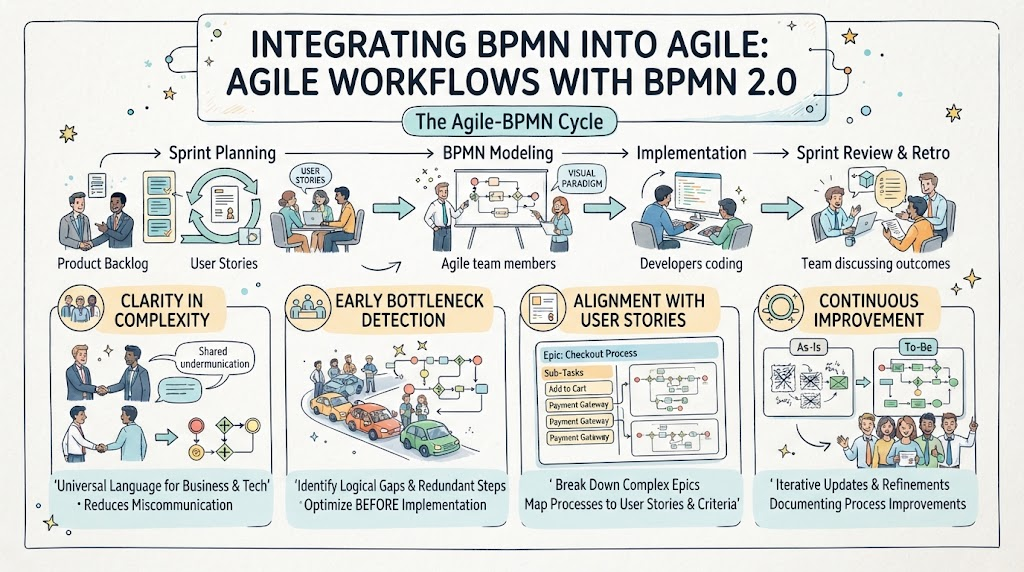
Why BPMN Matters for Agile Teams
-
Clarity in Complexity: BPMN provides a universal language that both product owners and developers understand, reducing miscommunication during backlog refinement.
-
Early Bottleneck Detection: Visualizing processes allows teams to spot logical gaps, redundant steps, or resource constraints before implementation begins.
-
Alignment with User Stories: Complex epics can be broken down into BPMN sub-processes, which directly map to individual user stories and acceptance criteria.
-
Continuous Improvement: As Agile emphasizes retrospectives, BPMN models can be updated iteratively to reflect “As-Is” vs. “To-Be” states, documenting process improvements over time.
Use Cases for Agile Teams
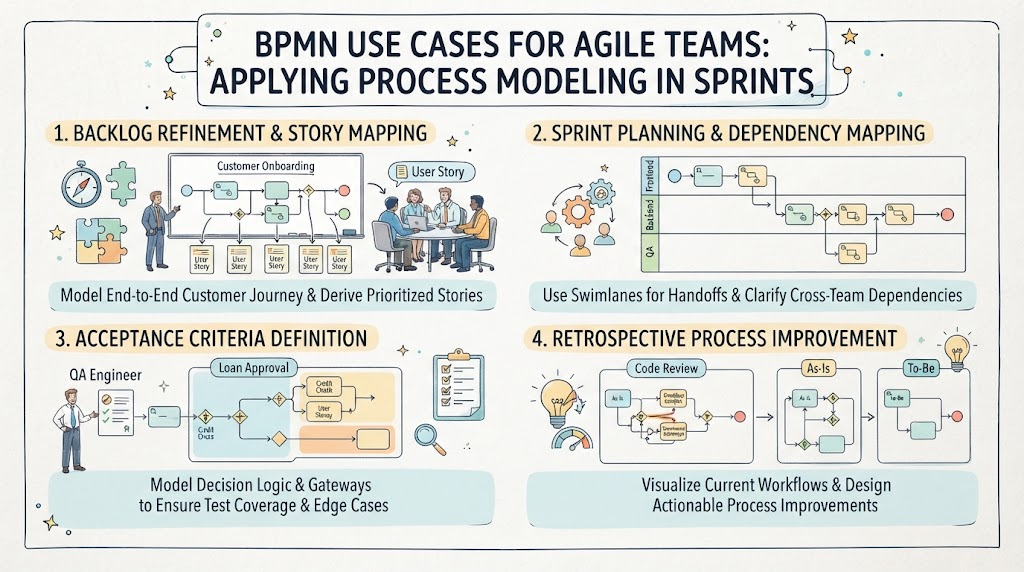
1. Backlog Refinement & Story Mapping
Scenario: A team is refining an epic for “Customer Onboarding.”
Application: Instead of just listing stories, the team creates a high-level BPMN diagram showing the end-to-end journey. Each task or gateway in the diagram becomes a candidate for a user story.
Benefit: Ensures no step is missed and helps prioritize stories based on process criticality.
2. Sprint Planning & Dependency Mapping
Scenario: Planning a sprint that involves multiple teams (e.g., Frontend, Backend, QA).
Application: Use BPMN swimlanes to assign tasks to specific roles or teams. Sequence flows highlight handoffs and dependencies.
Benefit: Clarifies who does what and when, reducing cross-team friction during the sprint.
3. Acceptance Criteria Definition
Scenario: Defining acceptance criteria for a complex feature like “Loan Approval.”
Application: Use BPMN gateways (exclusive, parallel) to model decision logic. Each path through the gateway represents a different scenario that must be tested.
Benefit: Provides a visual checklist for QA and ensures all edge cases are covered.
4. Retrospective Process Improvement
Scenario: The team identifies delays in the “Code Review” process during a retrospective.
Application: Model the current “As-Is” review process in BPMN. Identify bottlenecks (e.g., long wait times at a specific task). Design a “To-Be” model with improvements (e.g., parallel reviews).
Benefit: Creates a clear, actionable plan for process optimization in the next sprint.
Recommended Tooling: Visual Paradigm
Visual Paradigm stands out as an enterprise-grade yet Agile-friendly tool for BPMN modeling. Its suite balances high-level visibility with deep technical execution, making it ideal for teams that need both speed and precision.
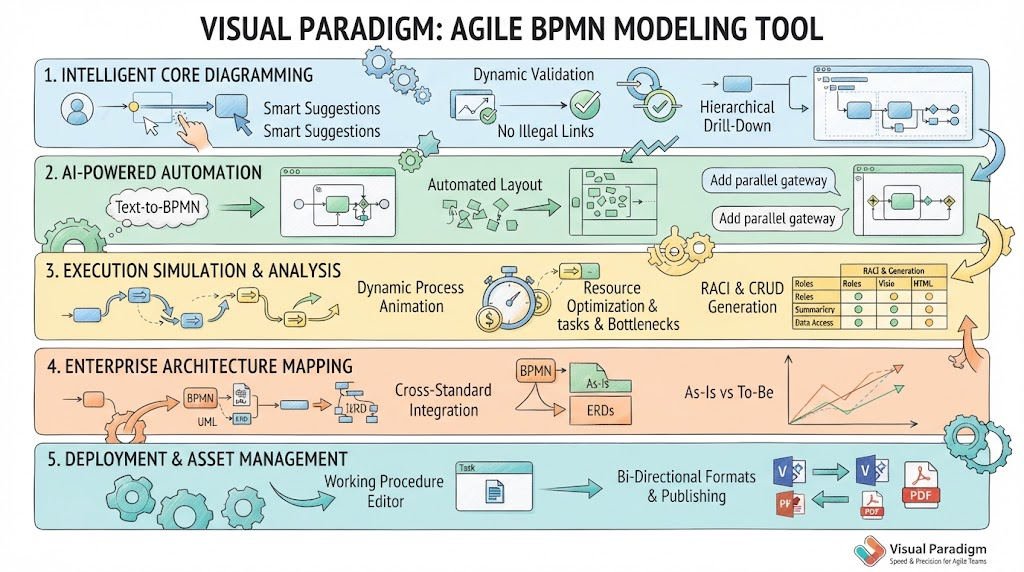
Key Features for Agile Teams
1. Intelligent Core Diagramming
-
Context-Aware Resource Catalog: Drag-and-drop connectors suggest valid next steps, speeding up diagram creation during fast-paced planning sessions.
-
Dynamic Validation Rules: Prevents illegal links (e.g., crossing pool boundaries), ensuring models remain compliant and error-free without manual checks.
-
Hierarchical Process Drill-Down: Keeps main diagrams clean by collapsing sub-processes. Teams can focus on high-level flow during planning and drill down into details only when necessary.
2. AI-Powered Automation
-
Text-to-BPMN NLP Engine: Converts natural language descriptions (e.g., from user stories) into initial BPMN drafts instantly. This accelerates the transition from idea to visual model.
-
Automated Layout Generation: AI structures swimlanes and sequences automatically, saving time on formatting and allowing teams to focus on logic.
-
Conversational AI Refinement: Use a chatbot interface to tweak diagrams (e.g., “Add a parallel gateway for testing”). This supports iterative refinement during collaborative sessions.
3. Execution Simulation & Analysis
-
Dynamic Process Animation: Visualizes token flow, helping teams understand complex decision paths and identify potential deadlocks.
-
Resource Optimization Simulation: Assign costs and times to tasks to forecast bottlenecks. This data-driven approach helps in realistic sprint capacity planning.
-
RACI & CRUD Matrix Generation: Automatically extracts responsibility matrices from diagrams, clarifying roles and data interactions for the team.
4. Enterprise Architecture Mapping
-
Cross-Standard Integration: Links BPMN workflows with UML, ERDs, or user story maps, ensuring alignment across different artifacts used by the team.
-
As-Is and To-Be Gap Analysis: Tracks changes between current and future processes, providing a clear audit trail for continuous improvement efforts.
5. Deployment & Asset Management
-
Working Procedure Editor: Embeds detailed guidelines within tasks without cluttering the diagram, keeping documentation accessible but unobtrusive.
-
Bi-Directional Formats & Publishing: Easily import/export from Visio and publish to HTML/PDF for sharing with stakeholders who may not have the tool.
Practical Example: Integrating BPMN into a Sprint
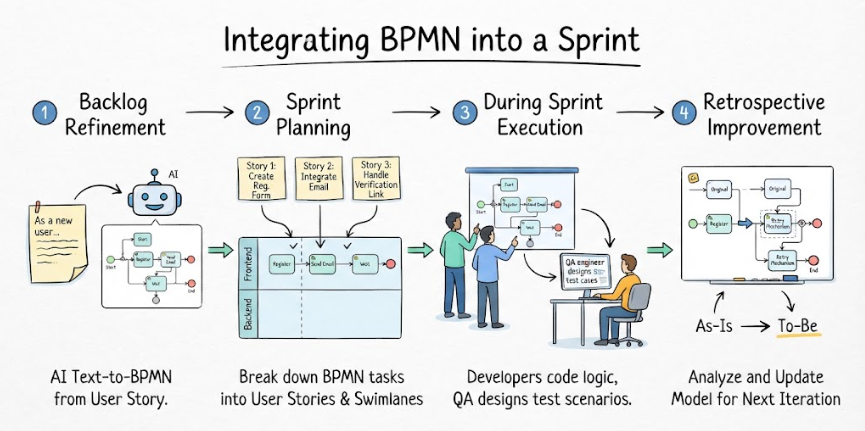
Sprint Goal: Implement “User Registration with Email Verification.”
-
Backlog Refinement:
-
Use Visual Paradigm’s AI Text-to-BPMN to generate a draft diagram from the user story: “As a new user, I want to register so that I can access the platform, requiring email verification.”
-
Review the generated diagram: Start Event → Register Task → Send Email Task → Wait for Click Event → Verify Task → End Event.
-
-
Sprint Planning:
-
Break down the BPMN tasks into user stories:
-
Story 1: Create Registration Form (Register Task)
-
Story 2: Integrate Email Service (Send Email Task)
-
Story 3: Handle Verification Link (Wait for Click & Verify Tasks)
-
-
Use Swimlanes to assign frontend/backend responsibilities.
-
-
During Sprint:
-
Developers refer to the BPMN diagram for logic clarity.
-
QA uses the diagram’s gateway paths to design test cases for success/failure scenarios.
-
-
Retrospective:
-
If email delivery delays were an issue, update the model to include a “Retry Mechanism” sub-process.
-
Use As-Is/To-Be analysis to document this improvement for future sprints.
-
Conclusion
Integrating BPMN into Agile sprint planning transforms abstract requirements into clear, actionable visual models. It enhances communication, reduces rework, and supports continuous process improvement. Visual Paradigm empowers Agile teams with intelligent diagramming, AI-driven automation, and robust simulation capabilities, making it easier to adopt BPMN without sacrificing agility. By leveraging these tools, teams can achieve greater clarity, efficiency, and alignment throughout their development lifecycle.
Reference Resources: Visual Paradigm Tooling
- AI BPMN Diagram Generator: Professional BPD Tool: Explains how to generate BPMN diagrams from text using AI in the Visual Paradigm desktop application.
- Comprehensive Guide to BPMN, Visual Paradigm Tooling, AI, and Ecosystem: Covers BPMN fundamentals and the ecosystem, with practical AI-generated BPMN examples like employee onboarding.
- How to Create BPMN Business Process Diagrams in Visual Paradigm: A step-by-step tutorial on drawing BPMN diagrams manually, including creating pools, lanes, tasks, gateways, and using simulation features.
- BPMN Tutorial: Visual Paradigm Tooling, AI Chatbot & Ecosystem: Details the AI Chatbot capabilities for generating and refining diagrams via conversational commands.
- AI Business Process Diagram Generator Update: Highlights the AI BPMN generator’s ability to produce complex, multi-pool diagrams from simple text prompts.
- Mastering Business Process Modeling: A Complete Guide to BPMN and AI: A comprehensive guide on BPMN basics and using the AI generator to create diagrams from natural language descriptions.
- Creating Your First BPMN Diagram in Visual Paradigm: A beginner-friendly tutorial covering essential BPMN concepts like events, gateways, and swimlanes, with practical tips.
- BPMN 2.0 Business Process Modeling Beginner’s Guide: Offers a step-by-step guide for beginners, including AI prompt strategies for effective BPMN generation.
- How to Draw BPMN Diagram?: A visual tutorial on using Visual Paradigm’s resource catalog to efficiently draw BPMN diagrams and add gateways and events.
- Mastering BPMN: A Comprehensive Tutorial with Visual Paradigm, AI Chatbot, and Ecosystem: Discusses how the AI chatbot enables rapid, iterative BPMN modeling through plain language commands.