


Introduction
Business Process Model and Notation (BPMN) is the global standard for visualizing business workflows. At the heart of every BPMN diagram lies the Activity. While events trigger a process and gateways control its flow, activities are where the actual work happens. They represent the “verbs” of your business model—the specific actions taken by people or systems to achieve a goal.
Understanding the distinction between atomic tasks and compound sub-processes is critical for creating diagrams that are both readable and accurate. This guide explores the fundamental types of BPMN activities and demonstrates how to effectively model them using Visual Paradigm, a leading tool for enterprise architecture and process modeling.
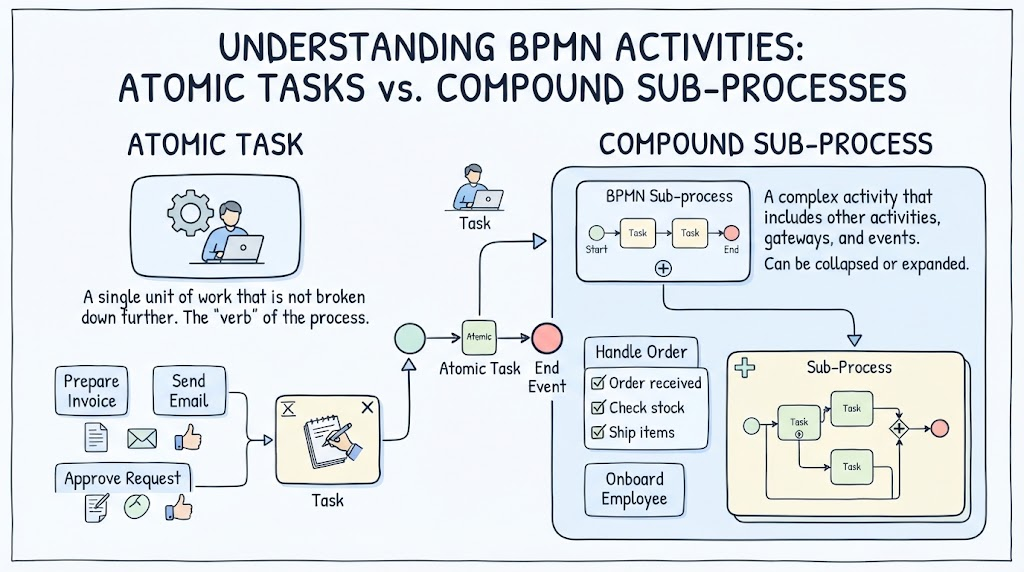
Key Concepts: The Anatomy of an Activity
Based on the core principles of BPMN 2.0, an activity is defined as work performed within a business process. Visually, activities are always represented as rounded rectangles. They generally fall into two categories based on their granularity
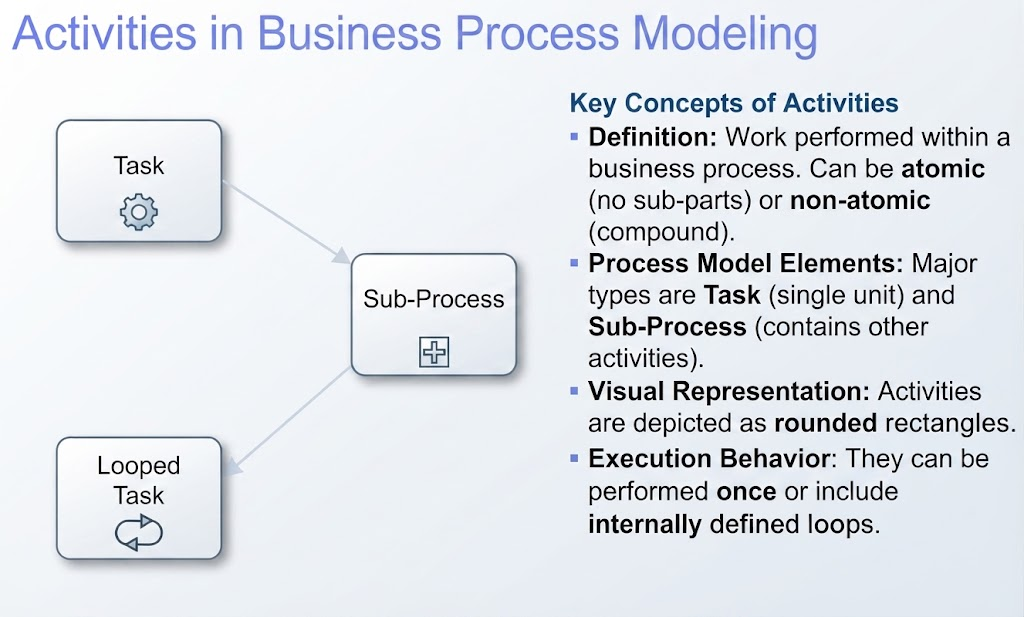
1. The Task (Atomic Activity)
A Task is an atomic activity, meaning it is not broken down into further detail within the current diagram. It represents a single unit of work.
-
Visual Representation: A simple rounded rectangle with text describing the action (e.g., “Review Application”).
-
Usage: Use a task when the step is self-explanatory and does not require a separate page or sub-diagram to explain.
2. The Sub-Process (Compound Activity)
A Sub-Process is a non-atomic activity. It acts as a container for a set of other activities, flows, and events. It allows you to “zoom in” on complex logic without cluttering the main high-level view.
-
Visual Representation: A rounded rectangle containing a small plus sign (+) marker at the bottom center.
-
Usage: Use a sub-process when a step involves multiple distinct actions (e.g., “Onboard New Employee”) that would make the main diagram too messy if drawn individually.
3. Looping Behavior
Activities are not always linear; they can be iterative.
-
Looped Task: An activity that repeats until a certain condition is met.
-
Visual Representation: A rounded rectangle containing a circular arrow icon at the bottom.
Tooling: Modeling Activities in Visual Paradigm
Visual Paradigm provides a robust drag-and-drop interface specifically designed for BPMN 2.0. Below is a workflow for implementing the concepts above.
Step 1: Setting Up the Canvas
-
Open Visual Paradigm and create a new BPMN Diagram.
-
Locate the BPMN Shape Palette on the left-hand side. You will see sections for “Flow Objects,” “Connecting Objects,” and “Swimlanes.”
Step 2: Creating a Standard Task
-
Drag a Task shape from the palette onto the canvas.
-
Double-click the shape to rename it (e.g., “Validate Data”).
-
Pro Tip: In the resource catalog, you can change the task type to specific variations like “User Task” (human actor) or “Service Task” (automated system) by right-clicking the shape and selecting Type > User Task. This adds a small user icon to the top-left corner, adding semantic clarity.
Step 3: Creating a Sub-Process
-
Drag a Sub-Process shape onto the canvas. Note that it automatically includes the + marker.
-
To define what happens inside:
-
Option A (Collapsed): Keep the
+visible. This keeps the main diagram clean. You can double-click the shape to navigate to a child diagram where you model the internal steps. -
Option B (Expanded): Right-click the Sub-Process and select Expand. The box will grow larger, allowing you to drag other tasks and gateways directly inside it. This is useful for showing detail without switching views.
-
Step 4: Adding Loops
-
Select an existing Task or Sub-Process.
-
Look for the Loop Marker resource in the popup resource catalog (or right-click and look for markers).
-
Select the Loop marker (circular arrow).
-
Visual Paradigm will update the shape to indicate that this work is repetitive. You can configure the loop condition (Standard Loop vs. Multi-Instance) in the shape’s specification window.
Examples: Putting Theory into Practice
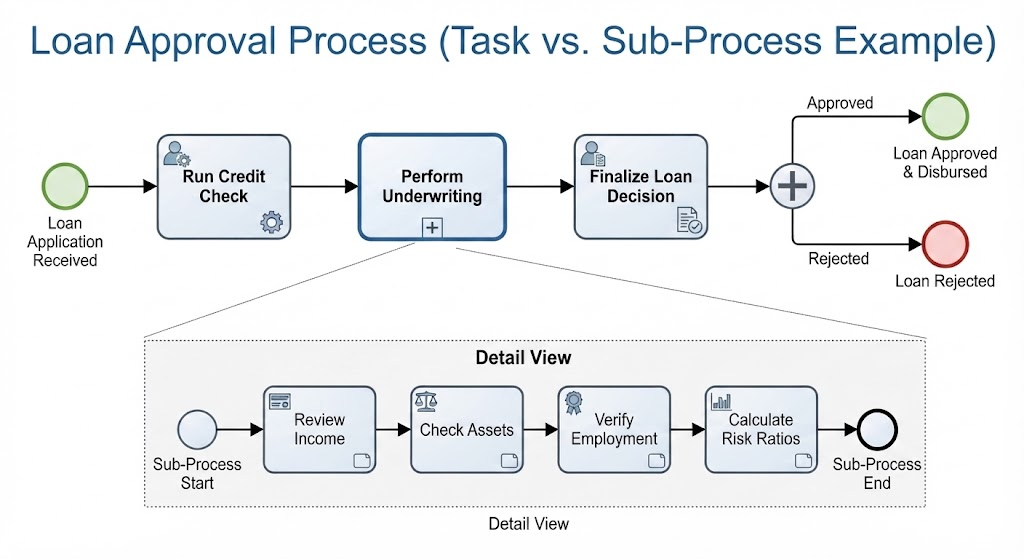
Example 1: The Loan Approval Process (Task vs. Sub-Process)
Imagine you are modeling a bank loan approval system.
-
As a Task: If the credit check is a simple API call that takes 2 seconds, model it as a Service Task named “Run Credit Check.” It is atomic and doesn’t need explanation.
-
As a Sub-Process: If the “Underwriting” phase involves reviewing income, checking assets, verifying employment, and calculating risk ratios, do not draw five different tasks on the main line. Instead, create a Sub-Process named “Perform Underwriting.” Inside that sub-process (on a separate tab or expanded view), you map out the detailed steps.
Example 2: The Invoice Reconciliation (Looped Task)
You are modeling an accounting process.
-
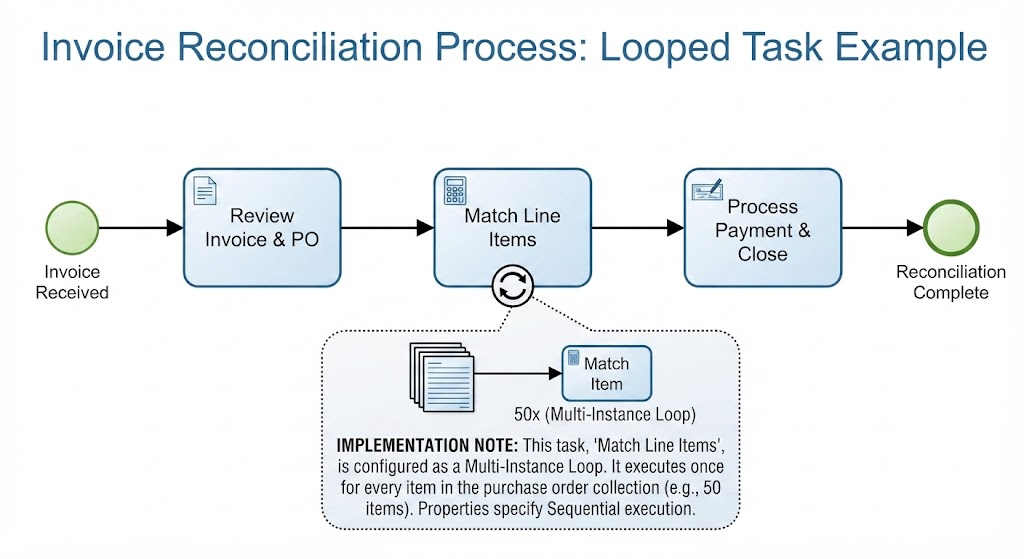
Scenario: The accountant must match every line item on a purchase order against the received goods. If there are 50 items, they perform the same “Match Item” action 50 times.
-
Implementation: Create a Task named “Match Line Items.” Apply the Loop Marker. In the documentation or properties panel, specify that this is a “Multi-Instance” loop, meaning it runs once for every item in the collection.
Conclusion
Activities are the engine of any BPMN diagram. By correctly distinguishing between Tasks (for simple, atomic steps) and Sub-Processes (for complex, compound logic), you ensure your diagrams remain readable regardless of the complexity of the underlying business rules.
Using tools like Visual Paradigm streamlines this process, allowing you to toggle between high-level overviews and detailed sub-processes effortlessly. Remember: a good process model tells a clear story. Use Tasks for the plot points and Sub-Processes for the chapters, and your stakeholders will be able to follow the narrative without getting lost in the details.