


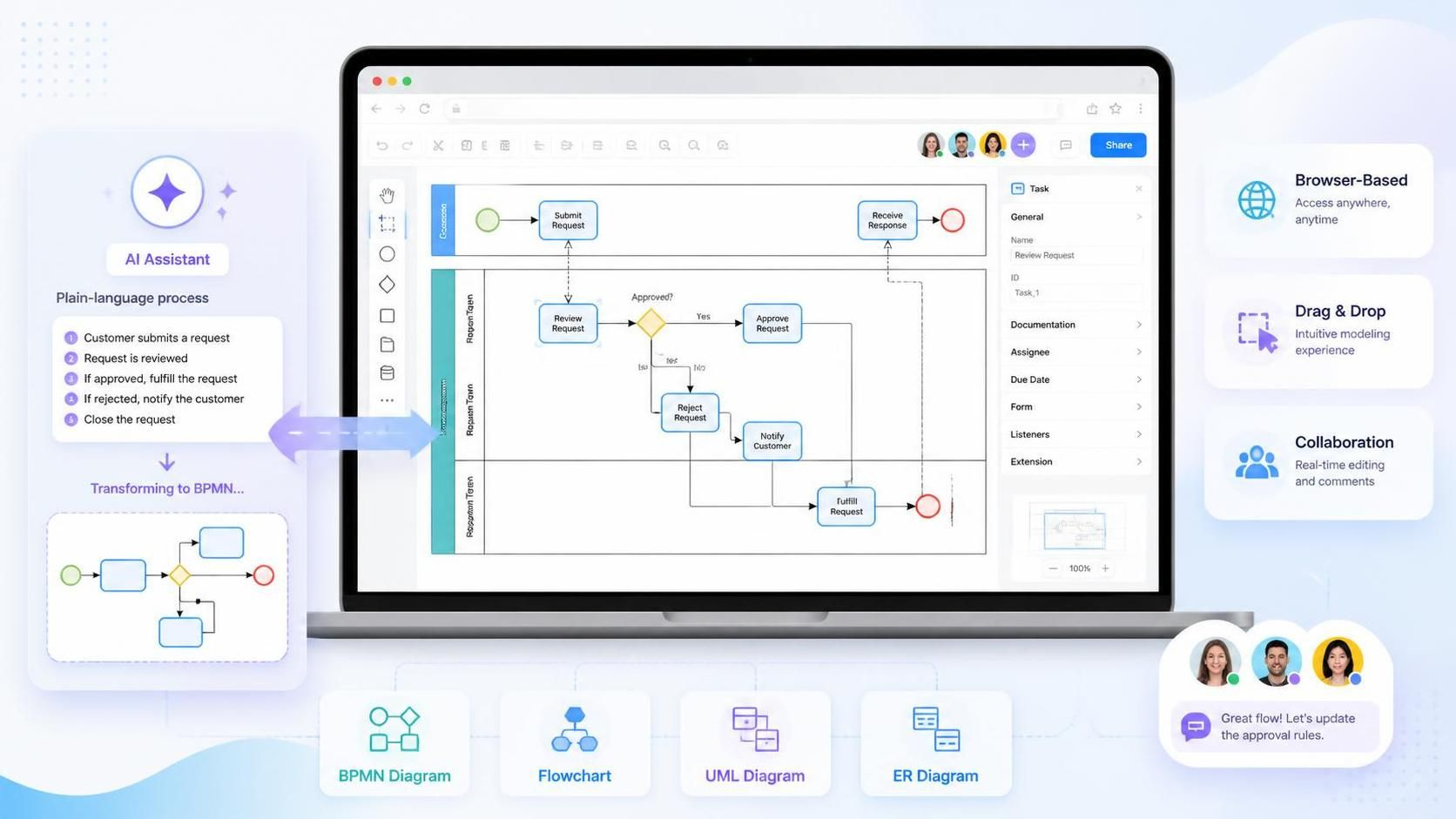
Creating a BPMN diagram does not have to begin with a blank canvas. With Visual Paradigm’s BPMN Online tool, users can model business processes in a browser, use familiar drag-and-drop diagramming features, and collaborate on process documentation without installing desktop software. Visual Paradigm Online supports BPMN alongside other diagram types, including flowcharts, UML diagrams, and entity-relationship diagrams.
The platform is especially useful for teams that want to move quickly from a process idea to a shareable BPMN model. Its AI-assisted features can help generate an initial diagram from a plain-language description, while the visual editor allows analysts and stakeholders to review, correct, and refine the result.
What Is Visual Paradigm BPMN Online?
Visual Paradigm BPMN Online is a web-based modeling environment for creating Business Process Model and Notation diagrams. It is designed for users who need to document workflows, analyze responsibilities, and communicate process logic through standardized BPMN symbols.
The online environment provides access to a visual diagram editor and cloud-based workspace. This makes it practical for:
-
Business analysts documenting current processes
-
Students learning BPMN notation
-
Managers mapping departmental responsibilities
-
Project teams designing future-state workflows
-
Consultants preparing process documentation
-
Subject-matter experts contributing process knowledge
A browser-based tool also makes it easier to conduct process workshops. Participants can review a diagram from different locations, suggest changes, and work from a shared version rather than exchanging multiple diagram files.
Why Use an Online BPMN Tool?
Traditional desktop diagramming can work well for complex modeling, but an online tool is often more convenient for early-stage analysis and collaboration.
Easy access
Users can open the modeling environment through a web browser instead of setting up specialized software on every computer. This is useful when process owners, customers, and technical teams need to review the same model.
Faster collaboration
Process modeling is rarely a one-person activity. A business analyst may understand the notation, but employees who perform the work usually provide the most accurate operational details. An online workspace can support a shared review process in which participants comment on missing steps, incorrect responsibilities, or unclear decisions.
Reusable templates and examples
Starting from a template can help teams avoid the blank-page problem. A template also encourages consistent diagram structure across related processes, such as purchase approval, invoice processing, and employee onboarding.
Support for multiple diagram types
BPMN is often only one part of a larger analysis effort. Teams may also need flowcharts, UML diagrams, data models, or organizational views. Visual Paradigm Online brings these diagramming capabilities together in one web-based environment.
Creating a BPMN Diagram Manually
The manual modeling workflow is useful when the process is well understood or when the analyst needs precise control over every BPMN element.
A typical process is:
-
Open Visual Paradigm Online and create a new BPMN or business process diagram.
-
Define the process scope and give the diagram a clear name.
-
Add a pool for the primary participant or organization.
-
Add lanes for departments, roles, systems, or responsibilities.
-
Place a start event at the point where the process begins.
-
Add tasks using action-oriented names, such as “Review application” or “Approve purchase.”
-
Insert gateways where the process branches or merges.
-
Connect elements with sequence flows.
-
Add end events for the possible outcomes.
-
Use data objects, annotations, and groups to provide additional context.
-
Review the model with process participants.
-
Export, publish, or share the completed diagram as appropriate.
For example, an employee onboarding process might contain lanes for Human Resources, Information Technology, the hiring manager, and the new employee. Tasks can then be placed in the lane of the person or system responsible for completing them.
Using AI to Generate a BPMN Diagram
AI-assisted modeling changes the starting point. Instead of manually placing every symbol, a user describes the process in natural language and allows the AI tool to create an initial model.
Visual Paradigm’s AI BPMN capabilities can interpret a structured process narrative, identify participants, organize swimlanes, recognize activities, and suggest gateway logic. The generated result is intended to be an editable BPMN diagram rather than a static image.
The AI-generated diagram should be treated as a first draft. It can accelerate the modeling process, but a process owner or business analyst still needs to verify:
-
Whether every activity is included
-
Whether tasks are assigned to the correct participant
-
Whether gateway conditions are accurate
-
Whether exceptions and alternate outcomes are represented
-
Whether sequence flows reflect the real order of work
-
Whether the model follows the organization’s BPMN conventions
A practical AI modeling workflow
-
Open the AI diagram-generation feature.
-
Select the business process diagram or BPMN option.
-
Enable pools and lanes when the process involves multiple departments, roles, or systems.
-
Enter a detailed description of the workflow.
-
Generate the diagram.
-
Inspect the participants, events, activities, gateways, and connectors.
-
Open the result in the visual editor.
-
Correct terminology, responsibilities, conditions, and exceptions.
-
Review the model with subject-matter experts.
-
Apply consistent formatting and publish the final version.
Visual Paradigm documentation describes an AI workflow in which users select a business process diagram, choose whether to include pools and lanes, and provide a chronological process description.
How to Write an Effective AI Prompt
The quality of an AI-generated BPMN diagram depends heavily on the quality of the process description. A short topic such as “loan application” gives the tool very little information about participants, decisions, or outcomes.
A stronger prompt identifies:
-
The process objective
-
The participating roles or organizations
-
The order of activities
-
Decision points and conditions
-
Alternative and exception paths
-
Systems involved
-
Timers, deadlines, or escalation rules
-
Expected end states
Weak prompt
Create a BPMN diagram for an order process.
Improved prompt
Create a BPMN diagram for an online order fulfillment process. Include lanes for Customer, Order Management System, Warehouse, Payment Provider, and Shipping Carrier. The customer submits an order, and the system checks inventory. If the item is unavailable, the system notifies the customer and ends the process. If the item is available, the payment provider authorizes payment. Approved payments proceed to warehouse picking and packing. Declined payments trigger a notification asking the customer to update the payment method. The carrier collects the package and delivers it to the customer.
This version gives the AI enough information to identify participants, tasks, decision outcomes, and process completion points.
Example: Generating an Employee Onboarding Diagram
Consider the following process narrative:
Human Resources creates a new employee record and sends an onboarding request to Information Technology. IT creates the employee’s account and prepares a laptop. The hiring manager confirms the employee’s start date. If equipment is ready, the employee receives access instructions. If equipment is delayed, IT sends an escalation to the hiring manager. The process ends when the employee completes the first-day checklist.
An AI-assisted BPMN tool could use this narrative to propose:
-
A pool for the organization
-
Lanes for Human Resources, IT, the hiring manager, and the employee
-
A start event for the onboarding request
-
Tasks for record creation, account setup, equipment preparation, and checklist completion
-
A gateway for equipment readiness
-
An escalation or exception path for delayed equipment
-
Separate end events for completed and escalated outcomes
The analyst should then check whether the generated diagram accurately reflects the organization’s actual onboarding policy.
Pools and Lanes in Visual Paradigm
Pools and lanes are among the most valuable features for analyzing responsibility.
A pool generally represents an organization, business participant, external company, or independent process participant. A lane divides a pool into departments, roles, systems, or other areas of responsibility.
For example, a purchase approval model might use:
| BPMN element | Example |
|---|---|
| Pool | Company |
| Lane | Employee |
| Lane | Department Manager |
| Lane | Finance |
| Lane | Procurement System |
| External pool | Supplier |
Tasks should be placed in the lane of the participant responsible for performing them. This makes ownership visible and can reveal:
-
Too many handoffs
-
Delays between departments
-
Duplicate approvals
-
Activities without clear ownership
-
Systems that depend on manual intervention
-
Bottlenecks at a particular role or department
When generating a diagram with AI, explicitly name the participants and request pools or lanes. Visual Paradigm’s AI guidance specifically describes using an “Include Pools and Lanes” option to organize activities by department or role.
AI-Assisted Refinement
AI can be useful after the initial diagram has been generated. A model may be asked to suggest:
-
Missing exception paths
-
Possible timer events
-
Additional data objects
-
More precise task names
-
Alternative gateway conditions
-
Potential process bottlenecks
-
Opportunities for automation
-
Questions to ask process owners
For example, after generating an invoice approval process, an analyst might ask:
Review this process for missing exception paths. Consider rejected invoices, duplicate invoices, missing purchase orders, approval delays, and invoices that exceed the approval threshold.
The suggestions should be reviewed by a human expert. AI can identify plausible modeling improvements, but it does not automatically know whether a proposed rule matches the organization’s policies.
From AI Draft to Professional BPMN Model
An AI-generated diagram becomes useful only after it has been validated and refined. Use the following review sequence.
1. Confirm the scope
Make sure the model begins and ends at the intended boundaries. Avoid combining several unrelated processes in one diagram.
2. Validate participants
Check that every task belongs to the correct lane and that external organizations are modeled as separate participants when appropriate.
3. Review sequence flows
Confirm that each connector represents the actual order of work. Sequence flows should not be used to show communication between separate pools; use message flows for that purpose.
4. Check gateway logic
Every gateway should have a clear purpose. Label outgoing conditional paths with understandable conditions such as “Approved,” “Rejected,” or “Item unavailable.”
5. Add exceptions
Look for timeouts, errors, escalations, cancellations, and rework loops. These paths are often missing from first drafts because process descriptions focus on the normal case.
6. Improve task names
Use concise verb-object labels:
-
“Validate application”
-
“Check inventory”
-
“Approve payment”
-
“Send notification”
Avoid vague labels such as “Processing,” “Review,” or “Handle request.”
7. Simplify the layout
Remove unnecessary gateways, reduce connector crossings, and move highly detailed logic into sub-processes. Visual Paradigm’s AI-generated diagrams can be opened in a visual editor for manual adjustment and refinement.
Best Practices for Using AI with BPMN
AI-assisted modeling works best when it supports analysis rather than replacing it.
-
Describe the process chronologically.
-
Name every important participant.
-
State the conditions that control branching.
-
Identify both normal and exceptional outcomes.
-
Separate business activities from system actions.
-
Include deadlines and service-level requirements.
-
Use consistent terminology.
-
Generate a first draft before attempting detailed optimization.
-
Validate the result with people who perform the process.
-
Maintain a record of important modeling decisions.
It is also helpful to use AI for one process at a time. A focused prompt generally produces a clearer result than a description containing several connected but independent workflows.
Visual Paradigm Online or Desktop?
The online tool is a practical choice for browser-based diagramming, quick process documentation, workshops, and collaborative review. It is especially suitable when users need to create or edit diagrams without installing desktop software.
The desktop environment is better suited to larger modeling projects that require deeper modeling capabilities, advanced documentation, or integration with broader software and enterprise architecture work. Visual Paradigm describes a workflow in which AI-generated diagrams can be edited online and then imported into the desktop application for more advanced modeling.
A common approach is to use both:
-
Generate or sketch the initial process online.
-
Review the model with business stakeholders.
-
Refine the BPMN structure.
-
Move the model into a larger desktop project when detailed analysis or enterprise documentation is required.
Conclusion
Visual Paradigm BPMN Online provides a convenient starting point for creating and sharing business process diagrams. Its drag-and-drop editor supports traditional BPMN modeling, while AI-assisted features can turn a structured process narrative into an editable first draft.
The most effective workflow combines both approaches: use AI to accelerate initial creation, use the visual editor to correct and organize the model, and use stakeholder review to confirm that the diagram represents reality. With clear prompts, accurate pools and lanes, well-defined gateway conditions, and careful human validation, Visual Paradigm can help teams move from informal process descriptions to useful BPMN documentation more efficiently.