


Introduction
In the fast-paced world of Agile development, process documentation often falls by the wayside, viewed as bureaucratic overhead rather than a strategic asset. However, clear process modeling is essential for aligning cross-functional teams, identifying bottlenecks, and ensuring regulatory compliance. Business Process Model and Notation (BPMN) 2.0 provides the global standard for this visualization, but manual creation is time-consuming and prone to error.
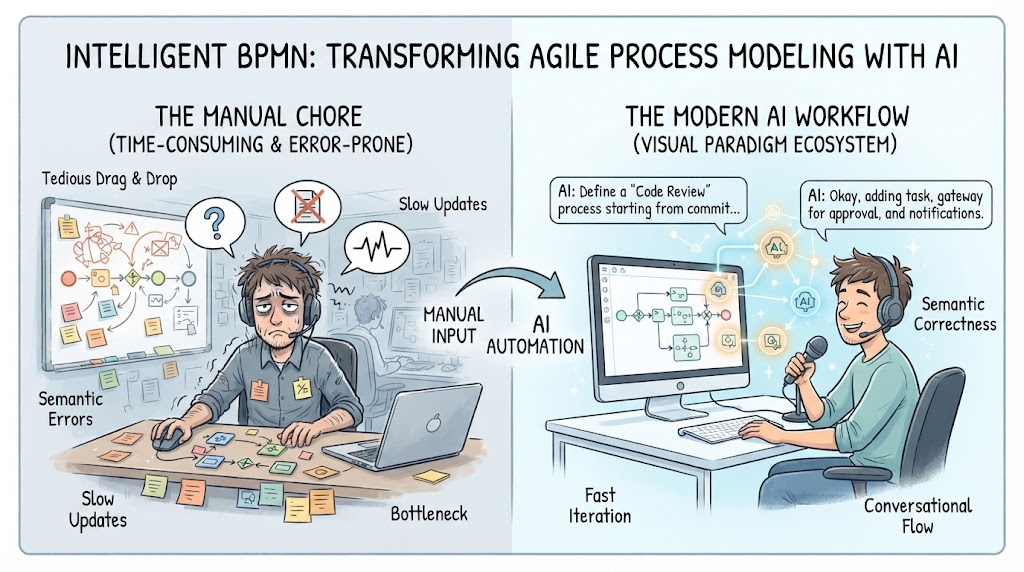
This guide outlines the top ten best practices for creating effective BPMN diagrams, specifically tailored for Agile teams. We will explore how modern tooling, particularly Visual Paradigm’s AI-driven ecosystem, transforms this complex task from a manual drag-and-drop chore into an intelligent, conversational workflow that ensures mathematical and semantic correctness.
Usage Cases for Agile Teams
Before diving into best practices, it is crucial to understand where BPMN adds value in an Agile context:
-
Sprint Planning & Story Refinement: Breaking down complex user stories into actionable tasks across different roles (Dev, QA, DevOps).
-
Onboarding New Team Members: Providing visual maps of existing workflows reduces the learning curve for new hires.
-
Stakeholder Alignment: Bridging the gap between technical teams and business stakeholders by using a standardized, non-technical visual language.
-
Process Optimization (Kaizen): Identifying redundant steps or handoffs during retrospectives to improve velocity.
Top 10 BPMN Best Practices
1. Define Clear Pools and Lanes for Role Clarity
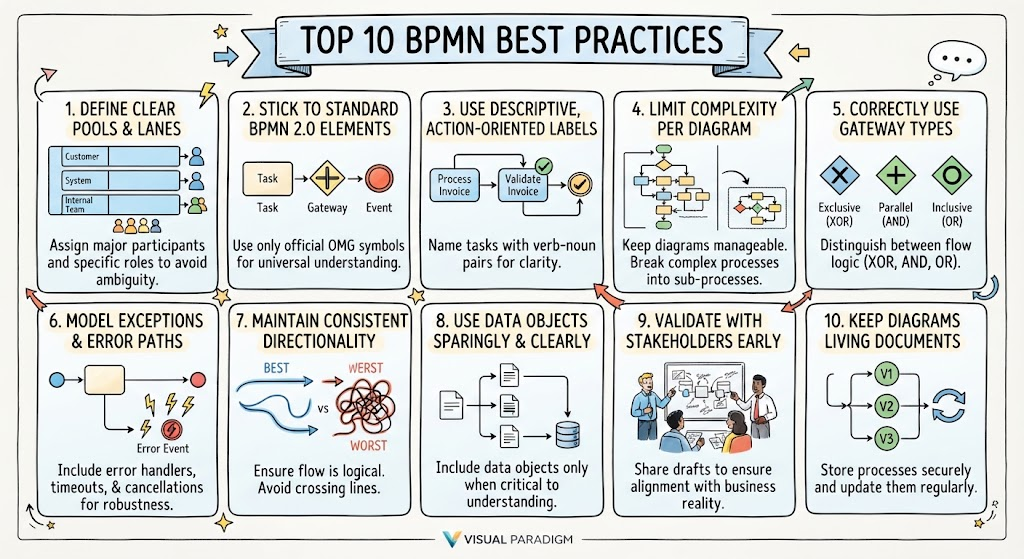
Always use Pools to represent major participants (e.g., Customer, System, Internal Team) and Lanes to represent specific roles or departments within those pools. This prevents ambiguity about who is responsible for each task.
-
Why Visual Paradigm Helps: Its AI engine automatically performs Swimlane Mapping by evaluating organizational keywords in your text narrative, assigning tasks to the correct structural pools without manual setup.
2. Stick to Standard BPMN 2.0 Elements
Avoid using custom shapes or non-standard symbols. Use only OMG-compliant elements like Tasks, Gateways, and Events. This ensures interoperability and universal understanding.
-
Why Visual Paradigm Helps: Unlike generic LLMs that generate basic shapes prone to syntax flaws, Visual Paradigm enforces strict OMG metamodel rules, blocking illegal notation and ensuring your diagram is technically valid.
3. Use Descriptive, Action-Oriented Labels
Label every task with a verb-noun pair (e.g., “Validate Invoice” instead of “Invoice”). Avoid vague labels like “Process” or “Handle.”
-
Why Visual Paradigm Helps: The Text-to-BPMN Generator parses unstructured narratives to isolate sequential tasks, encouraging you to provide clear, descriptive input which translates directly into precise diagram labels.
4. Limit Complexity per Diagram
A single diagram should not try to map an entire enterprise system. Break complex processes into sub-processes. If a diagram has more than 15-20 elements, consider decomposing it.
-
Why Visual Paradigm Helps: The tool supports iterative refinement via its Conversational AI Chatbot. You can start with a high-level view and then prompt the AI to expand specific sections into detailed sub-processes without losing context.
5. Correctly Use Gateway Types
Distinguish clearly between Exclusive (XOR), Parallel (AND), and Inclusive (OR) gateways. Misusing these leads to logical errors in execution engines.
-
Why Visual Paradigm Helps: Its Connectivity Safeguards actively block invalid flows, such as connecting a message event directly to a gateway, ensuring logical consistency in routing logic.
6. Model Exceptions and Error Paths
Don’t just model the “Happy Path.” Include boundary events for timeouts, errors, and cancellations. This makes the process robust and realistic.
-
Why Visual Paradigm Helps: Through the Conversational AI Chatbot, you can iteratively prompt adjustments like “Add a timeout exception here,” and the AI will update the diagram while retaining the full state context of the previous layout.
7. Maintain Consistent Directionality
Flow should generally move from left to right and top to bottom. Avoid crossing lines whenever possible.
-
Why Visual Paradigm Helps: The Automated Layout & Matrix Routing feature intelligently handles multi-dimensional syntax layouts, preventing tangled or overlapping lines during generation, resulting in clean, readable diagrams.
8. Use Data Objects Sparingly and Clearly
Only include data objects if they are critical to understanding the process flow. Over-cluttering with data inputs/outputs can obscure the main workflow.
-
Why Visual Paradigm Helps: The AI generator focuses on isolating roles and sequential tasks first. You can then selectively add data objects through iterative chat prompts, keeping the initial model clean.
9. Validate with Stakeholders Early
Share draft models with both technical and business stakeholders to ensure the logic matches reality.
-
Why Visual Paradigm Helps: Because Visual Paradigm outputs native, fully editable models rather than static images, you can quickly make changes based on feedback and re-export, facilitating rapid collaboration.
10. Keep Diagrams Living Documents
Processes change. Ensure your BPMN diagrams are stored in a version-controlled environment and updated regularly.
-
Why Visual Paradigm Helps: By integrating natively into production workspaces, Visual Paradigm allows for seamless updates. The AI’s ability to retain context means you can update a process description and regenerate only the affected parts, maintaining historical integrity.
Conclusion
Effective BPMN documentation is not about creating pretty pictures; it is about creating accurate, executable models of business reality. For Agile teams, speed and accuracy are paramount. By adhering to these ten best practices and leveraging advanced AI tooling like Visual Paradigm, teams can bypass the tedious manual drafting phase. This allows Product Managers and Business Analysts to focus on what truly matters: optimizing processes, clarifying responsibilities, and delivering value faster. The combination of strict OMG compliance and natural language processing ensures that your diagrams are not just visually appealing, but semantically correct and ready for implementation.
Recommended Reading: Visual Paradigm Resources
- From Narrative to Diagram: How Visual Paradigm’s AI BPMN Generator Transforms Process Modeling Workflows: Overview of how AI converts text descriptions into compliant BPMN diagrams.
- AI BPMN Tool Features: Detailed breakdown of AI capabilities including auto-layout and swimlane mapping.
- BPMN with Visual Paradigm AI: A Comprehensive Guide: Step-by-step tutorial on using AI for BPMN modeling.
- The Comprehensive Guide to BPMN Concepts, Best Practices, and Modern Tooling: Deep dive into BPMN standards and how modern tools enforce them.
- How AI-Powered NLP is Revolutionizing Text-to-BPMN Generation for Enterprise Process Modeling: Analysis of NLP technology in process modeling.
- AI Chatbot: A Comprehensive Guide to Visual Modeling: Guide on using conversational AI for iterative diagram refinement.
- BPMN Tutorial: Visual Paradigm Tooling & AI Chatbot Ecosystem: Practical examples of integrating AI chatbots into BPMN workflows.
- AI BPMN Business Process Diagram Generator Update: Release notes highlighting new features in the AI BPMN generator.