


Introduction
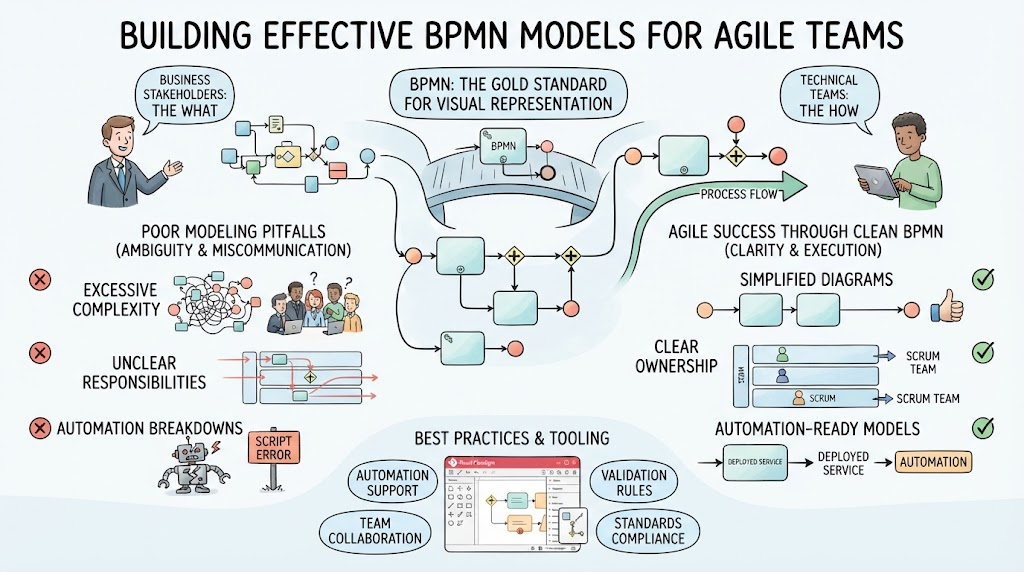
Business Process Model and Notation (BPMN) is the gold standard for visually representing business processes. It bridges the gap between business stakeholders who understand the “what” and technical teams who implement the “how.” However, poor modeling practices often lead to ambiguous diagrams, miscommunication among Agile teams, and broken automations.
For Agile teams, clarity is currency. A poorly constructed BPMN diagram can stall sprint planning, confuse developers during implementation, and lead to scope creep. This guide outlines the most frequent BPMN mistakes, provides real-world Agile usage cases, and demonstrates how Visual Paradigm tooling can help you create cleaner, more accurate, and automation-ready models.
1. The “Spaghetti” Model (Crossing Flow Lines)
-
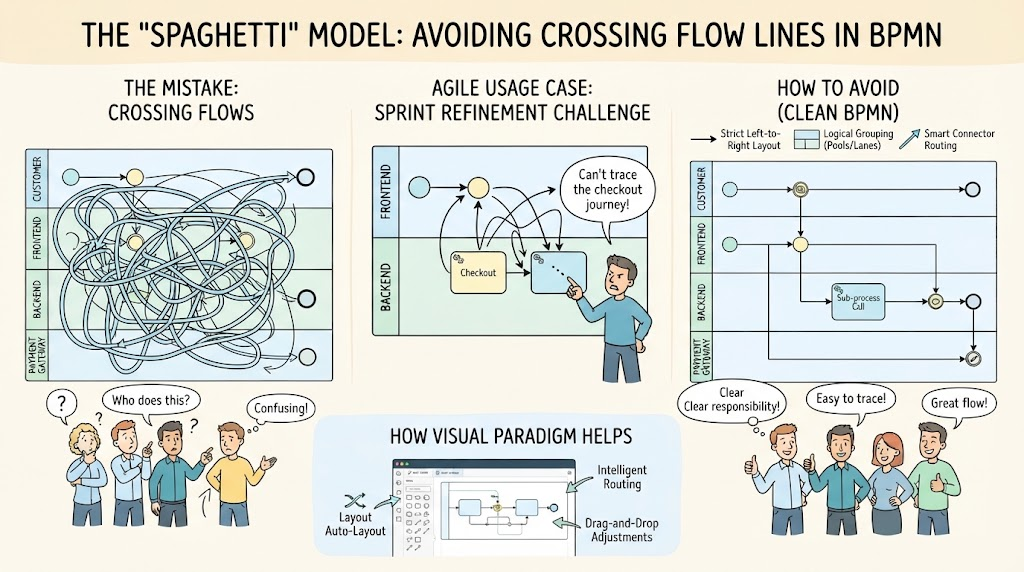
The Mistake: Connecting sequence flows haphazardly across the diagram, creating overlapping lines that make the process impossible to follow visually.
-
Agile Usage Case: During a sprint refinement session, the team struggles to trace the user journey for a new checkout feature because lines cross over multiple swimlanes, causing confusion about who is responsible for which step.
-
How to Avoid It:
-
Follow a strict left-to-right (or top-to-bottom) layout.
-
Utilize pools and lanes to group related responsibilities logically (e.g., Customer, Frontend, Backend, Payment Gateway).
-
If lines must cross, use intermediate events or separate sub-processes to reduce clutter rather than stretching a single flow across the entire canvas.
-
-
How Visual Paradigm Helps: Visual Paradigm’s auto-layout features and smart connectors automatically route lines to avoid overlaps. Its drag-and-drop interface ensures that when you move a task, the connected flows adjust intelligently, maintaining a clean “spaghetti-free” structure.
2. Misusing Gateways (Exclusive vs. Parallel vs. Inclusive)
-
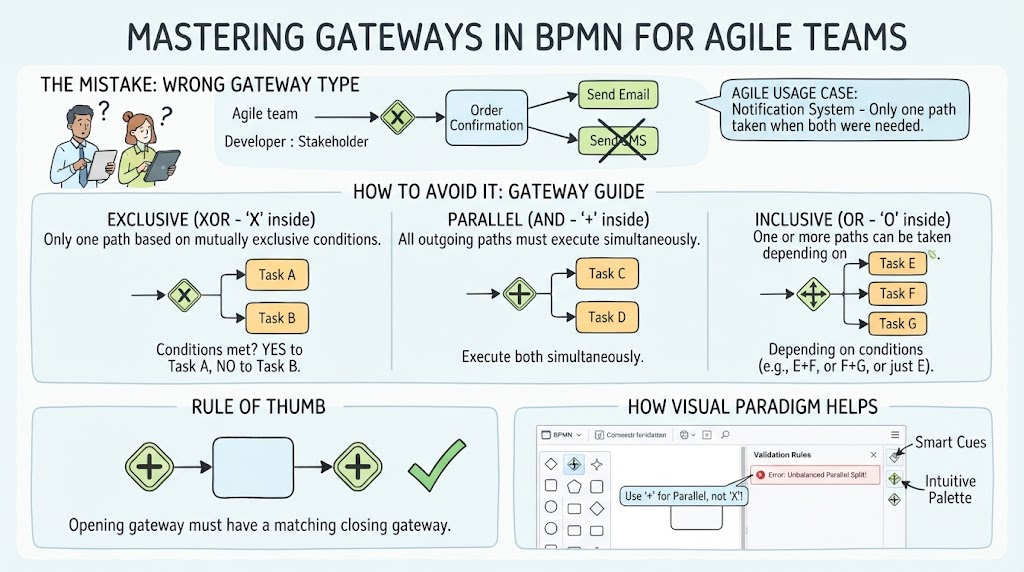
The Mistake: Using the wrong gateway type—such as using an Exclusive Gateway (X/OR) when multiple paths should be allowed to run concurrently (Parallel Gateway).
-
Agile Usage Case: An Agile team is building a notification system. They incorrectly use an Exclusive Gateway, meaning a user only receives either an email or a SMS, when the requirement was to send both simultaneously upon order confirmation.
-
How to Avoid It:
-
Exclusive (XOR – ‘X’ inside): Use when only one path can be taken based on mutually exclusive conditions.
-
Parallel (AND – ‘+’ inside): Use when all outgoing paths must execute simultaneously, or when incoming paths must all synchronize before proceeding.
-
Inclusive (OR – ‘O’ inside): Use when one or more paths can be taken depending on conditions.
-
Rule of Thumb: Always ensure every opening gateway has a corresponding closing gateway if paths merge back together.
-
-
How Visual Paradigm Helps: Visual Paradigm provides visual cues and validation rules that warn you if gateways are unbalanced (e.g., a parallel split without a matching join). Its intuitive palette makes it easy to select the correct gateway icon, reducing logical errors during design.
3. Ignoring the “Token” Concept (Endless Loops & Deadlocks)
-
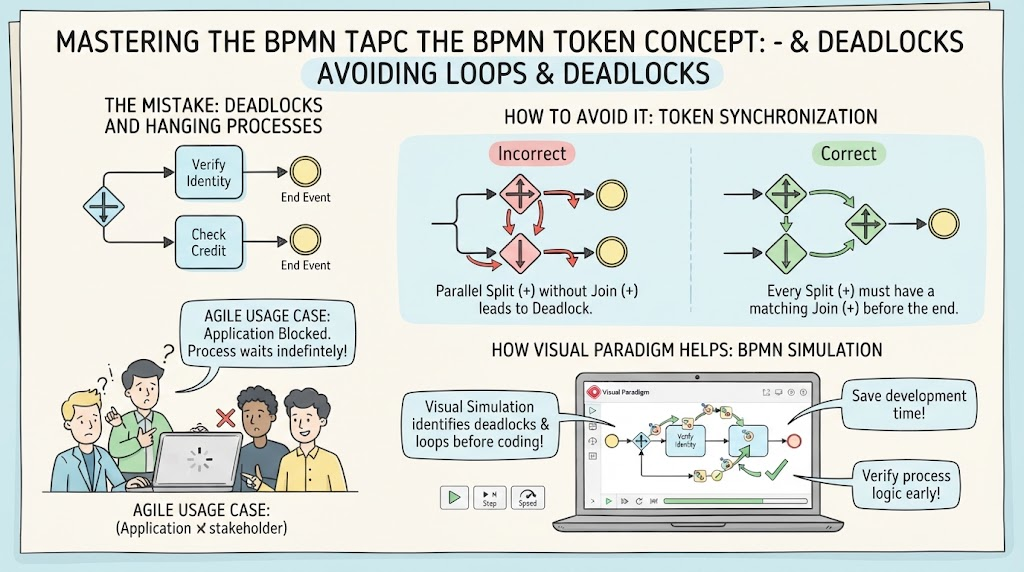
The Mistake: Designing loops or parallel splits without a clear mechanism for tokens to recombine, resulting in infinite loops or hanging processes (deadlocks).
-
Agile Usage Case: A developer implements a process where two parallel tasks (e.g., “Verify Identity” and “Check Credit”) must both finish before proceeding. However, the model lacks a proper joining gateway, causing the automation engine to wait indefinitely for a token that never arrives, blocking the user’s application.
-
How to Avoid It:
-
Remember that BPMN operates on a “token” model where flows represent moving tokens.
-
Every parallel split (
+) must eventually meet at a parallel join (+) to synchronize tokens before ending the process flow.
-
-
How Visual Paradigm Helps: Visual Paradigm includes a BPMN Simulation feature. You can run a simulation of your process to see how tokens move through the diagram. This allows you to identify deadlocks, endless loops, and unreachable tasks before writing any code, saving valuable development time.
4. Overcomplicating with Too Much Detail
-
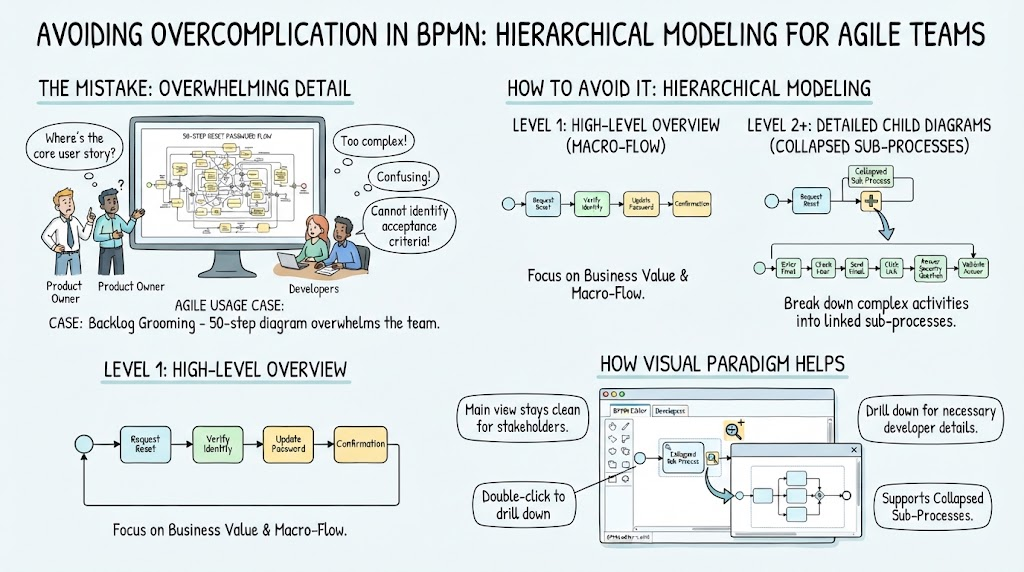
The Mistake: Trying to capture every single minute action, system click, or exception in a single top-level diagram, overwhelming the reader.
-
Agile Usage Case: During backlog grooming, the product owner presents a 50-step BPMN diagram for a simple “Reset Password” feature. Developers are overwhelmed by the detail, making it difficult to identify the core user stories and acceptance criteria.
-
How to Avoid It:
-
Apply hierarchical modeling. Start with a high-level overview (Level 1) and break complex activities down into collapsed sub-processes or separate child diagrams (Level 2+).
-
Focus on the business value and the macro-flow rather than micro-tasks.
-
-
How Visual Paradigm Helps: Visual Paradigm supports collapsed sub-processes. You can double-click a collapsed task to drill down into a detailed sub-diagram. This keeps the main view clean for stakeholders while providing developers with the necessary detail in linked views.
5. Incorrect Use of Events
-
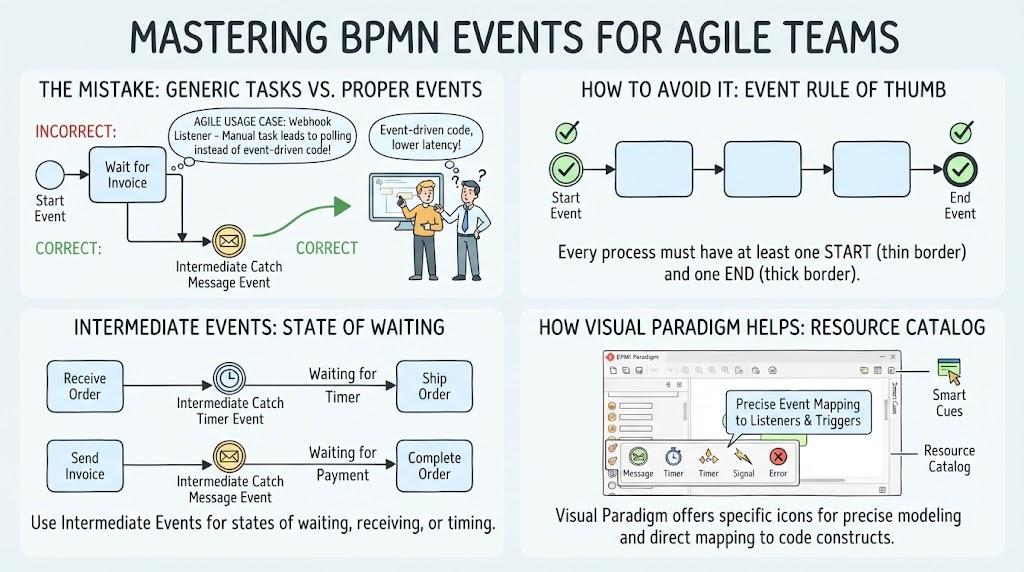
The Mistake: Using generic tasks instead of proper event triggers (e.g., drawing a task called “Wait for Invoice” instead of an Intermediate Catch Message Event), or failing to define start/end events properly.
-
Agile Usage Case: An integration team is building an API webhook listener. The BPMN model shows a manual task “Wait for Webhook,” leading developers to build a polling mechanism instead of an event-driven listener, resulting in higher latency and server load.
-
How to Avoid It:
-
Every process must have at least one Start Event (thin border) and one End Event (thick border).
-
Use Intermediate Events to represent states of waiting, receiving messages, or handling timers rather than making tasks do the heavy lifting of process control.
-
-
How Visual Paradigm Helps: Visual Paradigm’s resource catalog offers specific event icons (Message, Timer, Signal, Error) with distinct visual markers. This encourages precise modeling, ensuring that technical teams can directly map events to code constructs like listeners and triggers.
Summary Checklist for Better BPMN Models
-
Flow Direction: Does the process flow naturally from left to right?
-
Gateway Symmetry: Do all parallel and inclusive splits have matching joins?
-
Clarity: Are task names written in the standard Verb + Noun format (e.g., Approve Invoice)?
-
Simplicity: Can any complex sections be moved into sub-processes?
-
Event Precision: Are waits and triggers modeled as Events, not Tasks?
-
Simulation Tested: Have you run a simulation to check for deadlocks?
Why Visual Paradigm is the Recommended Tool for Agile Teams
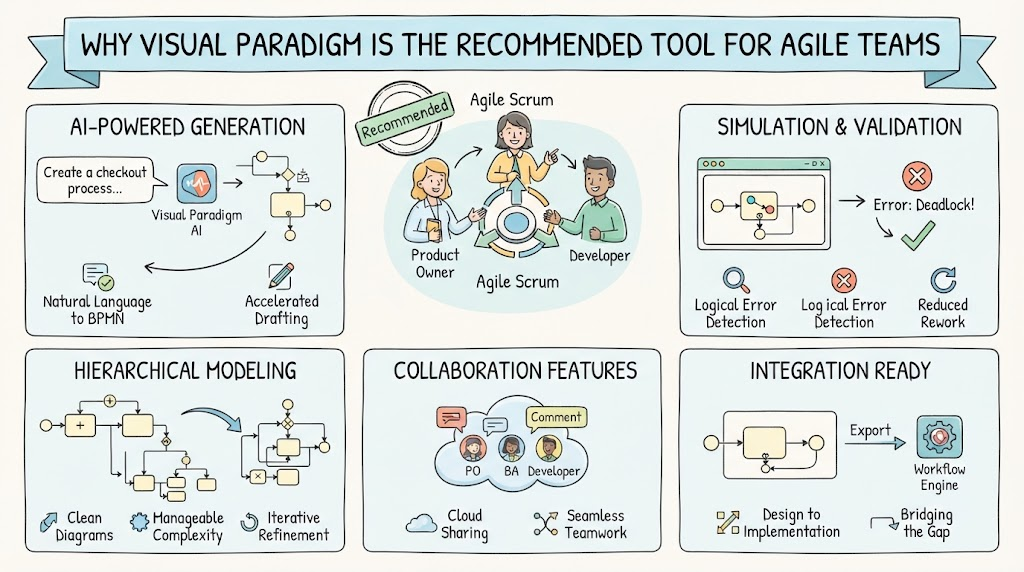
Visual Paradigm stands out as a comprehensive tool for BPMN modeling, especially for Agile teams who need speed, accuracy, and collaboration.
-
AI-Powered Generation: Visual Paradigm’s AI BPMN Generator allows you to create initial diagrams from natural language descriptions. This accelerates the initial drafting phase during sprint planning.
-
Simulation & Validation: Built-in simulation tools help identify logical errors (like deadlocks) early, reducing rework during development.
-
Hierarchical Modeling: Support for collapsed sub-processes keeps diagrams clean and manageable, aligning with Agile principles of iterative refinement.
-
Collaboration Features: Cloud-based sharing and commenting enable seamless collaboration between product owners, business analysts, and developers.
-
Integration Ready: Models created in Visual Paradigm can often be exported or integrated with workflow engines, bridging the gap between design and implementation.
Conclusion
Avoiding common BPMN mistakes is not just about creating pretty diagrams; it’s about ensuring clear communication, efficient development, and robust automation. By adhering to best practices—such as maintaining clean layouts, using gateways correctly, respecting the token concept, and leveraging hierarchical modeling—Agile teams can significantly improve their process clarity.
Tools like Visual Paradigm empower teams to model smarter, not harder. With features like AI generation, simulation, and intuitive design interfaces, Visual Paradigm helps transform ambiguous requirements into precise, actionable process models. Start applying these tips today, and watch your team’s efficiency and alignment improve.
Reference Resources: Visual Paradigm Tooling
- AI BPMN Diagram Generator: Professional BPD Tool: Explains how to generate BPMN diagrams from text using AI in the Visual Paradigm desktop application.
- Comprehensive Guide to BPMN, Visual Paradigm Tooling, AI, and Ecosystem: Covers BPMN fundamentals and the ecosystem, with practical AI-generated BPMN examples like employee onboarding.
- How to Create BPMN Business Process Diagrams in Visual Paradigm: A step-by-step tutorial on drawing BPMN diagrams manually, including creating pools, lanes, tasks, gateways, and using simulation features.
- BPMN Tutorial: Visual Paradigm Tooling, AI Chatbot & Ecosystem: Details the AI Chatbot capabilities for generating and refining diagrams via conversational commands.
- AI Business Process Diagram Generator Update: Highlights the AI BPMN generator’s ability to produce complex, multi-pool diagrams from simple text prompts.
- Mastering Business Process Modeling: A Complete Guide to BPMN and AI: A comprehensive guide on BPMN basics and using the AI generator to create diagrams from natural language descriptions.
- Creating Your First BPMN Diagram in Visual Paradigm: A beginner-friendly tutorial covering essential BPMN concepts like events, gateways, and swimlanes, with practical tips.
- BPMN 2.0 Business Process Modeling Beginner’s Guide: Offers a step-by-step guide for beginners, including AI prompt strategies for effective BPMN generation.
- How to Draw BPMN Diagram?: A visual tutorial on using Visual Paradigm’s resource catalog to efficiently draw BPMN diagrams and add gateways and events.
- Mastering BPMN: A Comprehensive Tutorial with Visual Paradigm, AI Chatbot, and Ecosystem: Discusses how the AI chatbot enables rapid, iterative BPMN modeling through plain language commands.