


Introduction
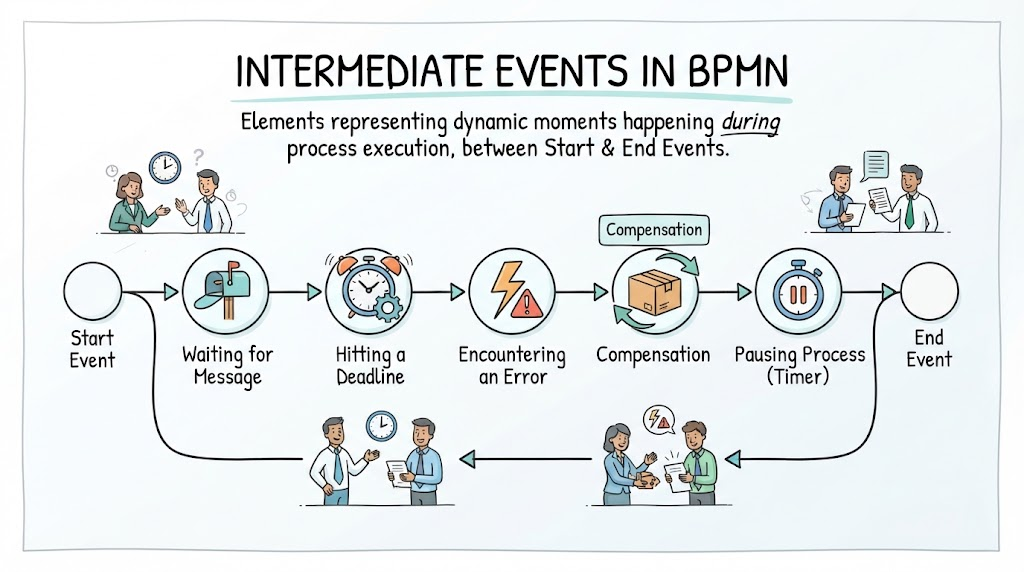
Business Process Model and Notation (BPMN) is the industry-standard language for modeling business processes. Among its most powerful constructs are Intermediate Events — elements that represent something happening during the execution of a process, between its start and end. Unlike Start Events (which trigger a process) or End Events (which conclude one), Intermediate Events capture the dynamic moments in between: waiting for a message, hitting a deadline, encountering an error, or triggering a compensation. Understanding these events is essential for creating accurate, executable, and communicable process models.
This guide explores every type of Intermediate Event, demonstrates how to model them using Visual Paradigm, and provides practical examples drawn from real-world business scenarios.
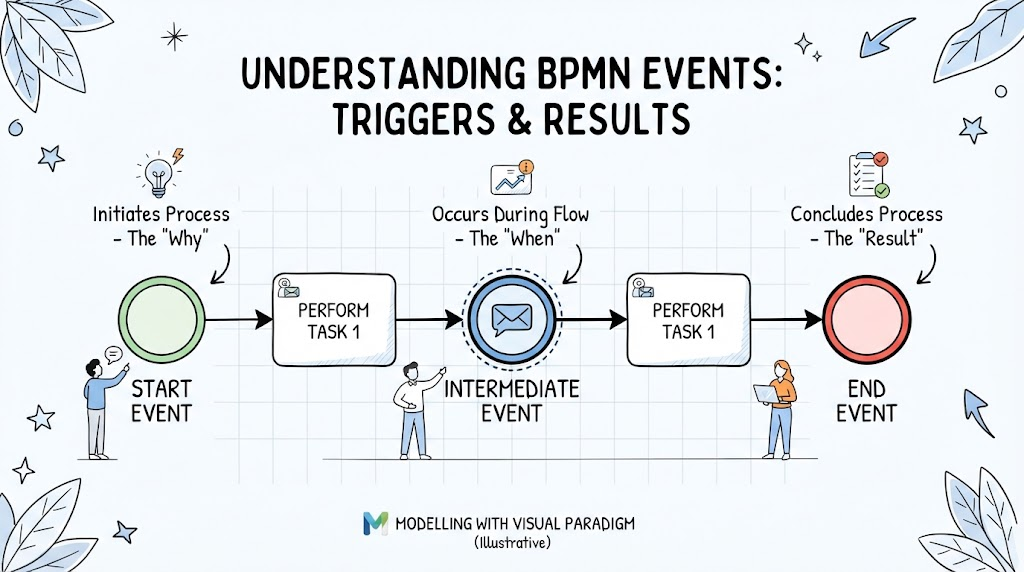
Key Concepts
What Are Intermediate Events?
-
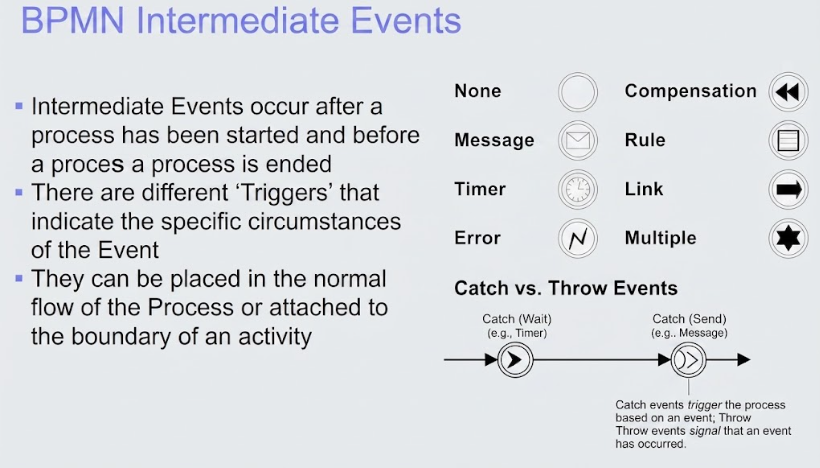
Definition: An Intermediate Event occurs after a process has started and before it ends. It represents a point in the flow where something happens that affects the continuation of the process.
-
Placement: They can be placed directly in the normal sequence flow (catching or throwing) or attached to the boundary of an activity (as a Boundary Event).
-
Triggers (Icons): Each event type is distinguished by a specific icon inside the double-bordered circle, indicating why the event fires.
Catching vs. Throwing
| Type | Description | Example |
|---|---|---|
| Catching | Waits for a condition to occur before continuing | Waiting for customer approval email |
| Throwing | Actively triggers/sends something and continues immediately | Sending a notification, raising an error |
The Eight Intermediate Event Types
-
None – No specific trigger; used as a generic placeholder or for linking flows.
-
Message – Catches or throws a message (e.g., email, API call).
-
Timer – Triggers based on a date/time, duration, or cycle.
-
Error – Catches or throws an error condition (typically used with Error End Events and Error Boundary Events).
-
Compensation – Triggers undo/rollback logic when a prior activity needs to be compensated.
-
Rule – Evaluates a business rule; proceeds based on the rule’s outcome.
-
Link – Connects two points in the same process level without drawing a long sequence flow line (improves diagram readability).
-
Multiple – Represents multiple possible triggers; the event fires when any (or all, depending on configuration) of the specified triggers occur.
Practical Examples & Visual Paradigm Walkthrough
Below are common real-world scenarios modeled with Intermediate Events, along with step-by-step instructions for building them in Visual Paradigm.
Example 1: Message Intermediate Event – Order Approval Workflow
Scenario: After a purchase order is created, the system must wait for manager approval via email before proceeding to fulfillment.
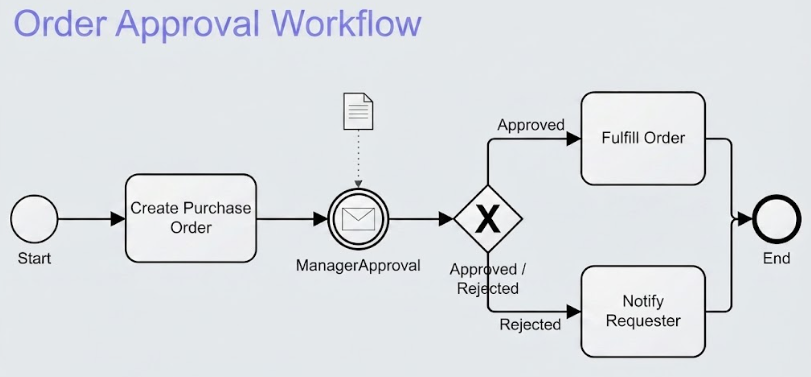
Model Elements:
-
Start Event → Task “Create Purchase Order” → Message Catch Event (wait for approval) → Gateway (approved/rejected) → Task “Fulfill Order” / Task “Notify Requester”
Visual Paradigm Steps:
-
Open Visual Paradigm → Create a new BPMN Diagram.
-
Drag a Start Event onto the canvas.
-
Add a Task (“Create Purchase Order”) and connect it with a Sequence Flow.
-
From the BPMN palette, drag an Intermediate Catch Event and place it on the flow.
-
Right-click the event → Set Event Type → Select Message.
-
In the Specification window, define the Message Name (e.g.,
ManagerApproval) and optionally link it to a Message artifact. -
Continue the flow with an Exclusive Gateway for the approve/reject decision.
Example 2: Timer Intermediate Event – SLA Escalation
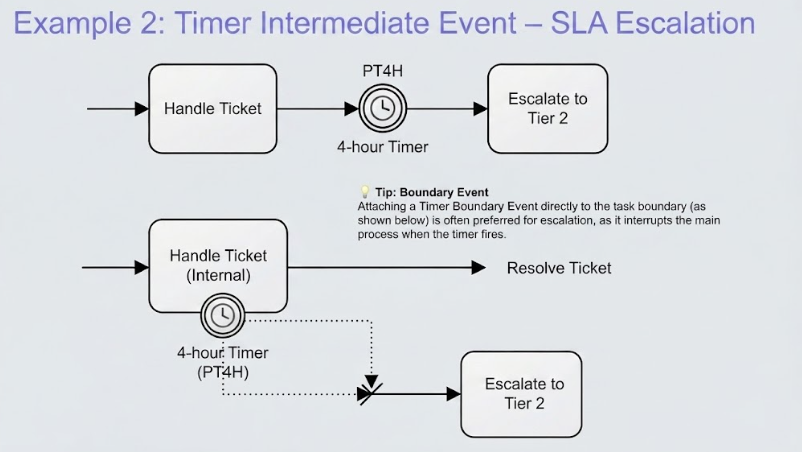
Scenario: If a support ticket is not resolved within 4 hours, automatically escalate it to Tier 2 support.
Model Elements:
-
Task “Handle Ticket” → Timer Intermediate Event (4-hour duration) → Task “Escalate to Tier 2”
Visual Paradigm Steps:
-
Place a Task (“Handle Ticket”) on the diagram.
-
Add an Intermediate Catch Event after it.
-
Set the event type to Timer.
-
In the Timer specification, choose Duration and enter
PT4H(ISO 8601 format for 4 hours). -
Connect the timer event to the “Escalate to Tier 2” task.
💡 Tip: You can also attach a Timer Boundary Event directly to the “Handle Ticket” task instead, which interrupts the task if the timer fires — this is often more semantically correct for escalation scenarios.
Example 3: Error Intermediate Event – Payment Processing Failure
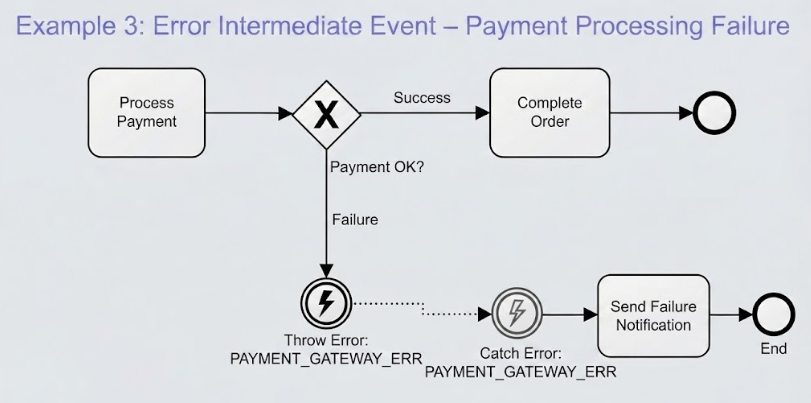
Scenario: During payment processing, if the payment gateway returns an error, catch it and notify the customer rather than failing silently.
Model Elements:
-
Task “Process Payment” → Error Throw Event (on failure path) → Error Catch Event → Task “Send Failure Notification”
Visual Paradigm Steps:
-
Model the “Process Payment” task with an Exclusive Gateway for success/failure.
-
On the failure branch, add an Intermediate Throw Event and set its type to Error.
-
Define the Error Code (e.g.,
PAYMENT_GATEWAY_ERR) in the specification. -
Downstream, add an Error Catch Event that references the same error code.
-
Connect it to the “Send Failure Notification” task.
Example 4: Compensation Intermediate Event – Refund After Cancellation
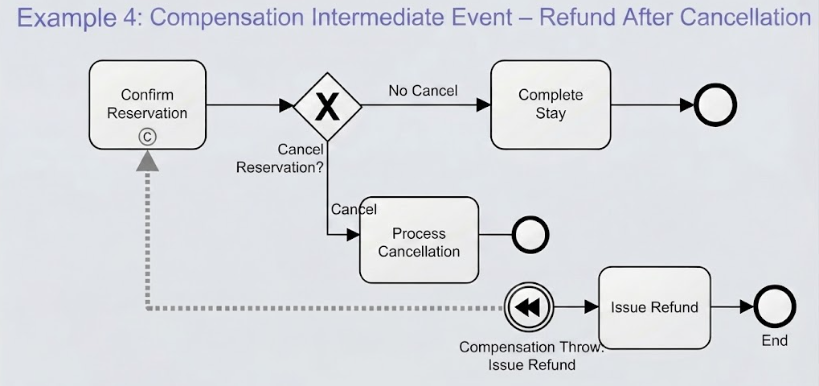
Scenario: After a hotel reservation is confirmed, if the guest later cancels, the system must compensate by issuing a refund.
Model Elements:
-
Task “Confirm Reservation” (marked as compensable) → …later… → Compensation Throw Event → Task “Issue Refund”
Visual Paradigm Steps:
-
Select the “Confirm Reservation” task → In its properties, check Compensate to mark it as compensable.
-
Later in the process (e.g., after a “Cancel Reservation” task), add an Intermediate Throw Event.
-
Set the type to Compensation.
-
Connect it to the “Issue Refund” task. Visual Paradigm will automatically associate it with the compensable activity.
Example 5: Link Intermediate Event – Improving Diagram Readability
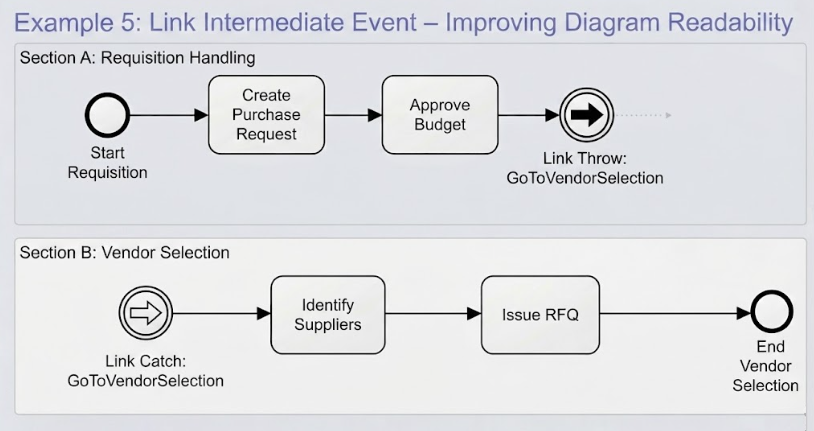
Scenario: A complex procurement process spans multiple pages or sections. Use Link events to avoid crossing lines.
Model Elements:
-
Link Throw Event at the end of Section A → Link Catch Event at the start of Section B (same name)
Visual Paradigm Steps:
-
At the point where you want to “jump,” add an Intermediate Throw Event and set type to Link.
-
Give it a meaningful name (e.g.,
GoToVendorSelection). -
At the target location, add an Intermediate Catch Event with type Link and the same name.
-
Visual Paradigm treats these as a logical connection without a visible sequence flow line.
Example 6: Rule Intermediate Event – Compliance Check
Scenario: Before approving a loan, evaluate whether the applicant meets regulatory compliance rules.
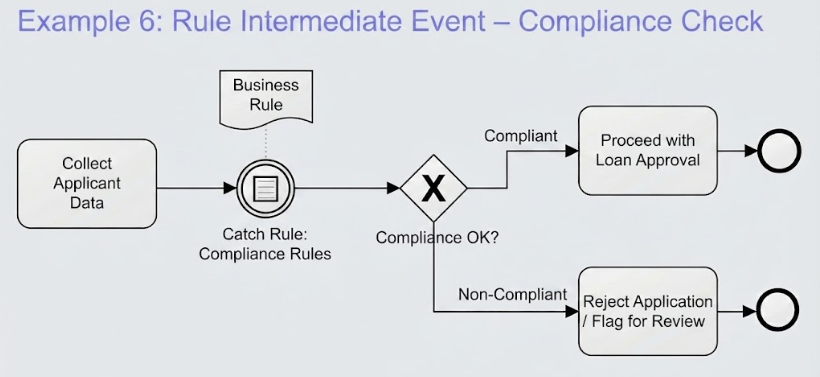
Model Elements:
-
Task “Collect Applicant Data” → Rule Intermediate Event → Gateway (compliant/non-compliant)
Visual Paradigm Steps:
-
After the data collection task, add an Intermediate Catch Event.
-
Set type to Rule.
-
In the specification, reference the Business Rule artifact (created separately in Visual Paradigm’s Rule Modeler).
-
Branch the flow based on the rule outcome.
Example 7: Multiple Intermediate Event – Any-of Trigger
Scenario: A shipment tracking process should proceed when either a delivery confirmation message arrives or a 7-day timer expires (whichever comes first).
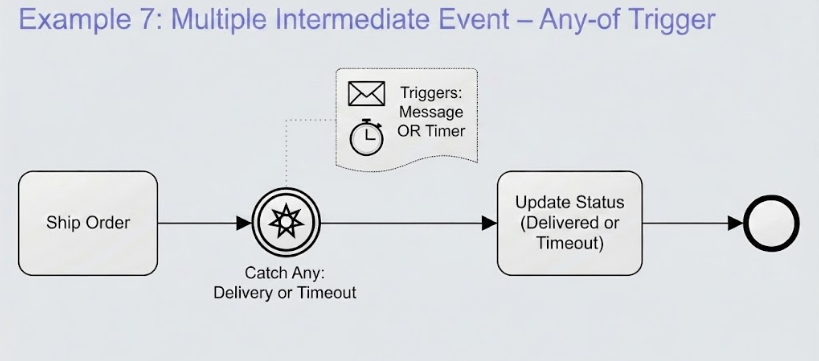
Model Elements:
-
Task “Ship Order” → Multiple Intermediate Catch Event (Message + Timer) → Task “Update Status”
Visual Paradigm Steps:
-
Add an Intermediate Catch Event after “Ship Order.”
-
Set type to Multiple.
-
In the specification, add both a Message trigger and a Timer trigger.
-
Choose the behavior: Any (first to fire wins) or All (must wait for all).
Best Practices
| Practice | Rationale |
|---|---|
| Prefer Boundary Events over inline events for exceptions | Keeps the happy path clean and visually separates exception handling |
| Always name your events clearly | “Wait for Approval” is better than an unnamed Message event |
| Use Link events sparingly | Overuse makes tracing the flow difficult |
| Document Error codes explicitly | Ensures consistency between throw and catch events |
| Validate with BPMN simulation in Visual Paradigm | Catches unreachable events and deadlocks before deployment |
Conclusion
Intermediate Events are the heartbeat of dynamic BPMN diagrams — they transform static flowcharts into living models that reflect real-world timing, communication, exceptions, and business rules. Whether you’re modeling a simple approval workflow or a complex multi-system integration, mastering the eight event types (None, Message, Timer, Error, Compensation, Rule, Link, and Multiple) gives you the precision needed to communicate processes accurately to both business stakeholders and technical implementers. With Visual Paradigm as your modeling tool, you gain not only a rich palette of BPMN symbols but also simulation, code generation, and documentation capabilities that turn your diagrams into actionable assets. Start small — model one process end-to-end with appropriate Intermediate Events — and progressively build toward enterprise-grade process architectures.