


Introduction
In Business Process Model and Notation (BPMN), every process must have a clear beginning and a definitive conclusion. While Start Events trigger workflows, End Events are equally critical—they signal that a specific path or the entire process has reached its conclusion. However, not all endings are created equal. An end event can signify a successful completion, a system error, a message sent to another pool, or even the immediate termination of all parallel activities.
Understanding the nuances of End Events is vital for accurate process modeling. Without them, stakeholders cannot distinguish between a “happy path” completion and an exception handling scenario. This guide explores the seven primary types of BPMN End Events, their specific use cases, and how to implement them effectively using Visual Paradigm.
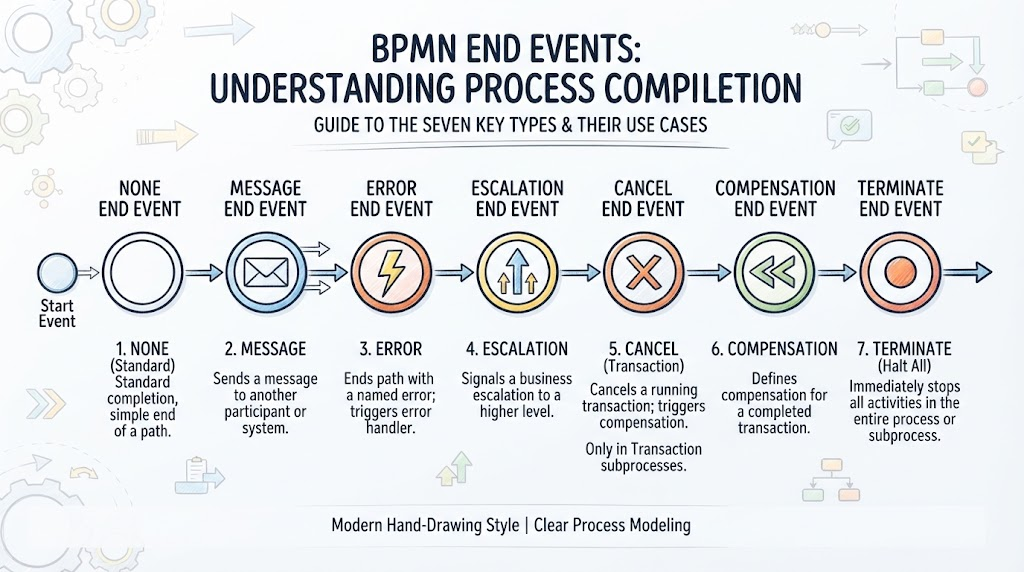
Key Concepts: The 7 Types of End Events
As illustrated in standard BPMN notation, End Events are depicted as circles with a thick border. The icon inside the circle determines the “Result”—the specific circumstance under which the process ends.
1. None End Event
-
Symbol: A thick circle with no inner icon.
-
Definition: This is the most common end event. It indicates that the process (or a specific path within it) has completed successfully without triggering any additional results.
-
Use Case: Standard process completion where no further action (like sending a message or throwing an error) is required.
2. Message End Event
-
Symbol: A thick circle with an envelope icon.
-
Definition: Indicates that upon reaching this point, a message is sent to another participant (usually in a different Pool).
-
Use Case: Completing an order and automatically sending a confirmation email to a customer or a notification to a partner system.
3. Error End Event
-
Symbol: A thick circle with a lightning bolt/bolt icon.
-
Definition: Indicates that the process has ended due to a specific business error or exception. This event “throws” an error that can be caught by an Error Boundary Event or an Error Start Event in a sub-process.
-
Use Case: A loan application is rejected due to insufficient credit score, triggering an exception flow rather than a standard approval flow.
4. Compensation End Event
-
Symbol: A thick circle with a rewind/undo icon.
-
Definition: Triggers compensation logic. It does not end the process immediately but signals that previous activities need to be “undone” or compensated for.
-
Use Case: A flight booking is confirmed, but the hotel reservation fails. The Compensation End Event triggers a task to cancel the flight booking to maintain data consistency.
5. Link End Event
-
Symbol: A thick circle with a right-pointing arrow.
-
Definition: Connects two points on the same page to avoid long, crossing sequence flows. Note: As mentioned in your source material, this is often considered a legacy element and may be replaced by Signal events in future BPMN versions.
-
Use Case: Connecting the end of a complex validation sequence on the left side of a diagram to a continuation point on the right side, keeping the diagram clean.
6. Terminate End Event
-
Symbol: A thick circle with a solid black dot.
-
Definition: This is the “hard stop.” When a token reaches a Terminate End Event, it immediately stops all execution within the current process instance, including any parallel paths that might still be active.
-
Use Case: A “Cancel Order” button is pressed. Regardless of whether the payment is processing or the warehouse is packing, the Terminate End Event kills the entire instance immediately.
7. Multiple End Event
-
Symbol: A thick circle with an asterisk/star icon.
-
Definition: Indicates that the process can end in one of several ways, or that multiple results occur simultaneously.
-
Use Case: A recruitment process ends when either a candidate is hired (Message) or the position is closed (None), depending on runtime conditions.
Tooling: Implementing End Events in Visual Paradigm
Visual Paradigm is a robust tool for creating BPMN diagrams. Here is how to effectively use these concepts within the software:
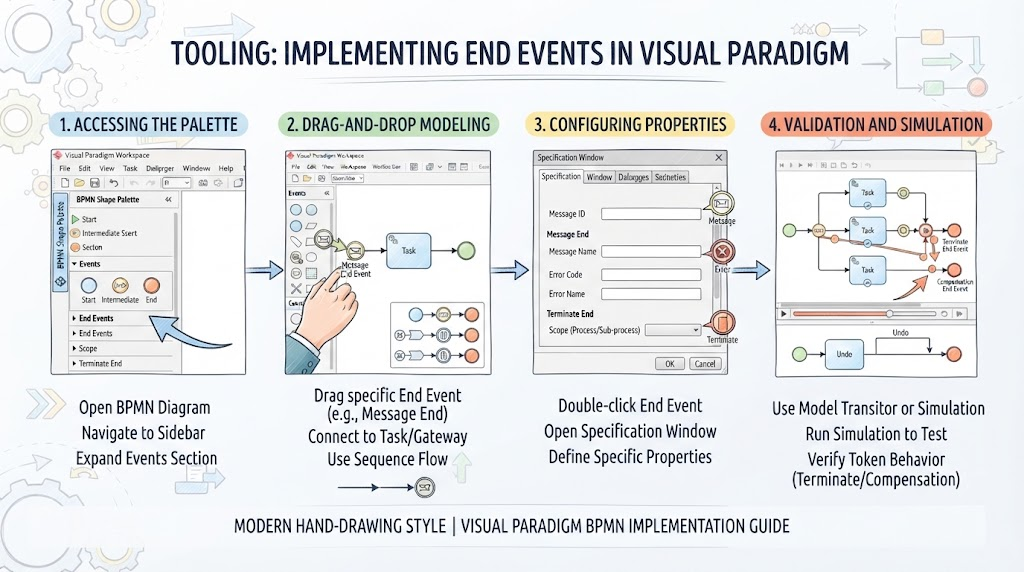
1. Accessing the Palette
-
Open your BPMN diagram in Visual Paradigm.
-
Navigate to the BPMN Shape Palette (usually on the left sidebar).
-
Expand the Events section. You will see categories for Start, Intermediate, and End events.
2. Drag-and-Drop Modeling
-
Simply drag the specific End Event shape (e.g., Message End Event) onto the canvas.
-
Connect it to the preceding Task or Gateway using a Sequence Flow (solid line with arrow).
3. Configuring Properties
-
Double-click the End Event to open the Specification Window.
-
For Message Events: You can define the specific Message ID and Name to ensure it links correctly to a Message Start Event in another pool.
-
For Error Events: Define the Error Code and Error Name. This is crucial for ensuring the corresponding Error Boundary Event catches the correct exception.
-
For Terminate Events: Visual Paradigm allows you to set the scope (Process vs. Sub-process) to ensure you don’t accidentally terminate a parent process when you only meant to stop a sub-flow.
4. Validation and Simulation
-
Use the BPMN Model Transitor or Process Simulation features in Visual Paradigm to test your End Events.
-
Run a simulation to verify that a Terminate End Event actually kills parallel tokens as expected, or that a Compensation End Event correctly triggers the undo tasks.
Conclusion
End Events are the punctuation marks of business process modeling. While a “None” end event acts as a period, signaling a simple stop, events like “Error,” “Compensate,” and “Terminate” act as exclamation points or semicolons, adding complex logic and control flow to your diagrams.
By mastering these seven types and utilizing tools like Visual Paradigm to configure their specific properties (such as Error Codes or Message IDs), you ensure your process models are not just visually appealing, but technically accurate and executable. Remember to keep an eye on evolving standards—specifically regarding Link Events—as the BPMN specification continues to mature toward more signal-based architectures.