


BPMN is a standard for business process modeling that provides a graphical notation for specifying business processes. The goal is to make the process flow easy to understand for all stakeholders, from business analysts to technical developers.
This guide breaks down the core elements of BPMN using the provided eCommerce diagram.
1. The Process Container: Collaboration (Pools and Lanes)
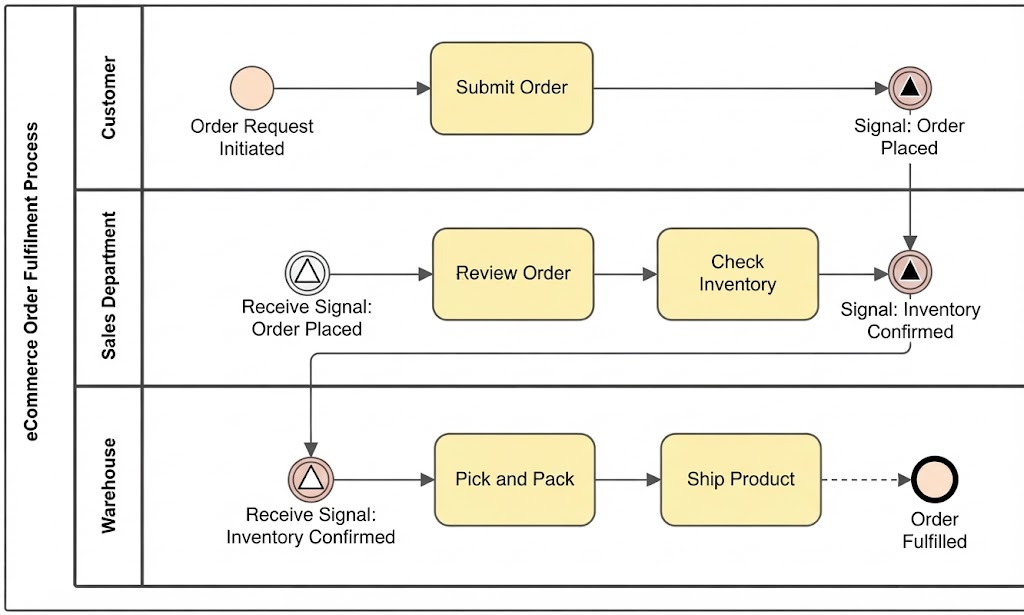
The entire diagram is a “Collaboration,” showing interactions between different participants.
Participant (Pool)
The large, labeled vertical box on the far left, “eCommerce Order Fulfilment Process,” represents a participant in the process. In BPMN, this is called a Pool. A pool represents a high-level organizational entity or system responsible for a set of activities.
Organizational Unit (Lanes)
The pool is divided into three horizontal rows, or sub-partitions. These are called Lanes. Lanes represent functional units, departments, or specific roles within the larger pool. Here we have:
-
Customer Lane: The actor initiating the process.
-
Sales Department Lane: The team managing the order details.
-
Warehouse Lane: The team responsible for physical goods.
Example Interpretation: The process is not just one single task; it spans three different departments within the eCommerce company.
2. Connecting Objects (Flows)
Connecting objects are the lines that show how process elements are linked.
Sequence Flow (Solid Arrow)
The solid lines with arrowheads, like the one from “Submit Order” to “Signal: Order Placed,” are Sequence Flows. They show the order in which activities are performed within a single lane. An arrow always points to the next step.
Message Flow (Dashed Arrow)
The dashed line with an open arrowhead, connecting “Ship Product” to the “Order Fulfilled” End Event, is a Message Flow. Message flows show the passing of information or a message between two different participants (pools). In this example, the message is “we have fulfilled your order,” which is sent from the system to the customer.
3. Flow Objects: Events
Events are things that “happen” during the course of a process. They affect the flow of the process and usually have a trigger or a result. They are typically circles.
Start Event (Thin Circle)
The plain circle in the Customer lane, labeled “Order Request Initiated,” is a Start Event. It indicates where the process begins. It has no incoming sequence flow.
Intermediate Event (Double Circle)
Events located between the Start and End events are Intermediate Events. They show something that occurs during the process. The diagram uses two specific types:
-
Throwing Signal Event (Internal Black Triangle): Labeled “Signal: Order Placed” and “Signal: Inventory Confirmed.” This type of event sends a communication. Once the “Submit Order” task is done, the process “throws” a signal to notify other parts of the system.
-
Catching Signal Event (Internal White Triangle): Labeled “Receive Signal: Order Placed” and “Receive Signal: Inventory Confirmed.” This type of event waits for and receives a specific signal. The Sales lane waits until it receives the “Order Placed” signal before it can proceed. This is how different lanes synchronize their work.
End Event (Thick Circle)
The circle in the Warehouse lane, labeled “Order Fulfilled,” is an End Event. It indicates where the process flow finishes.
4. Flow Objects: Activities
Activities are work that is performed within a business process. They are rounded rectangles.
Task (Simple Rounded Rectangle)
All the yellow boxes in the diagram, such as “Submit Order,” “Review Order,” “Check Inventory,” “Pick and Pack,” and “Ship Product,” are Tasks. A task is an atomic activity that is included within a process model. It’s used when the process is not broken down to a finer level of detail.
Example Interpretation: These are the discrete steps that must be completed. The sequence flows tell us that “Review Order” must be completed before “Check Inventory” can start.
5. Putting It All Together: A Walkthrough of the Example Process
Let’s interpret the full diagram using the notation guide above:
-
The process starts in the Customer lane with the “Order Request Initiated” Start Event.
-
The customer performs the first Task, “Submit Order.”
-
Once submitted, the process reaches a Throwing Signal Event, broadcasting “Signal: Order Placed.”
-
The Sales Department lane is waiting. It catches this signal with the “Receive Signal: Order Placed” event. This synchronization allows Sales to begin their work.
-
Sales performs the Task “Review Order,” followed by the Task “Check Inventory.”
-
Once inventory is checked, Sales throws a second signal: “Signal: Inventory Confirmed.”
-
This signal is caught by the Warehouse lane via the “Receive Signal: Inventory Confirmed” event.
-
Warehouse is now triggered to perform their work, starting with the Task “Pick and Pack.”
-
This leads to the final Task “Ship Product.”
-
After shipping, a Message Flow is sent to notify the customer that their “Order Fulfilled” (the final End Event).
By understanding these core BPMN elements, you can accurately read and interpret any business process diagram.
Reference
-
Comprehensive Guide to BPMN, Visual Paradigm Tooling, AI, and Ecosystem: Official blog post outlining the four pillars of the VP AI ecosystem with practical BPMN examples like Employee Onboarding and Order Fulfillment .
-
Mastering Business Process Modeling: A Complete Guide to BPMN and AI-Powered Diagram Generation: Official guide detailing how to use the AI Business Process Diagram generator, with step-by-step instructions and feature comparisons .
-
From Text to Process Flow: My Hands-On Review of Visual Paradigm’s AI-Powered BPMN Generator: Independent review testing the generator across real-world scenarios (e-commerce, IT support, banking) from a business analyst perspective .
-
AI BPMN Diagram Generator: Professional BPD Tool: Official product page explaining the text-to-diagram feature, how to access it in VP Desktop, and key benefits like standard compliance .
-
BPMN、Visual Paradigm 工具、人工智能与生态系统全面指南: Chinese version of the comprehensive guide, covering BPMN fundamentals and AI-driven generation case studies .
-
From Text to Process Flow: A Hands-On Review of Visual Paradigm’s AI-Powered BPMN Generator: Detailed case study on a hardware retailer’s shipment process, demonstrating how AI handles gateways, parallel execution, and swimlane logic .
-
AI BPMN图生成器:专业BPD工具: Chinese product guide detailing the AI generator’s capabilities, including automatic pool and lane inclusion for cross-functional clarity .
-
我的亲身体验:利用 Visual Paradigm 的 AI 驱动 BPMN 改变工作流程文档: First-hand review of the AI generator’s performance on employee onboarding, customer support, and loan approval scenarios .
-
BPMN 2.0 商业流程建模新手实战指南:运用 Visual Paradigm 与 AI 轻松打造专业流程图: Practical tutorial with prompt writing strategies and advanced optimization techniques using the AI Chatbot for conversational refinement .
-
BPMN 完整实战教程:Visual Paradigm 体验、AI 功能与生态系统深度指南: Series of articles covering the AI-powered BPMN generator launch, with deep dives into ecosystem integration and practical examples .
Related posts:
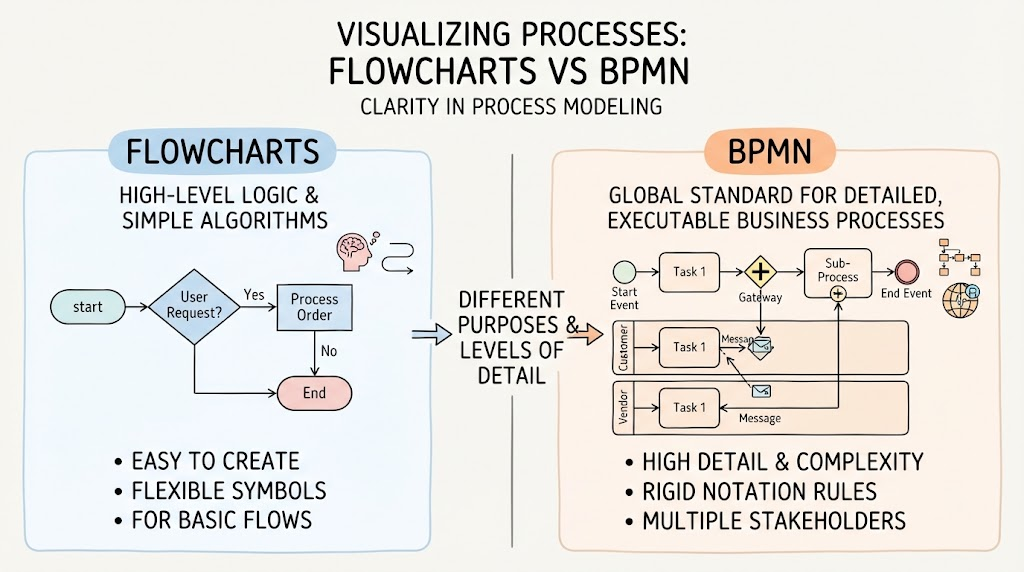 BPMN vs. Flowcharts: Understanding the Key Differences and When to Use Each
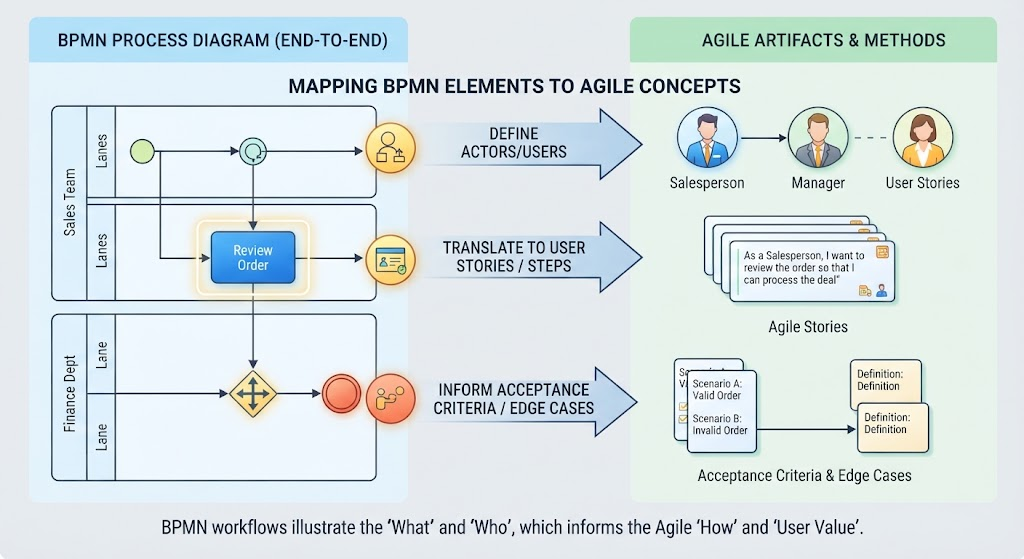 From Process to Product: Translating BPMN Diagrams into Agile User Stories
 Taming Spaghetti Diagrams: AI-Assisted Refactoring for Cleaner BPMN Architecture
Mastering BPMN Intermediate Events: A Practical Guide Using Visual Paradigm
Taming Spaghetti Diagrams: AI-Assisted Refactoring for Cleaner BPMN Architecture
Mastering BPMN Intermediate Events: A Practical Guide Using Visual Paradigm