


Introduction
In the dynamic world of Agile product management, processes are rarely linear. They are filled with waits, exceptions, messages, and timers. While Start and End events define the boundaries of a process, Intermediate Events define the life of the process. They represent things that happen during the execution of a process, enabling sophisticated interaction with external systems, handling of exceptions, and management of time-based delays.
For Agile teams, understanding the distinction between Catching (waiting for something to happen) and Throwing (triggering an event) intermediate events is crucial for modeling realistic workflows. This guide explores these concepts, provides practical usage cases for Agile teams, and demonstrates how Visual Paradigm’s AI-powered tooling can accelerate the creation of these complex diagrams from natural language narratives.
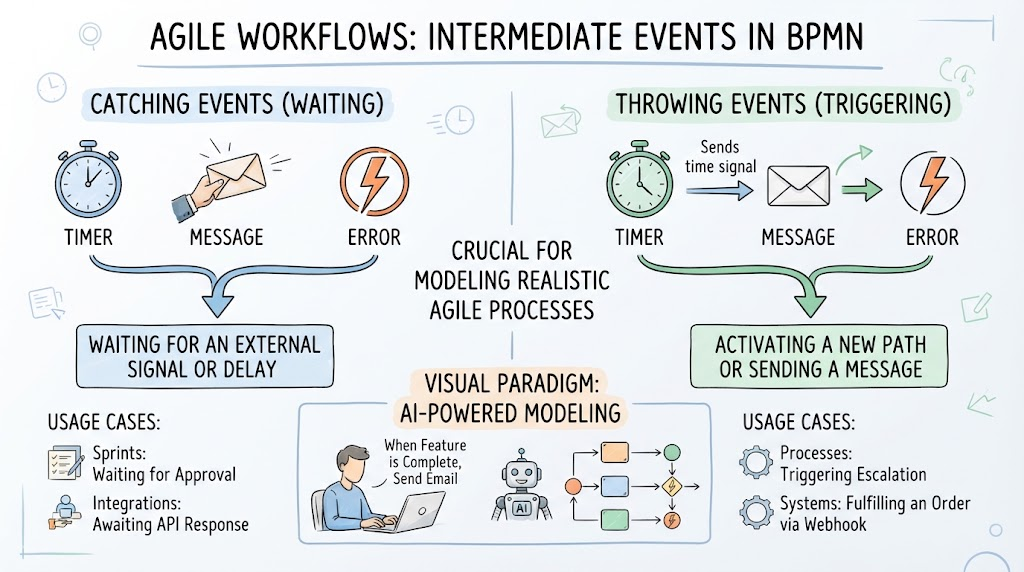
1. Understanding BPMN Intermediate Events
Intermediate events are represented by circles with a double thin border. They are categorized into two primary types based on their behavior:
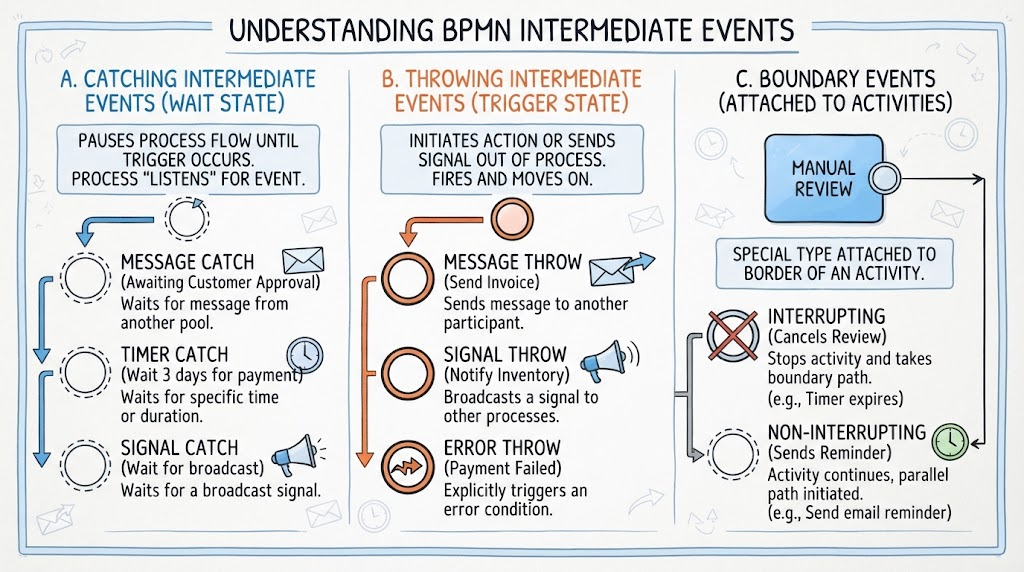
A. Catching Intermediate Events (Wait State)
A catching event pauses the process flow until a specific trigger occurs. The process “listens” for this event.
-
Visual Indicator: Thin border, often with a marker inside (e.g., envelope for message, clock for timer).
-
Behavior: The token stops at this event and waits. It does not proceed until the event is triggered.
-
Common Types:
-
Message Catch: Waits for a message from another pool/participant (e.g., “Awaiting Customer Approval”).
-
Timer Catch: Waits for a specific time or duration (e.g., “Wait 3 days for payment clearance”).
-
Signal Catch: Waits for a broadcast signal from elsewhere in the system.
-
B. Throwing Intermediate Events (Trigger State)
A throwing event triggers an action or sends a signal/message out of the current process flow.
-
Visual Indicator: Thick border, often filled or with a solid marker.
-
Behavior: The process actively initiates an action. It does not wait; it fires and moves on.
-
Common Types:
-
Message Throw: Sends a message to another participant (e.g., “Send Invoice to Customer”).
-
Signal Throw: Broadcasts a signal to other processes (e.g., “Notify Inventory System”).
-
Error Throw: Explicitly triggers an error condition to be caught by an error boundary event (e.g., “Payment Failed”).
-
C. Boundary Events (Attached to Activities)
A special and powerful type of intermediate event is the Boundary Event, which is attached to the border of an activity (task or sub-process).
-
Interrupting vs. Non-Interrupting:
-
Interrupting: If triggered, the current activity is stopped, and the boundary event’s path is taken (e.g., a timer expires while waiting for manual review, canceling the review).
-
Non-Interrupting: The activity continues, but a parallel path is initiated (e.g., sending a reminder email after 24 hours while still waiting for the original response).
-
2. Why This Is Interesting for Agile Teams
-
Handles Real-World Complexity: Agile processes aren’t just “do task A, then task B.” They involve waiting for user feedback, handling API failures, and managing SLAs. Intermediate events model this reality.
-
Exception Handling: Instead of cluttering the main flow with error checks, Error Throw/Catch events allow for clean separation of happy paths and exception paths.
-
Process Interaction: Message Events enable clear modeling of communication between different teams or systems (e.g., Product Team ↔ Engineering Team ↔ Customer Support).
-
Time-Based Automation: Timer Events help define SLAs, reminders, and automatic escalations, which are critical for operational efficiency.
3. Usage Cases for Agile Teams with Examples
Case 1: User Story Acceptance Workflow (Message & Timer Events)
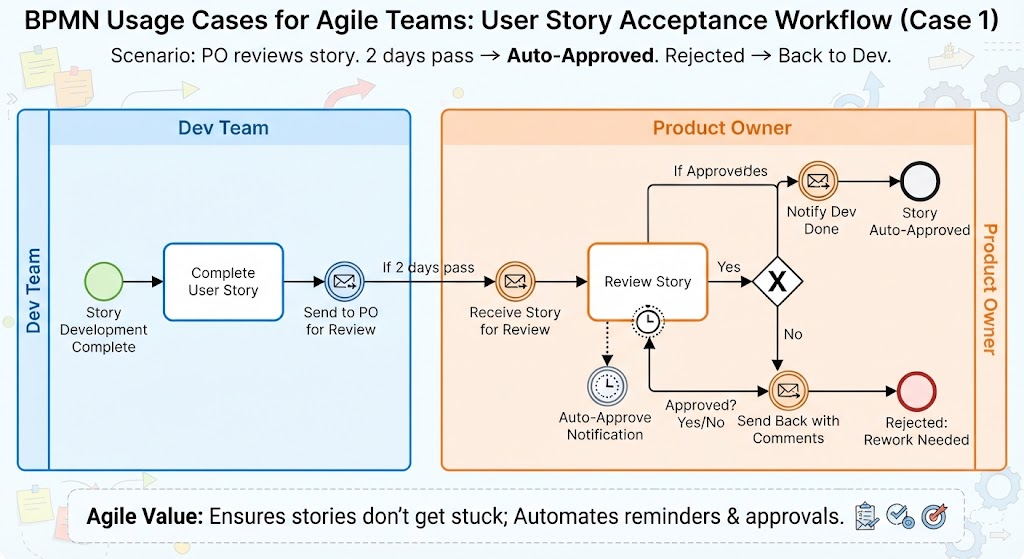
Scenario: A Product Owner reviews a completed user story. If no response is given within 2 days, it’s auto-approved. If rejected, it goes back to development.
-
Process Flow:
-
Dev Team completes story → Message Throw (Send to PO for Review).
-
PO Pool: Message Catch (Receive Story for Review).
-
Activity: “Review Story”.
-
Boundary Timer Event (Non-Interrupting): Attached to “Review Story”. If 2 days pass, Message Throw (Auto-Approve Notification).
-
Gateway: Did PO approve?
-
Yes → Message Throw (Notify Dev Done).
-
No → Message Throw (Send Back to Dev with Comments).
-
-
-
Agile Value: Ensures stories don’t get stuck in review limbo and automates reminders.
Case 2: Payment Processing with Exception Handling (Error Events)
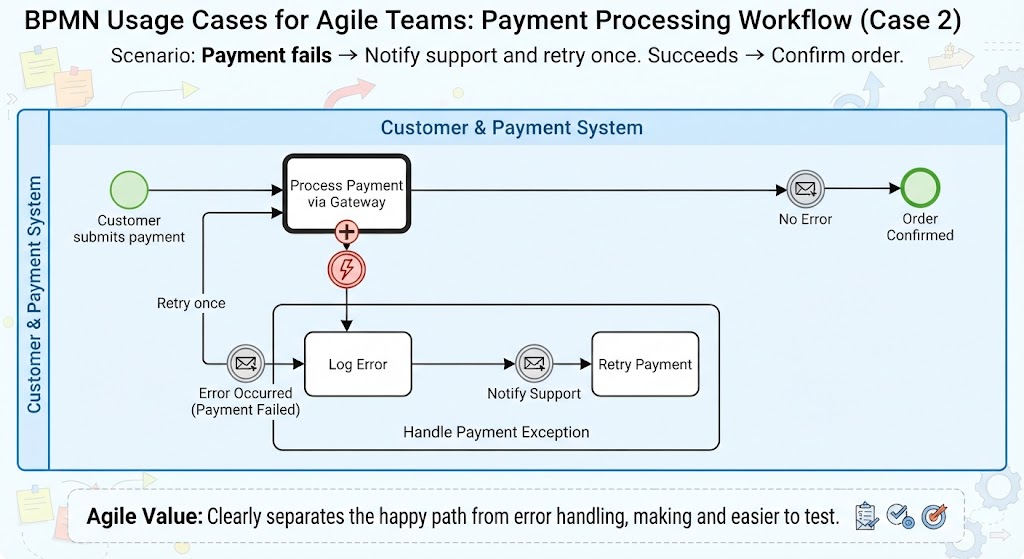
Scenario: A customer makes a payment. If it fails, notify support and retry once. If it succeeds, confirm order.
-
Process Flow:
-
Customer submits payment.
-
Activity: “Process Payment via Gateway”.
-
Boundary Error Event (Interrupting): Attached to “Process Payment”.
-
If Error Occurs → Error Throw (Payment Failed).
-
Path: Activity “Log Error” → Message Throw (Notify Support) → Activity “Retry Payment”.
-
-
If No Error → Message Throw (Send Confirmation Email).
-
-
Agile Value: Clearly separates the happy path from error handling, making the process resilient and easier to test.
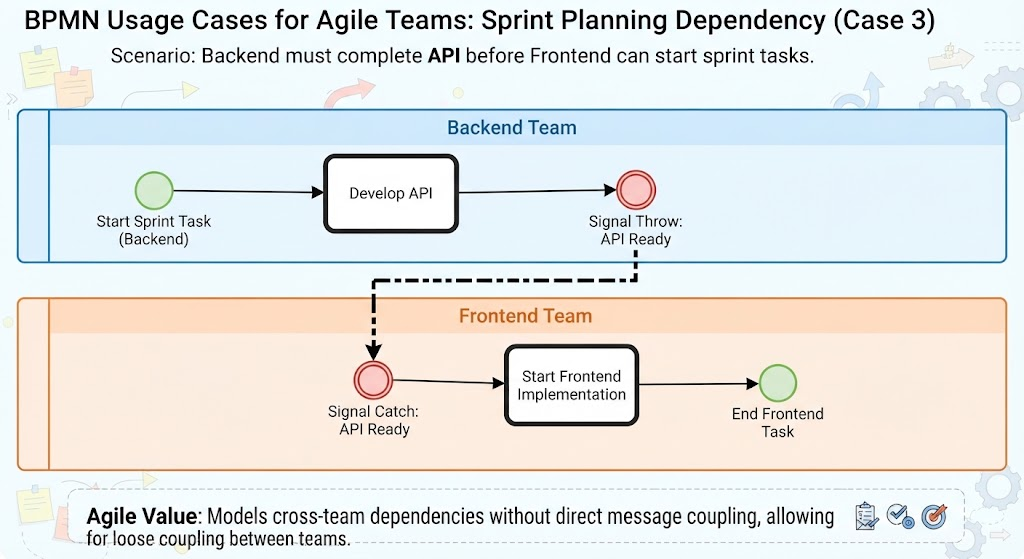
Case 3: Sprint Planning Dependency (Signal Events)
Scenario: The Backend team must complete an API before the Frontend team can start their sprint tasks.
-
Process Flow:
-
Backend Pool: Activity “Develop API” → Signal Throw (API Ready).
-
Frontend Pool: Signal Catch (Wait for API Ready) → Activity “Start Frontend Implementation”.
-
-
Agile Value: Models cross-team dependencies without direct message coupling, allowing for loose coupling between teams.
4. Visual Paradigm Tooling: Why It Helps & AI Angle
Visual Paradigm stands out as a recommended tool for Agile teams due to its robust BPMN support and integrated AI capabilities. Here’s why it’s particularly effective for modeling intermediate events:
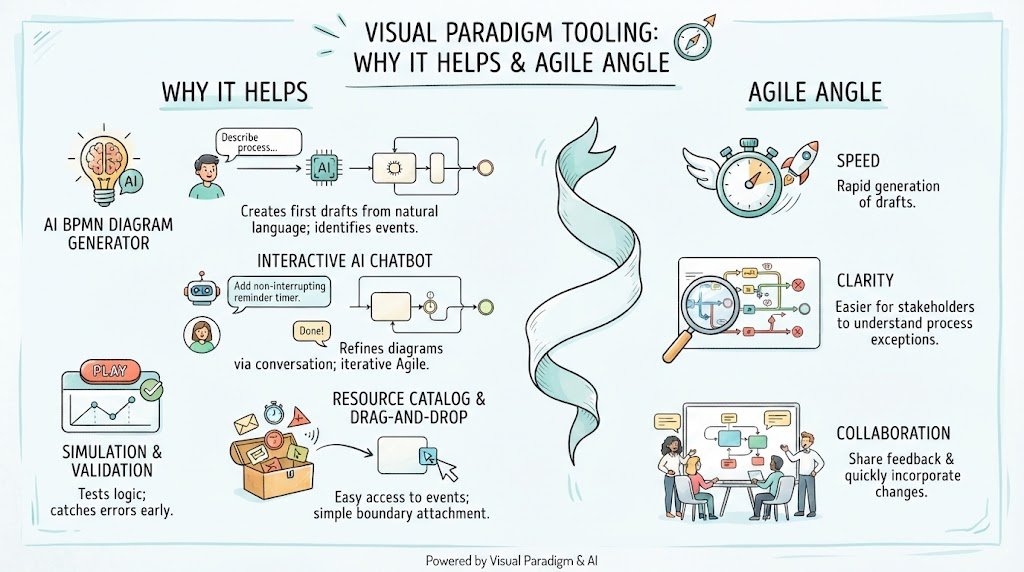
Key Features:
-
AI BPMN Diagram Generator:
-
How it helps: You can describe a process in natural language (e.g., “Create a BPMN diagram where a user submits a form, waits for 24 hours for admin approval, and if not approved, sends an error notification”), and the AI will generate the initial diagram, including the correct Timer Catch and Error Throw events.
-
AI Angle: The AI identifies potential interruption points in your narrative and suggests appropriate boundary events, reducing manual effort.
-
-
Interactive AI Chatbot:
-
How it helps: Refine your diagram through conversation. Ask the chatbot, “Add a non-interrupting timer to send a reminder after 12 hours,” and it will update the diagram accordingly. This is ideal for iterative Agile refinement.
-
-
Resource Catalog & Drag-and-Drop:
-
How it helps: Easily access all types of intermediate events (Message, Timer, Error, Signal) from the resource catalog. Visual Paradigm’s interface makes it simple to attach boundary events to activities and configure their properties (interrupting vs. non-interrupting).
-
-
Simulation & Validation:
-
How it helps: Test your process logic. Simulate the flow to ensure that timer events trigger correctly and error paths are reachable. This helps catch logical errors before implementation.
-
Why Visual Paradigm for Agile Teams?
-
Speed: AI generation reduces the time to create first drafts of complex processes.
-
Clarity: Visual representation of intermediate events makes it easier for stakeholders (developers, testers, POs) to understand wait states and exceptions.
-
Collaboration: Share diagrams with team members for feedback, using the AI chatbot to quickly incorporate changes.
Conclusion
BPMN Intermediate Events are the backbone of realistic, resilient process modeling. For Agile teams, mastering Catching and Throwing events, along with Boundary Events, enables the design of workflows that handle real-world complexities like delays, exceptions, and cross-team communication.
By leveraging Visual Paradigm’s AI-powered tools, Agile teams can rapidly translate natural language requirements into accurate BPMN diagrams, ensuring that process logic is clear, testable, and aligned with business needs. Whether you’re modeling a simple approval workflow or a complex multi-system integration, intermediate events provide the granularity needed to build robust Agile processes.
Reference Resources: Visual Paradigm Tooling
- AI BPMN Diagram Generator: Professional BPD Tool: Explains how to generate BPMN diagrams from text using AI in the Visual Paradigm desktop application.
- Comprehensive Guide to BPMN, Visual Paradigm Tooling, AI, and Ecosystem: Covers BPMN fundamentals and the ecosystem, with practical AI-generated BPMN examples like employee onboarding.
- How to Create BPMN Business Process Diagrams in Visual Paradigm: A step-by-step tutorial on drawing BPMN diagrams manually, including creating pools, lanes, tasks, gateways, and using simulation features.
- BPMN Tutorial: Visual Paradigm Tooling, AI Chatbot & Ecosystem: Details the AI Chatbot capabilities for generating and refining diagrams via conversational commands.
- AI Business Process Diagram Generator Update: Highlights the AI BPMN generator’s ability to produce complex, multi-pool diagrams from simple text prompts.
- Mastering Business Process Modeling: A Complete Guide to BPMN and AI: A comprehensive guide on BPMN basics and using the AI generator to create diagrams from natural language descriptions.
- Creating Your First BPMN Diagram in Visual Paradigm: A beginner-friendly tutorial covering essential BPMN concepts like events, gateways, and swimlanes, with practical tips.
- BPMN 2.0 Business Process Modeling Beginner’s Guide: Offers a step-by-step guide for beginners, including AI prompt strategies for effective BPMN generation.
- How to Draw BPMN Diagram?: A visual tutorial on using Visual Paradigm’s resource catalog to efficiently draw BPMN diagrams and add gateways and events.
- Mastering BPMN: A Comprehensive Tutorial with Visual Paradigm, AI Chatbot, and Ecosystem: Discusses how the AI chatbot enables rapid, iterative BPMN modeling through plain language commands.