


Introduction
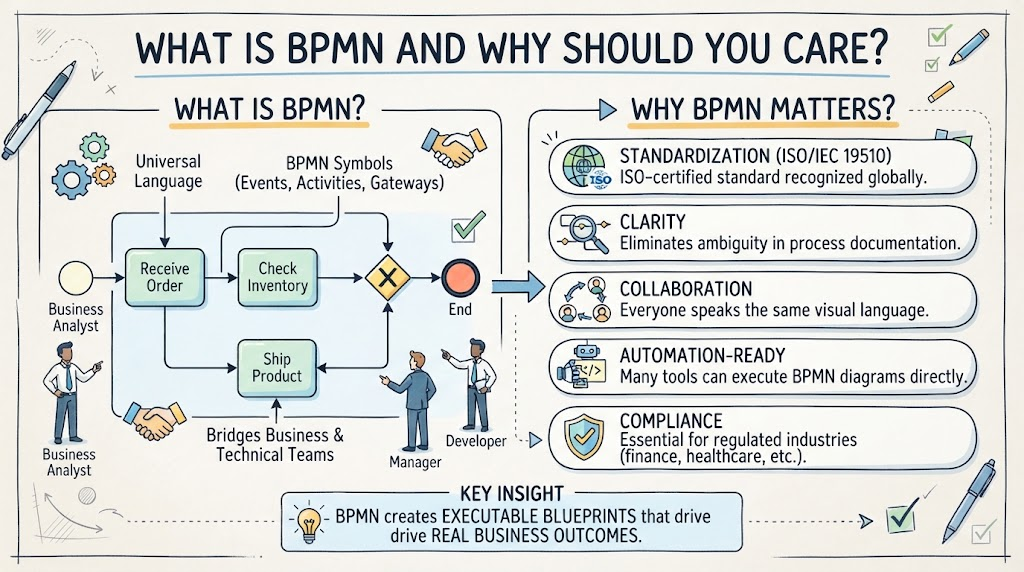
1. What Is BPMN and Why Should You Care?
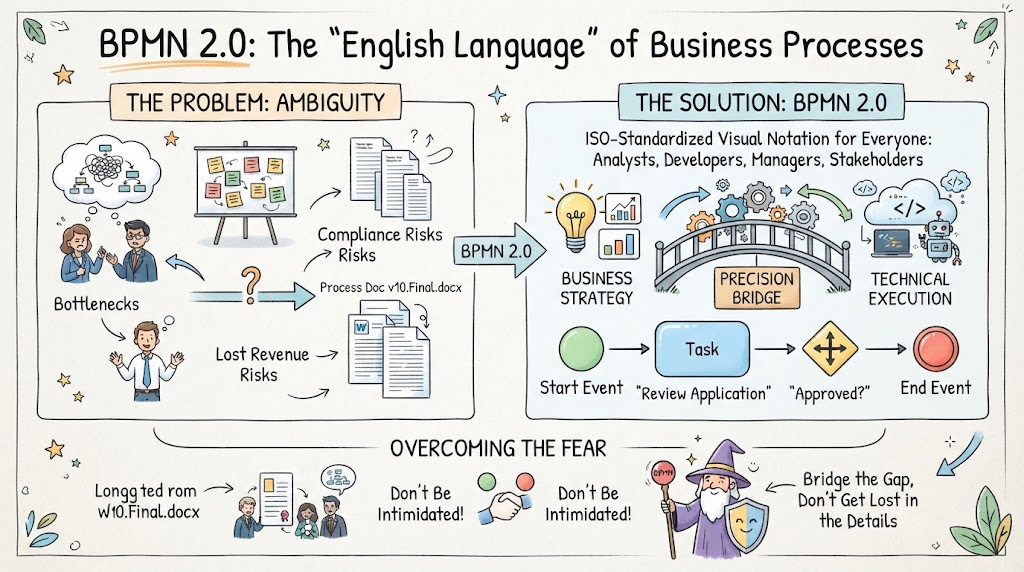
Business Process Model and Notation (BPMN) is a standardized graphical representation for specifying business processes. Think of it as the universal language that bridges the gap between business stakeholders, analysts, and technical teams.
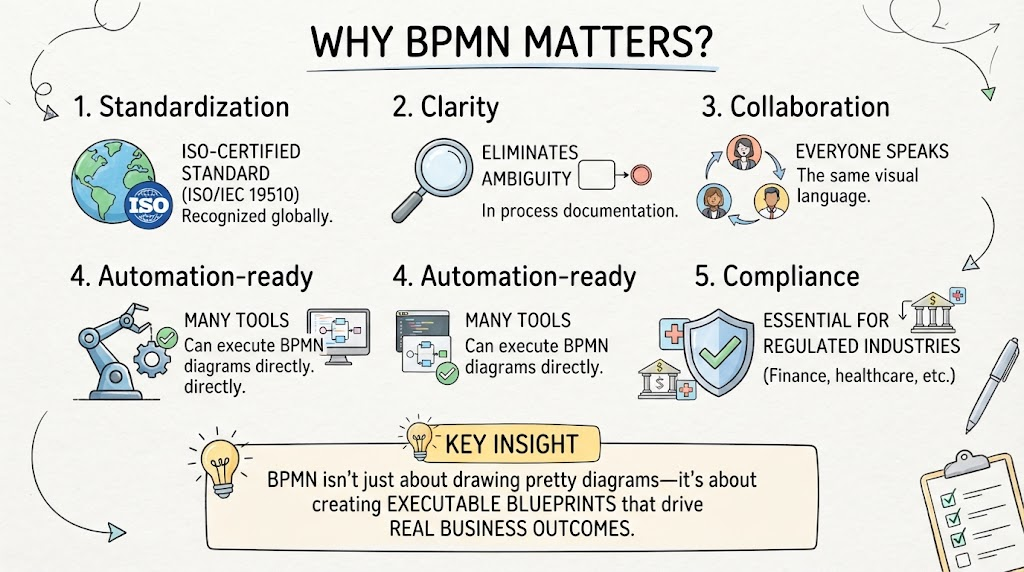
Why BPMN Matters:
-
Standardization: ISO-certified standard (ISO/IEC 19510) recognized globally
-
Clarity: Eliminates ambiguity in process documentation
-
Collaboration: Everyone speaks the same visual language
-
Automation-ready: Many tools can execute BPMN diagrams directly
-
Compliance: Essential for regulated industries (finance, healthcare, etc.)
Key Insight: BPMN isn’t just about drawing pretty diagrams—it’s about creating executable blueprints that drive real business outcomes.
2. The Four Core Building Blocks
Every BPMN diagram consists of four fundamental elements:
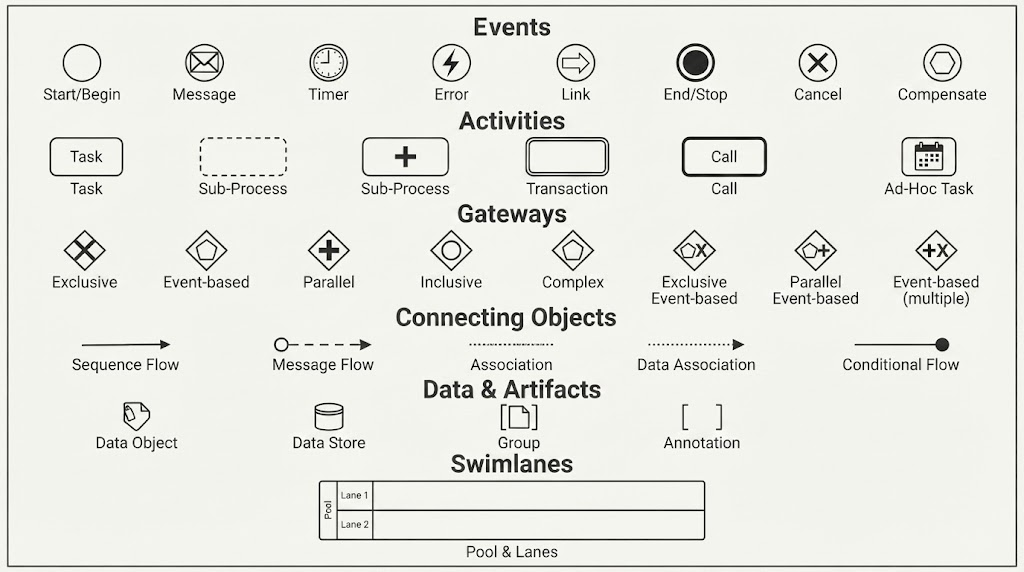
1. Flow Objects (Events, Activities, Gateways)
-
Events: Things that happen (start, intermediate, end)
-
Activities: Work that gets done (tasks, sub-processes)
-
Gateways: Decision points that control flow
2. Connecting Objects (Sequence Flows, Message Flows, Associations)
-
Show the order and relationships between flow objects
3. Swimlanes (Pools and Lanes)
-
Organize responsibilities by role, department, or system
4. Artifacts (Data Objects, Groups, Annotations)
-
Provide additional context without affecting flow
3. Essential BPMN Symbols Every Beginner Must Know
Events (Circles)
| Symbol | Name | Description |
|---|---|---|
| ⭕ Thin border | Start Event | Where the process begins |
| ⭕ Double border | End Event | Where the process ends |
| ⭕ Dashed border | Intermediate Event | Something happens during the process |
Event Types:
-
📧 Message: Communication sent/received
-
⏰ Timer: Time-based trigger
-
❗ Error: Exception handling
-
✅ Signal: Broadcast notification
Activities (Rounded Rectangles)
| Symbol | Name | Description |
|---|---|---|
| ▭ Single border | Task | Atomic unit of work |
| ▭ Double border | Sub-Process | Collapsible group of tasks |
| ▭ Bold border | Call Activity | Reusable process reference |
Task Markers:
-
🔄 Loop marker: Task repeats
-
📋 List marker: Multi-instance task
-
⚙️ Gear marker: Service task (automated)
Gateways (Diamonds)
| Symbol | Name | Description |
|---|---|---|
| ◇ Empty | Exclusive Gateway | XOR—one path only |
| ◇ Plus sign | Parallel Gateway | AND—all paths simultaneously |
| ◇ Circle | Inclusive Gateway | OR—one or more paths |
| ◇ X mark | Event-Based Gateway | Waits for first event |
Connecting Objects
-
→ Solid arrow: Sequence flow (order of execution)
-
⇢ Dashed arrow: Message flow (communication between pools)
-
⤡ Dotted line: Association (links artifacts to flow objects)
4. Step-by-Step: Creating Your First BPMN Diagram
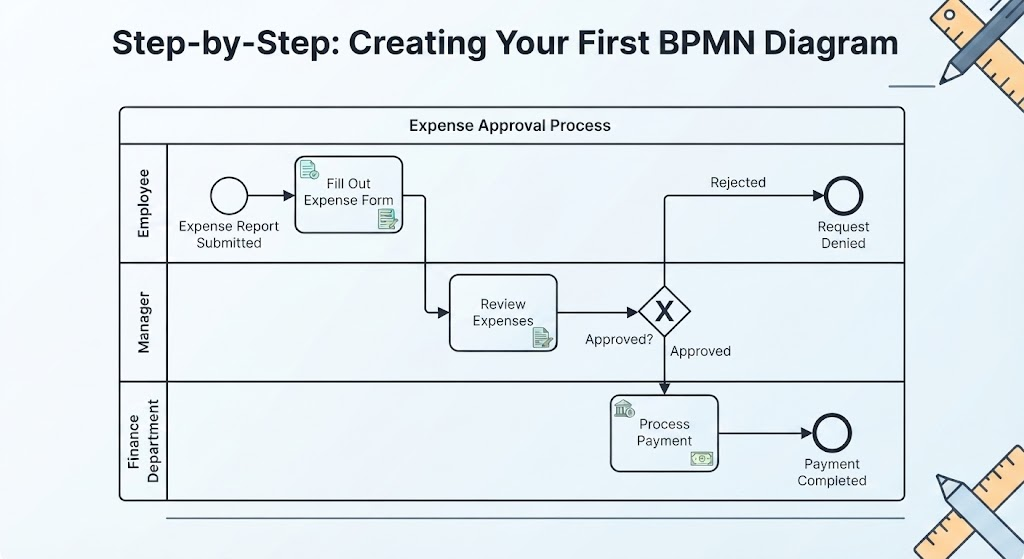
Let’s model a simple Employee Expense Approval Process.
Step 1: Identify the Pool and Lanes
Pool: "Expense Approval Process"
  Lane 1: Employee
  Lane 2: Manager
  Lane 3: Finance Department
Step 2: Define the Start Event
-
Start Event (thin circle) in Employee lane
-
Label: “Expense Report Submitted”
Step 3: Add Activities
-
Task (Employee): “Fill Out Expense Form”
-
Task (Manager): “Review Expenses”
-
Task (Finance): “Process Payment”
Step 4: Add Decision Points
-
Exclusive Gateway (diamond) after Manager review
-
Path A: “Approved” → Finance lane
-
Path B: “Rejected” → Back to Employee
-
Step 5: Define End Events
-
End Event (double circle) in Finance lane: “Payment Completed”
-
End Event in Employee lane: “Request Denied”
Step 6: Connect Everything
Use sequence flows (solid arrows) to show the order:
5. Real-World Examples
Example 1: Online Order Fulfillment
Scenario: Customer places an order on an e-commerce site.
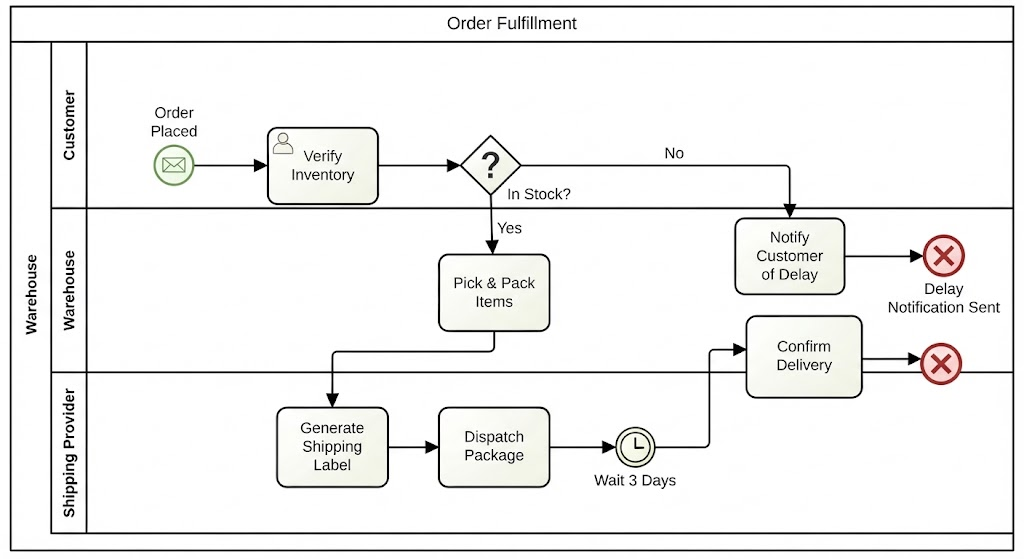
Pool: "Order Fulfillment"
  Lane: Customer
  Lane: Warehouse
  Lane: Shipping Provider

Process Flow:
1. Start Event: "Order Placed"
2. Task (Warehouse): "Verify Inventory"
3. Exclusive Gateway: "In Stock?"
   - Yes → Task: "Pick & Pack Items"
   - No → Task: "Notify Customer of Delay" → End
4. Task (Shipping): "Generate Shipping Label"
5. Task (Shipping): "Dispatch Package"
6. Intermediate Event (Timer): "Wait 3 Days"
7. Task (Warehouse): "Confirm Delivery"
8. End Event: "Order Complete"
Key Learning: Notice how swimlanes clarify who does what, and gateways handle decision logic.
Example 2: Employee Onboarding
Scenario: New hire joins the company.
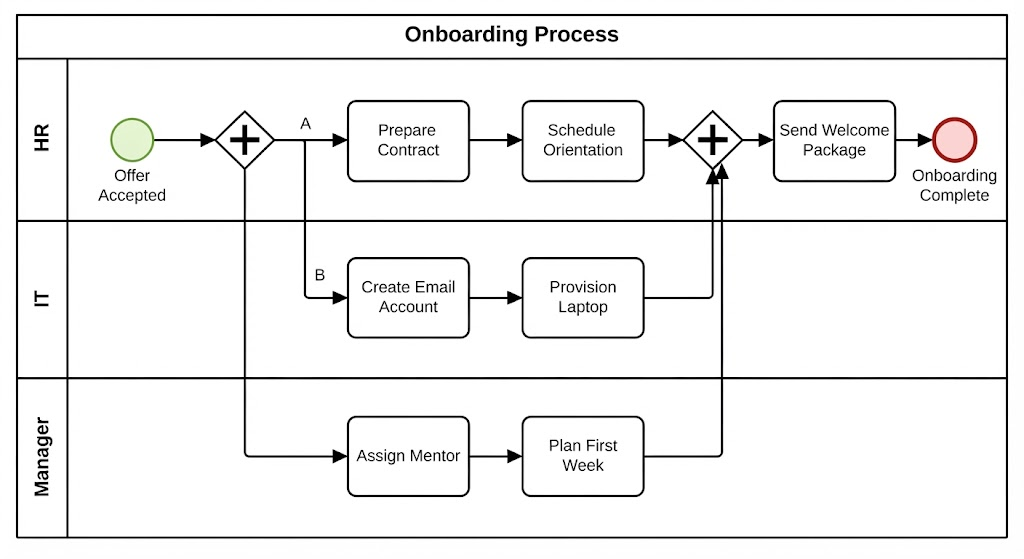
Pool: "Onboarding Process"
  Lane: HR
  Lane: IT
  Lane: Manager

Process Flow:
1. Start Event: "Offer Accepted"
2. Parallel Gateway (AND): Split into three parallel paths

   Path A (HR):
   - Task: "Prepare Contract"
   - Task: "Schedule Orientation"

   Path B (IT):
   - Task: "Create Email Account"
   - Task: "Provision Laptop"

   Path C (Manager):
   - Task: "Assign Mentor"
   - Task: "Plan First Week"

3. Parallel Gateway (AND): All paths must complete
4. Task (HR): "Send Welcome Package"
5. End Event: "Employee Day 1 Ready"
Key Learning: Parallel gateways show work happening simultaneously, reducing total onboarding time.
Example 3: Customer Support Ticket Resolution
Scenario: Customer submits a support request.
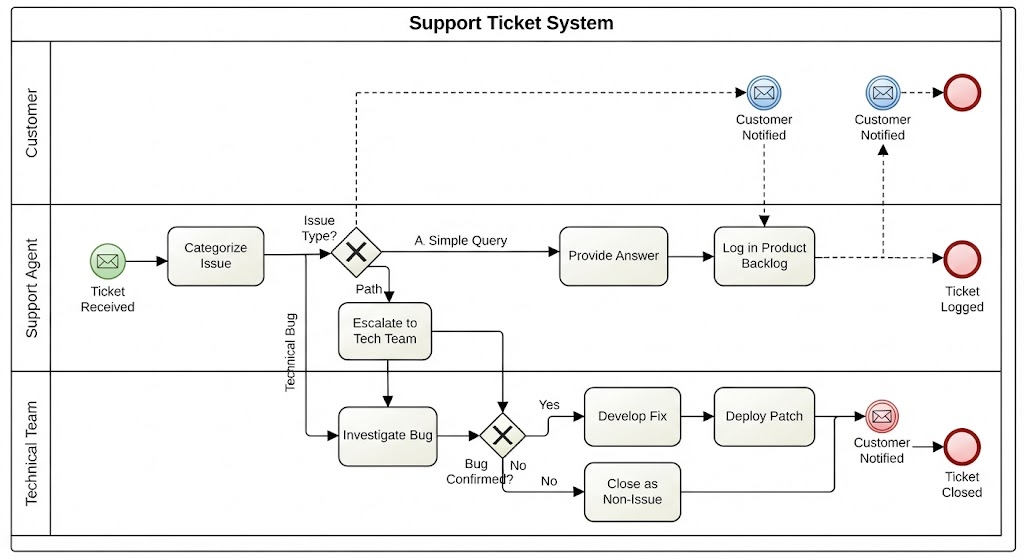
Pool: "Support Ticket System"
  Lane: Customer
  Lane: Support Agent
  Lane: Technical Team

Process Flow:
1. Start Event (Message): "Ticket Received"
2. Task (Agent): "Categorize Issue"
3. Exclusive Gateway: "Issue Type?"

   Path A: "Simple Query"
   - Task (Agent): "Provide Answer"
   - End Event: "Ticket Resolved"

   Path B: "Technical Bug"
   - Task (Agent): "Escalate to Tech Team"
   - Task (Tech): "Investigate Bug"
   - Exclusive Gateway: "Bug Confirmed?"
     - Yes → Task: "Develop Fix" → Task: "Deploy Patch"
     - No → Task: "Close as Non-Issue"
   - End Event: "Ticket Closed"

   Path C: "Feature Request"
   - Task (Agent): "Log in Product Backlog"
   - End Event: "Request Logged"

4. Intermediate Event (Message): "Customer Notified"
Key Learning: Multiple gateways handle complex routing, and message events show external communication.
6. Common Mistakes to Avoid
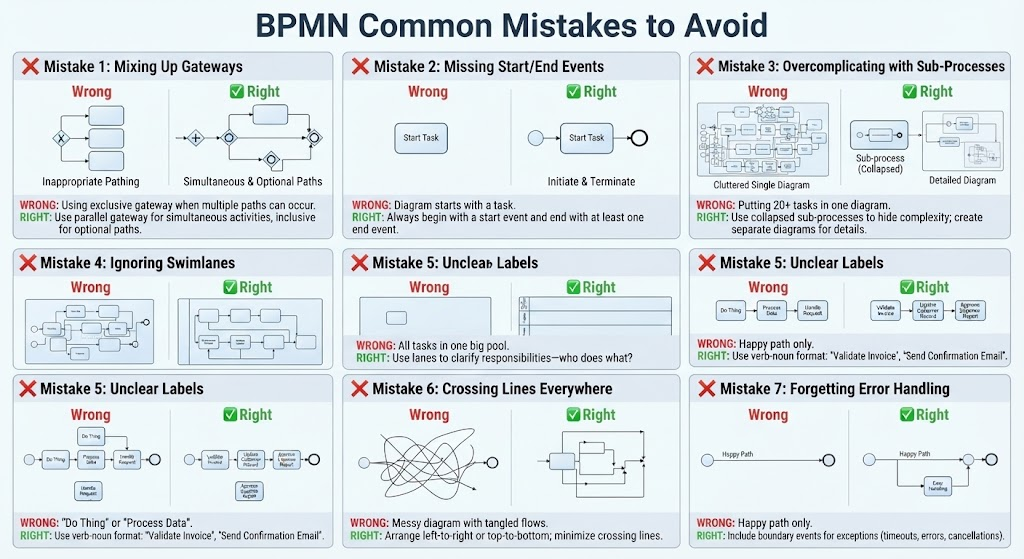
❌ Mistake 1: Mixing Up Gateways
Wrong: Using exclusive gateway when multiple paths can occur
Right: Use parallel gateway for simultaneous activities, inclusive for optional paths
❌ Mistake 2: Missing Start/End Events
Wrong: Diagram starts with a task
Right: Always begin with a start event and end with at least one end event
❌ Mistake 3: Overcomplicating with Sub-Processes
Wrong: Putting 20+ tasks in one diagram
Right: Use collapsed sub-processes to hide complexity; create separate diagrams for details
❌ Mistake 4: Ignoring Swimlanes
Wrong: All tasks in one big pool
Right: Use lanes to clarify responsibilities—who does what?
❌ Mistake 5: Unclear Labels
Wrong: “Do Thing” or “Process Data”
Right: Use verb-noun format: “Validate Invoice,” “Send Confirmation Email”
❌ Mistake 6: Crossing Lines Everywhere
Wrong: Messy diagram with tangled flows
Right: Arrange left-to-right or top-to-bottom; minimize crossing lines
❌ Mistake 7: Forgetting Error Handling
Wrong: Happy path only
Right: Include boundary events for exceptions (timeouts, errors, cancellations)
7. Best Practices for Professional Diagrams
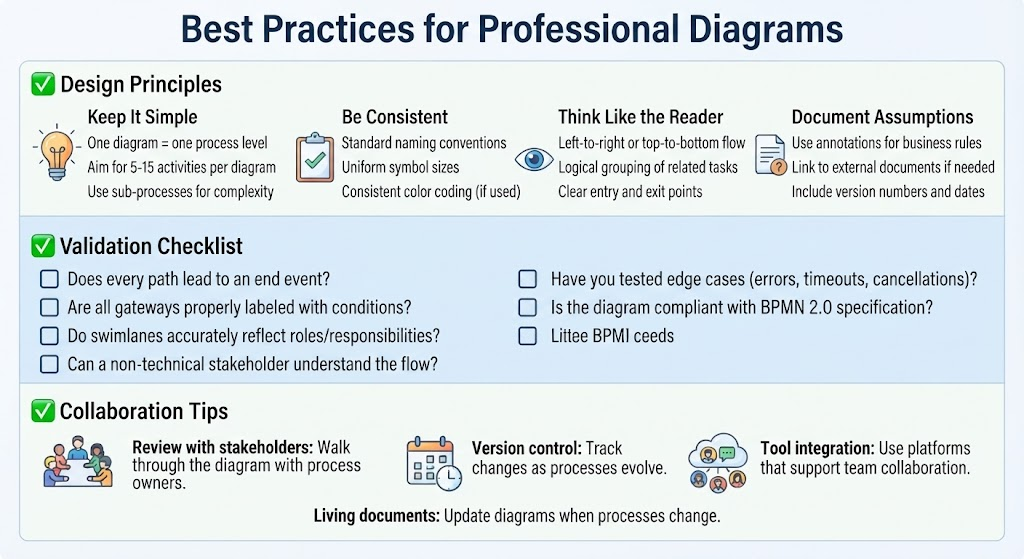
✅ Design Principles
-
Keep It Simple
-
One diagram = one process level
-
Aim for 5-15 activities per diagram
-
Use sub-processes for complexity
-
-
Be Consistent
-
Standard naming conventions
-
Uniform symbol sizes
-
Consistent color coding (if used)
-
-
Think Like the Reader
-
Left-to-right or top-to-bottom flow
-
Logical grouping of related tasks
-
Clear entry and exit points
-
-
Document Assumptions
-
Use annotations for business rules
-
Link to external documents if needed
-
Include version numbers and dates
-
✅ Validation Checklist
Before finalizing your BPMN diagram, ask:
-
Does every path lead to an end event?
-
Are all gateways properly labeled with conditions?
-
Do swimlanes accurately reflect roles/responsibilities?
-
Can a non-technical stakeholder understand the flow?
-
Have you tested edge cases (errors, timeouts, cancellations)?
-
Is the diagram compliant with BPMN 2.0 specification?
✅ Collaboration Tips
-
Review with stakeholders: Walk through the diagram with process owners
-
Version control: Track changes as processes evolve
-
Tool integration: Use platforms that support team collaboration
-
Living documents: Update diagrams when processes change
Final Thoughts
Mastering BPMN 2.0 isn’t about memorizing every symbol—it’s about understanding when and why to use each element to communicate processes clearly. Start simple, validate with stakeholders, and iterate.
As you practice, you’ll notice a shift. Meetings become shorter because everyone is looking at the same visual reference. Handoffs between departments become smoother because responsibilities are clearly defined. And perhaps most importantly, you’ll gain a deeper understanding of how your organization truly operates, uncovering inefficiencies and opportunities that were previously hidden in plain sight.
Next Steps:
-
Pick a simple process from your work
-
Sketch it using the four core building blocks
-
Validate with a colleague
-
Refine based on feedback
-
Gradually add complexity as you gain confidence
Happy modeling! 🎯
Reference Resources: Visual Paradigm Tooling
-
AI BPMN Diagram Generator: Professional BPD Tool: Explains how to generate BPMN diagrams from text using AI in the Visual Paradigm desktop application.
-
Comprehensive Guide to BPMN, Visual Paradigm Tooling, AI, and Ecosystem: Covers BPMN fundamentals and the ecosystem, with practical AI-generated BPMN examples like employee onboarding.
-
How to Create BPMN Business Process Diagrams in Visual Paradigm: A step-by-step tutorial on drawing BPMN diagrams manually, including creating pools, lanes, tasks, gateways, and using simulation features.
-
BPMN Tutorial: Visual Paradigm Tooling, AI Chatbot & Ecosystem: Details the AI Chatbot capabilities for generating and refining diagrams via conversational commands.
-
AI Business Process Diagram Generator Update: Highlights the AI BPMN generator’s ability to produce complex, multi-pool diagrams from simple text prompts.
-
Mastering Business Process Modeling: A Complete Guide to BPMN and AI: A comprehensive guide on BPMN basics and using the AI generator to create diagrams from natural language descriptions.
-
Creating Your First BPMN Diagram in Visual Paradigm: A beginner-friendly tutorial covering essential BPMN concepts like events, gateways, and swimlanes, with practical tips.
-
BPMN 2.0 Business Process Modeling Beginner’s Guide: Offers a step-by-step guide for beginners, including AI prompt strategies for effective BPMN generation.
-
How to Draw BPMN Diagram?: A visual tutorial on using Visual Paradigm’s resource catalog to efficiently draw BPMN diagrams and add gateways and events.
-
Mastering BPMN: A Comprehensive Tutorial with Visual Paradigm, AI Chatbot, and Ecosystem: Discusses how the AI chatbot enables rapid, iterative BPMN modeling through plain language commands.