


Introduction
In modern software development, a significant gap often exists between business analysts who map out complex workflows and agile development teams who build the actual software. Business Process Model and Notation (BPMN) provides a standardized, visual language for detailing how a process works, capturing every decision, actor, and event. However, agile teams operate on user stories that define what needs to be built from a user’s perspective.
Bridging this gap is crucial for ensuring that the final product aligns perfectly with business requirements. This guide explores a systematic approach to translating BPMN diagrams into actionable user stories and acceptance criteria, leveraging tools like Visual Paradigm to streamline the workflow. By converting visual process maps into agile artifacts, teams can achieve better traceability, clearer requirements, and faster delivery.
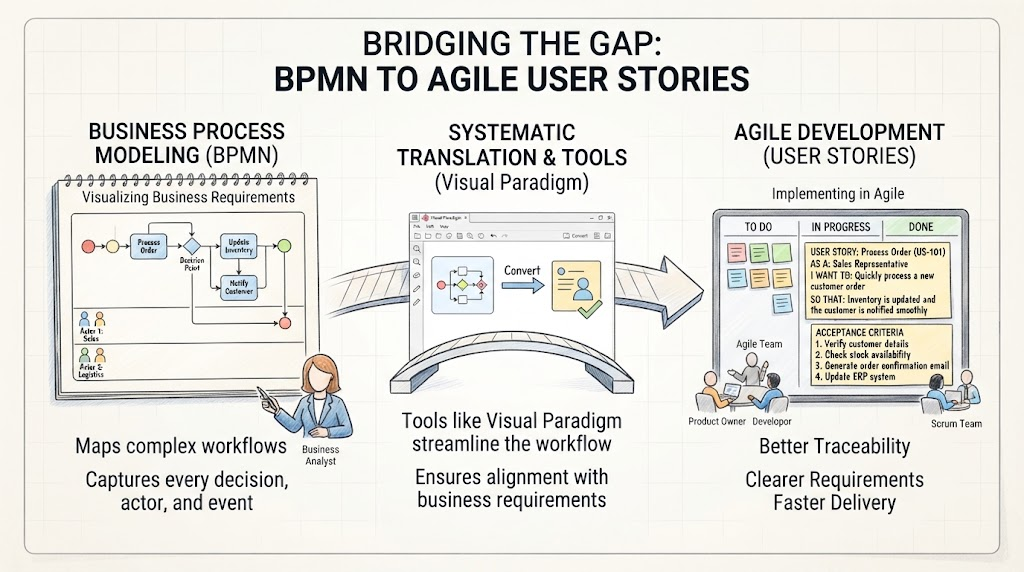
1. Understand the Relationship Between BPMN and Agile
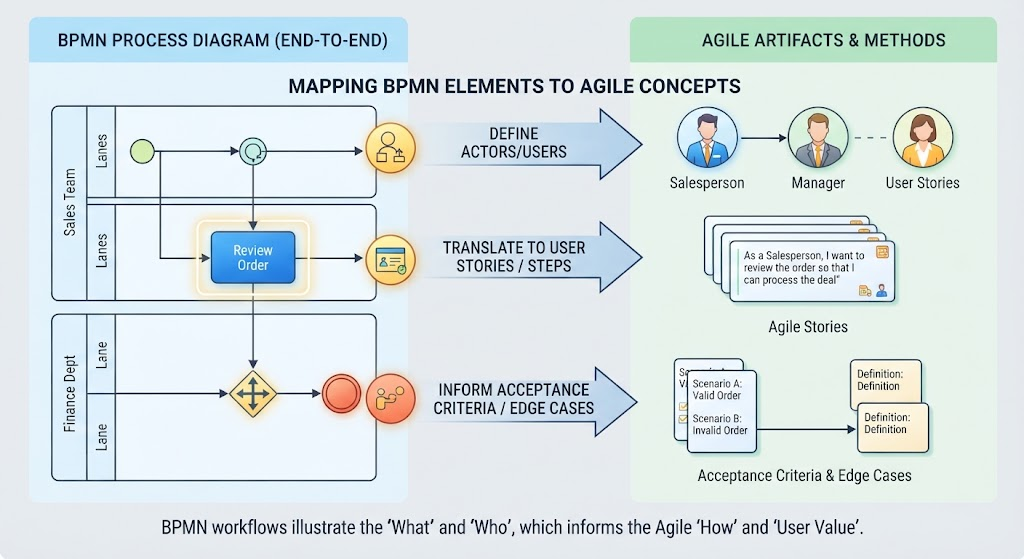
Before diving into translation, it is essential to understand how BPMN elements map to agile concepts. BPMN diagrams, particularly collaboration and process diagrams, illustrate end-to-end business workflows.
-
BPMN Pools/Lanes Define the Actors or Users in your user stories.
-
BPMN Tasks/Activities Translate into User Stories or specific steps within a workflow.
-
Gateways and Events Inform the Acceptance Criteria and edge cases (e.g., success and failure paths).
2. Step-by-Step Translation Process
Step 1: Analyze the BPMN Diagram and Identify Scopes
Trying to write a single massive story for an entire BPMN diagram is a recipe for complexity and confusion. Instead, break down the process:
-
Break down the process: Look at the end-to-end process and break it down by sub-processes, pools, or major milestones.
-
Identify the actors: Look at the lanes or pools. Each distinct actor interacting with the system is a potential “As a [type of user]” in your user story format.
Step 2: Convert Process Activities into User Stories
For each core activity or task in the BPMN diagram, draft a user story using the standard Mike Cohn template:
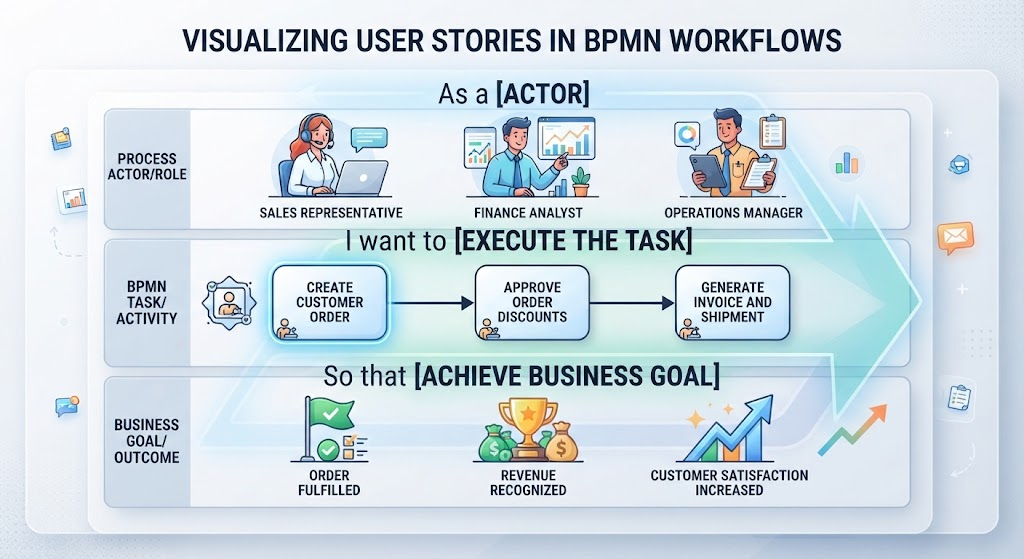
As a [Actor/Role from BPMN lane],
I want to [Execute the task/activity],
So that [Achieve the business goal/outcome shown in the end event].
Example:
If a BPMN task is “Review Loan Application” performed by a “Loan Officer,” the story becomes:
As a Loan Officer, I want to review submitted loan applications so that I can approve or reject them based on company policy.
Step 3: Derive Acceptance Criteria from Gateways and Events
BPMN gateways (diamonds) and events (circles) are goldmines for acceptance criteria, particularly for Behavior-Driven Development (BDD) using the Given-When-Then format.
-
Exclusive/Inclusive Gateways (Decisions): Each branch or path coming out of a gateway represents a different scenario or rule.
-
Given the loan application is complete, When the loan officer reviews it, Then the system routes it to the “Approval” queue.
-
Given the loan application is missing documents, When the loan officer reviews it, Then the system routes it to the “Request Info” queue.
-
-
Intermediate Events: Timers, message receipts, or error events dictate system triggers and constraints that must be met.
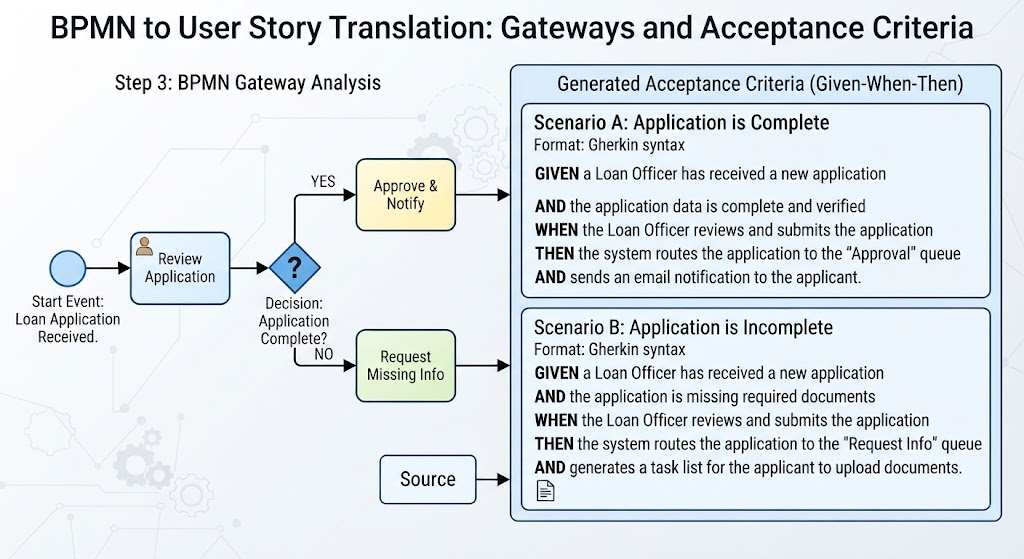
Image illustrates how decision gateways in BPMN translate to conditional acceptance criteria)
3. Key Concepts and Examples
The “Happy Path” vs. Exception Flows
Start by mapping the primary sequence of events leading to the end goal (the Happy Path). Once the core functionality is defined, use the exception branches in your BPMN diagram to write stories for error handling and edge cases.
Traceability
Maintain a naming convention or ID system linking your user stories back to specific task IDs in the BPMN diagram. This ensures that every business requirement is accounted for in the development backlog.
Tooling: Visual Paradigm
Visual Paradigm offers robust features for both creating BPMN diagrams and managing the transition to agile requirements. Its AI capabilities can even help generate initial diagrams from text descriptions, speeding up the initial analysis phase.
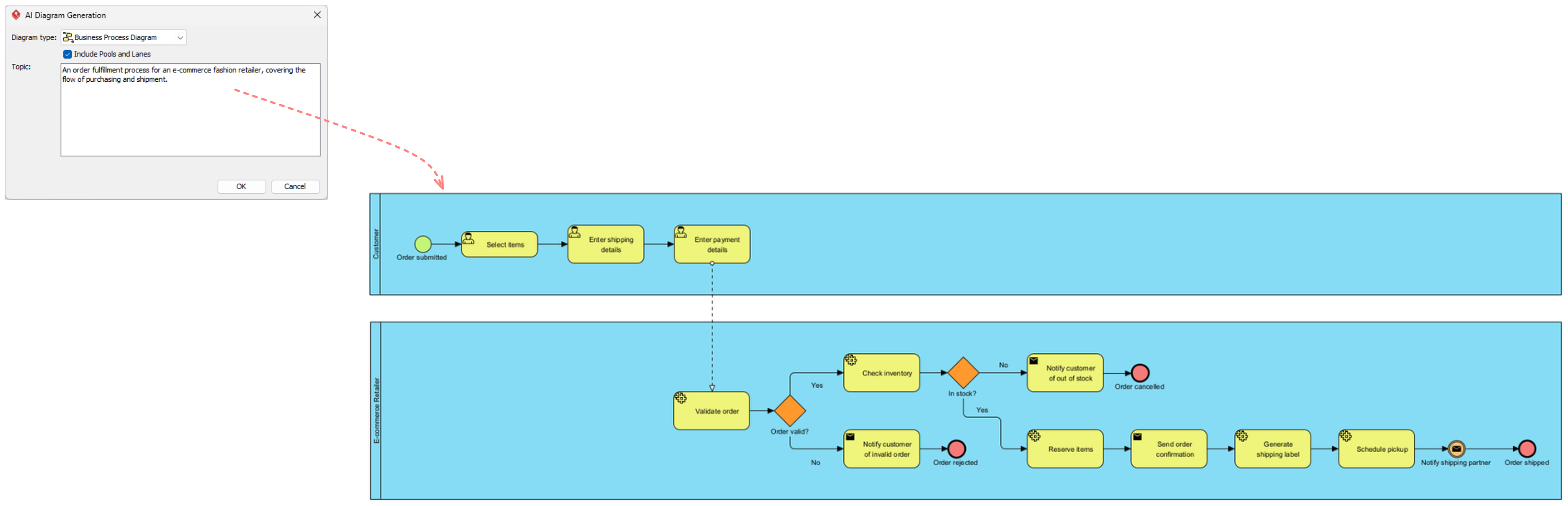
(The Image showcases the Visual Paradigm interface for creating and managing BPMN diagrams)
4. Best Practices for Success
-
Keep it Iterative: Focus on the “Happy Path” first before writing stories for exception flows and error events.
-
Collaborate with Stakeholders: Walk through the BPMN diagram with Product Owners and developers while drafting the stories to ensure technical and business alignment.
-
Use AI Assistance: Leverage tools like Visual Paradigm’s AI BPMN Generator to quickly prototype processes from natural language descriptions, then refine them into detailed models.
-
Validate with Simulation: Use simulation features in tools like Visual Paradigm to test the logic of your BPMN diagram before converting it into stories, ensuring no dead ends or logical errors exist.
Conclusion
Translating BPMN diagrams into user stories is not just a documentation exercise; it is a critical step in ensuring that agile development delivers true business value. By systematically mapping actors to users, tasks to stories, and gateways to acceptance criteria, teams can create a clear, traceable link between business processes and software features. Leveraging powerful tooling like Visual Paradigm further enhances this process, allowing for rapid modeling, AI-assisted generation, and seamless collaboration. Embrace this structured approach to bridge the gap between analysis and development, resulting in higher quality products and more satisfied stakeholders.
Reference Resources: Visual Paradigm Tooling
- AI BPMN Diagram Generator: Professional BPD Tool: Explains how to generate BPMN diagrams from text using AI in the Visual Paradigm desktop application.
- Comprehensive Guide to BPMN, Visual Paradigm Tooling, AI, and Ecosystem: Covers BPMN fundamentals and the ecosystem, with practical AI-generated BPMN examples like employee onboarding.
- How to Create BPMN Business Process Diagrams in Visual Paradigm: A step-by-step tutorial on drawing BPMN diagrams manually, including creating pools, lanes, tasks, gateways, and using simulation features.
- BPMN Tutorial: Visual Paradigm Tooling, AI Chatbot & Ecosystem: Details the AI Chatbot capabilities for generating and refining diagrams via conversational commands.
- AI Business Process Diagram Generator Update: Highlights the AI BPMN generator’s ability to produce complex, multi-pool diagrams from simple text prompts.
- Mastering Business Process Modeling: A Complete Guide to BPMN and AI: A comprehensive guide on BPMN basics and using the AI generator to create diagrams from natural language descriptions.
- Creating Your First BPMN Diagram in Visual Paradigm: A beginner-friendly tutorial covering essential BPMN concepts like events, gateways, and swimlanes, with practical tips.
- BPMN 2.0 Business Process Modeling Beginner’s Guide: Offers a step-by-step guide for beginners, including AI prompt strategies for effective BPMN generation.
- How to Draw BPMN Diagram?: A visual tutorial on using Visual Paradigm’s resource catalog to efficiently draw BPMN diagrams and add gateways and events.
- Mastering BPMN: A Comprehensive Tutorial with Visual Paradigm, AI Chatbot, and Ecosystem: Discusses how the AI chatbot enables rapid, iterative BPMN modeling through plain language commands.