


Introduction
Business Process Model and Notation (BPMN) is the industry-standard language for visualizing, analyzing, and improving business processes. Among its most powerful yet frequently misunderstood constructs are Intermediate Events. These events sit at the heart of process dynamics—they capture what happens during a process rather than just at its beginning or end. Whether you are modeling a simple approval workflow or a complex multi-party transaction, understanding how to correctly place and configure intermediate events is essential for producing accurate, executable process models.
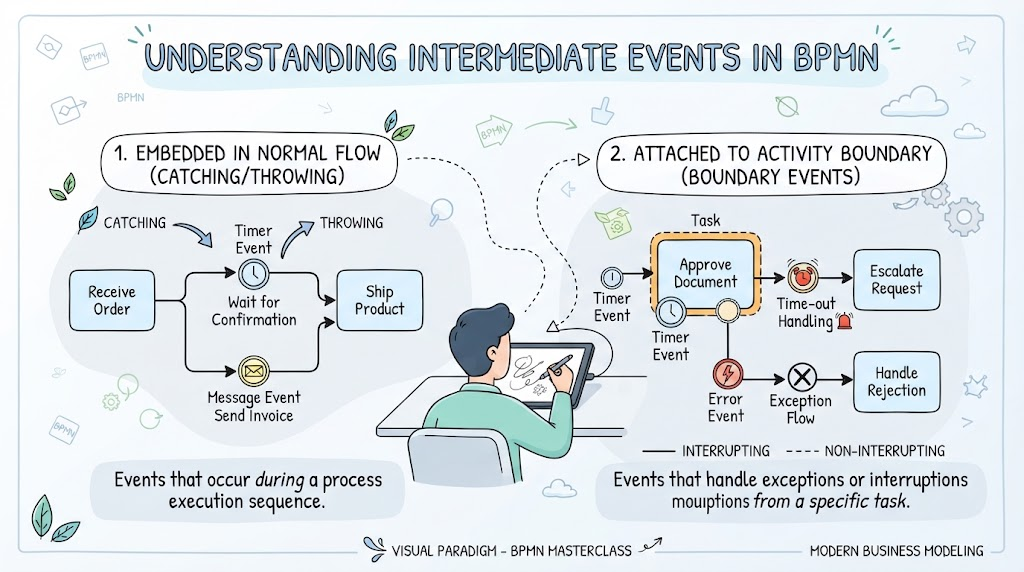
This guide explores the two primary categories of intermediate events—those embedded within the normal flow and those attached to activity boundaries—and demonstrates how to model them effectively using Visual Paradigm, one of the leading BPMN design tools on the market. By the end, you will be able to distinguish between catching and throwing events, apply boundary events for exception handling, and build robust process diagrams that reflect real-world operational logic.
Key Concepts
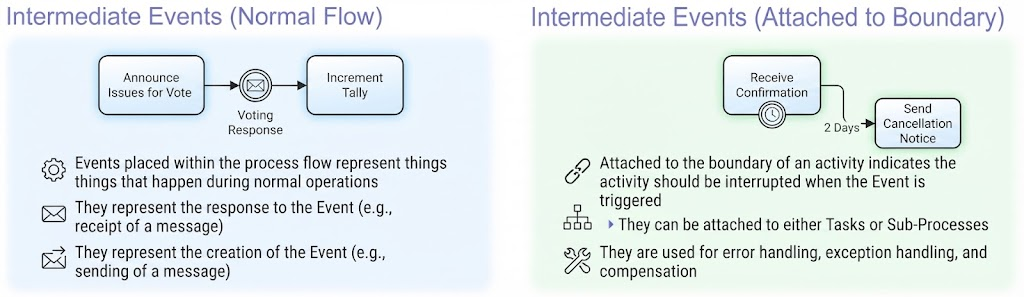
1. What Are Intermediate Events?
Intermediate events are circular symbols placed between the start and end of a process. Unlike start events (which trigger a process) or end events (which conclude it), intermediate events represent occurrences that take place during the execution of a process. They are visually distinguished by a double thin border around the circle, differentiating them from single-bordered start/end events.
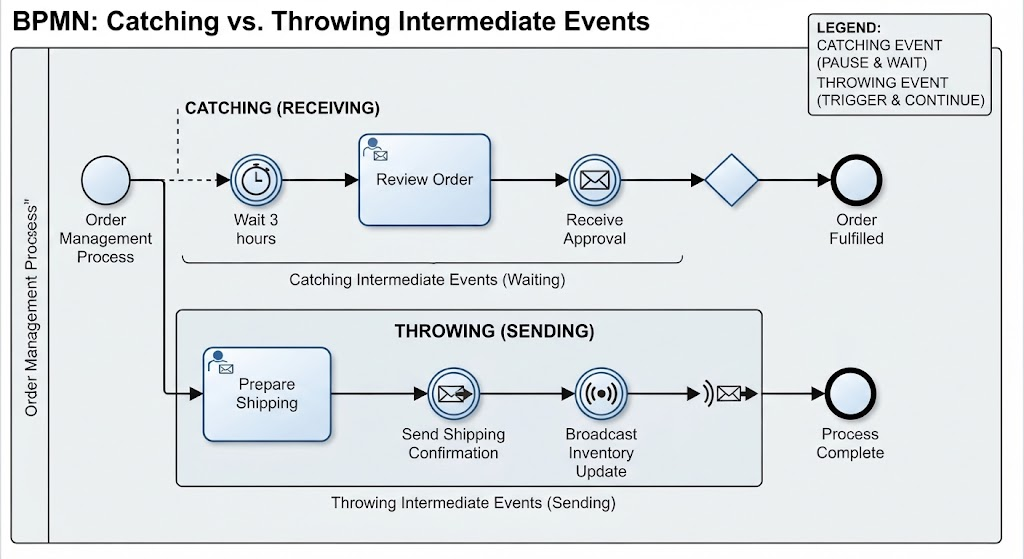
There are two fundamental orientations:
-
Catching (Receiving) Intermediate Events: The process pauses and waits for something to occur before continuing. Examples include waiting for a message, a timer expiring, or a signal being broadcast.
-
Throwing (Sending) Intermediate Events: The process actively generates or triggers something and then continues. Examples include sending a message, emitting a signal, or logging an escalation.
2. Intermediate Events in Normal Flow
When placed directly on the sequence flow between activities, intermediate events represent routine, expected occurrences within the standard path of a process. They are part of the “happy path” and do not interrupt or divert the flow—they simply mark a point where something must happen before the next task can proceed.
Common types used in normal flow:
-
Message Event (Catching): Waits for an incoming message (e.g., a customer reply, a system notification).
-
Message Event (Throwing): Sends a message to an external participant or system.
-
Timer Event (Catching): Pauses the process until a specific time or duration elapses.
-
Signal Event (Catching/Throwing): Waits for or broadcasts a global signal across the process environment.
-
Link Event: Connects two distant points on the same page to avoid long, cluttered sequence flows.
Example Scenario – Voting Tally Process:
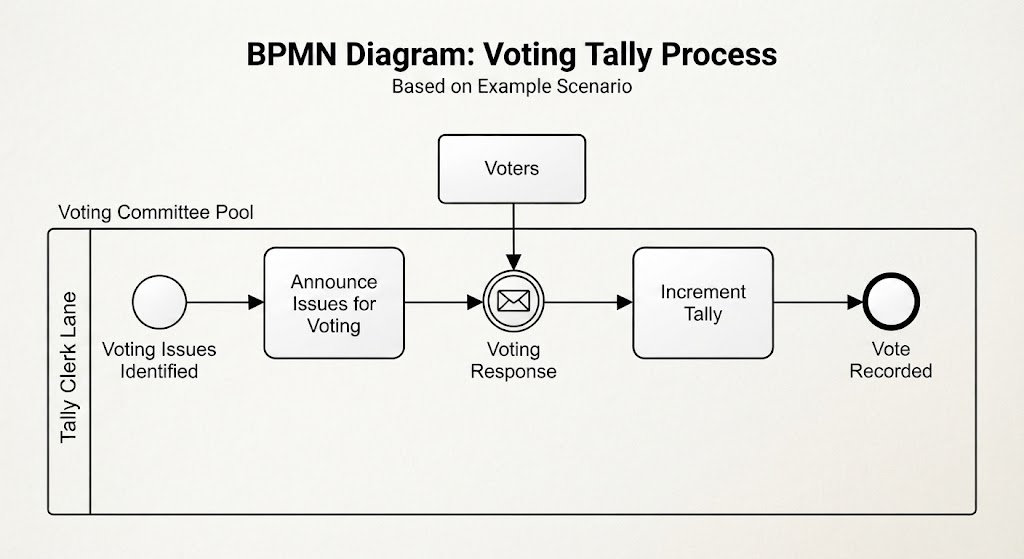
A committee announces issues open for voting. The process then waits for individual voting responses to arrive (a catching message event labeled “Voting Response”). Once a vote is received, the tally is incremented. This is a textbook normal-flow intermediate event: the message receipt is an expected, integral part of the process, not an exception.
3. Intermediate Events Attached to Boundaries
Boundary intermediate events are attached to the edge of an activity (task or sub-process) rather than sitting on the sequence flow. Their purpose is fundamentally different: they define what happens when something unexpected or time-sensitive occurs while an activity is executing.
Boundary events come in two behavioral flavors:
-
Interrupting (Solid Border): When triggered, the host activity is immediately cancelled and the flow diverts to the boundary event’s outgoing path. This is used for timeouts, errors, or cancellations.
-
Non-Interrupting (Dashed Border): When triggered, the host activity continues running in parallel with the boundary event’s path. This is useful for notifications, reminders, or monitoring that should not stop the main work.
Common boundary event types:
-
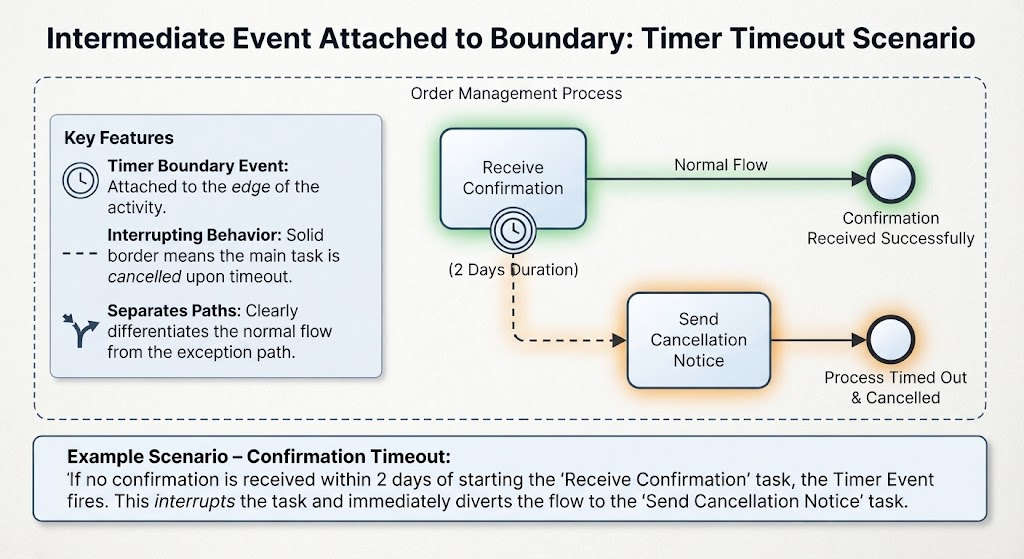
Timer Boundary Event: Triggers after a defined duration or at a specific date/time (e.g., “if no confirmation arrives within 2 days, send a cancellation notice”).
-
Error Boundary Event: Catches errors thrown by the host activity, enabling structured error handling without cluttering the main flow.
-
Escalation Boundary Event: Handles business-level escalations (e.g., a manager must be notified if a task exceeds its SLA).
-
Cancel Boundary Event: Used exclusively within transaction sub-processes to handle explicit cancellation.
-
Compensation Boundary Event: Triggers compensating actions when a previously completed activity needs to be undone.
-
Message/Signal Boundary Event: Listens for external messages or signals while the activity is active.
Example Scenario – Confirmation Timeout:
A process includes a “Receive Confirmation” task. A timer boundary event is attached with a 2-day duration. If the confirmation does not arrive within 2 days, the timer fires, interrupts the receive task, and diverts the flow to “Send Cancellation Notice.” This cleanly separates the normal path from the timeout exception path.
4. Catching vs. Throwing: A Quick Reference
| Aspect | Catching Event | Throwing Event |
|---|---|---|
| Behavior | Waits / Listens | Sends / Triggers |
| Icon Fill | Empty (white) | Filled (solid) |
| Sequence Flow | Incoming arrow enters; outgoing continues after trigger | Outgoing arrow leaves immediately after trigger |
| Typical Use | Receiving messages, waiting for timers | Sending messages, emitting signals, escalating |
Modeling Intermediate Events in Visual Paradigm
Visual Paradigm provides a comprehensive BPMN 2.0 modeling environment with drag-and-drop support for all intermediate event types. Below is a practical walkthrough for both categories.
Setting Up Your Diagram
-
Open Visual Paradigm and create a new BPMN Business Process Diagram.
-
From the BPMN Shape Palette on the left, locate the Intermediate Event shapes under the “Events” category. You will find separate icons for Message, Timer, Signal, Error, Escalation, Cancel, Compensation, and Link events—each available in both catching (empty) and throwing (filled) variants.
-
Drag your chosen event onto the canvas.
Modeling Normal Flow Intermediate Events
Step-by-step: Voting Response Example
-
Place a Task shape labeled “Announce Issues for Vote” on the canvas.
-
From the palette, drag a Catching Message Intermediate Event (empty envelope icon) and place it to the right of the task.
-
Use the Sequence Flow connector to draw an arrow from the task to the message event. Label this flow if desired (e.g., “Await Response”).
-
Drag another Task shape labeled “Increment Tally” and connect it from the message event with a second sequence flow.
-
Double-click the message event to open its specification dialog. Here you can define the message name, correlation keys, and whether the event is interrupting (for normal flow, it is inherently sequential, so this setting has limited impact).
-
Optionally, add a Throwing Message Event after “Increment Tally” to model sending an acknowledgment back to the voter.
Tips:
-
Use Link Events when your diagram becomes too wide; they allow you to jump between distant points without crossing lines.
-
Apply Annotations (the bracket-shaped note tool) to explain why a particular message is being waited for—this improves readability for stakeholders who are not BPMN experts.
Modeling Boundary Intermediate Events
Step-by-step: Confirmation Timeout Example
-
Place a Task shape labeled “Receive Confirmation” on the canvas.
-
From the palette, select the Timer Boundary Event (clock icon). Hover over the “Receive Confirmation” task until attachment points appear on its border, then click the bottom edge to attach the timer.
-
By default, Visual Paradigm attaches boundary events as interrupting (solid border). To make it non-interrupting, right-click the event and select “Toggle Interrupting”—the border will change to dashed.
-
Draw a sequence flow from the timer event downward to a new Task labeled “Send Cancellation Notice.”
-
Double-click the timer event to specify the time definition: choose between a specific date/time, a duration (e.g., “P2D” for 2 days in ISO 8601 format), or a cycle for recurring timers.
-
The normal outgoing flow from “Receive Confirmation” (to the right) represents the successful path; the boundary flow (downward) represents the timeout exception path. Both coexist cleanly on the diagram.
Tips:
-
When attaching multiple boundary events to a single activity (e.g., a timer AND an error handler), stack them vertically along the bottom edge to maintain visual clarity.
-
Use Sub-Process shapes when you need to group several tasks under a single boundary event. For example, a “Process Order” collapsed sub-process can have a single error boundary event that catches any error occurring within its internal tasks.
-
Visual Paradigm’s BPMN Validation feature (under Tools > Validate) will flag common mistakes such as missing outgoing flows from catching events or improperly attached boundary events.
Advanced Patterns
Compensation Handling:
After a “Process Payment” task completes successfully, attach a Compensation Boundary Event. If a later “Ship Order” task fails and triggers compensation, the boundary event activates a “Refund Payment” handler task. This pattern ensures financial reversals are modeled explicitly rather than as ad-hoc notes.
Parallel Monitoring with Non-Interrupting Timers:
Attach a non-interrupting timer boundary event to a “Review Application” task with a 24-hour duration. When the timer fires, it triggers a “Send Reminder to Reviewer” task while the review continues. After 48 hours, a second interrupting timer escalates to a manager. This layered approach models realistic SLA monitoring without disrupting the primary workflow.
Best Practices
-
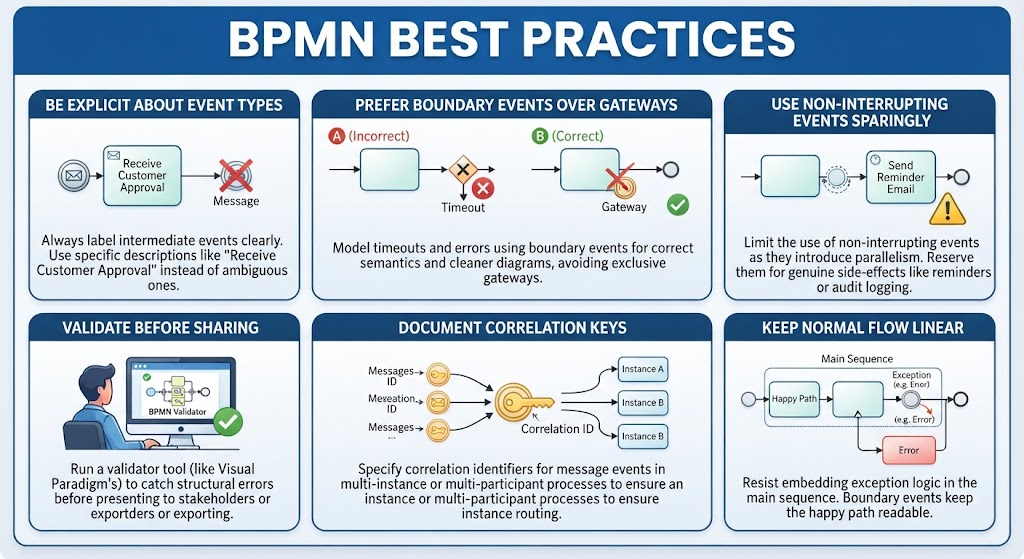
Be Explicit About Event Types: Always label intermediate events clearly. “Message” alone is ambiguous; use “Receive Customer Approval” or “Send Invoice Notification” instead.
-
Prefer Boundary Events Over Gateways for Exceptions: Do not model timeouts or errors using exclusive gateways with decision diamonds. Boundary events are semantically correct and produce cleaner diagrams.
-
Use Non-Interrupting Events Sparingly: They introduce parallelism that can confuse readers. Reserve them for genuine side-effects like reminders or audit logging.
-
Validate Before Sharing: Run Visual Paradigm’s built-in BPMN validator to catch structural errors before presenting diagrams to stakeholders or exporting to execution engines.
-
Document Correlation Keys: For message events in multi-instance or multi-participant processes, always specify correlation identifiers so the engine knows which message instance belongs to which process instance.
-
Keep Normal Flow Linear: Resist the temptation to embed exception logic in the main sequence. Boundary events exist precisely to keep the happy path readable.
Conclusion
Intermediate events are the connective tissue of BPMN diagrams. They transform static flowcharts into dynamic process models that accurately reflect waiting periods, message exchanges, timeouts, errors, and compensations. By mastering the distinction between normal-flow events and boundary events—and by leveraging Visual Paradigm’s intuitive modeling interface—you can produce process diagrams that are not only visually clear but also semantically precise and ready for automation.
Whether you are documenting an existing process for compliance, designing a new workflow for implementation, or training business analysts in BPMN fundamentals, intermediate events deserve deliberate attention. They are where the real complexity of business operations lives, and modeling them correctly is what separates professional-grade process architecture from amateur sketching. Start with the patterns described in this guide, practice with real scenarios from your organization, and let Visual Paradigm’s validation and simulation features confirm that your models behave as intended.