Introduction
Events, activities, and gateways form the foundation of most BPMN process diagrams. Events show when something starts, occurs, or ends; activities represent the work performed by people or systems; and gateways determine how the process branches, merges, or waits for a response. Understanding these elements is essential for creating diagrams that are both easy to read and useful for process improvement or automation.
Visual Paradigm BPMN Online makes it possible to model these elements through a visual, browser-based editor. Its AI-assisted features can also generate an initial BPMN diagram from a plain-language process description. This article explains how to use Visual Paradigm to model BPMN events, activities, and gateways, and how to review and improve AI-generated process diagrams for accuracy and clarity.
Events, activities, and gateways are the core building blocks of most BPMN diagrams. Events show what starts, interrupts, or ends a process. Activities represent work. Gateways control how the process branches, merges, or waits for different conditions.
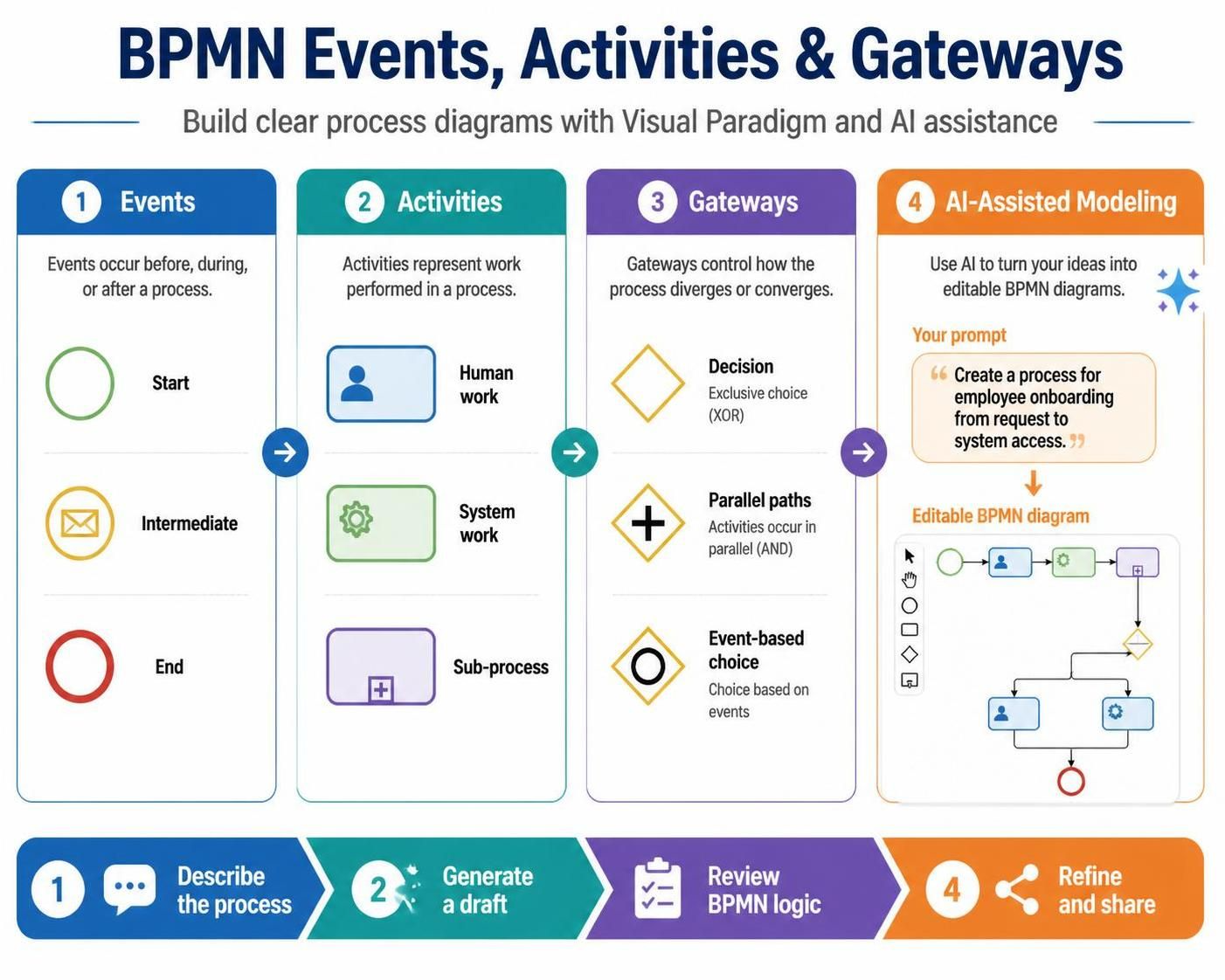
Visual Paradigm helps model these elements through a browser-based BPMN editor, drag-and-drop modeling tools, and AI-assisted diagram generation. The AI can create an initial process model from a written description, while the visual editor lets you validate and refine the result.
What You Will Learn
By the end of this article, you should be able to:
-
Recognize the main BPMN event types
-
Distinguish tasks from sub-processes
-
Select the right gateway for a business rule
-
Model common process patterns
-
Generate a BPMN draft from plain-language instructions
-
Review and improve an AI-generated diagram in Visual Paradigm
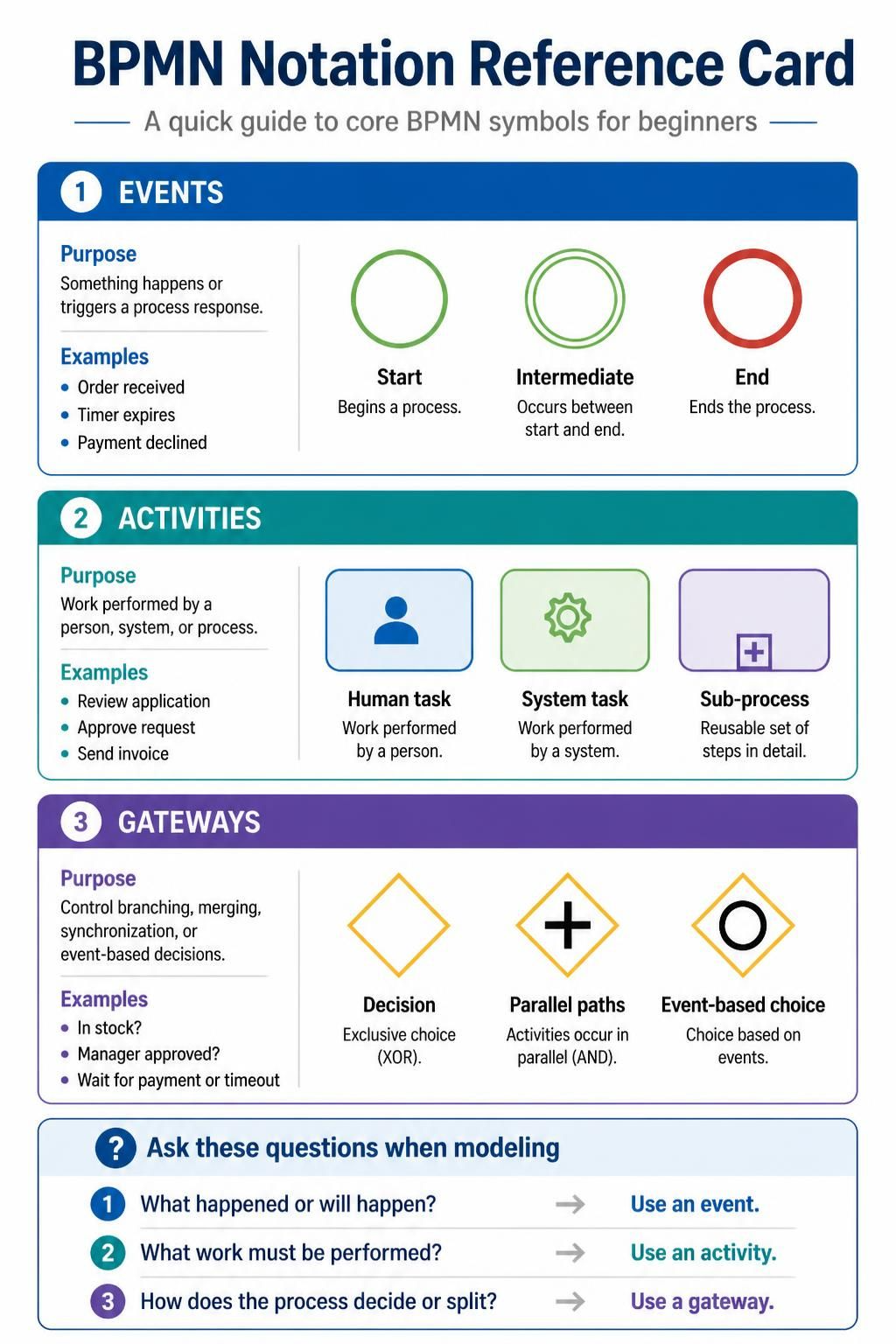
A Quick Overview of the Three Element Types
| BPMN element | Purpose | Typical examples |
|---|---|---|
| Events | Represent something that happens or triggers a process response | Order received, timer expires, payment declined |
| Activities | Represent work performed by a person, system, or process | Review application, Approve request, Send invoice |
| Gateways | Control branching, merging, synchronization, or event-based decisions | In stock?, Manager approved?, Wait for payment or timeout |
A useful modeling question is:
-
What happened or will happen? Use an event.
-
What work must be performed? Use an activity.
-
How does the process decide or split? Use a gateway.
Modeling BPMN Events
An event is represented by a circle. Its border and internal symbol indicate its function.
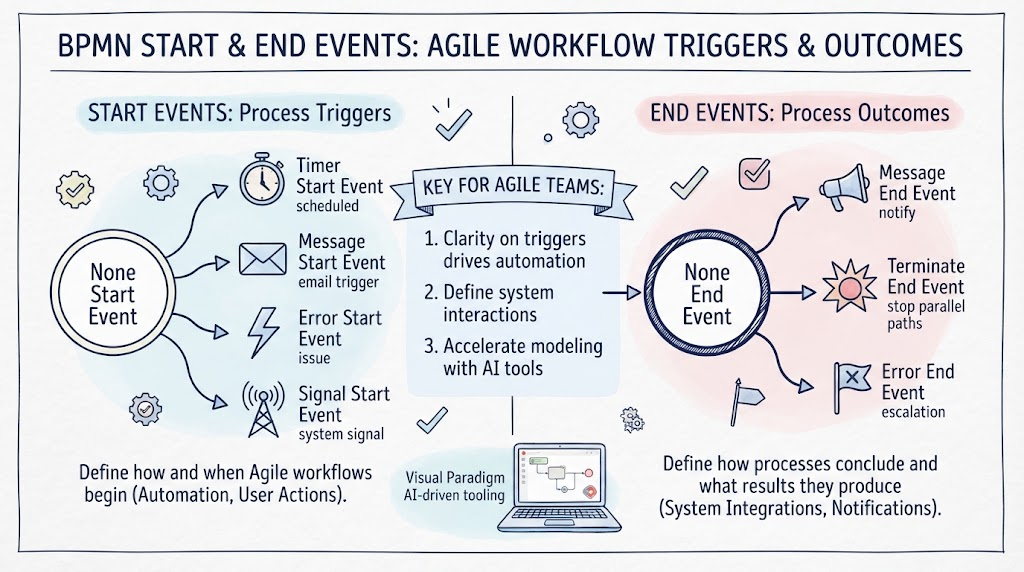
Start Events
A start event identifies where a process begins. It may represent an external request, a received message, a scheduled time, or another trigger.
Common examples include:
-
A customer submits an order
-
An employee joins the company
-
A support ticket is created
-
A scheduled billing date arrives
-
A message is received from another system
A basic process might begin like this:
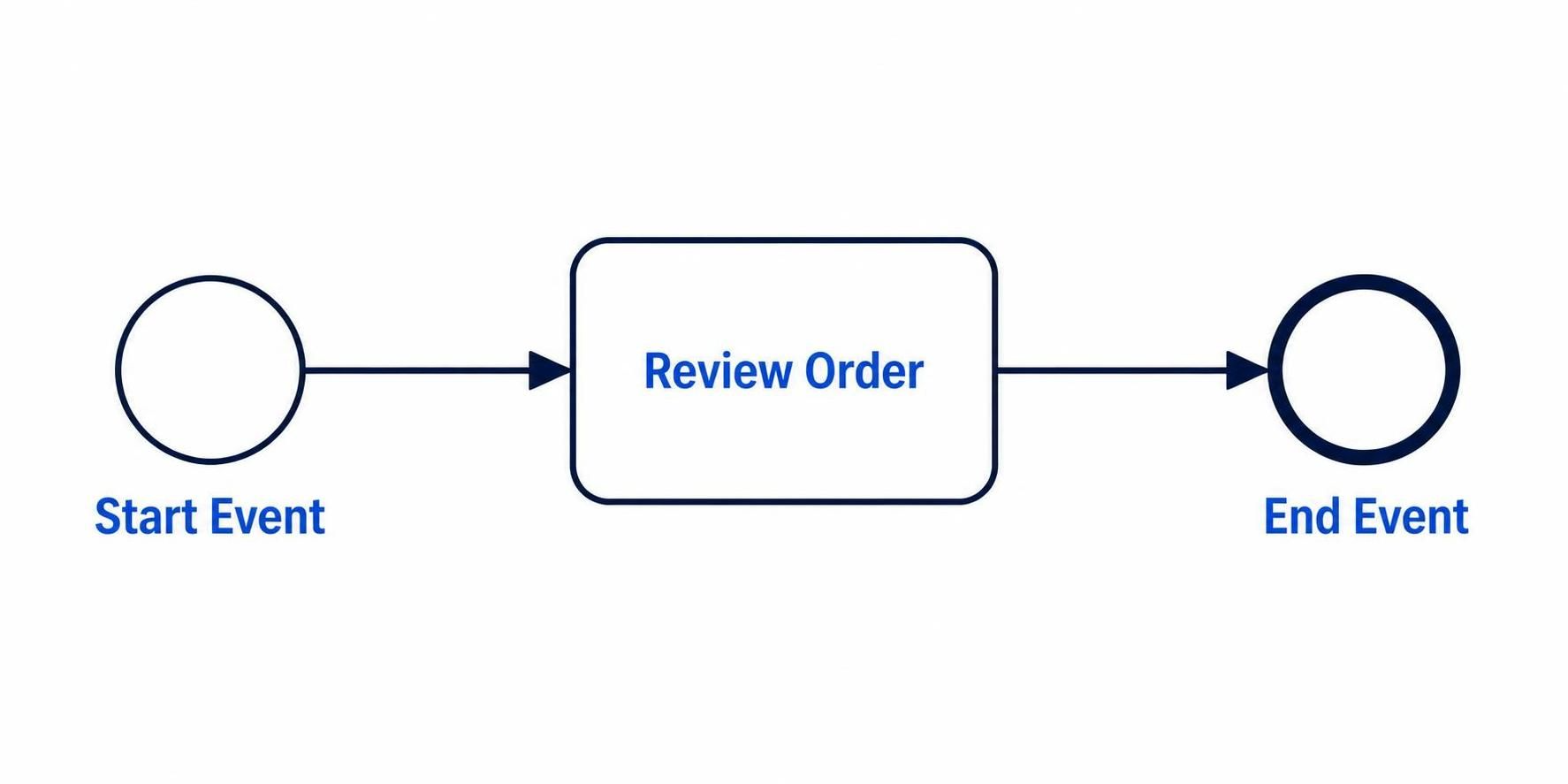
In Visual Paradigm, add a start event from the BPMN palette and connect it to the first activity using a sequence flow. Give the following task a clear verb-based name, such as Review Order rather than simply Order Review.
Intermediate Events
Intermediate events occur between the start and end of a process. They can show that the process is waiting, receiving information, sending a message, or responding to an exception.
Typical intermediate events include:
-
Timer events
-
Message events
-
Error events
-
Escalation events
-
Signal events
-
Conditional events
-
Link events
For example, an invoice process may wait for payment:
Send Invoice → Wait for Payment → Record Payment
The waiting step can be represented by an intermediate timer or message event, depending on the business requirement.
End Events
An end event shows how a process path finishes. Different end events can communicate different outcomes, such as:
-
Order completed
-
Application rejected
-
Error reported
-
Message sent
-
Compensation required
Using separate end events makes the model easier to understand. Instead of connecting every outcome to a generic End, use names such as Order Approved, Order Rejected, and Payment Failed.
Interrupting and Non-Interrupting Events
Boundary events are attached to the edge of an activity or sub-process.
An interrupting boundary event stops the activity when its event occurs. For example, a payment timeout may cancel the payment activity.
A non-interrupting boundary event starts an additional path while the original activity continues. For example, an escalation notification may be sent while a support team continues working on a ticket.
This distinction is important when modeling exceptions: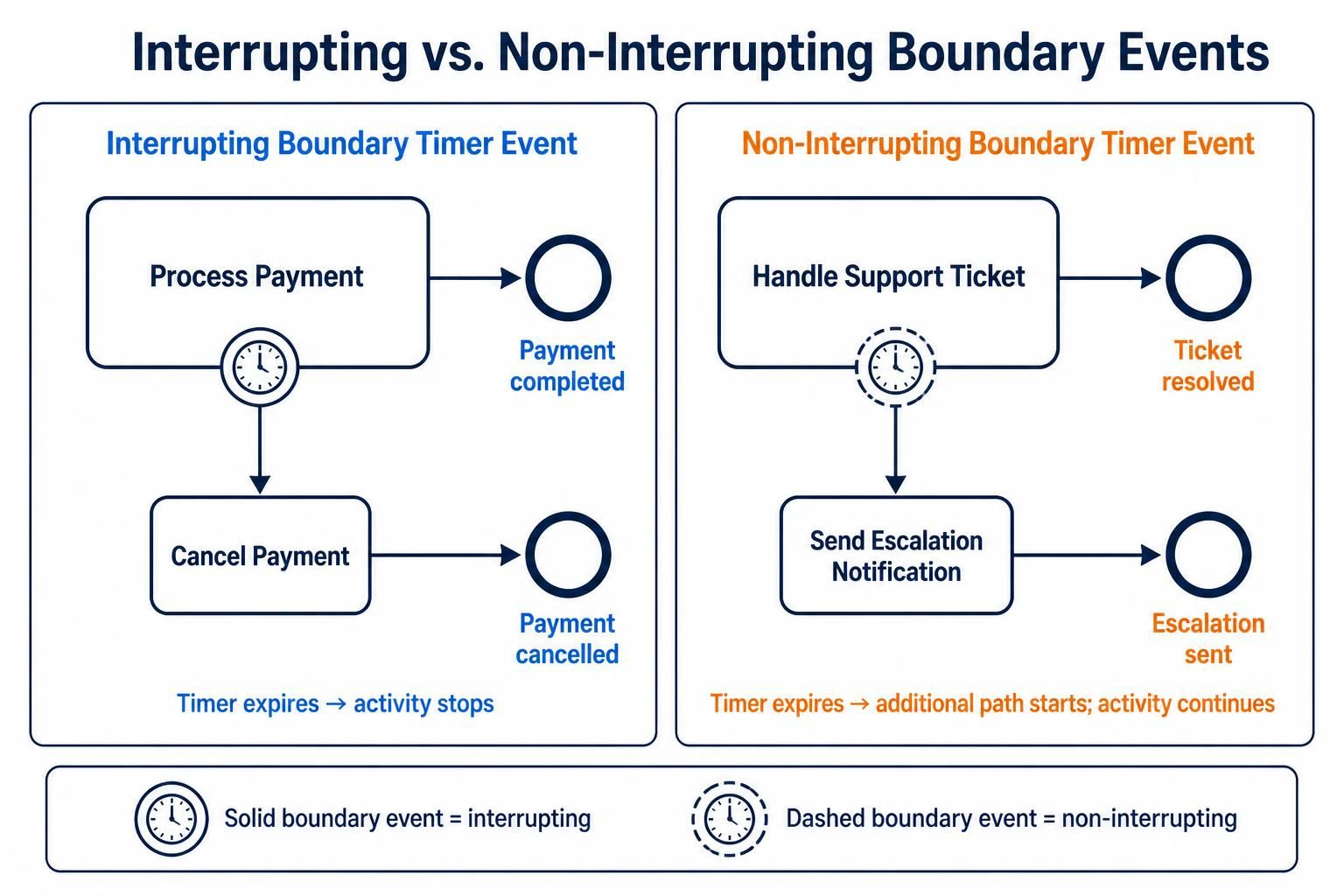
If the timer should cancel payment, use an interrupting timer event. If it should only send a reminder, use a non-interrupting timer event.
Modeling BPMN Activities
Activities represent work performed in a process. They may be completed by a person, a system, or another process.
Tasks
A task is a single unit of work that does not need to be broken down further in the current diagram.
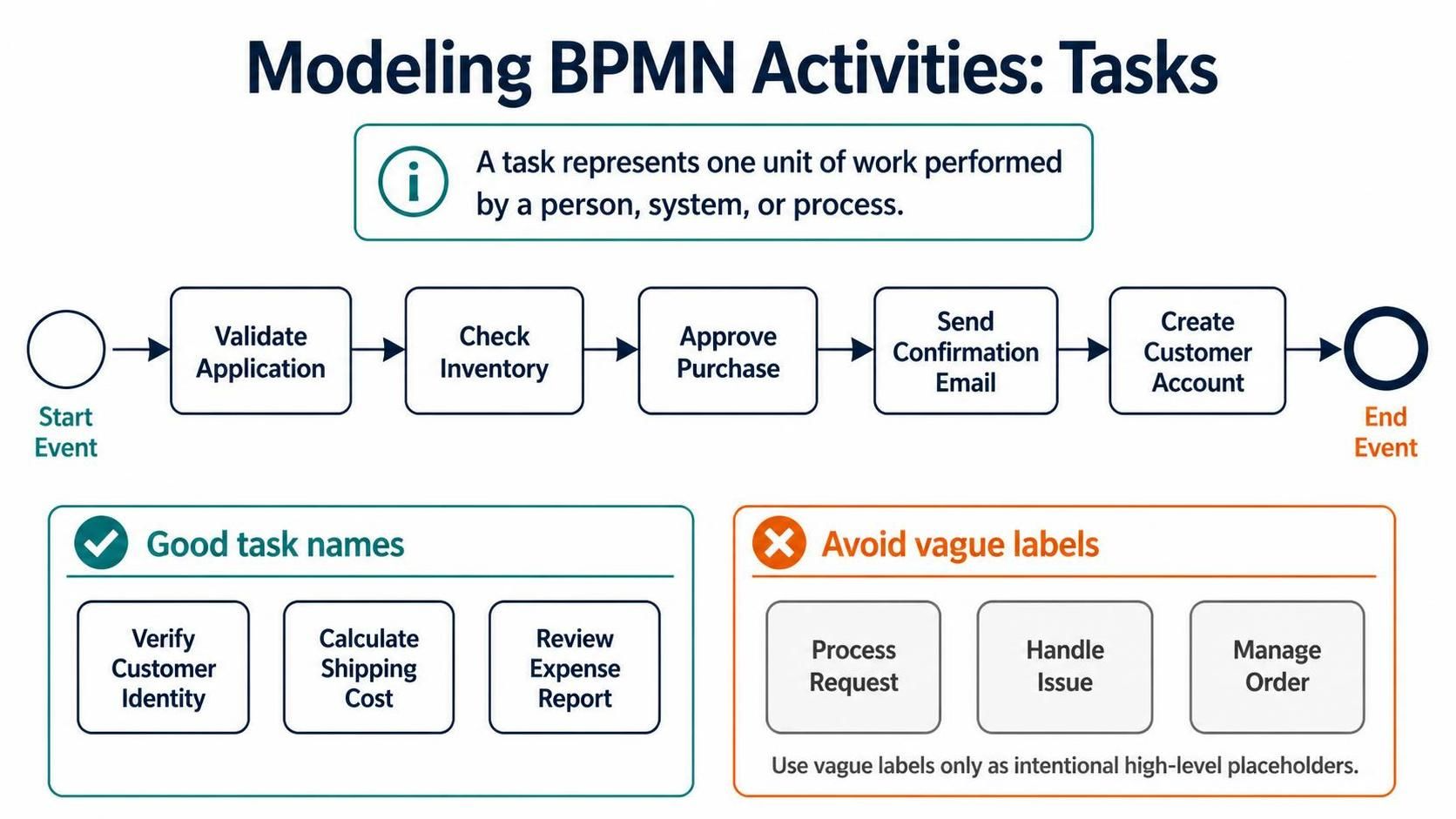
Examples include:
-
Validate application
-
Check inventory
-
Approve purchase
-
Send confirmation email
-
Create customer account
Use specific names that describe the action and, when helpful, the object being acted upon.
Good task names include:
-
Verify Customer Identity
-
Calculate Shipping Cost
-
Review Expense Report
-
Send Approval Notification
Avoid vague labels such as Process Request, Handle Issue, or Manage Order unless the task is intentionally being used as a high-level placeholder.
User Tasks
A user task is performed by a person with the help of a software application.
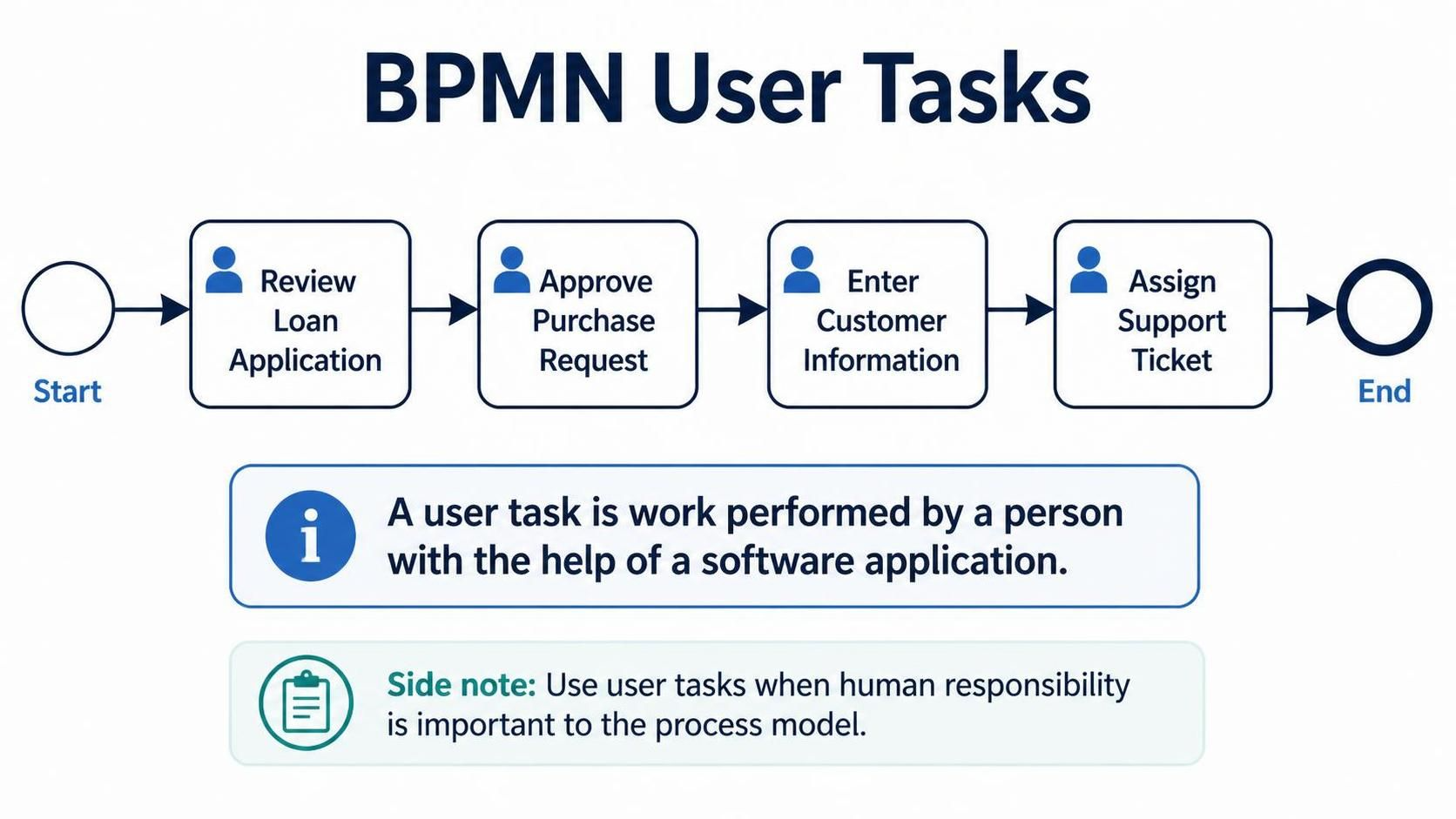
Examples:
-
Review loan application
-
Approve purchase request
-
Enter customer information
-
Assign support ticket
Use user tasks when human responsibility is important to the process model.
Manual Tasks
A manual task is performed without the assistance of a process application.
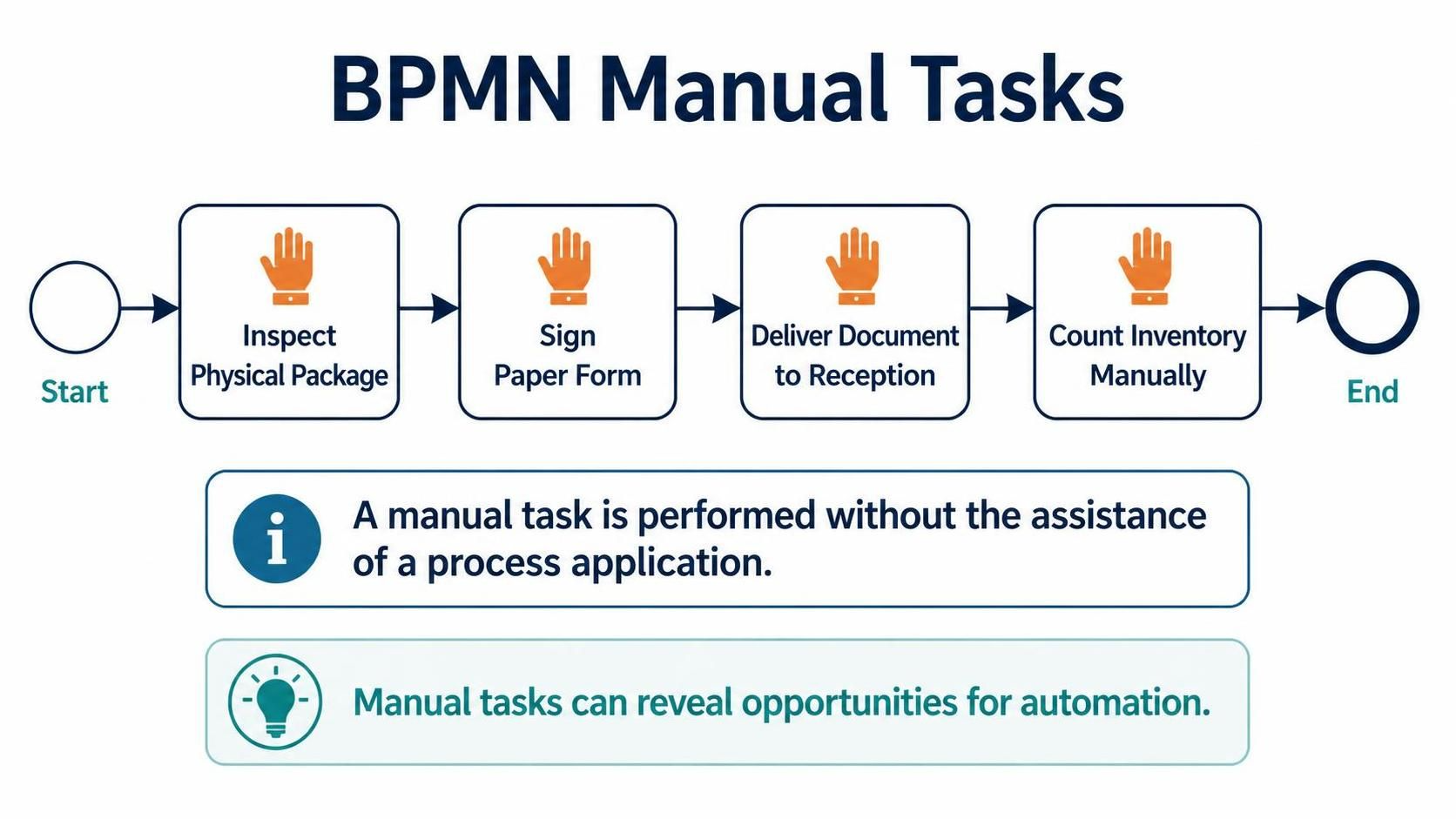
Examples:
-
Inspect physical package
-
Sign paper form
-
Deliver document to reception
-
Count inventory manually
This distinction can help identify opportunities for automation.
Service Tasks
A service task is completed automatically by a system or software service.
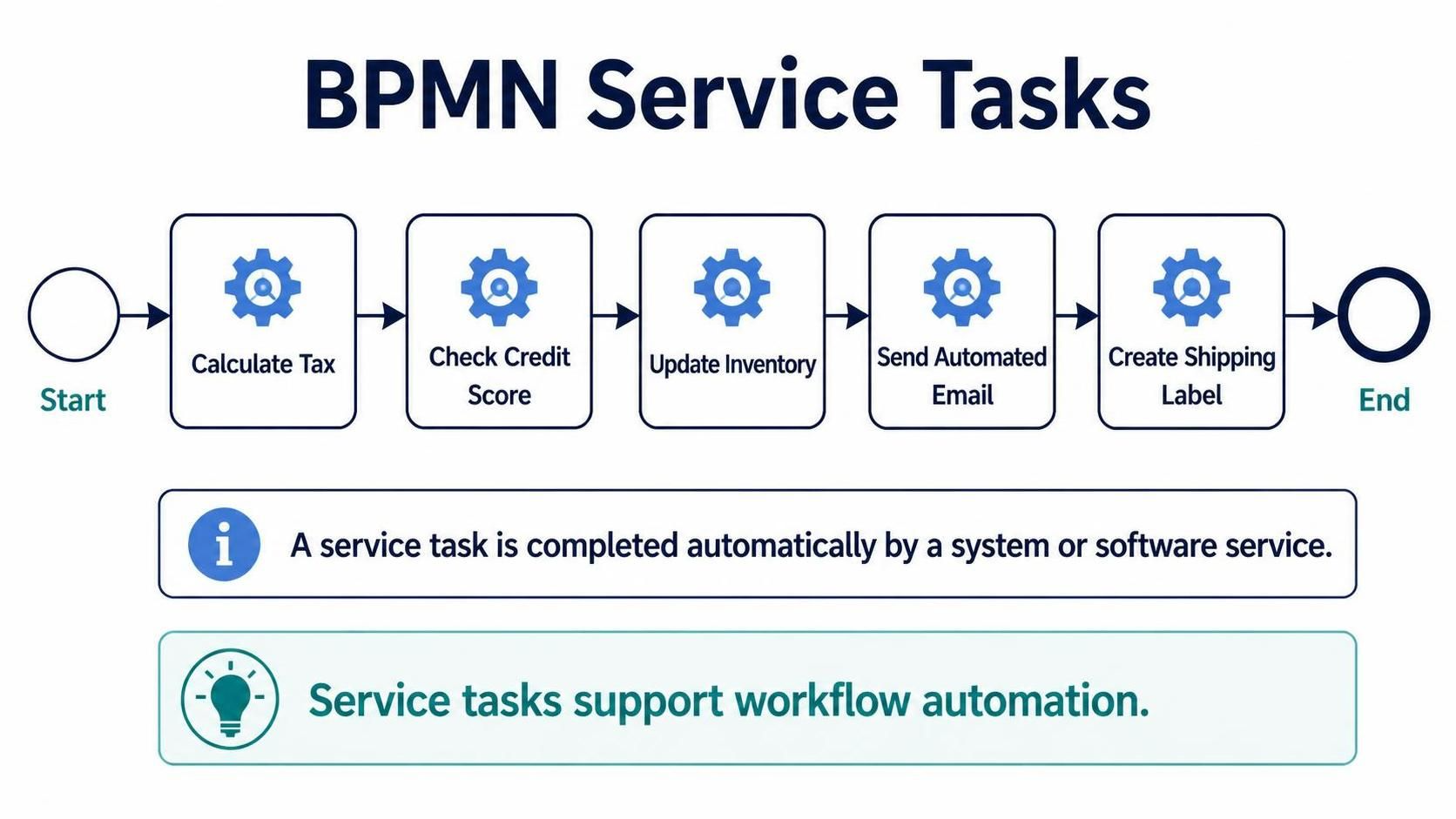
Examples:
-
Calculate tax
-
Check credit score
-
Update inventory
-
Send automated email
-
Create shipping label
Service tasks are especially useful when the BPMN model is intended to support workflow automation.
Script Tasks
A script task represents an automated action carried out by a script within the process environment.
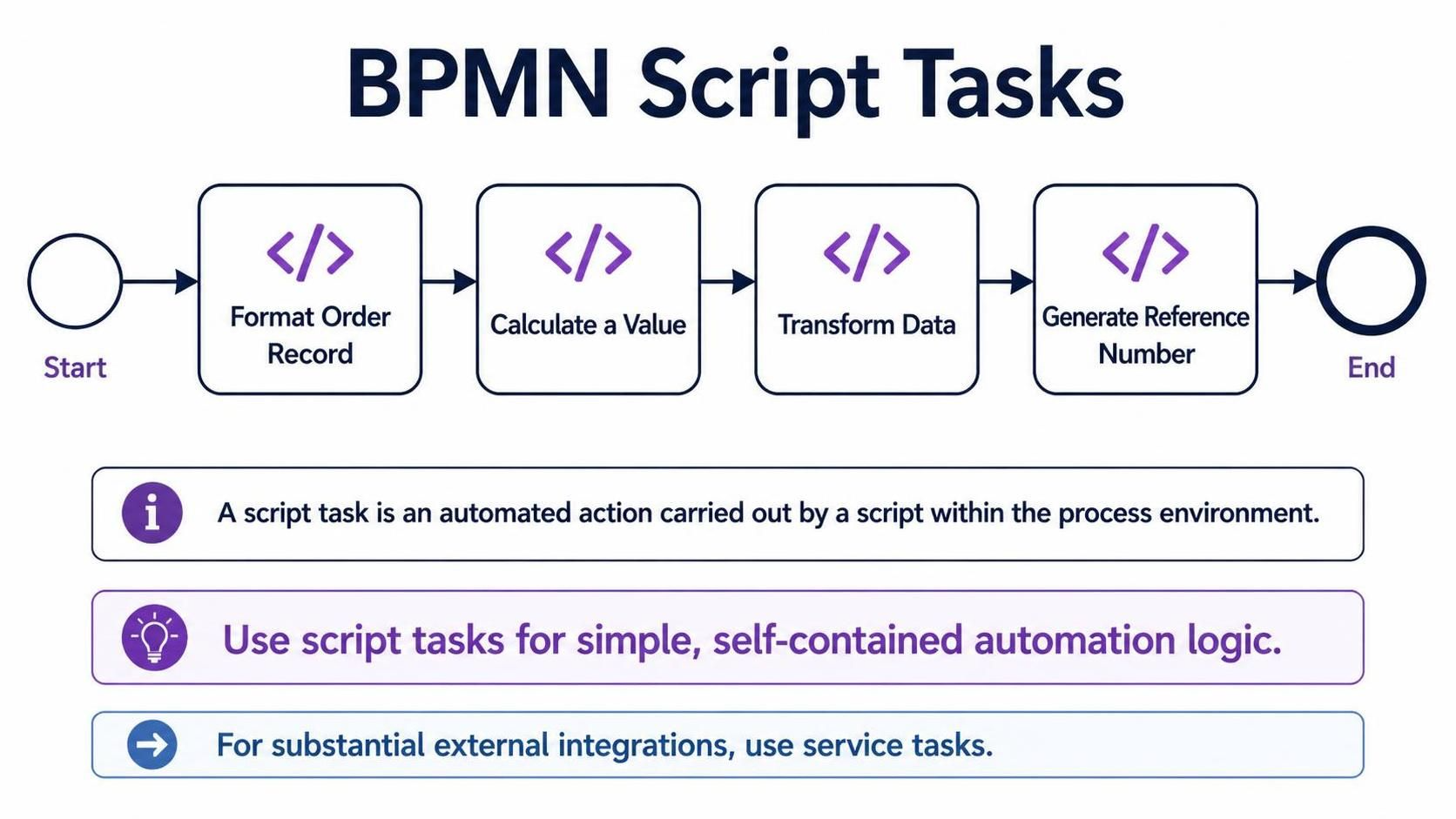
For example:
-
Format an order record
-
Calculate a value
-
Transform data
-
Generate a reference number
Use script tasks only when the automation logic is simple and contained within the process environment. More substantial integrations are usually better represented as service tasks.
Sub-Processes
A sub-process groups several activities into a larger unit. This keeps the main diagram readable while preserving the option to show more detail separately.
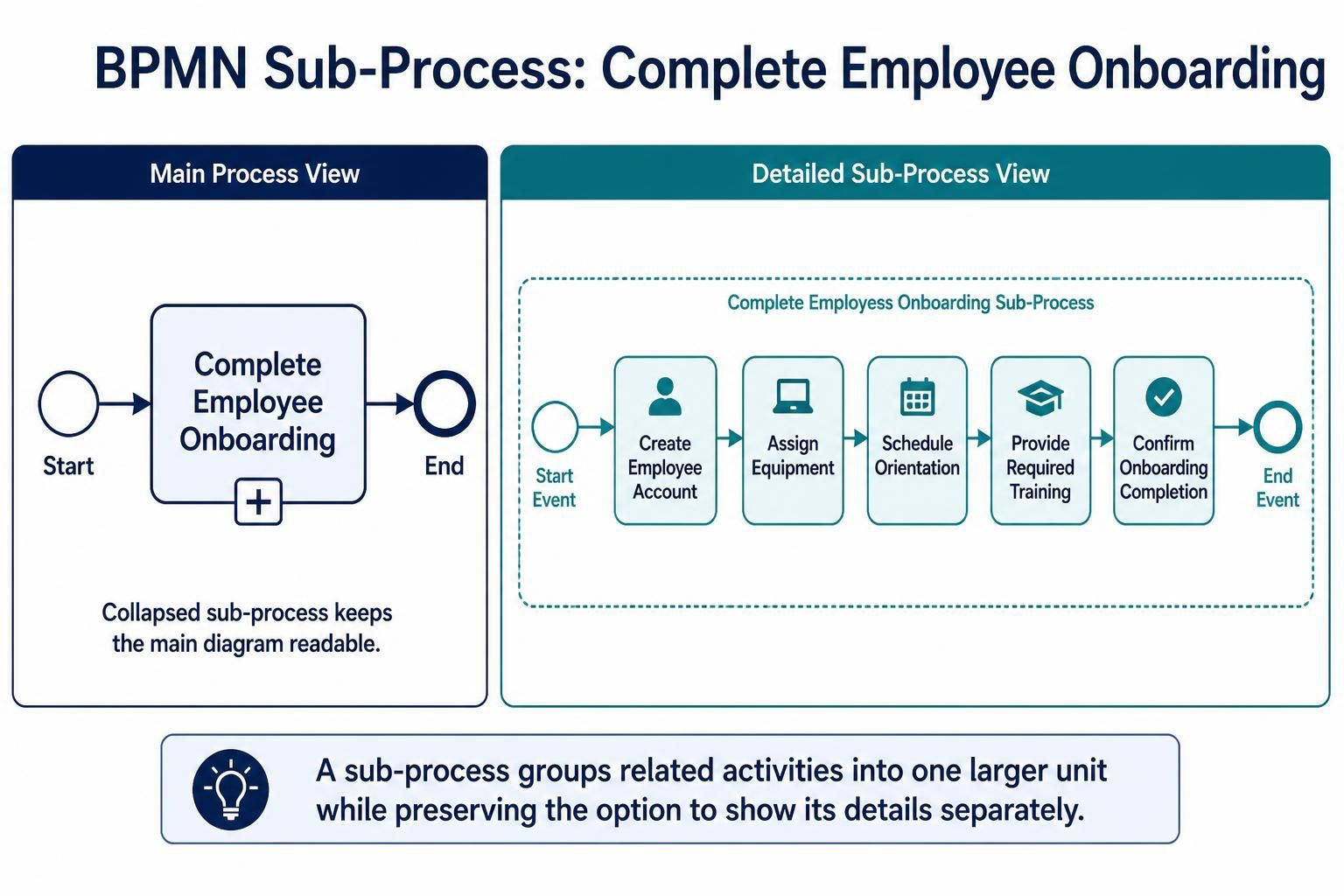
For example, Complete Employee Onboarding may contain:
-
Create employee account
-
Assign equipment
-
Schedule orientation
-
Provide required training
-
Confirm onboarding completion
In the main diagram, this can appear as one collapsed sub-process. A separate diagram can show the detailed steps.
Call Activities
A call activity invokes a reusable process or sub-process. It is useful when the same procedure appears in multiple business processes.
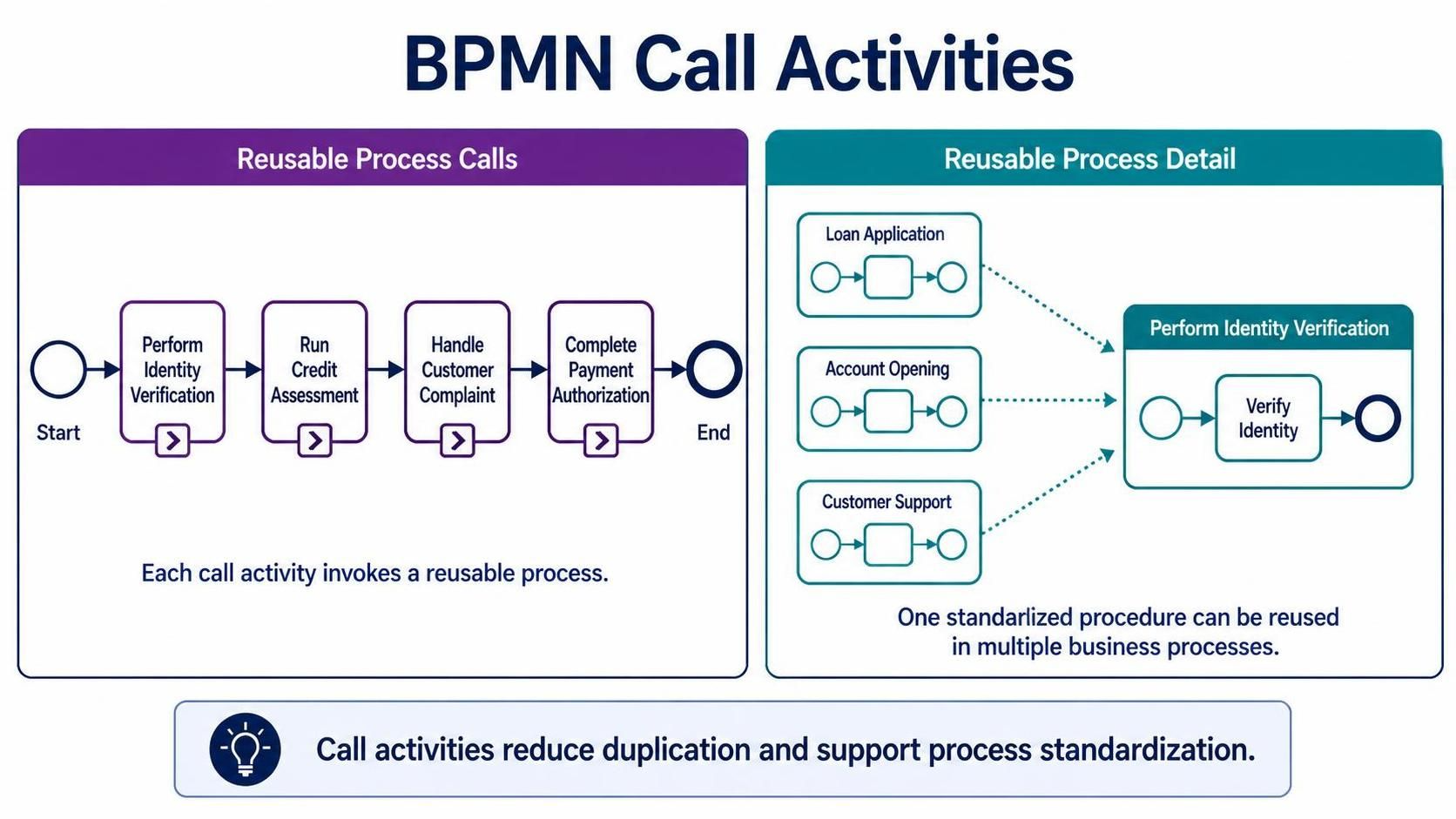
Examples include:
-
Perform identity verification
-
Run credit assessment
-
Handle customer complaint
-
Complete payment authorization
Using a call activity reduces duplication and supports process standardization.
Loops and Multi-Instance Activities
Some activities repeat until a condition is satisfied. For example:
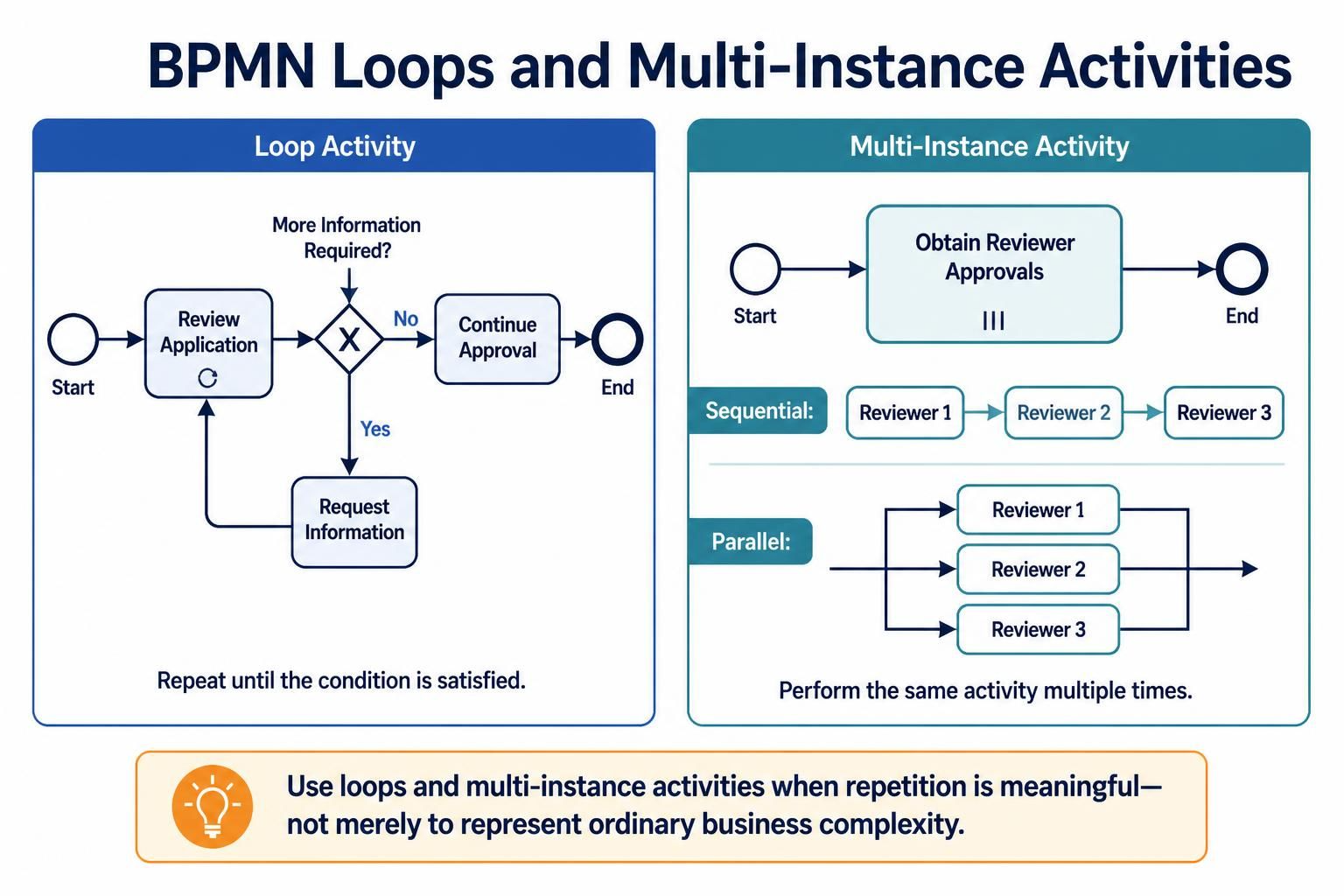
A multi-instance activity is performed multiple times, either sequentially or in parallel. For example, a purchase request might require approval from several reviewers.
Use these patterns when the repetition is meaningful to the process. Avoid adding loops merely to represent ordinary business complexity.
Modeling BPMN Gateways
Gateways control the flow of a process. They can split one path into multiple paths or merge several paths into one.
Exclusive Gateway
An exclusive gateway, commonly called an XOR gateway, selects exactly one outgoing path.
Example:
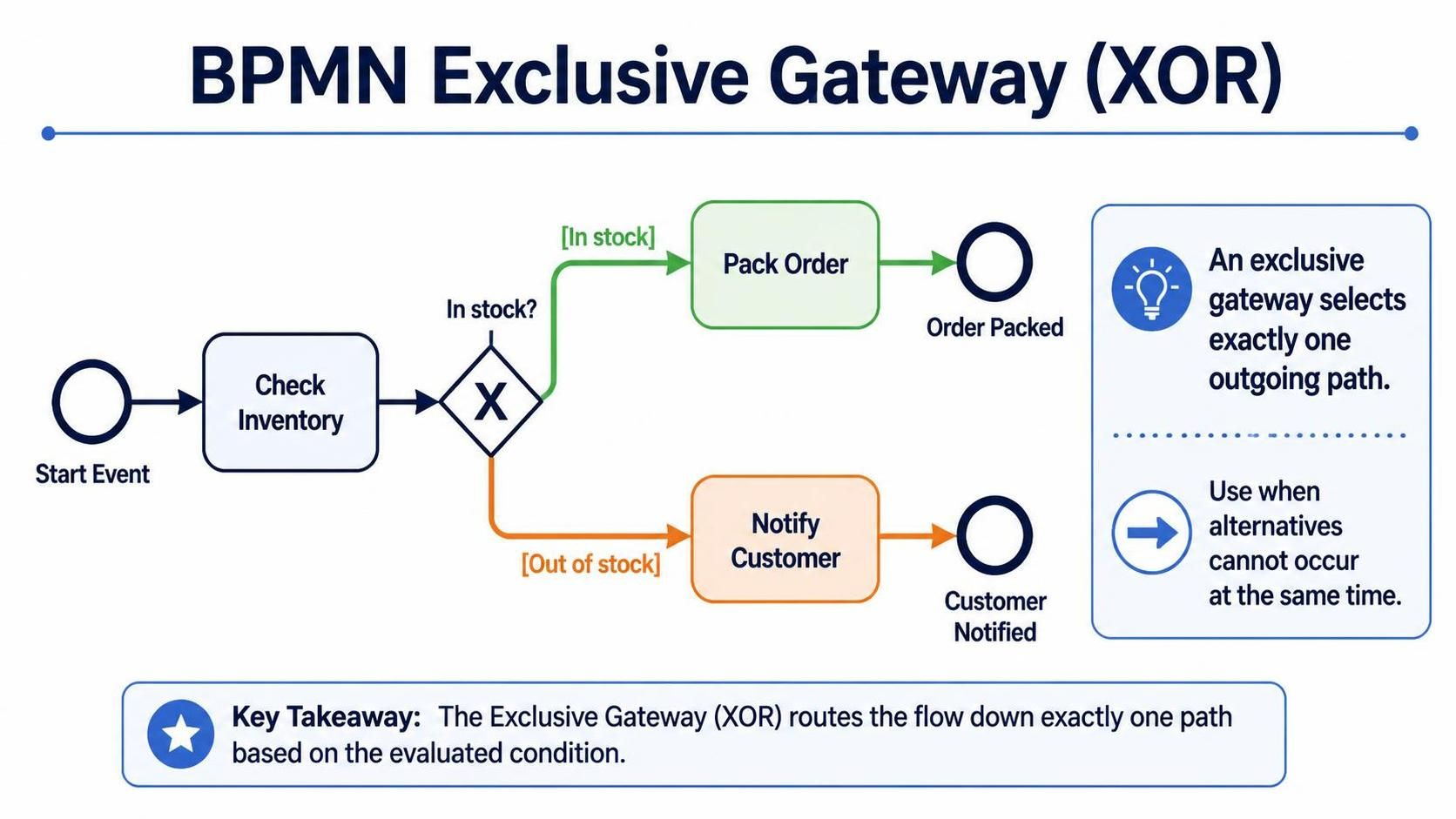
Only one route is selected. The outgoing sequence flows should have clear conditions such as:
-
[In stock] -
[Out of stock]
Use an exclusive gateway when the alternatives cannot occur at the same time.
Inclusive Gateway
An inclusive gateway, or OR gateway, allows one or more paths to be selected.
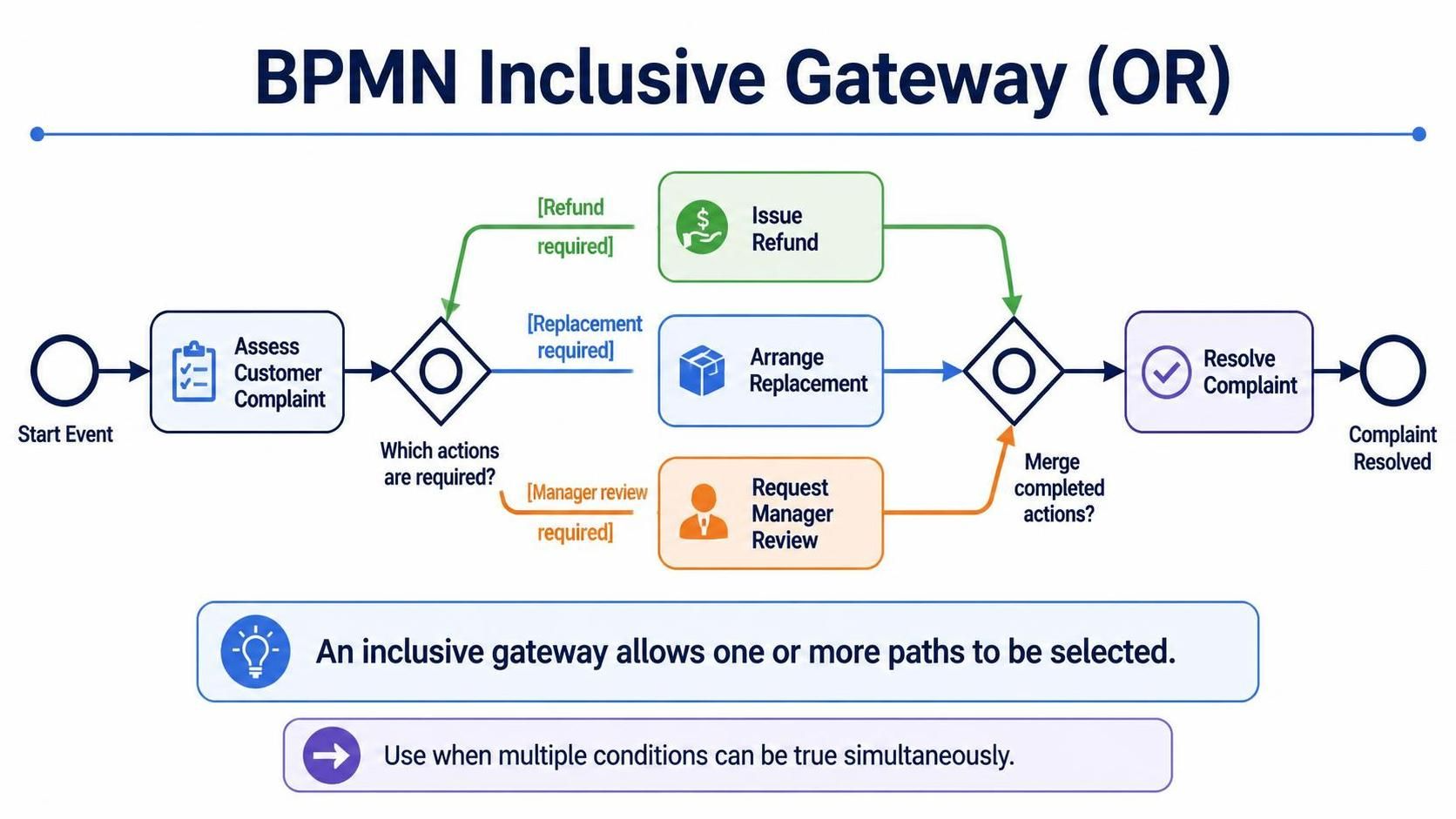
For example, a customer complaint may require:
-
A refund
-
A replacement
-
A manager review
Depending on the complaint, one, two, or all three actions may be required.
Use an inclusive gateway when multiple conditions can be true simultaneously.
Parallel Gateway
A parallel gateway, or AND gateway, activates multiple paths at the same time.
Example:
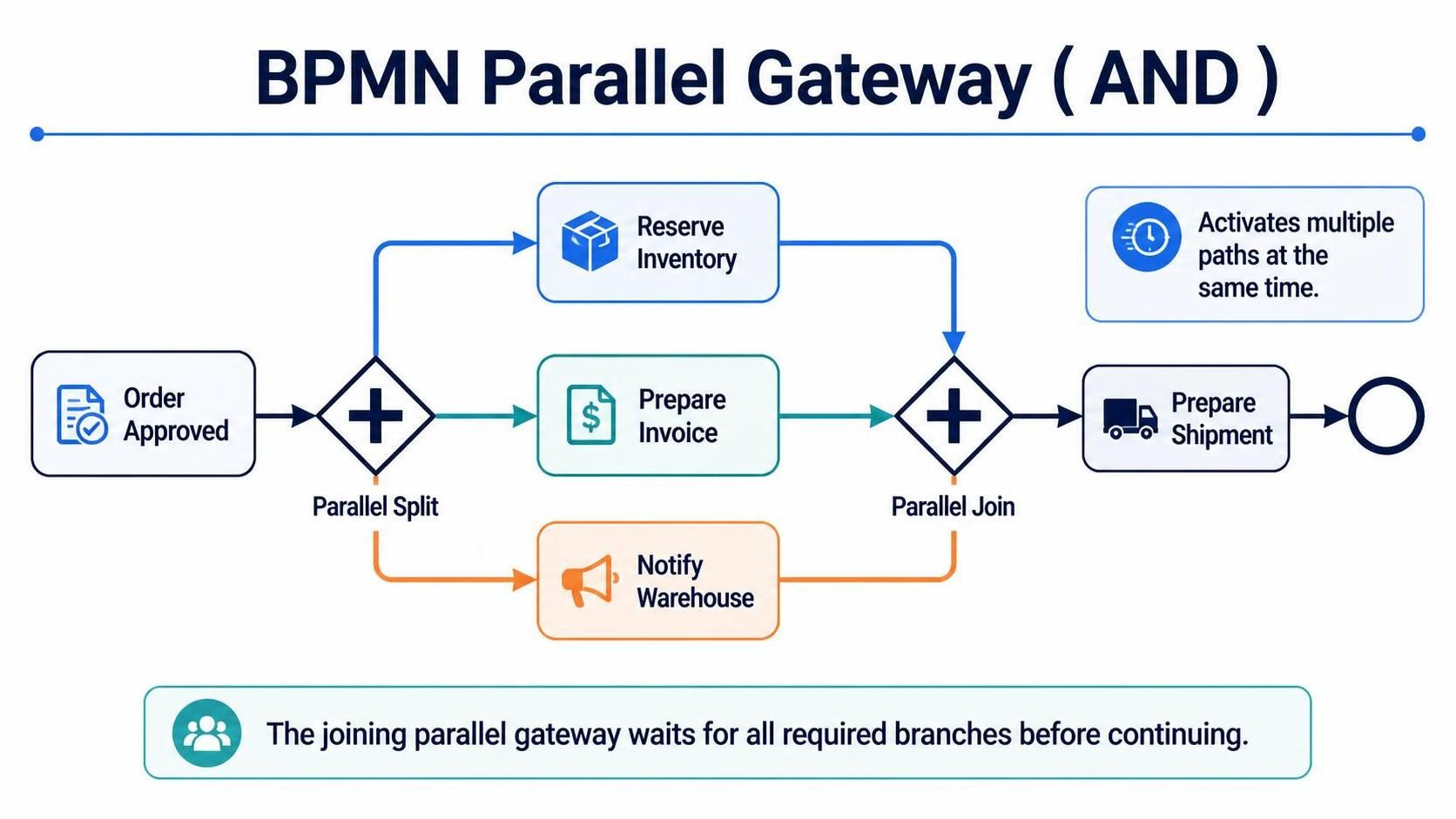
The joining parallel gateway waits for all required branches to complete before continuing.
A common modeling error is using a parallel gateway when only one route should be selected. If the process asks “Which option applies?”, an exclusive gateway is usually more appropriate.
Event-Based Gateway
An event-based gateway waits for one of several possible events. The first event to occur determines the path.
Example:
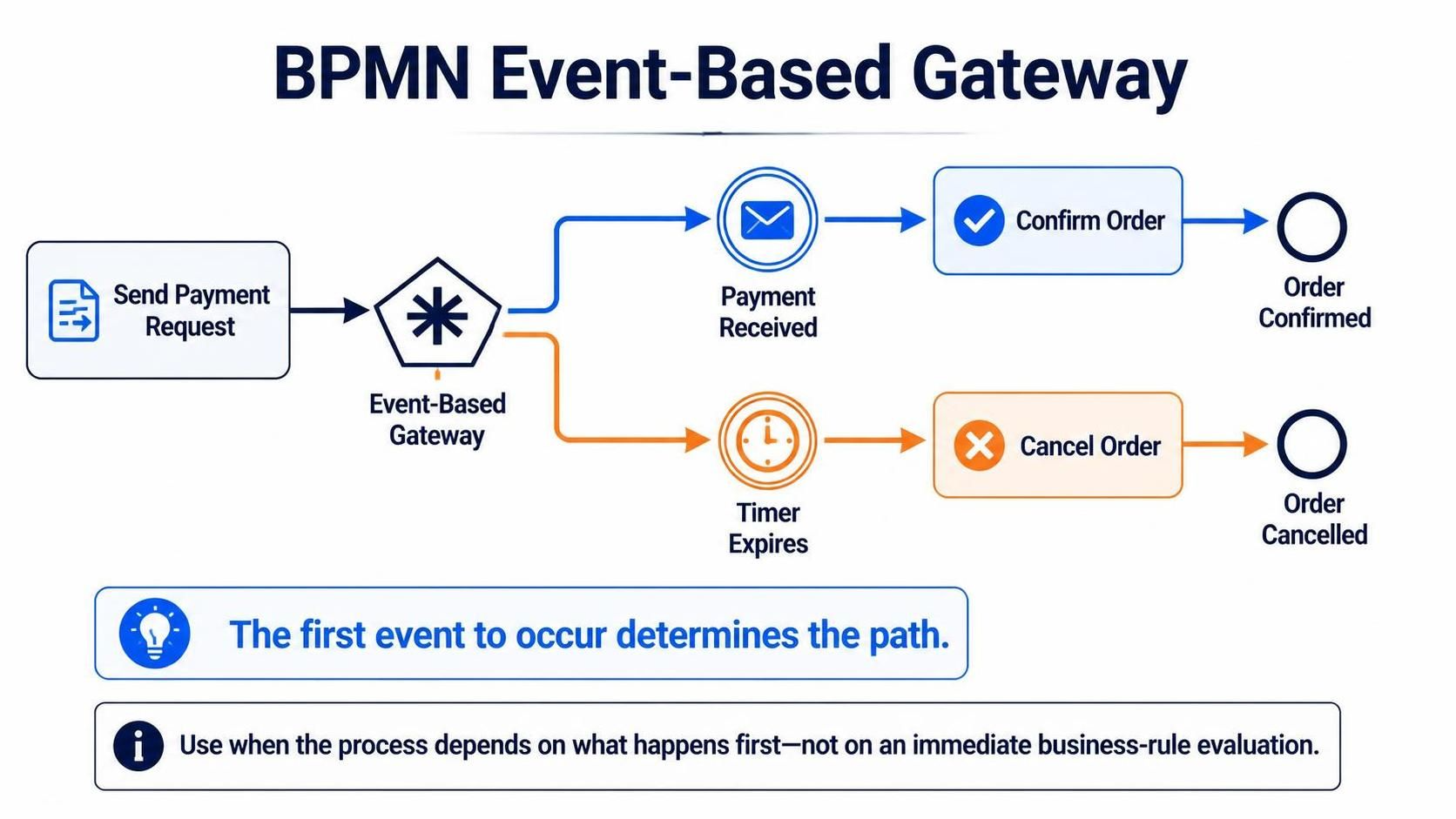
This gateway is useful when the process depends on what happens first rather than on an immediate business-rule evaluation.
Complex Gateway
A complex gateway is used for more specialized conditions that cannot be represented easily with exclusive, inclusive, or parallel gateways.
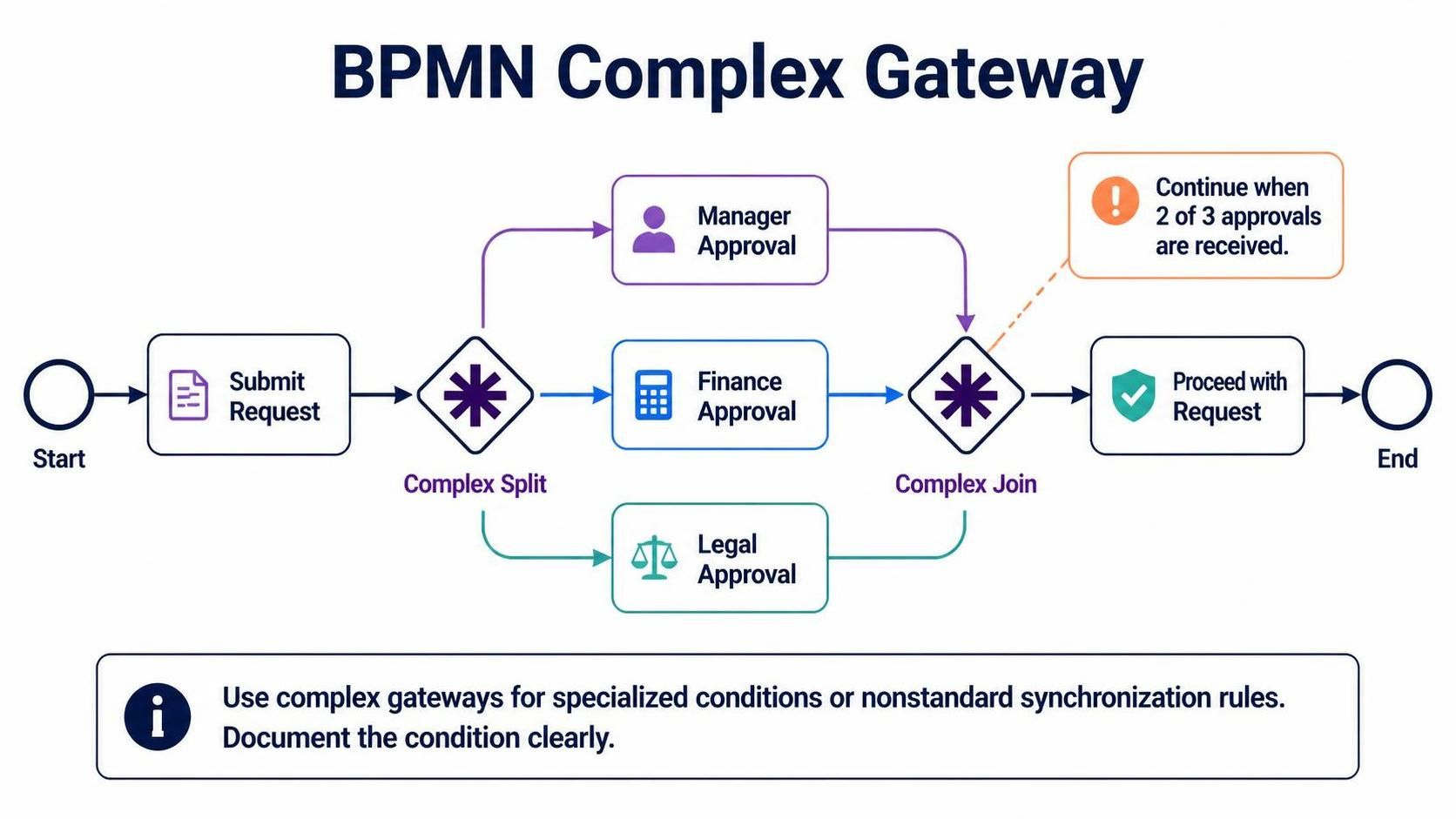
Examples include:
-
Continue after two of three approvals are received
-
Proceed when a custom combination of branches is complete
-
Apply a nonstandard synchronization rule
Because complex gateways can be harder for readers to interpret, document the condition clearly with an annotation or modeling note.
Using Visual Paradigm BPMN Online
Visual Paradigm’s online diagramming environment provides a browser-based way to create and edit BPMN diagrams. The general workflow is:
-
Open the BPMN diagramming tool.
-
Create a new business process diagram.
-
Select BPMN elements from the palette.
-
Drag events, activities, and gateways onto the canvas.
-
Connect elements with sequence flows.
-
Add conditions to outgoing gateway paths.
-
Arrange and label the diagram.
-
Review the process with stakeholders.
-
Export or share the completed diagram as needed.
The visual editor is most useful when you already understand the process and want direct control over the notation. You can manually choose whether an element should be a timer event, user task, service task, exclusive gateway, or another BPMN type.
For larger or more detailed models, Visual Paradigm also provides desktop modeling capabilities and links AI-generated diagrams with editable modeling environments.
Creating a BPMN Draft with AI Assistance
Visual Paradigm’s AI BPMN features can turn a written process description into an editable process diagram. The AI analyzes the narrative and can identify activities, roles, sequence, decision points, and potential swimlanes.
A typical desktop workflow is:
-
Open Visual Paradigm.
-
Choose Tools > AI Diagram Generation.
-
Select Business Process Diagram.
-
Enable pools and lanes if the process involves multiple roles or departments.
-
Enter a detailed process description.
-
Generate the initial diagram.
-
Review the events, activities, gateways, and connections.
-
Correct the model manually or refine it through AI-assisted changes.
The AI-generated result should be treated as a first draft. Business analysts and process owners still need to verify that the model accurately represents the real process.
A Weak Prompt
Create a purchase approval process.
This description does not identify the participants, decision rules, or possible outcomes.
A Stronger Prompt
Create a BPMN diagram for an employee purchase request process.
The employee submits a request. The department manager reviews the request.
If the amount is $1,000 or less, the manager can approve or reject it.
If the amount is greater than $1,000, Finance must review it after manager approval.
When the request is approved, Procurement places the order.
When it is rejected, the system notifies the employee.
Include lanes for Employee, Manager, Finance, Procurement, and the System.
A structured narrative gives the AI explicit information about:
-
Participants
-
Task order
-
Decision conditions
-
Alternative outcomes
-
System interactions
-
Required lanes
Visual Paradigm’s guidance similarly recommends describing the process chronologically and naming the actors, actions, conditions, and outcomes rather than providing only a short topic phrase.
Example: Modeling an Online Order Process
Consider this process:
-
The customer submits an order.
-
The system checks inventory.
-
If the product is unavailable, the customer is notified.
-
If the product is available, payment is requested.
-
If payment is declined, the customer is asked to update the payment method.
-
If payment is approved, the warehouse picks and packs the order.
-
The carrier collects the package.
-
The customer receives a delivery notification.
The BPMN structure could be:
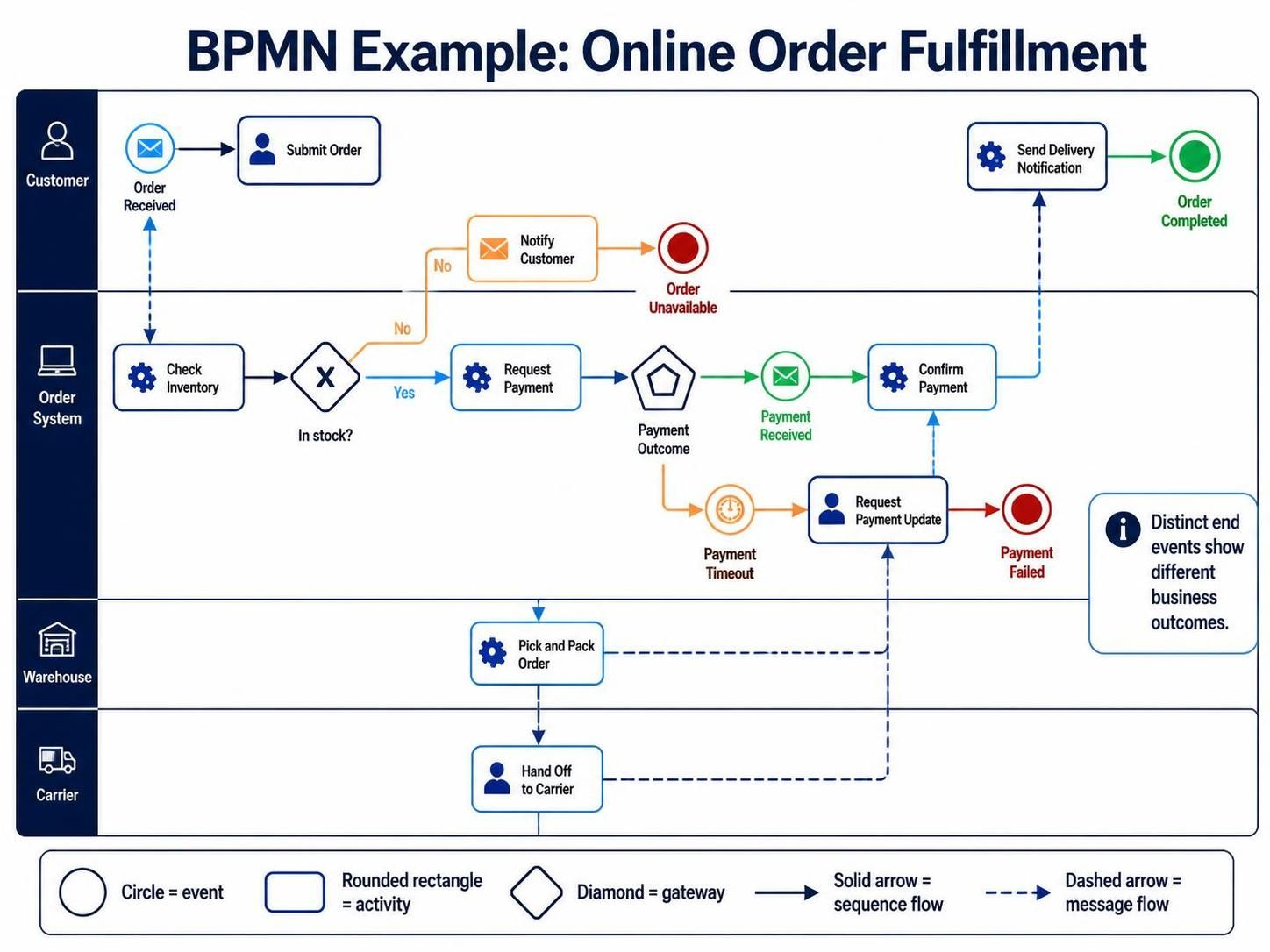
Suggested BPMN elements:
-
Message start event: Customer order is received
-
Service task: Check inventory
-
Exclusive gateway: In stock?
-
Send task or service task: Notify customer
-
Service task: Request payment
-
Event-based gateway: Payment received or timeout occurs
-
User or manual task: Pick and pack order
-
Service task: Send delivery notification
-
Distinct end events: Order completed, order unavailable, payment failed
An AI prompt for this example could be:
Create a BPMN 2.0 business process diagram for an online order fulfillment process.
The Customer places an order through an e-commerce website.
The Order System checks inventory. If the product is out of stock,
the system notifies the Customer and ends the process. If the product is
in stock, the system requests payment. If payment is declined, the Customer
is asked to update the payment method. If payment is approved, the Warehouse
picks and packs the order, the Shipping Carrier collects it, and the system
sends a delivery notification. Include lanes for Customer, Order System,
Warehouse, and Shipping Carrier. Use gateways for inventory availability
and payment approval.
After generation, check whether the diagram has correctly identified:
-
The customer as a participant
-
The system as a service provider
-
The warehouse and carrier as separate responsibilities
-
An exclusive gateway for inventory availability
-
An exclusive gateway for payment approval
-
Separate end events for successful and unsuccessful outcomes
Reviewing and Improving an AI-Generated Diagram
AI can accelerate the first draft, but the generated model may still contain assumptions. Review it systematically.
Check the Start and End Events
Ask:
-
What exactly triggers the process?
-
Can the process end in more than one way?
-
Are all meaningful outcomes represented?
A process with no clear start event may be difficult to interpret. A process with one generic end event may hide important business outcomes.
Check Activity Types
Ask whether each task is performed by:
-
A human user
-
A person without system support
-
An automated service
-
A script
-
Another reusable process
Changing a generic task into a user task or service task can make responsibilities and automation opportunities clearer.
Check Gateway Logic
For every gateway, ask:
-
Is this an exclusive, inclusive, parallel, or event-based decision?
-
Are the outgoing conditions mutually exclusive?
-
Could more than one path occur?
-
Does a parallel split have a corresponding synchronization point?
-
Are the conditions written on the sequence flows?
Check Exception Paths
Important exceptions are often omitted from the first draft. Consider whether the process needs:
-
A timer for a deadline
-
An error event for a failed system call
-
An escalation for an overdue task
-
A message event for external communication
-
A compensation path for reversing completed work
Check Participant Boundaries
If multiple organizations or independent systems communicate, use separate pools and message flows where appropriate. Use lanes for roles or departments within the same participant.
This distinction helps prevent a common BPMN modeling mistake: representing separate organizations as lanes when they should be modeled as separate pools.
Practical Modeling Tips
Use these guidelines when working manually or refining an AI-generated model:
-
Use one clear start event whenever the process has one primary trigger.
-
Name tasks with action-oriented phrases.
-
Use exclusive gateways for “one of these paths” decisions.
-
Use parallel gateways when activities must happen simultaneously.
-
Use event-based gateways when the first event to occur determines the outcome.
-
Label gateway paths with business conditions.
-
Use separate end events for different results.
-
Collapse detailed sub-processes when the main diagram becomes crowded.
-
Avoid creating gateways without a clear decision or synchronization purpose.
-
Keep the diagram readable from left to right.
-
Confirm the model with the people who perform the actual work.
Final Takeaway
Events explain when something happens, activities show the work being performed, and gateways control the route through the process. Together, they form the logic of a BPMN model.
Visual Paradigm BPMN Online is useful for manually creating and refining diagrams with a browser-based editor. Its AI-assisted features can accelerate the first modeling step by converting a structured process narrative into an editable BPMN draft. The most effective workflow combines both approaches: use AI to reduce repetitive diagram construction, then apply BPMN knowledge and stakeholder review to verify the logic, responsibilities, exceptions, and outcomes.
Conclusion
Events, activities, and gateways give BPMN diagrams their structure and logic. Events identify triggers and outcomes, activities describe the work being performed, and gateways represent decisions, parallel work, and event-driven alternatives. Choosing the correct element for each part of a process makes the resulting model easier to understand and more useful for analysis, communication, and automation.
Visual Paradigm BPMN Online provides a practical environment for creating these diagrams manually, while its AI-assisted features can speed up the initial modeling process. However, an AI-generated diagram should always be reviewed by someone familiar with the real business process. By combining AI-generated drafts with careful BPMN modeling, stakeholder feedback, and clear process rules, teams can produce diagrams that accurately reflect how work is performed and where it can be improved.