


Introduction
In the world of process modeling, clarity is currency. Whether you are an Agile Product Manager refining a user journey or a Business Analyst mapping out enterprise workflows, the tool you choose to visualize your process dictates how effectively that process can be understood, executed, and improved.
Two of the most common visualization methods are Flowcharts and Business Process Model and Notation (BPMN). While they may look similar at a glance—both use shapes and arrows to represent steps—they serve fundamentally different purposes. Flowcharts are ideal for high-level logic and simple algorithms, while BPMN is the global standard for detailed, executable business processes involving multiple stakeholders.
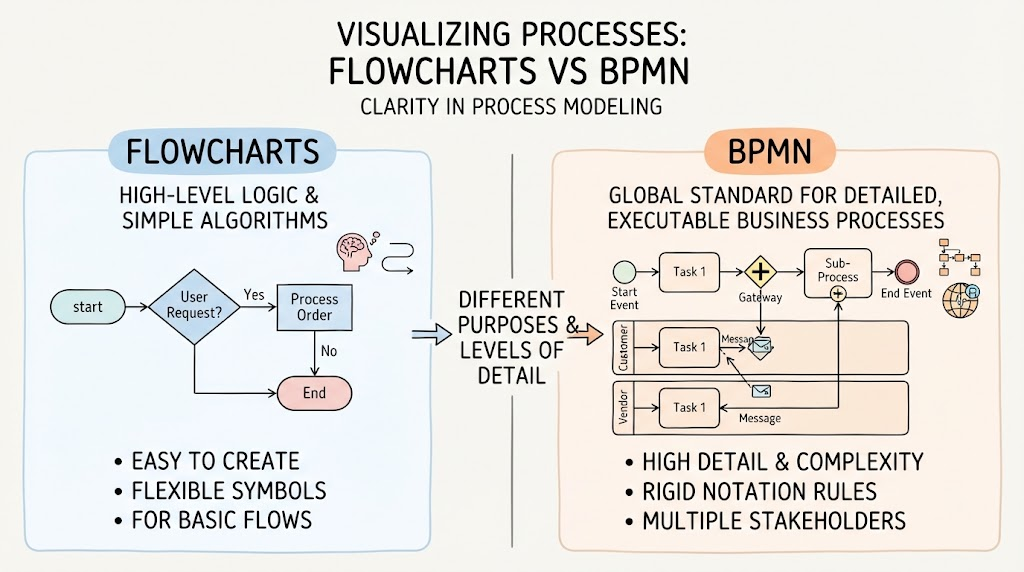
This guide explores the critical differences between the two, provides usage cases specifically for Agile teams, and highlights how modern AI-driven tooling like Visual Paradigm can bridge the gap between narrative requirements and precise, standards-compliant diagrams.
1. The Core Differences: Flowcharts vs. BPMN
What is a Flowchart?
A flowchart is a generic diagram that represents a workflow or algorithm. It uses basic symbols (rectangles for processes, diamonds for decisions, ovals for start/end) to show the step-by-step progression of a task.
-
Focus: Logic, sequence, and simplicity.
-
Standard: No strict international standard; symbols vary by creator.
-
Best For: Simple decision trees, programming logic, or quick brainstorming sessions.
What is BPMN?
BPMN (Business Process Model and Notation) is an OMG (Object Management Group) standard. It is a rigorous graphical notation for specifying business processes in a business process diagram.
-
Focus: Execution, collaboration, and technical precision.
-
Standard: Strictly defined by BPMN 2.0 specifications.
-
Best For: Cross-functional workflows, system integrations, and processes requiring automation or compliance.
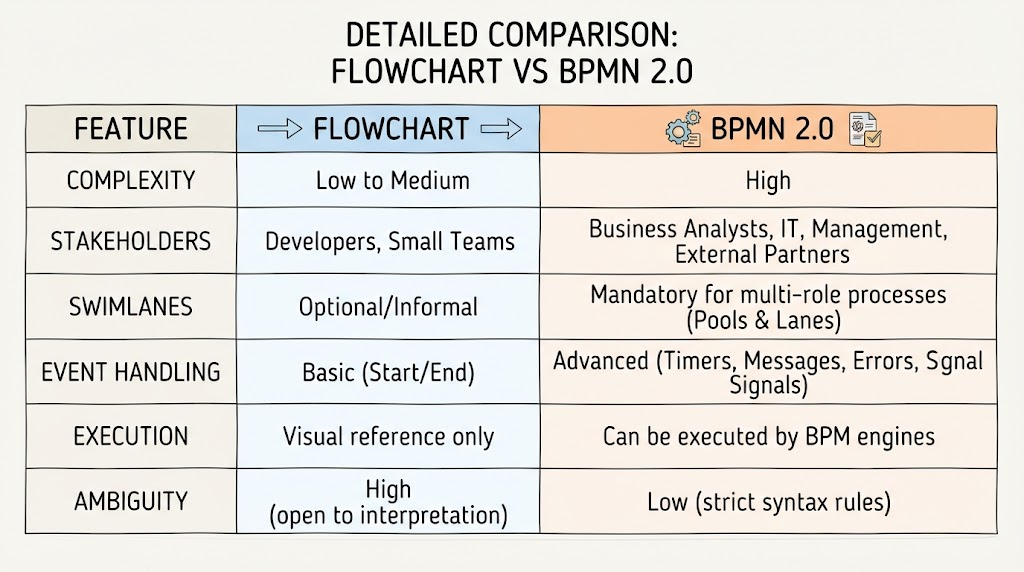
Comparison Table
2. Usage Cases for Agile Teams
Agile teams often struggle with documentation overhead. However, certain scenarios require more than a sticky note on a Jira ticket. Here is when to use which:
When to Use Flowcharts in Agile
-
Sprint Planning Brainstorming: Quickly mapping out the logic of a new feature during refinement sessions.
-
User Story Acceptance Criteria: Visualizing simple “If/Then” logic for QA testers.
-
Bug Triage: Mapping out the reproduction steps of a specific defect.
Example: A team is building a “Forgot Password” feature. A simple flowchart shows: Enter Email -> Check DB -> Send Link -> Show Success Message. This is sufficient for dev handoff.
When to Use BPMN in Agile
-
Cross-Team Dependencies: When a user story involves interactions between your team, a third-party API, and a customer support team.
-
Regulatory Compliance: If your product handles financial data (PCI-DSS) or health records (HIPAA), BPMN provides the audit trail required.
-
Process Automation: When the goal is to hand off the process to a workflow engine (e.g., Camunda, Appian) for automatic execution.
Example: An Agile team is integrating a new payment gateway. The process involves: User Checkout -> Fraud Check Service -> Payment Gateway -> Inventory System Update -> Email Confirmation.
Using BPMN, you can define Pools for “Customer,” “Your System,” and “Payment Provider.” You can model Message Flows between these pools and handle Error Events if the payment fails. This level of detail prevents integration bugs that a simple flowchart would miss.
3. Why Visual Paradigm? The AI Advantage
Creating BPMN diagrams manually is time-consuming and prone to syntax errors. Dragging and dropping every gateway, event, and sequence flow can slow down Agile velocity. This is where Visual Paradigm transforms the workflow.
How Visual Paradigm Helps Agile Teams
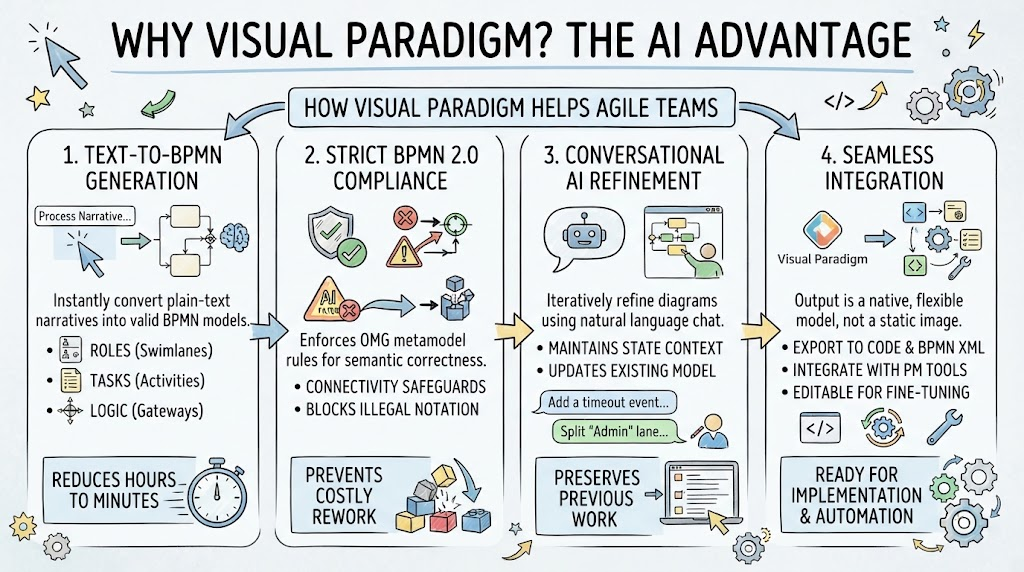
1. Text-to-BPMN Generation
Instead of spending hours drawing, you can paste a plain-text narrative of your process into Visual Paradigm’s AI engine. The NLP (Natural Language Processing) engine parses the text to identify:
-
Roles: Automatically creates Swimlanes (Pools/Lanes).
-
Tasks: Converts verbs into Task nodes.
-
Logic: Identifies decisions and converts them into Gateways.
Benefit: Reduces diagram creation time from hours to minutes, allowing Product Managers to focus on process logic rather than tool mechanics.
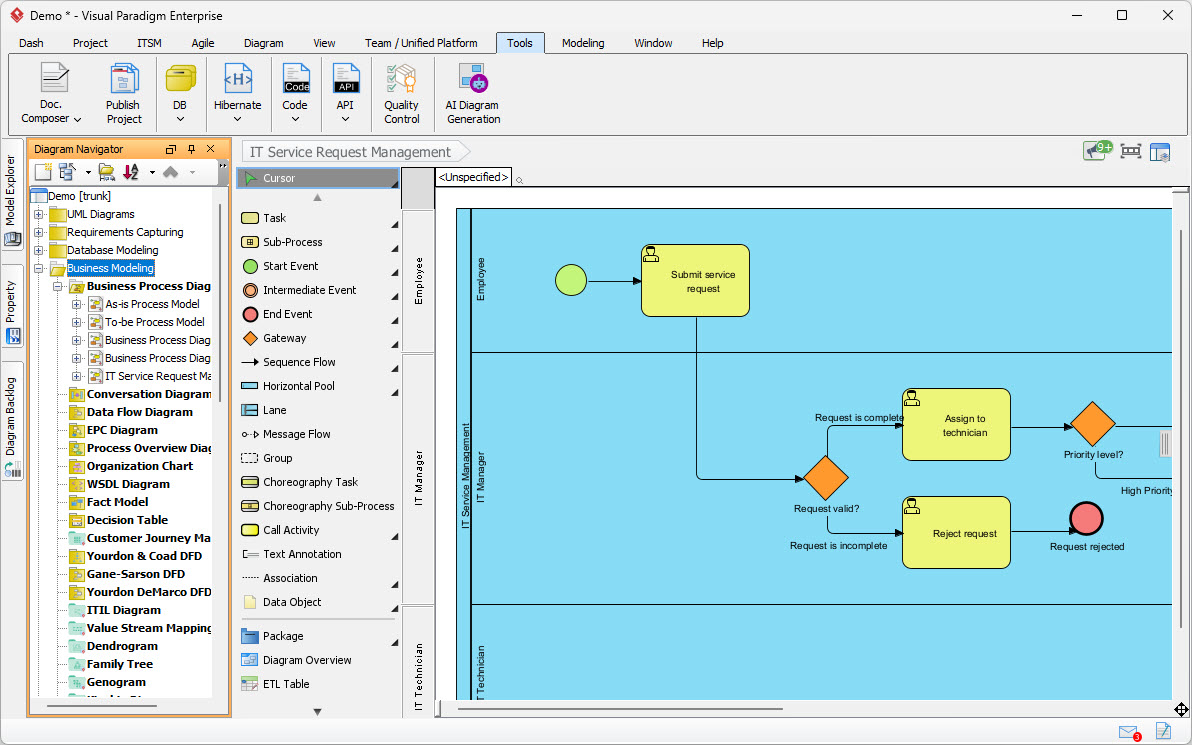
2. Strict BPMN 2.0 Compliance
Generic AI tools or basic drawing apps often allow invalid connections (e.g., connecting a message directly to a gateway without an intermediate event). Visual Paradigm enforces OMG metamodel rules.
-
Connectivity Safeguards: Blocks illegal notation.
-
Semantic Correctness: Ensures the model is not just a picture, but a valid specification.
Benefit: Prevents costly rework during development or automation implementation. What you model is what gets built.
3. Conversational AI Refinement
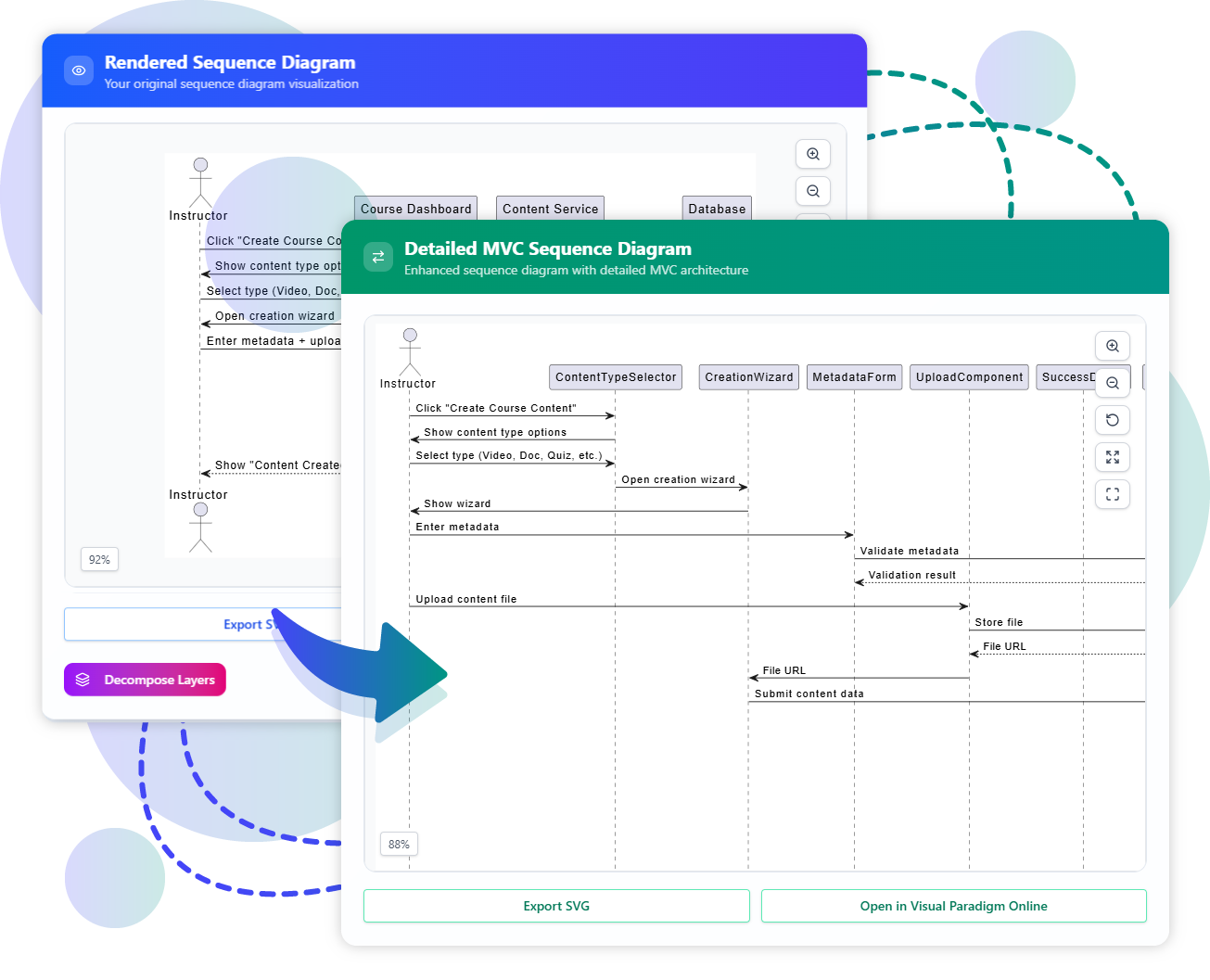
Agile requirements change. With Visual Paradigm’s AI Chatbot, you can iteratively refine your diagram.
-
“Add a timeout event if the payment gateway doesn’t respond in 30 seconds.”
-
“Split the ‘Admin’ lane into ‘Support Admin’ and ‘Super Admin’.”
Benefit: Maintains state context. Unlike generic LLMs that might rewrite the whole diagram, Visual Paradigm updates the existing model, preserving your previous work.
4. Seamless Integration
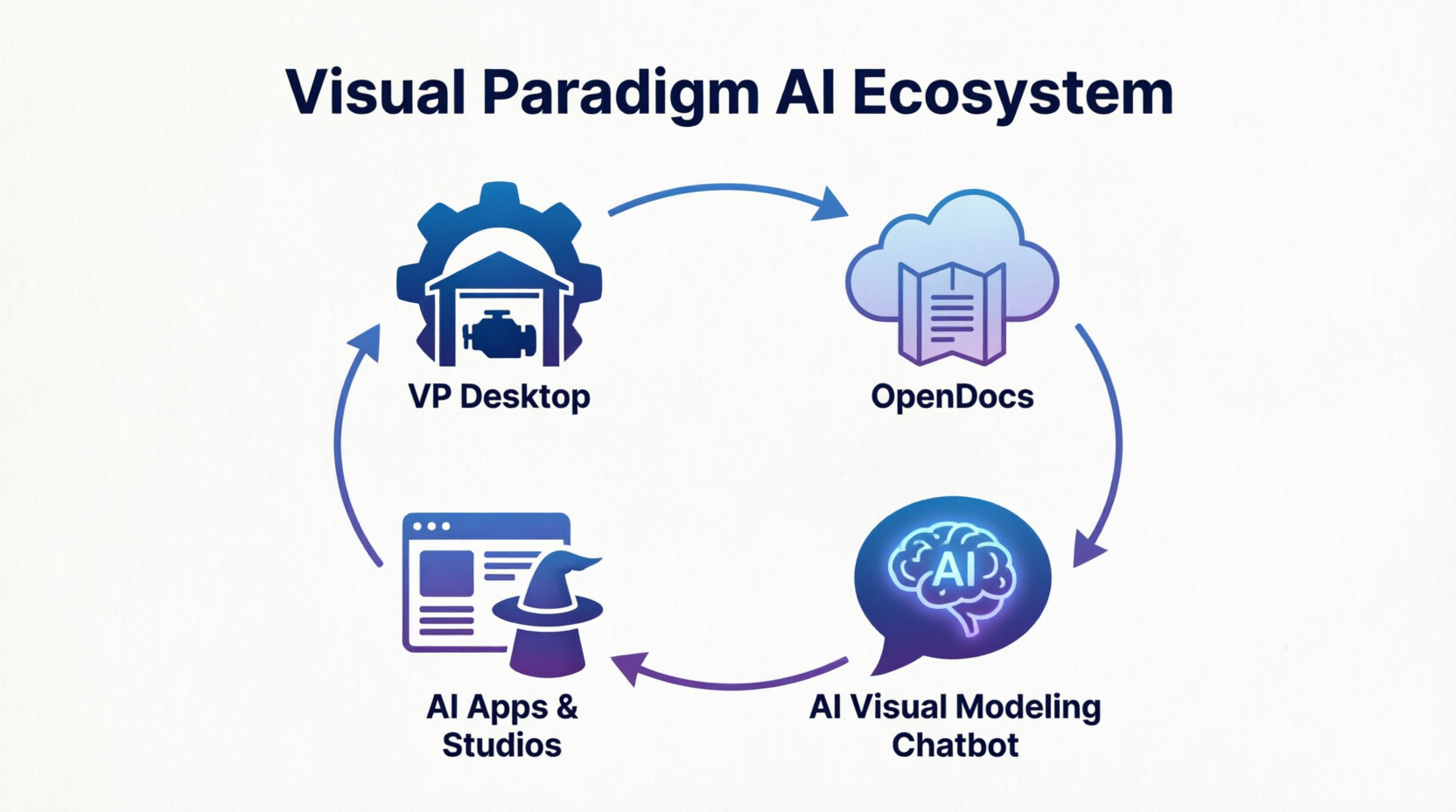
The output is not a static image. It is a native Visual Paradigm model that can be:
-
Exported to code or BPMN XML.
-
Integrated with project management tools.
-
Edited manually for fine-tuning.
4. Step-by-Step: Generating a BPMN Diagram with Visual Paradigm AI
-
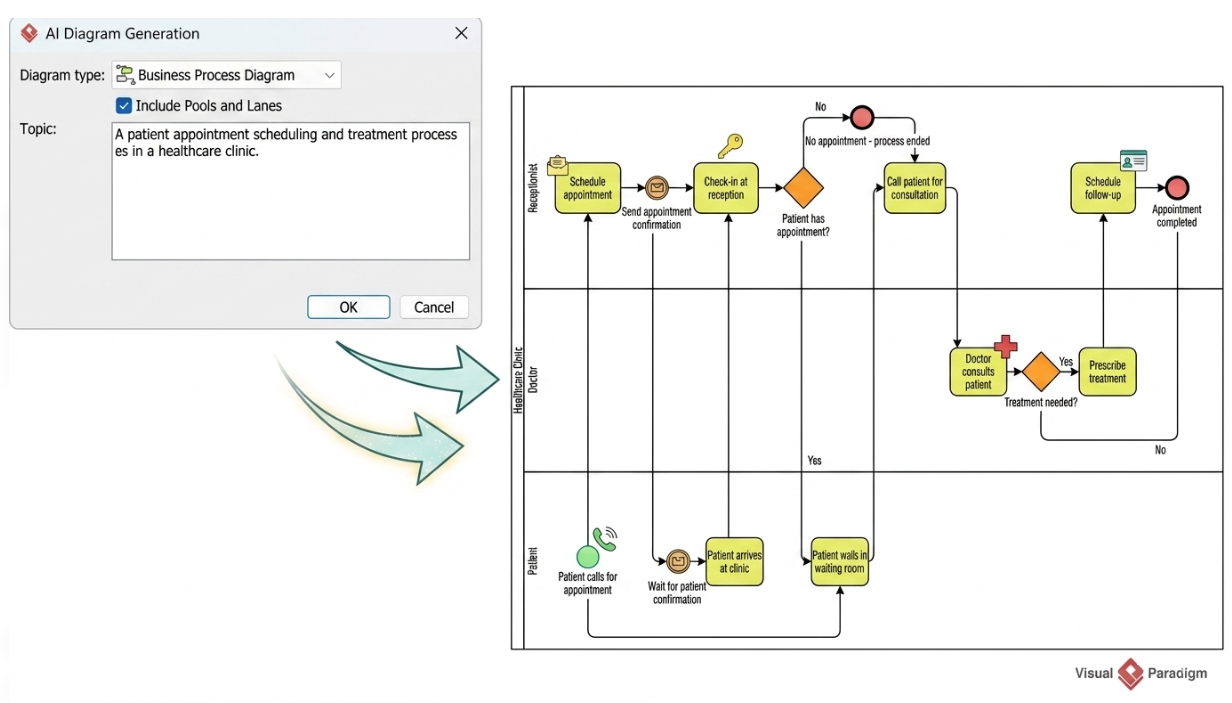
Open the Tool: Launch Visual Paradigm and select AI Diagram Generation from the Tools menu or open the AI Chatbot panel.
-
Select Type: Choose Business Process Diagram.
-
Enable Structure: Check the Include Pools and Lanes option to ensure organizational roles are segmented automatically.
-
Input Narrative: Paste your plain-text workflow.
-
Example Input: “When a customer places an order, the Sales Team verifies the details. If valid, the Inventory System checks stock. If stock is available, the Warehouse Team packs the item. If not, the Sales Team notifies the customer.”
-
-
Generate: Click OK. The AI renders a fully editable, standards-compliant BPMN diagram.
-
Refine: Use the chat interface to make adjustments or manually tweak the layout using the automated matrix routing to avoid tangled lines.
Conclusion
Choosing between Flowcharts and BPMN isn’t about which is “better,” but which is fit for purpose. For quick logic checks and internal team alignment, Flowcharts remain a valuable, low-friction tool. However, for complex, cross-functional, or automated business processes, BPMN 2.0 is indispensable.
For Agile teams, the barrier to adopting BPMN has traditionally been the steep learning curve and time investment. Visual Paradigm removes this barrier by leveraging AI to translate natural language into rigorous, compliant models. By automating the drafting process and enforcing syntax rules, it allows Product Managers and Business Analysts to deliver precise, actionable documentation without sacrificing sprint velocity. In an era where clarity drives execution, combining the rigor of BPMN with the speed of AI is the competitive edge modern teams need.
Recommended Reading: Visual Paradigm Resources
- From Narrative to Diagram: How Visual Paradigm’s AI BPMN Generator Transforms Process Modeling Workflows: An overview of how AI converts text descriptions into structured BPMN diagrams.
- AI BPMN Tool Features: Detailed breakdown of AI capabilities including text-to-diagram and conversational refinement.
- BPMN with Visual Paradigm AI: A Comprehensive Guide: Step-by-step tutorial on using AI for BPMN modeling.
- The Comprehensive Guide to BPMN Concepts, Best Practices, and Modern Tooling: Deep dive into BPMN standards and how modern tools support them.
- How AI-Powered NLP is Revolutionizing Text-to-BPMN Generation for Enterprise Process Modeling: Technical insight into the NLP engines behind automated diagram generation.
- AI Chatbot: A Comprehensive Guide to Visual Modeling: Guide on using conversational AI to iteratively build and refine visual models.
- BPMN Tutorial: Visual Paradigm Tooling & AI Chatbot Ecosystem: Practical examples of integrating AI chatbots into BPMN workflows.
- AI BPMN Business Process Diagram Generator Update: Release notes and new features for the AI BPMN generator.