


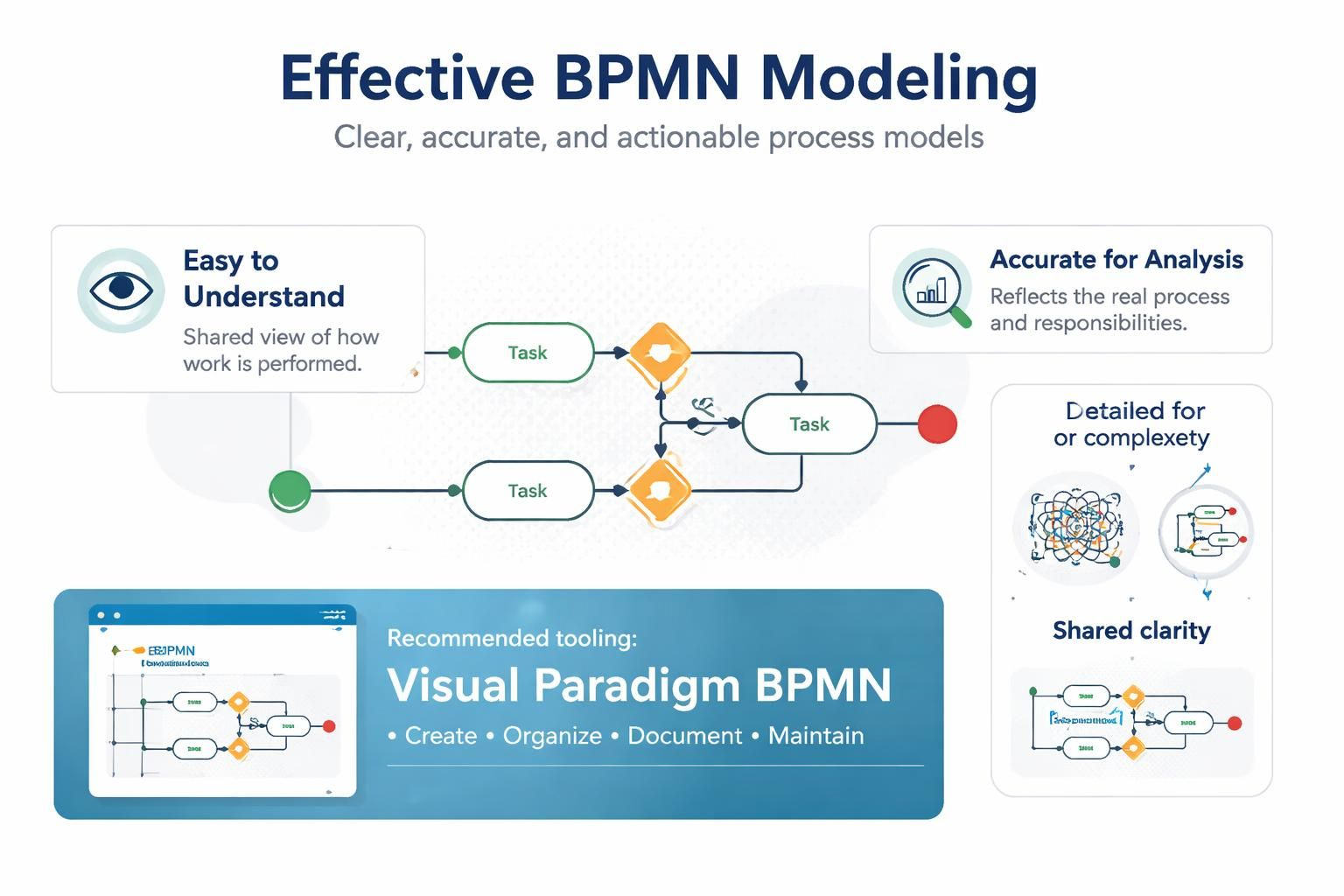
BPMN is most valuable when a process model is easy to understand, accurate enough for analysis, and detailed enough to support improvement or automation. The goal is not to create the most complicated diagram possible; it is to create a shared representation of how work is performed.
Visual Paradigm BPMN can support this work by providing a graphical modeling environment for creating BPMN diagrams, organizing process models, documenting elements, and maintaining consistency across related diagrams.
1. Define the purpose and audience first
Before creating a BPMN diagram, determine why it is being created and who will use it.
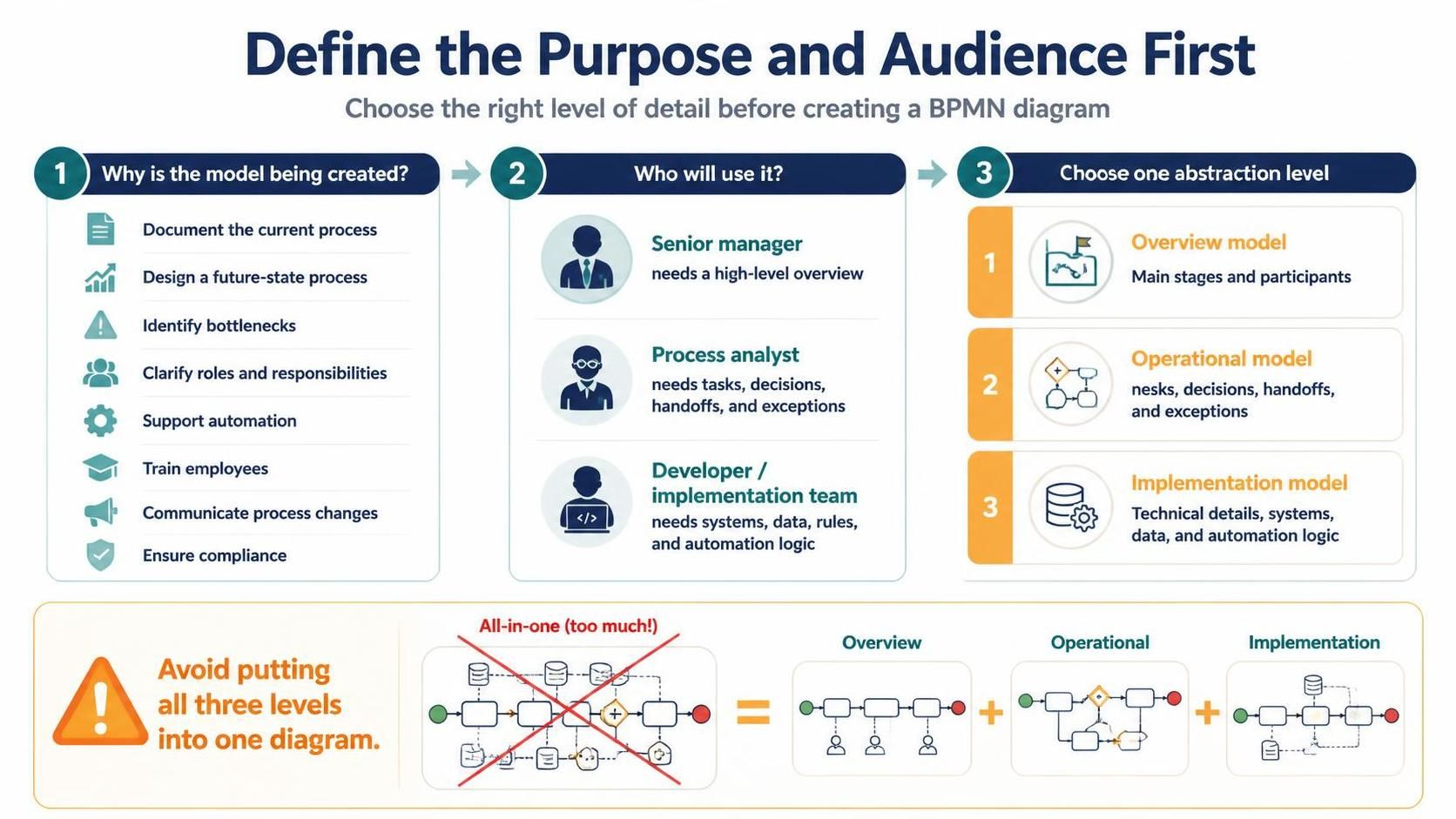
Common purposes include:
-
Documenting the current process
-
Designing a future-state process
-
Identifying bottlenecks and unnecessary steps
-
Clarifying roles and responsibilities
-
Supporting automation or software implementation
-
Training employees
-
Communicating process changes to management
-
Ensuring compliance or auditability
The same process may require different levels of detail for different audiences. A senior manager may need a high-level overview, while a process analyst or developer may need detailed tasks, data, exceptions, and business rules.
A useful practice is to define the intended level of abstraction before modeling:
-
Overview model: Shows the main stages and participants
-
Operational model: Shows tasks, decisions, handoffs, and exceptions
-
Implementation model: Adds technical details, system interactions, data, and automation logic
Avoid trying to represent all three levels in one diagram.
2. Establish clear process boundaries
Every BPMN diagram should have a clear beginning and end. Define what is inside the process and what is outside its scope.
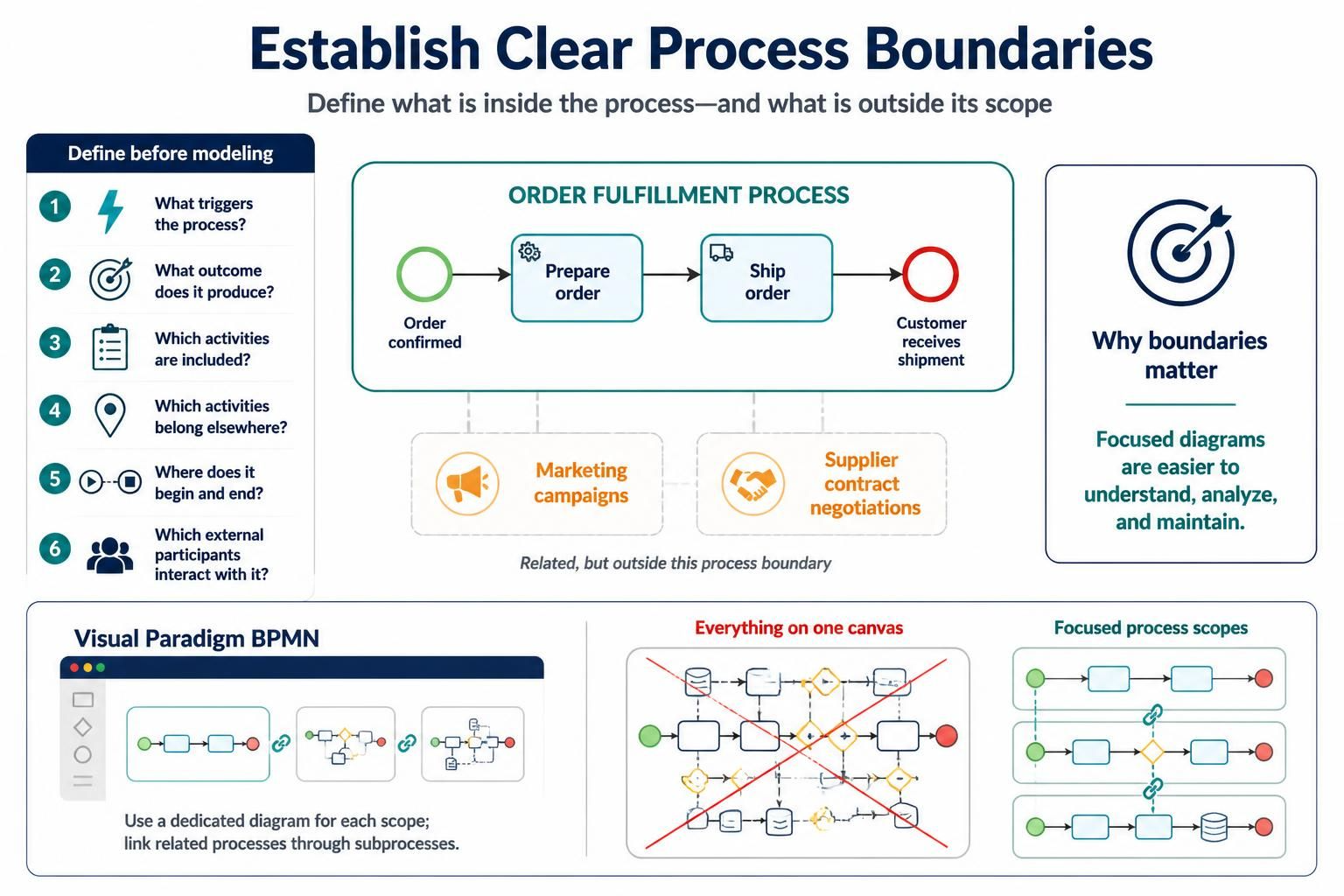
For example, an “Order Fulfillment” process might begin when an order is confirmed and end when the customer receives the shipment. Activities such as marketing campaigns or supplier contract negotiations may be related but outside the process boundary.
Ask these questions before modeling:
-
What triggers the process?
-
What outcome does the process produce?
-
Which activities are included?
-
Which activities belong to another process?
-
Where does the process begin and end?
-
What external participants interact with it?
Clearly defined boundaries prevent diagrams from becoming overly broad and difficult to maintain.
In Visual Paradigm, you can use a dedicated BPMN diagram for each process scope and connect related processes through linked or referenced subprocesses rather than putting everything on one canvas.
3. Use pools and lanes correctly
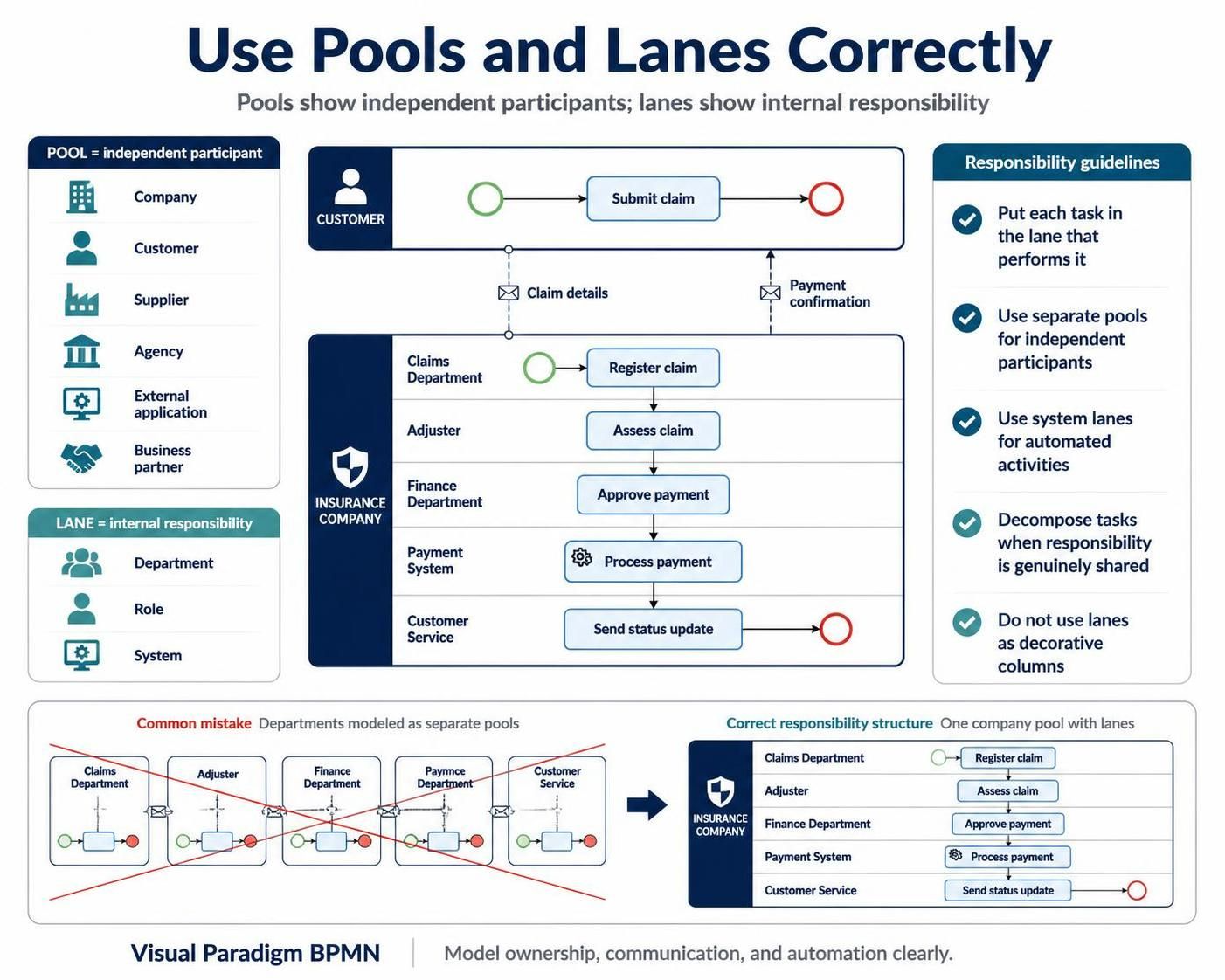
Pools and lanes communicate responsibility.
Pools
A pool represents an independent participant in a collaboration, such as:
-
A company
-
A customer
-
A supplier
-
A government agency
-
An external application
-
A business partner
Use separate pools when participants have independent control over their processes or when communication between them needs to be shown explicitly.
Lanes
Lanes divide a pool into internal roles, departments, systems, or responsibility areas.
For example, an insurance claims process might use lanes for:
-
Customer
-
Claims Department
-
Adjuster
-
Finance Department
-
Payment System
A common mistake is using lanes merely as decorative columns. Each lane should communicate who performs or owns the activities inside it.
Responsibility guidelines
-
Place each task in the lane of the role or system responsible for performing it.
-
Avoid assigning one task to several lanes unless the responsibility is genuinely shared.
-
If multiple departments collaborate on one task, consider whether the task should be decomposed.
-
Use system lanes when the system performs an automated activity.
-
Use pools for independent participants, not simply for every department.
4. Apply consistent naming conventions
Good names make a BPMN diagram understandable without additional explanation.
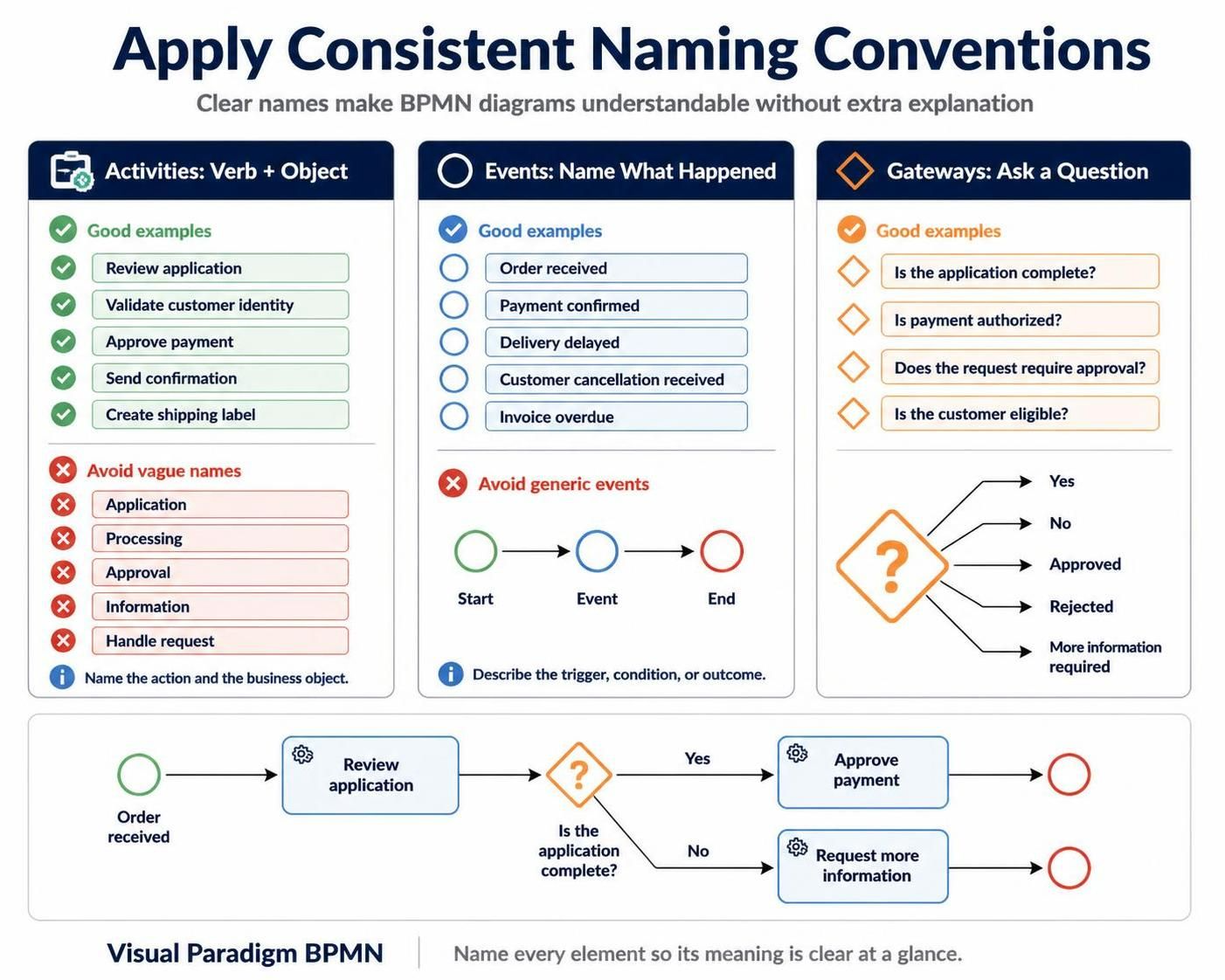
Name activities with verb–object phrases
Use names such as:
-
Review application
-
Validate customer identity
-
Approve payment
-
Send confirmation
-
Create shipping label
Avoid vague names such as:
-
Application
-
Processing
-
Approval
-
Information
-
Handle request
A task name should communicate an action and its business object.
Name events based on their meaning
Examples include:
-
Order received
-
Payment confirmed
-
Delivery delayed
-
Customer cancellation received
-
Invoice overdue
Avoid naming every event simply “Start,” “Event,” or “End.” The name should clarify what happened or what condition exists.
Name gateways as questions when useful
Gateway labels can improve readability:
-
Is the application complete?
-
Is payment authorized?
-
Does the request require approval?
-
Is the customer eligible?
The outgoing sequence flows should then use clear conditions such as:
-
Yes
-
No
-
Approved
-
Rejected
-
More information required
5. Keep the main flow simple and readable
A BPMN diagram should generally read in one direction, usually from left to right or from top to bottom. Avoid unnecessary crossing lines, backtracking, and disconnected elements.
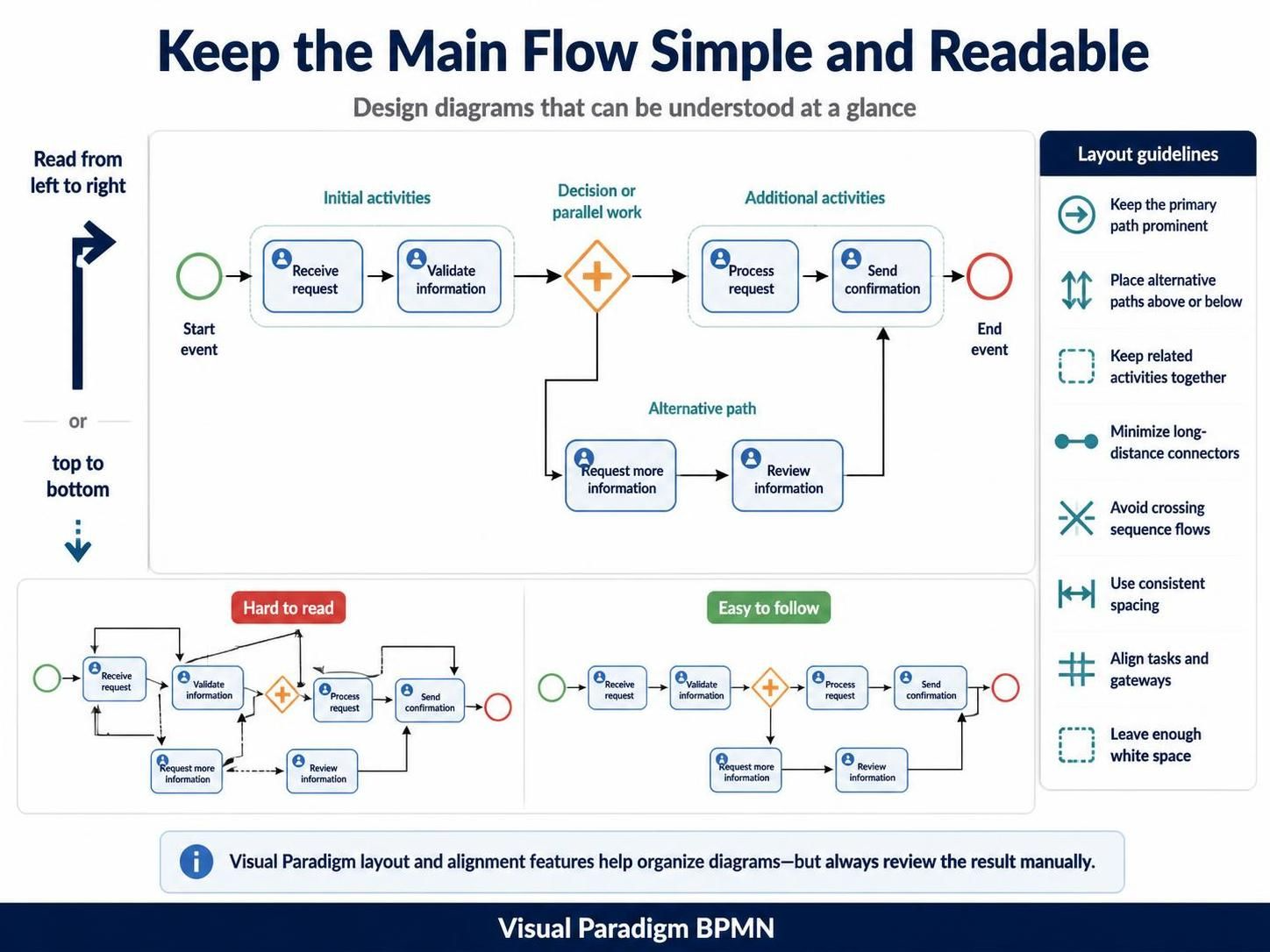
A readable main flow usually follows this pattern:
-
Start event
-
Initial activities
-
Decision or parallel work
-
Additional activities
-
End event
Practical layout guidelines include:
-
Keep the primary path visually prominent.
-
Place alternative paths below or above the main path.
-
Keep related activities near one another.
-
Minimize long-distance connectors.
-
Avoid crossing sequence flows.
-
Use consistent spacing between elements.
-
Align tasks and gateways where possible.
-
Give diagrams enough white space.
Visual Paradigm’s diagram layout and alignment features can help organize elements, but automatic layout should be reviewed manually. A technically valid diagram can still be difficult to read if the visual flow is confusing.
6. Use gateways according to their actual meaning
Gateways are frequently misused. Each gateway type communicates a different kind of control logic.
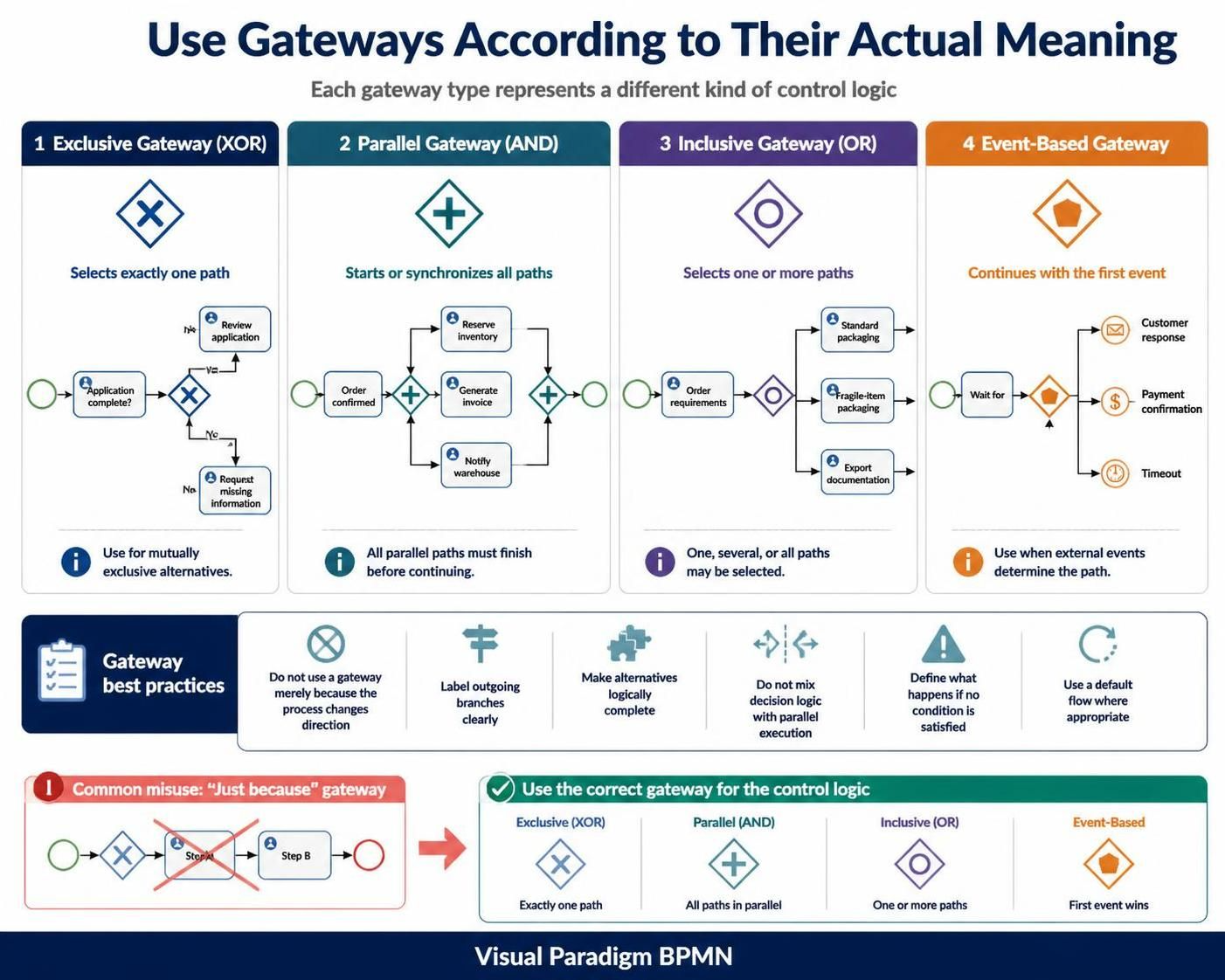
Exclusive gateway
An exclusive gateway represents a decision where only one outgoing path is selected.
Example:
Application complete?
 ├── Yes → Review application
 └── No  → Request missing information
Use an exclusive gateway when the alternatives are mutually exclusive.
Parallel gateway
A parallel gateway starts or synchronizes multiple paths that occur simultaneously.
Example:
Order confirmed
 ├── Reserve inventory
 ├── Generate invoice
 └── Notify warehouse
Use a matching parallel gateway to synchronize paths when all parallel activities must finish before the process continues.
Inclusive gateway
An inclusive gateway selects one or more paths based on conditions.
For example, an order may require:
-
Standard packaging
-
Fragile-item packaging
-
Export documentation
One, several, or all of these paths may be selected.
Event-based gateway
An event-based gateway routes the process based on which event occurs first.
Example:
Wait for:
 ├── Customer response
 ├── Payment confirmation
 └── Timeout
This is useful when the process reacts to external events rather than evaluating a data condition.
Gateway best practices
-
Do not use a gateway simply because a process changes direction.
-
Label outgoing branches clearly.
-
Ensure the branches represent logically complete alternatives.
-
Avoid mixing decision logic and parallel execution in one gateway.
-
Specify what happens if no condition is satisfied.
-
Use a default flow where appropriate.
7. Distinguish sequence flows from message flows
This distinction is essential.
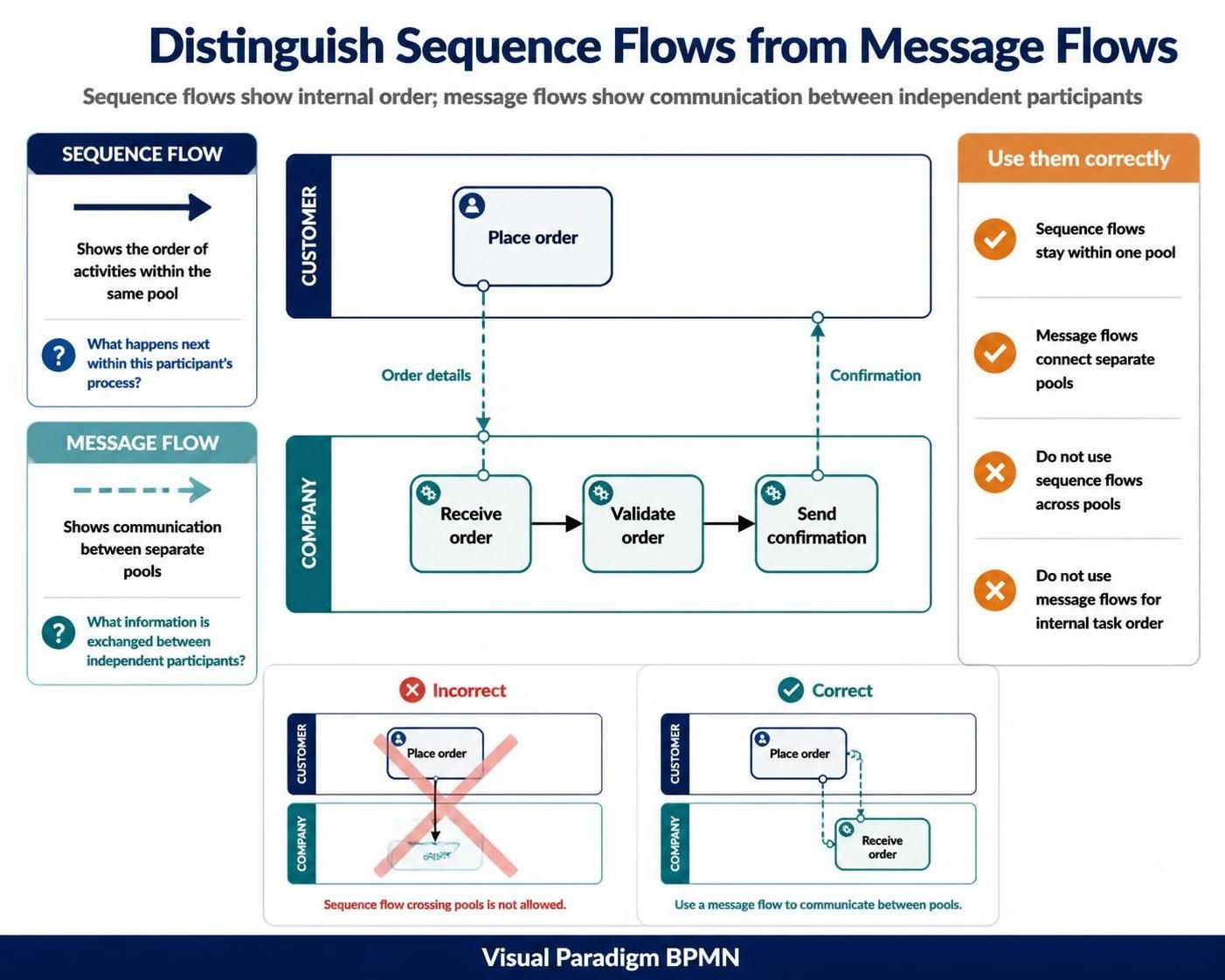
Sequence flow
A sequence flow shows the order of activities within the same pool. It answers:
What happens next within this participant’s process?
Message flow
A message flow shows communication between separate pools. It answers:
What information is exchanged between independent participants?
For example, a customer sending an order to a company should generally be represented with a message flow between the customer pool and the company pool.
Do not use sequence flows to connect activities across separate pools. Likewise, do not use message flows to represent the internal order of tasks within one participant’s process.
A simple collaboration might look conceptually like this:
Customer Pool                         Company Pool

Place order  ── message ──>          Receive order
                                     Validate order
                 <── message ──       Send confirmation
8. Separate normal flow from exception flow
Real processes include errors, delays, cancellations, and unusual conditions. These should be modeled without overwhelming the primary process path.
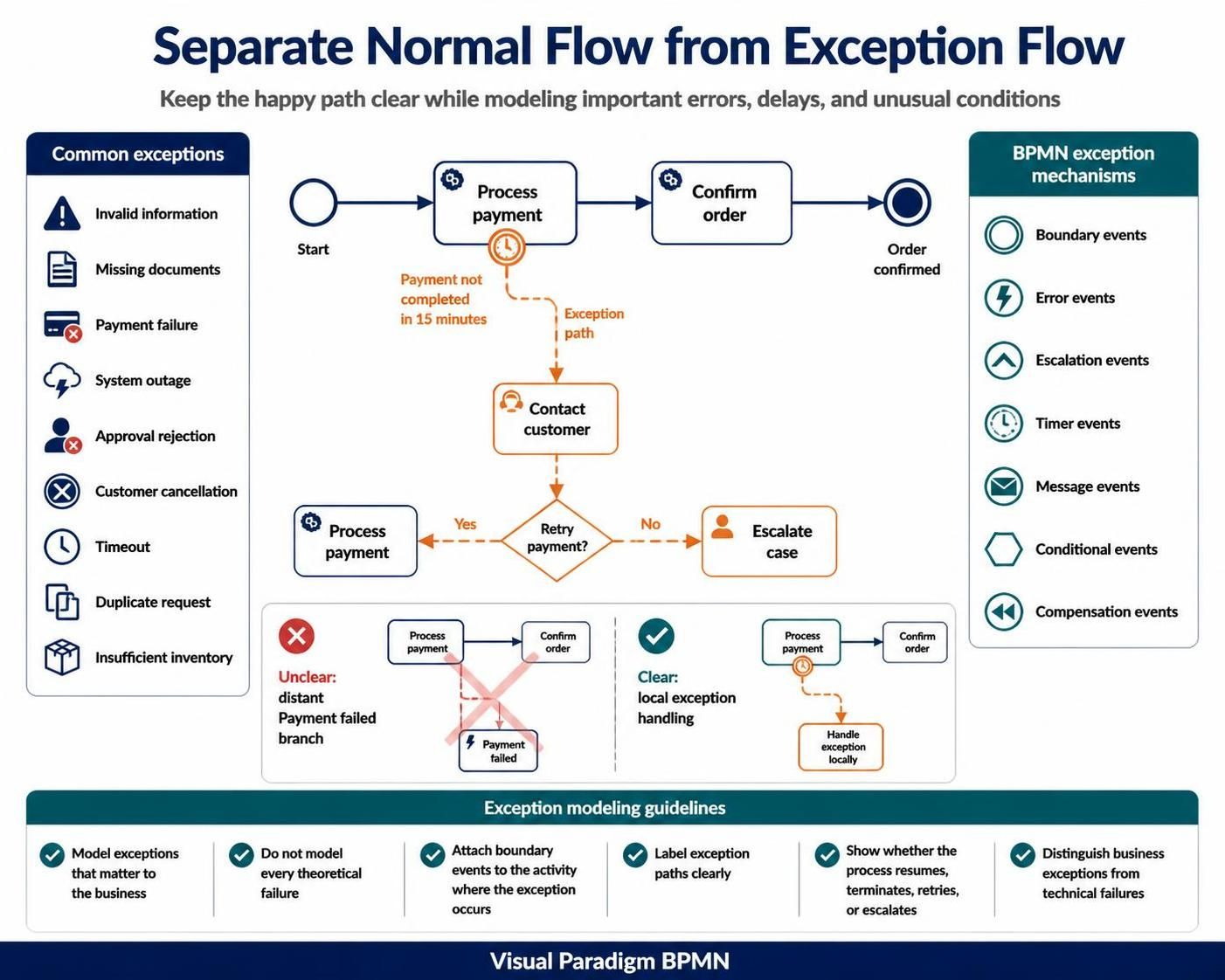
Common exception scenarios include:
-
Invalid information
-
Missing documents
-
Payment failure
-
System outage
-
Approval rejection
-
Customer cancellation
-
Timeout
-
Duplicate request
-
Insufficient inventory
BPMN provides several mechanisms for representing exceptions, including:
-
Boundary events
-
Error events
-
Escalation events
-
Timer events
-
Message events
-
Conditional events
-
Compensation events
Example: payment timeout
A payment task might have a timer boundary event attached to it:
Process payment
 ├── Payment successful → Confirm order
 └── Timeout → Contact customer
This is clearer than placing a distant “Payment failed” branch somewhere else in the diagram.
Exception modeling guidelines
-
Model exceptions that matter to the business.
-
Do not model every theoretical failure.
-
Attach boundary events to the activity where the exception can occur.
-
Clearly label the exception path.
-
Show whether the process resumes, terminates, retries, or escalates.
-
Distinguish business exceptions from technical failures.
9. Use subprocesses to control complexity
Large diagrams become difficult to understand when they show too much detail at once. Subprocesses allow a modeler to present a process at multiple levels.
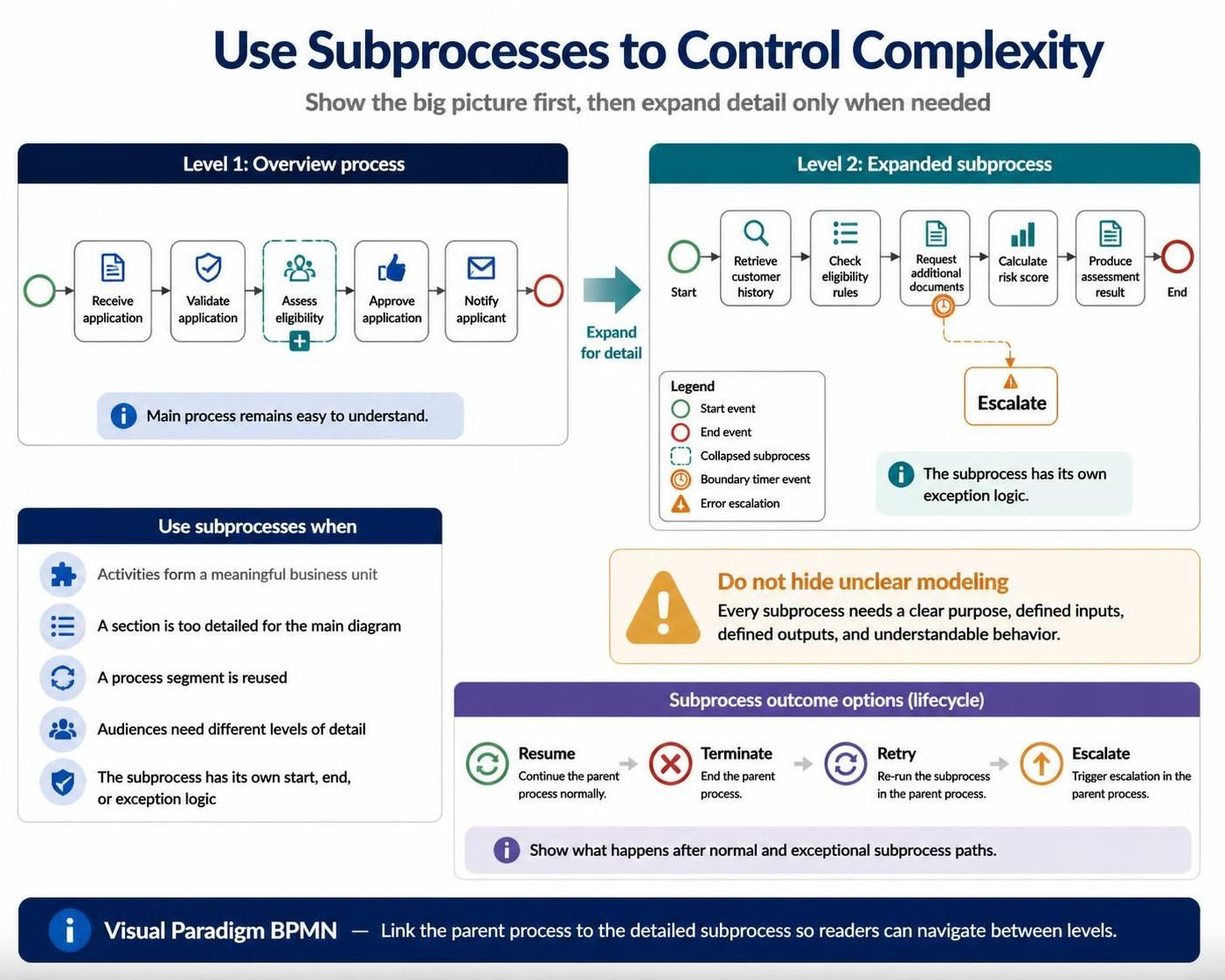
For example, a high-level process may include:
Receive application
Validate application
Assess eligibility
Approve application
Notify applicant
“Assess eligibility” could then be expanded into a separate subprocess containing:
-
Retrieve customer history
-
Check eligibility rules
-
Request additional documents
-
Calculate risk score
-
Produce assessment result
Use subprocesses when:
-
A group of activities forms a meaningful business unit.
-
A section of the process is too detailed for the main diagram.
-
The same process segment is reused.
-
Different audiences need different levels of detail.
-
A subprocess has its own start, end, or exception logic.
Do not use subprocesses merely to hide unclear modeling. Each subprocess should have a clear purpose and well-defined inputs and outputs.
In Visual Paradigm, maintain a logical relationship between the parent process and the detailed subprocess diagram so readers can navigate from the overview to the expanded view.
10. Model data consistently
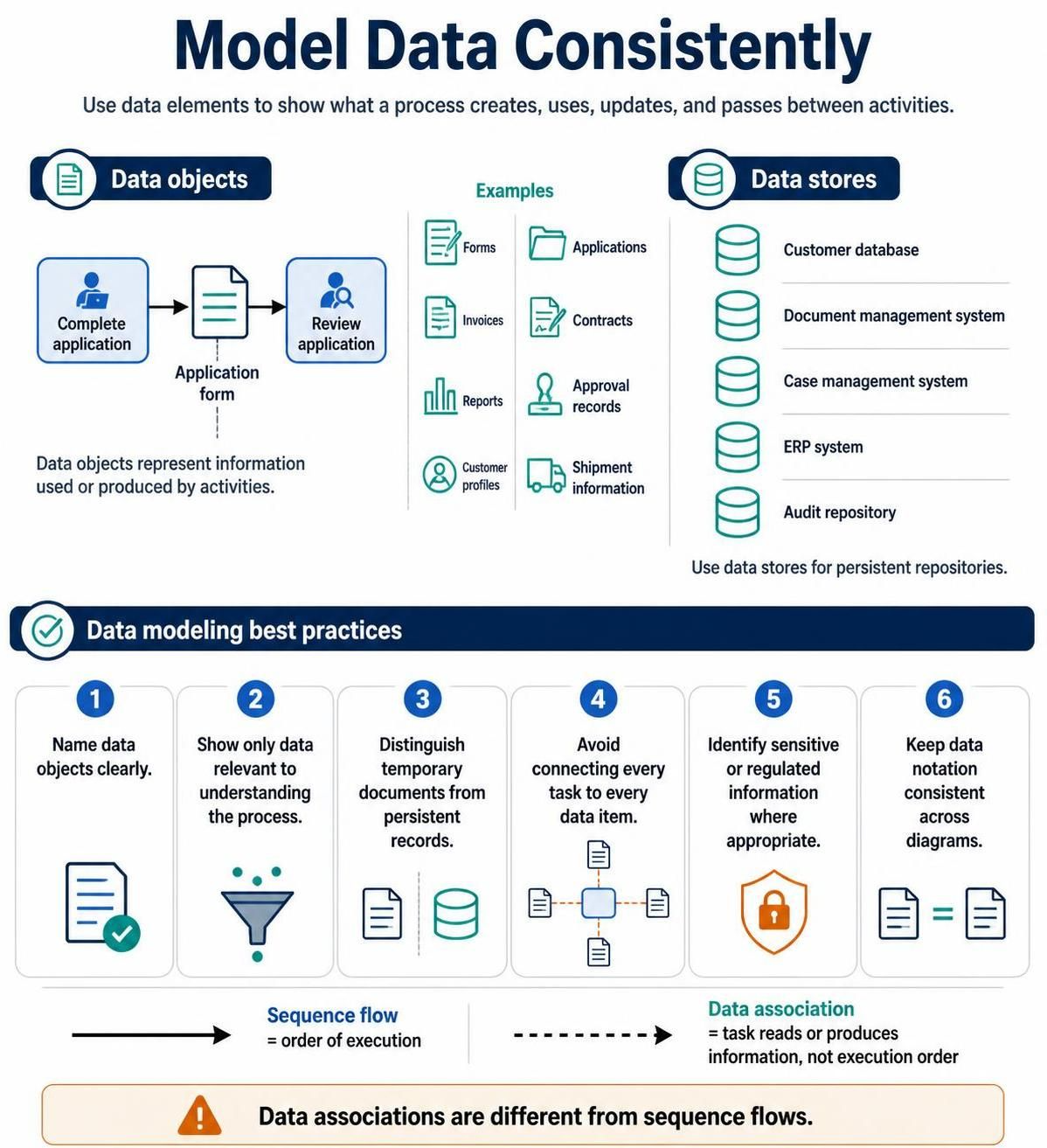
Data often explains why a process exists and what each activity produces. BPMN data elements can represent:
-
Forms
-
Applications
-
Invoices
-
Contracts
-
Reports
-
Approval records
-
Customer profiles
-
Shipment information
Use data objects when information is created, used, updated, or passed between activities.
Example:
Complete application → Application form → Review application
Use data stores for persistent repositories such as:
-
Customer database
-
Document management system
-
Case management system
-
ERP system
-
Audit repository
Data modeling best practices include:
-
Name data objects clearly.
-
Show only data relevant to understanding the process.
-
Distinguish temporary documents from persistent records.
-
Avoid connecting every task to every data item.
-
Identify sensitive or regulated information where appropriate.
-
Keep data notation consistent across diagrams.
Data associations are different from sequence flows. A data association shows that a task reads or produces information; it does not show the order of execution.
11. Make business rules visible
Many process decisions depend on policies or rules that may not be obvious from the diagram.
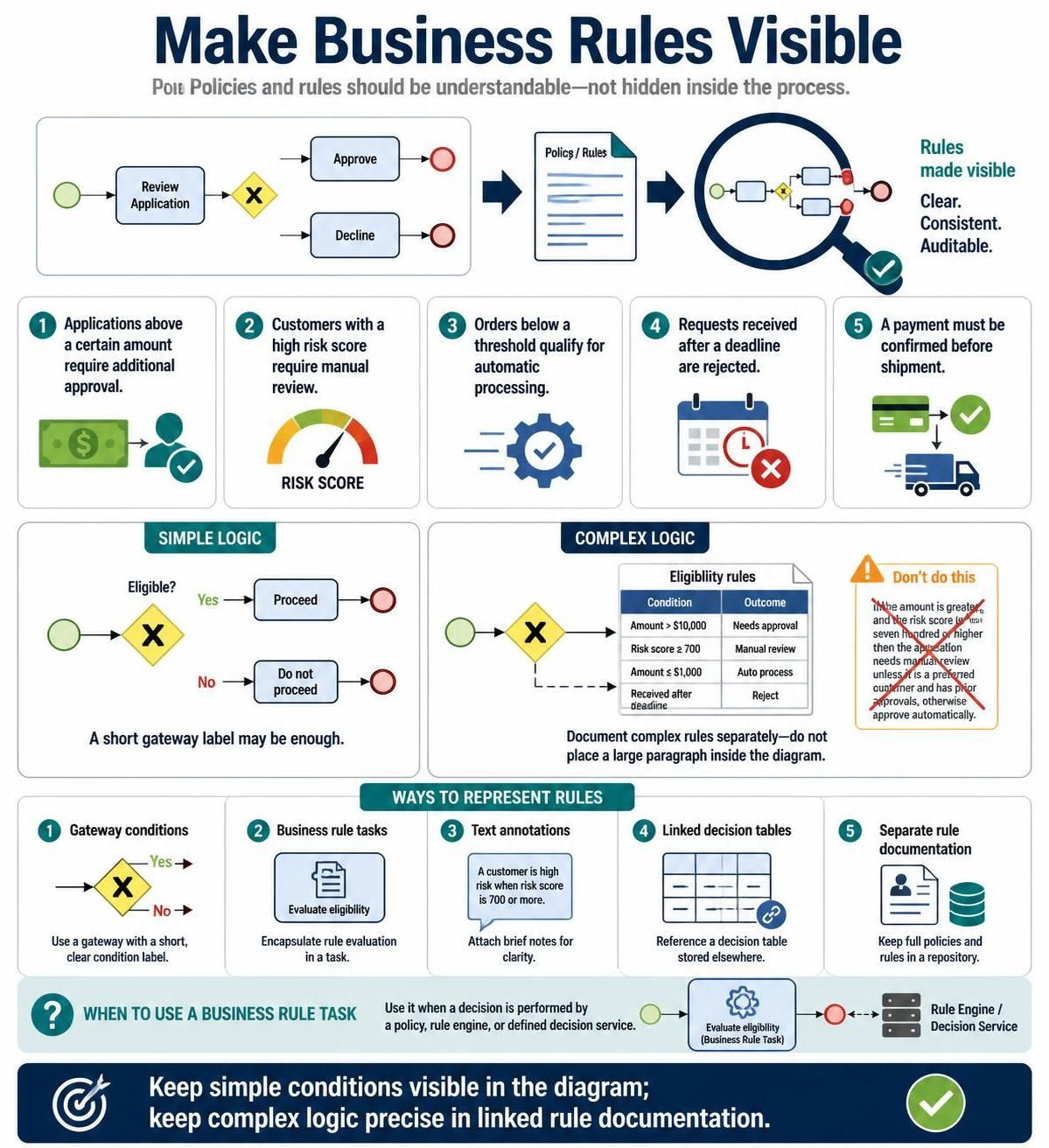
Examples include:
-
Applications above a certain amount require additional approval.
-
Customers with a high risk score require manual review.
-
Orders below a threshold qualify for automatic processing.
-
Requests received after a deadline are rejected.
-
A payment must be confirmed before shipment.
Represent these rules using:
-
Gateway conditions
-
Business rule tasks
-
Text annotations
-
Linked decision tables
-
Separate rule documentation
A gateway label such as “Eligible?” may be sufficient for a simple process. For complex logic, document the rule separately rather than placing a large paragraph inside the diagram.
A business rule task is appropriate when a decision is performed by a policy, rule engine, or defined decision service.
12. Maintain a consistent level of detail
Inconsistent detail is one of the most common BPMN quality problems.
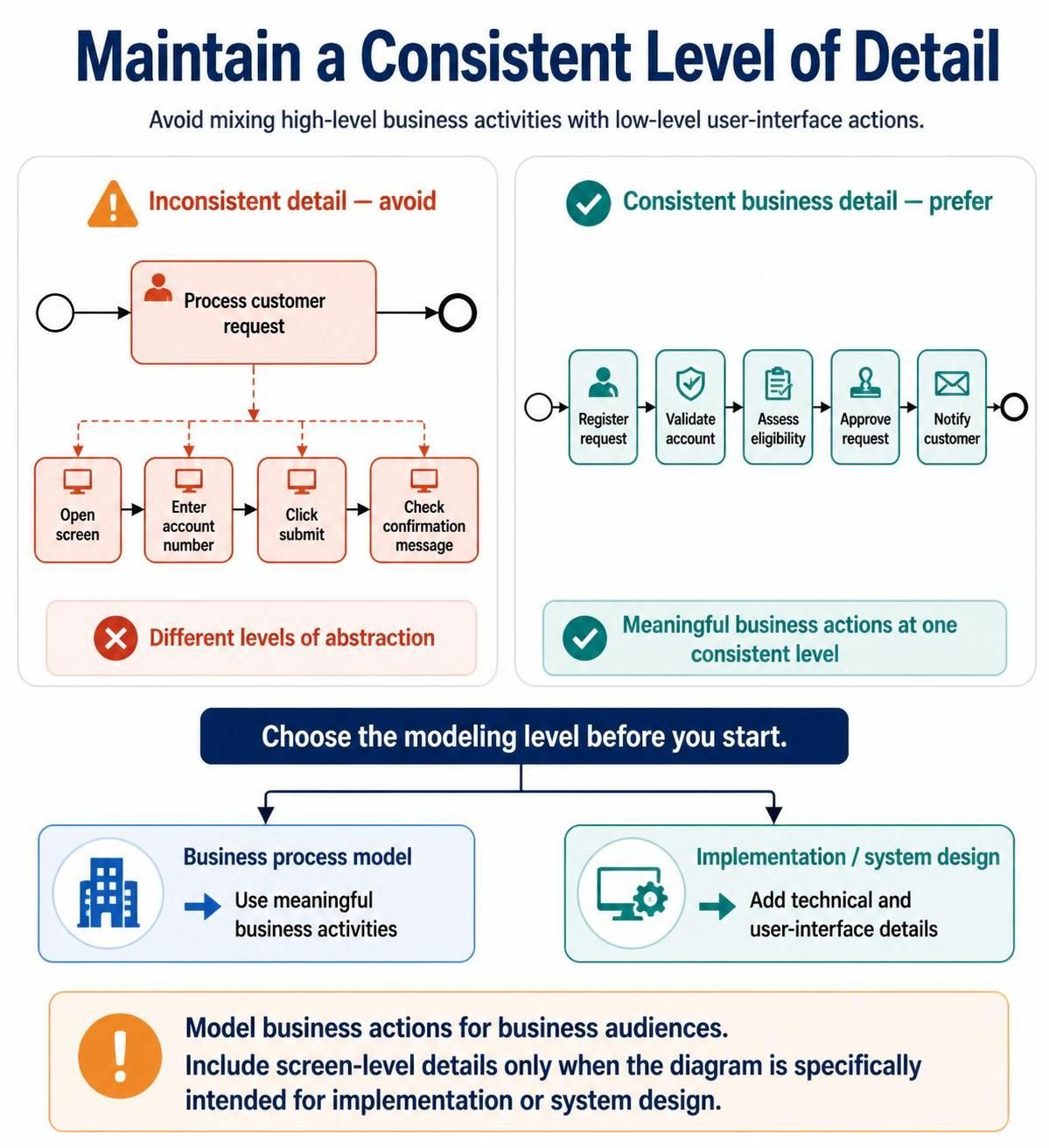
For example, a process might show:
-
“Process customer request” as one high-level task
-
“Open screen”
-
“Enter account number”
-
“Click submit”
-
“Check confirmation message”
These activities belong to different levels of abstraction. Decide whether the model describes business activities or detailed user-interface actions.
For business process modeling, prefer meaningful business actions such as:
-
Register request
-
Validate account
-
Assess eligibility
-
Approve request
-
Notify customer
Add technical or user-interface details only when the diagram is specifically intended for implementation or system design.
13. Avoid over-modeling
A BPMN diagram is not a transcript of every action an employee performs. Too much detail reduces clarity and makes maintenance difficult.
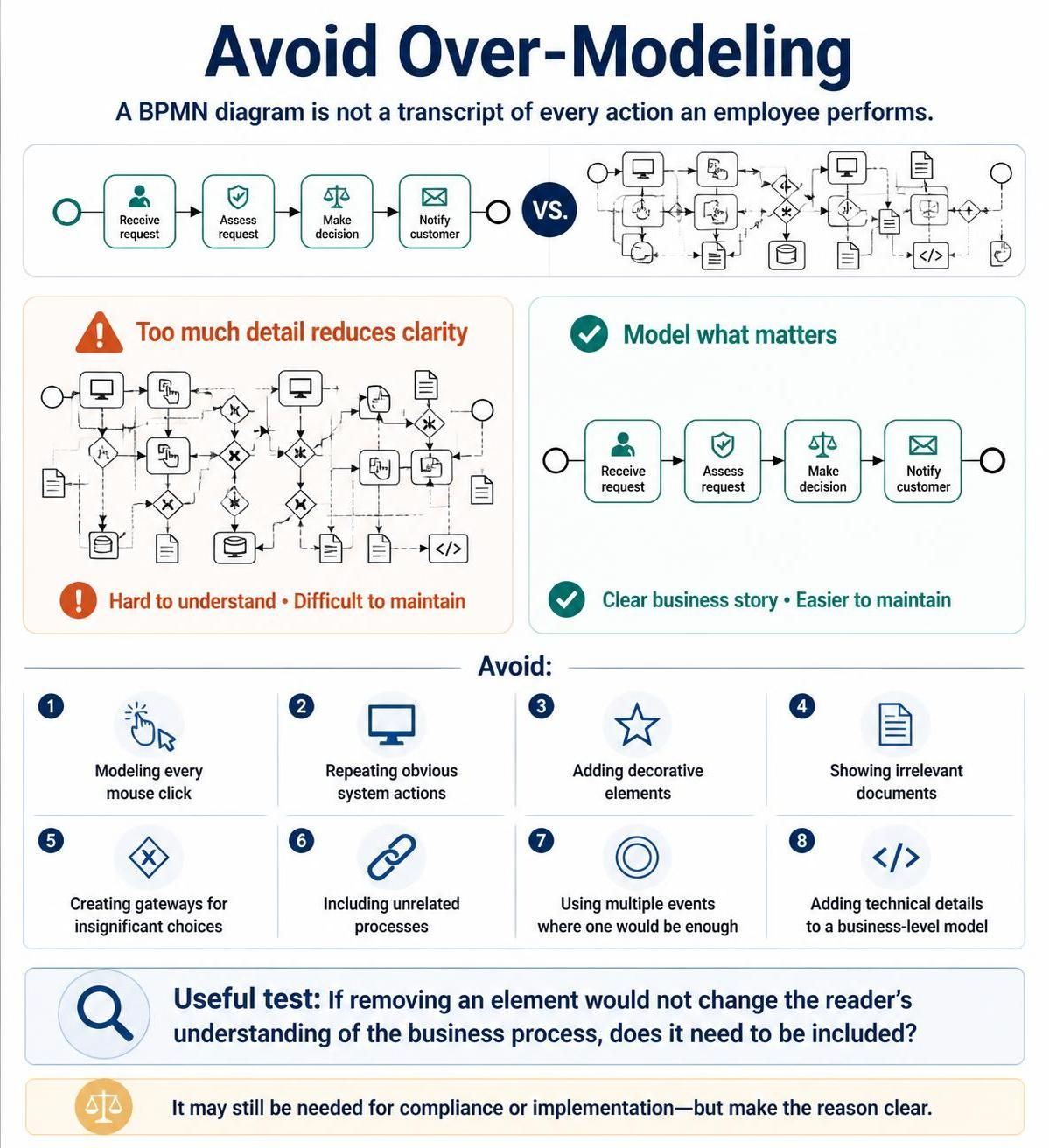
Avoid:
-
Modeling every mouse click
-
Repeating obvious system actions
-
Adding decorative elements
-
Showing irrelevant documents
-
Creating gateways for insignificant choices
-
Including unrelated processes
-
Using multiple events where one would be enough
-
Adding technical details to a business-level model
A useful test is:
If removing an element would not change the reader’s understanding of the business process, does it need to be included?
The answer may still be yes for compliance or implementation purposes, but the reason should be clear.
14. Use annotations carefully
Text annotations are useful for clarifying:
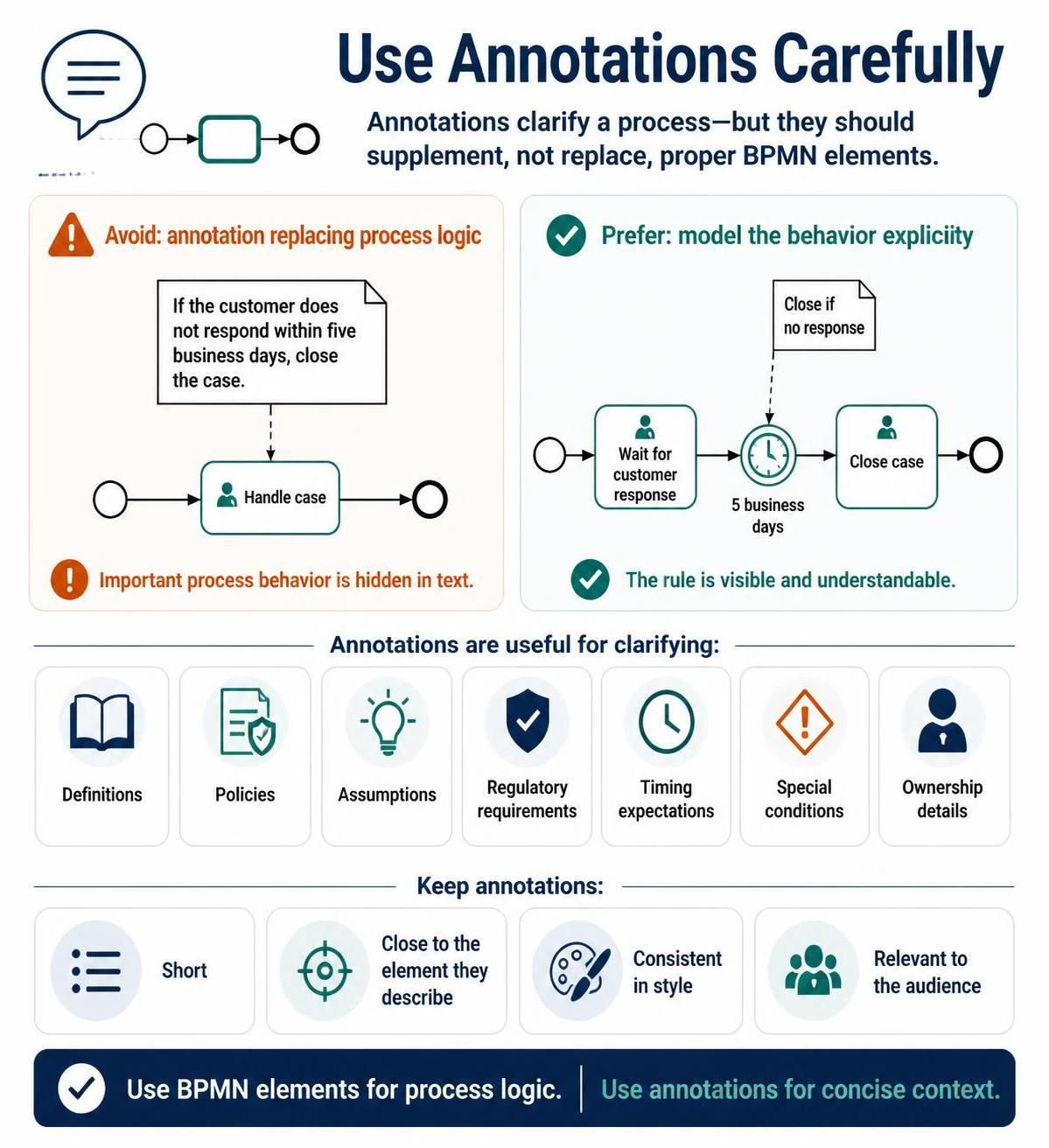
-
Definitions
-
Policies
-
Assumptions
-
Regulatory requirements
-
Timing expectations
-
Special conditions
-
Ownership details
However, annotations should supplement—not replace—proper BPMN elements.
For example, instead of writing “If the customer does not respond within five business days, close the case” in a large annotation, consider modeling a timer event and then using a short annotation to explain the business rule.
Keep annotations:
-
Short
-
Close to the element they describe
-
Consistent in style
-
Relevant to the audience
15. Represent timing and service-level expectations
Many processes depend on time. Examples include:
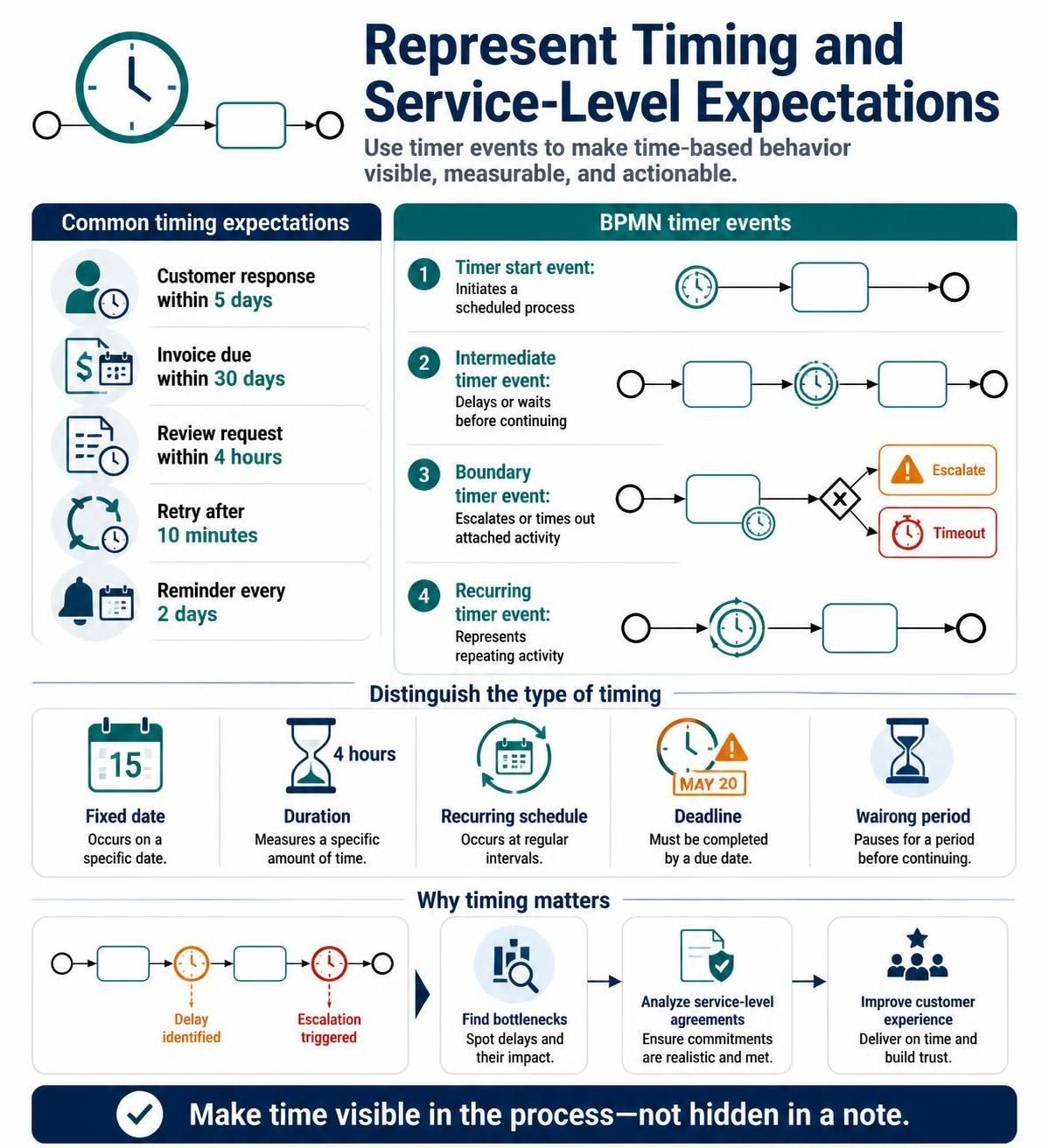
-
A customer must respond within five days.
-
An invoice is due within 30 days.
-
A request must be reviewed within four hours.
-
A retry occurs after ten minutes.
-
A reminder is sent every two days.
Use timer events to model time-based behavior:
-
A timer start event can initiate a scheduled process.
-
An intermediate timer event can delay a process.
-
A boundary timer event can trigger an escalation or timeout.
-
A timer event can represent recurring activity.
Clearly distinguish between:
-
A fixed date
-
A duration
-
A recurring schedule
-
A deadline
-
A waiting period
Timing information is particularly useful when analyzing bottlenecks, service-level agreements, and customer experience.
16. Model reusable processes consistently
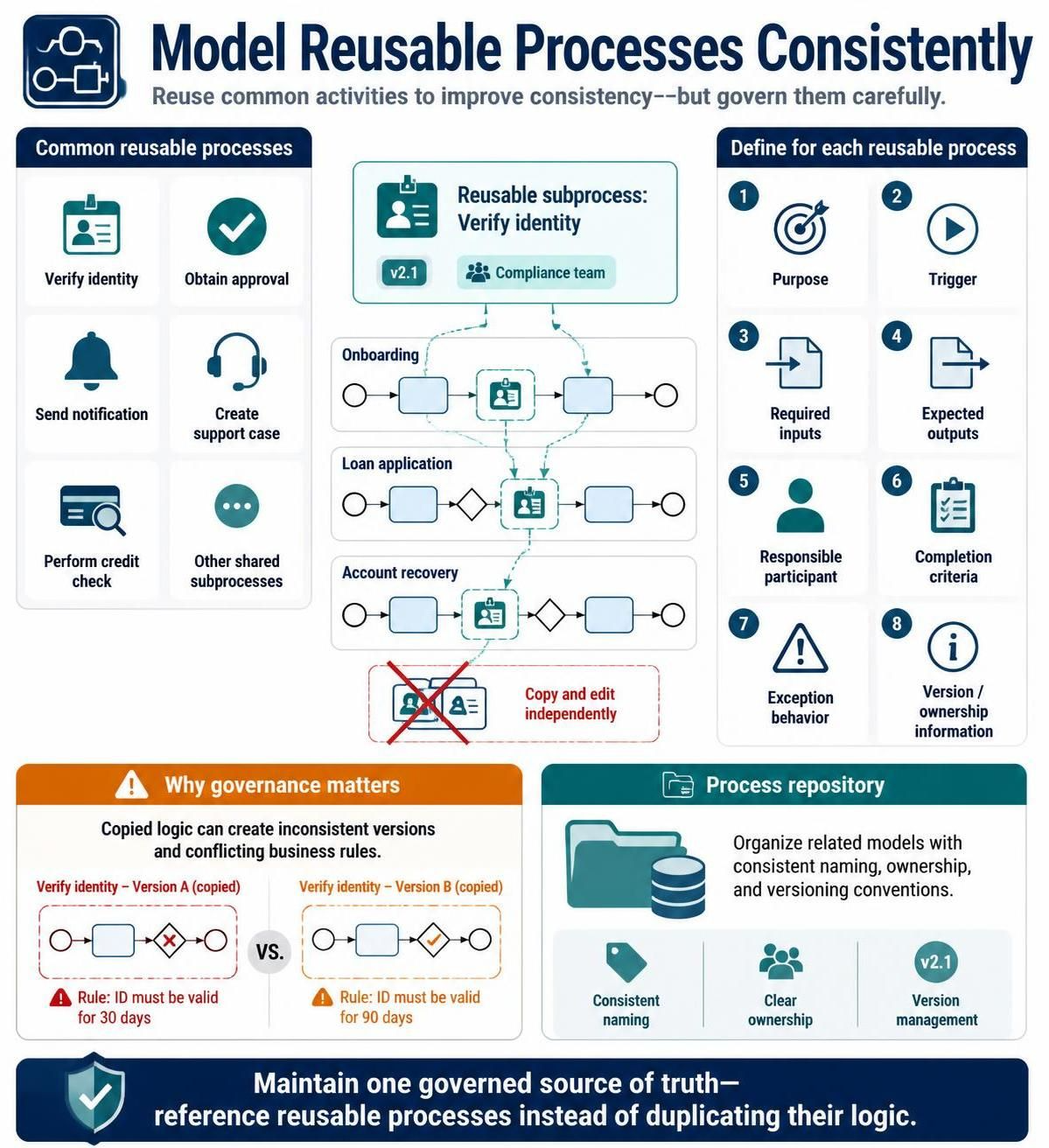
Organizations often reuse the same activity across multiple processes, such as:
-
Verify identity
-
Obtain approval
-
Send notification
-
Create support case
-
Perform credit check
Reusable subprocesses improve consistency but require governance.
For each reusable process, define:
-
Purpose
-
Trigger
-
Required inputs
-
Expected outputs
-
Responsible participant
-
Completion criteria
-
Exception behavior
-
Version or ownership information
Avoid copying and independently editing the same logic in several diagrams. This can lead to inconsistent versions and conflicting business rules.
A process repository in Visual Paradigm can help organize related models, provided that naming, ownership, and versioning conventions are applied consistently.
17. Apply visual consistency standards
A BPMN diagram should use visual conventions consistently throughout the model repository.
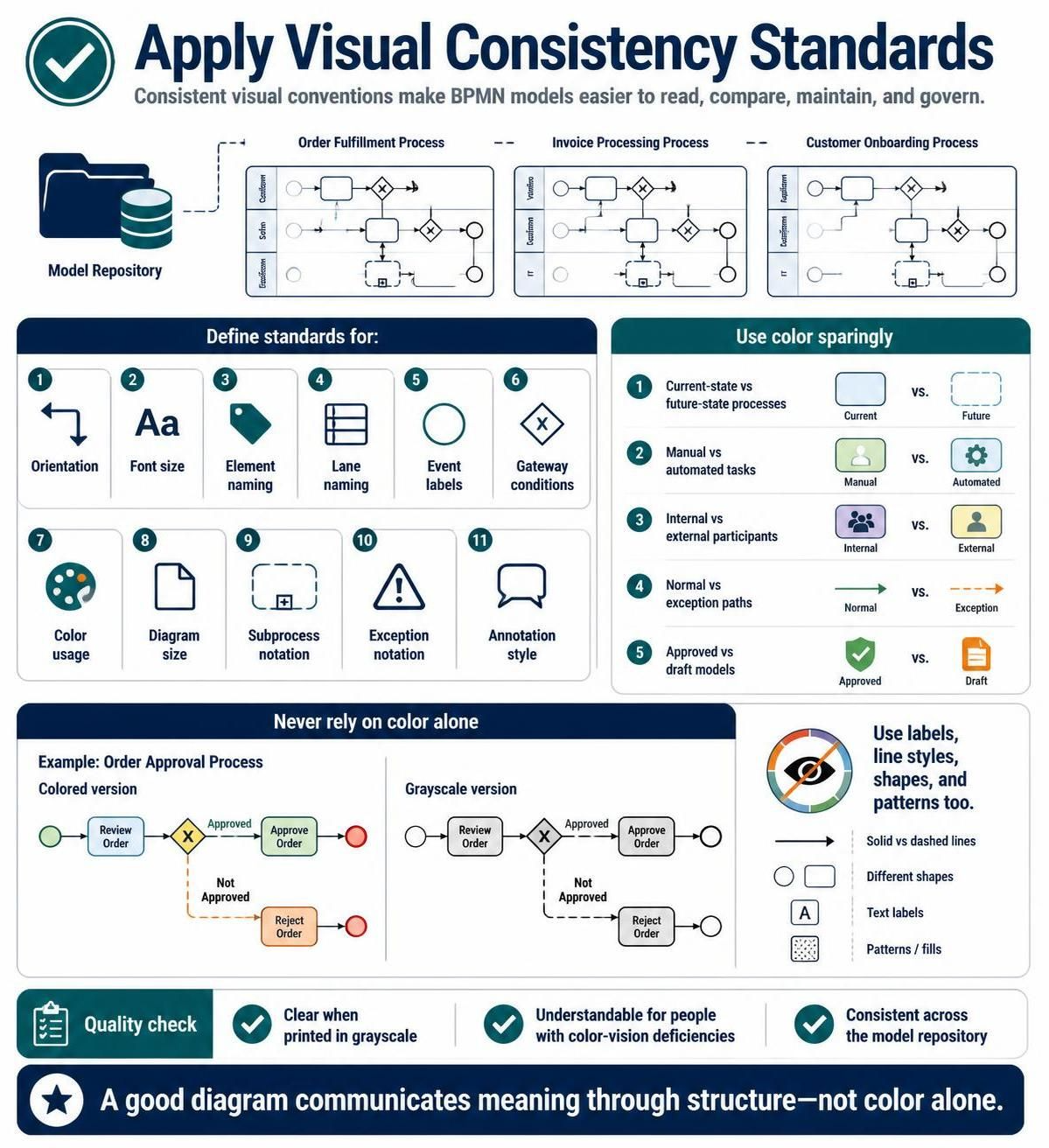
Define standards for:
-
Orientation
-
Font size
-
Element naming
-
Lane naming
-
Event labels
-
Gateway conditions
-
Color usage
-
Diagram size
-
Subprocess notation
-
Exception notation
-
Annotation style
Use color sparingly. Color can help distinguish:
-
Current-state versus future-state processes
-
Manual versus automated tasks
-
Internal versus external participants
-
Normal versus exception paths
-
Approved versus draft models
However, color should not be the only way to communicate meaning. A diagram should remain understandable when printed in grayscale or viewed by someone with color-vision deficiencies.
18. Validate the model technically and semantically
A BPMN diagram can be syntactically valid but still fail to represent the real process.
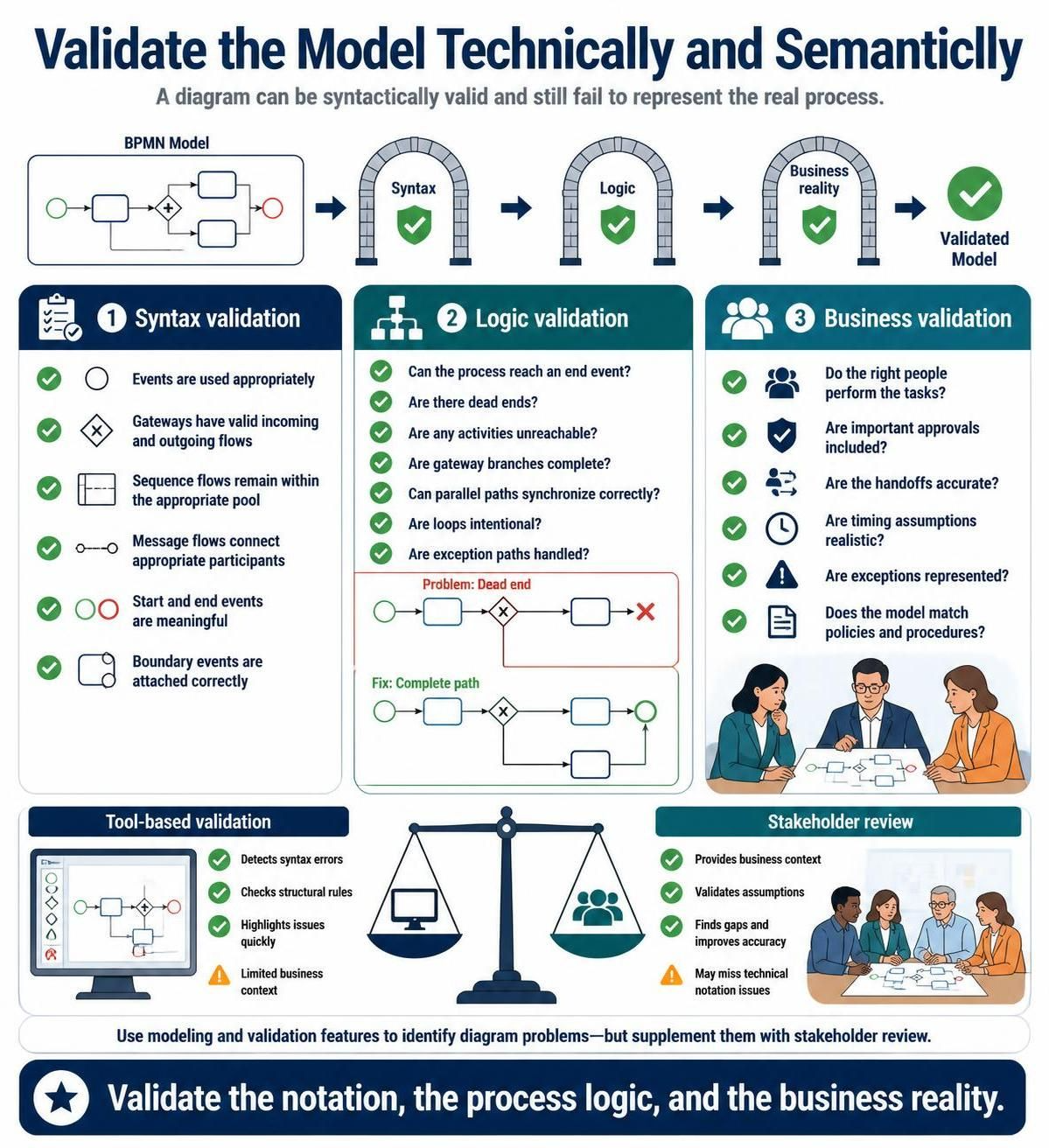
Validation should occur at several levels.
Syntax validation
Check whether the diagram follows BPMN notation rules:
-
Events are used appropriately.
-
Gateways have valid incoming and outgoing flows.
-
Sequence flows remain within the appropriate pool.
-
Message flows connect appropriate participants.
-
Start and end events are meaningful.
-
Boundary events are attached correctly.
Logic validation
Check whether the process can actually execute conceptually:
-
Can the process reach an end event?
-
Are there dead ends?
-
Are any activities unreachable?
-
Are gateway branches complete?
-
Can parallel paths synchronize correctly?
-
Are loops intentional?
-
Are exception paths handled?
Business validation
Check whether the model reflects reality:
-
Do the right people perform the tasks?
-
Are important approvals included?
-
Are the handoffs accurate?
-
Are timing assumptions realistic?
-
Are exceptions represented?
-
Does the model match policies and procedures?
Visual Paradigm’s validation and modeling features can help identify diagram problems, but tool-based validation should supplement stakeholder review rather than replace it.
19. Review models with stakeholders
Process models should be reviewed by the people who perform, manage, support, or receive the process.
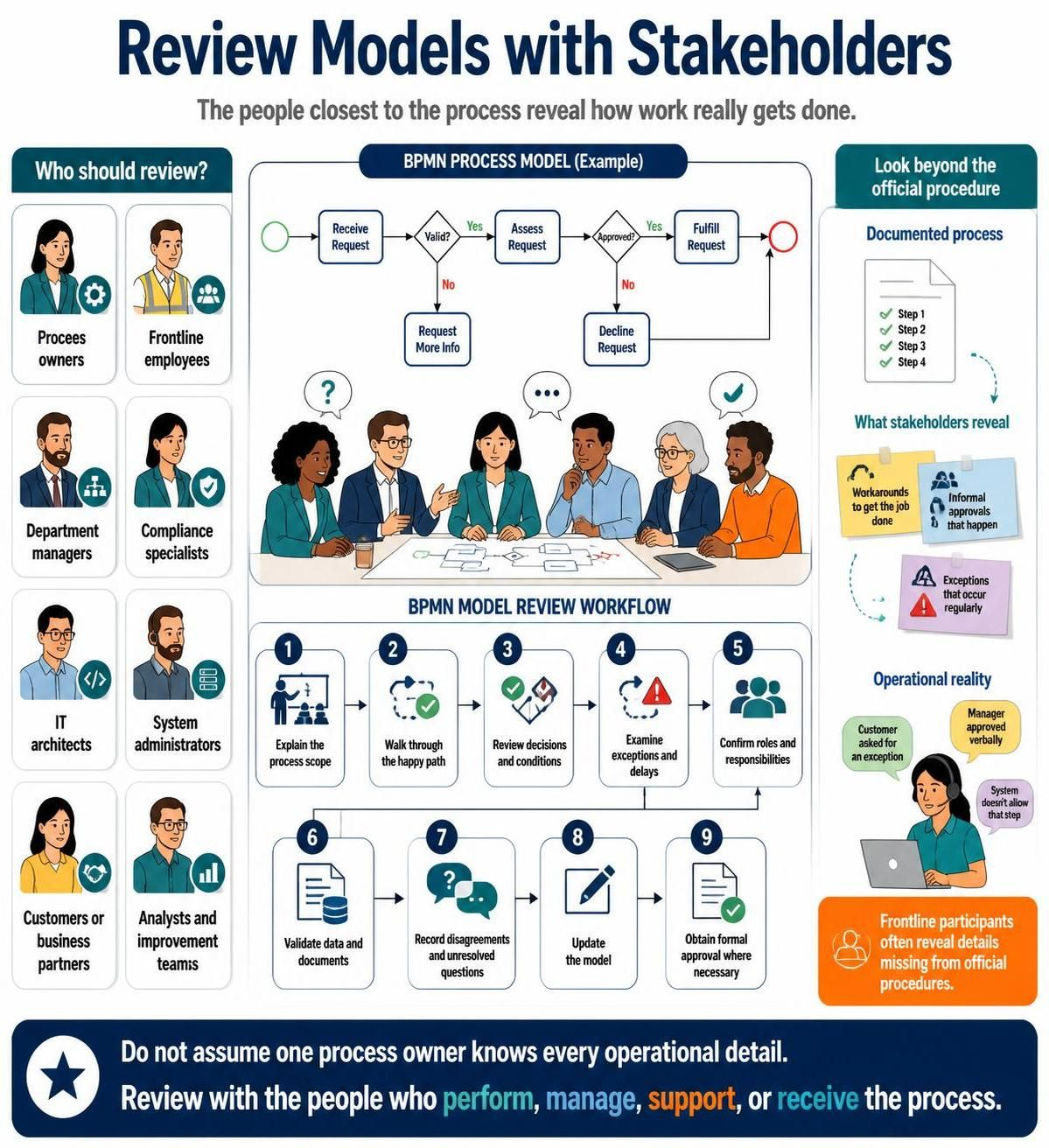
Useful reviewers include:
-
Process owners
-
Frontline employees
-
Department managers
-
Compliance specialists
-
IT architects
-
System administrators
-
Customers or business partners
-
Analysts and improvement teams
Use a structured review process:
-
Explain the process scope.
-
Walk through the happy path.
-
Review decisions and conditions.
-
Examine exceptions and delays.
-
Confirm roles and responsibilities.
-
Validate data and documents.
-
Record disagreements and unresolved questions.
-
Update the model.
-
Obtain formal approval where necessary.
Do not assume that a process owner knows every operational detail. Frontline participants often reveal workarounds, informal approvals, and exceptions that are absent from official procedures.
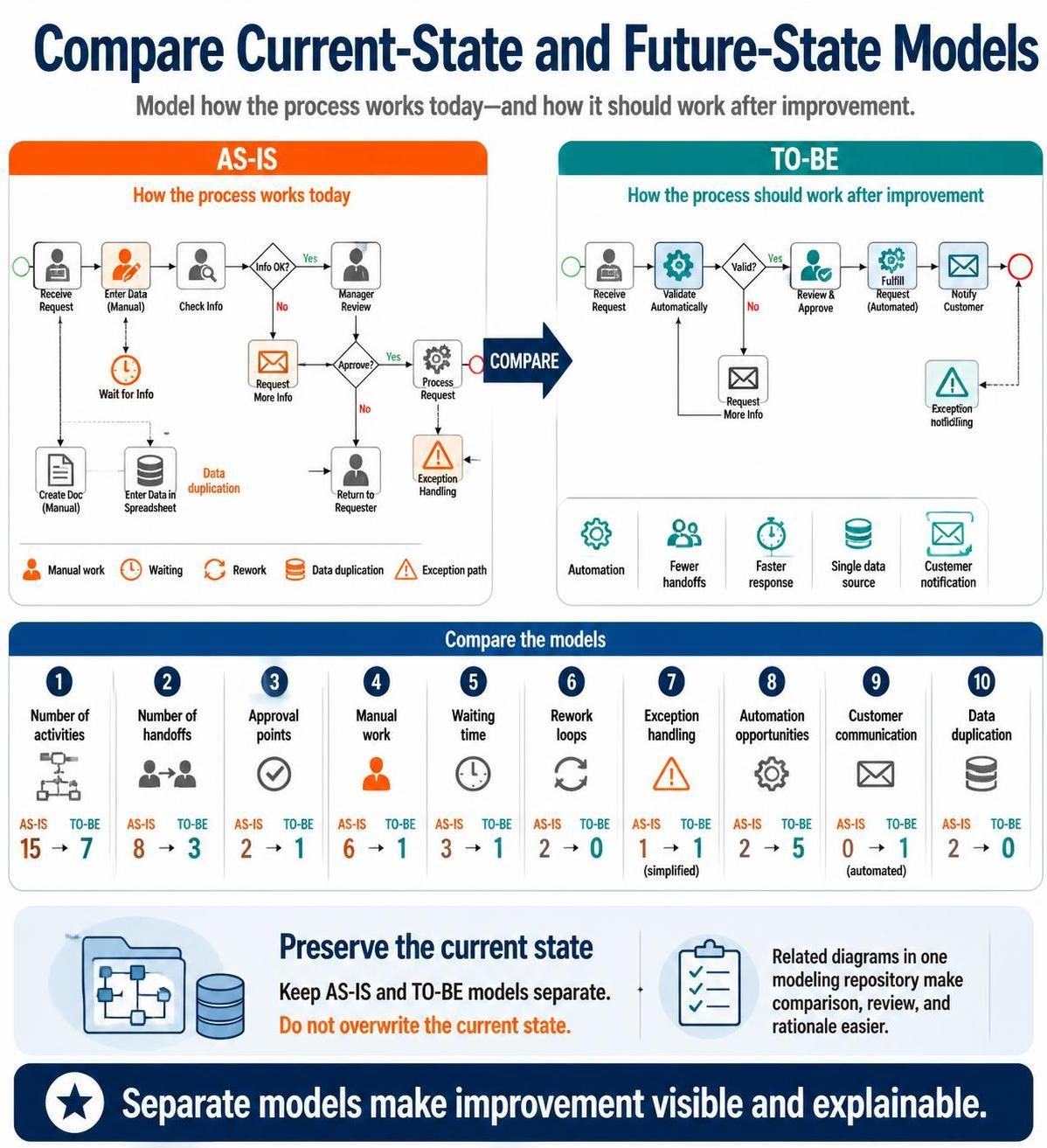
20. Compare current-state and future-state models
For process improvement, create separate models for:
-
As-is: How the process works today
-
To-be: How the process should work after improvement
Keep the two models separate rather than overwriting the current state. This allows the organization to compare changes and understand the rationale for redesign.
Look for differences in:
-
Number of activities
-
Number of handoffs
-
Approval points
-
Manual work
-
Waiting time
-
Rework loops
-
Exception handling
-
Automation opportunities
-
Customer communication
-
Data duplication
Visual Paradigm can be used to maintain related current-state and future-state diagrams within the same modeling repository, making comparison and review easier.
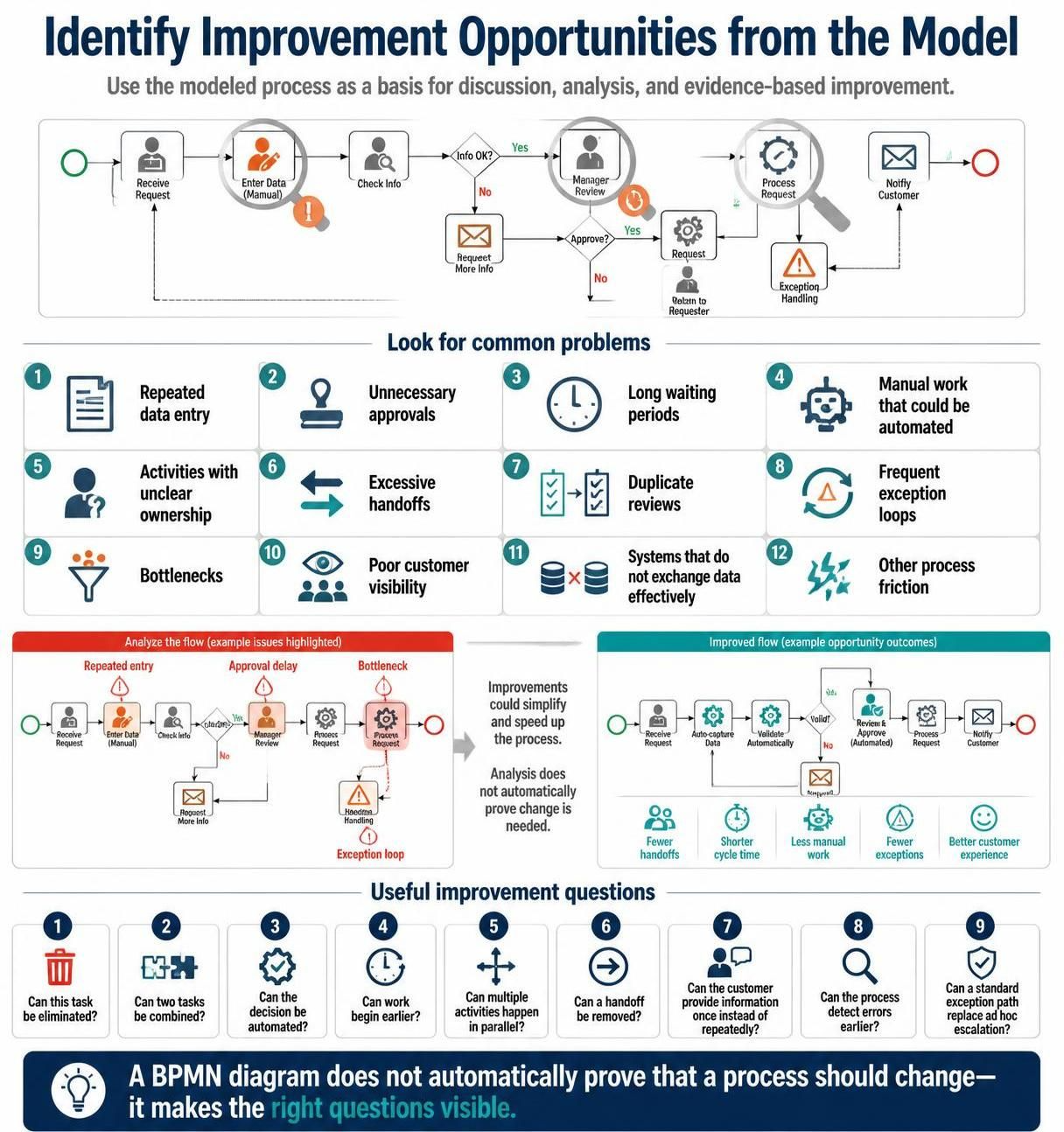
21. Identify improvement opportunities from the model
Once the process is modeled, analyze it for common problems:
-
Repeated data entry
-
Unnecessary approvals
-
Long waiting periods
-
Manual work that could be automated
-
Activities with unclear ownership
-
Excessive handoffs
-
Duplicate reviews
-
Frequent exception loops
-
Bottlenecks
-
Poor customer visibility
-
Systems that do not exchange data effectively
A BPMN diagram does not automatically prove that a process should be changed. Use it as a basis for discussion and analysis.
Useful improvement questions include:
-
Can this task be eliminated?
-
Can two tasks be combined?
-
Can the decision be automated?
-
Can work begin earlier?
-
Can multiple activities happen in parallel?
-
Can a handoff be removed?
-
Can the customer provide information once instead of repeatedly?
-
Can the process detect errors earlier?
-
Can a standard exception path replace ad hoc escalation?
22. Prepare diagrams for automation carefully
If a BPMN model will be used for workflow automation, additional precision is needed.
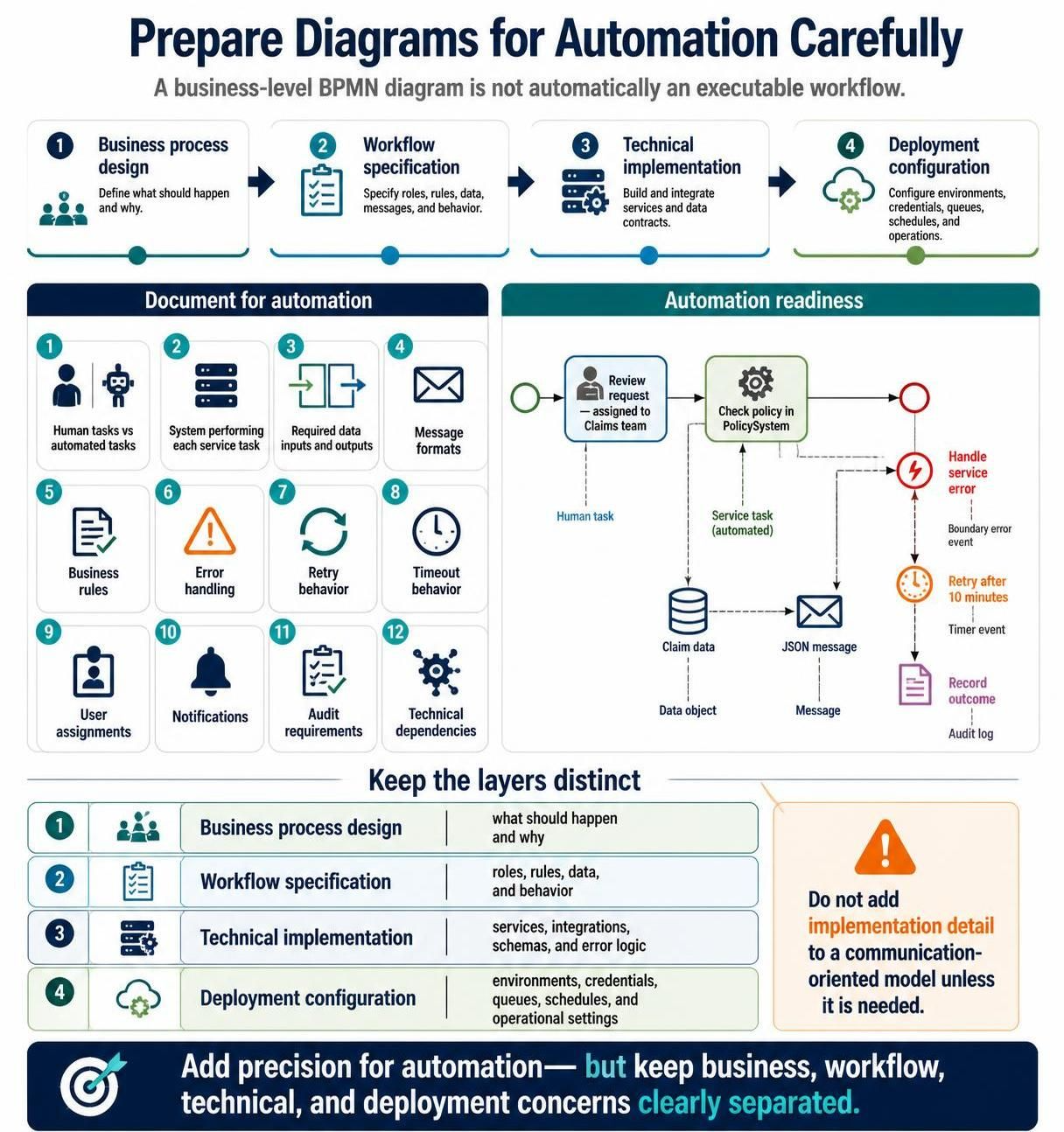
Document:
-
Which tasks are performed by people
-
Which tasks are automated
-
Which system performs each service task
-
Required data inputs and outputs
-
Message formats
-
Business rules
-
Error handling
-
Retry behavior
-
Timeout behavior
-
User assignments
-
Notifications
-
Audit requirements
Do not assume that a business-level BPMN diagram is immediately executable. Automation usually requires implementation details that are unnecessary in a communication-oriented model.
Maintain a clear distinction between:
-
Business process design
-
Workflow specification
-
Technical implementation
-
Deployment configuration
23. Use Visual Paradigm effectively
When using Visual Paradigm BPMN, establish a repeatable modeling workflow.
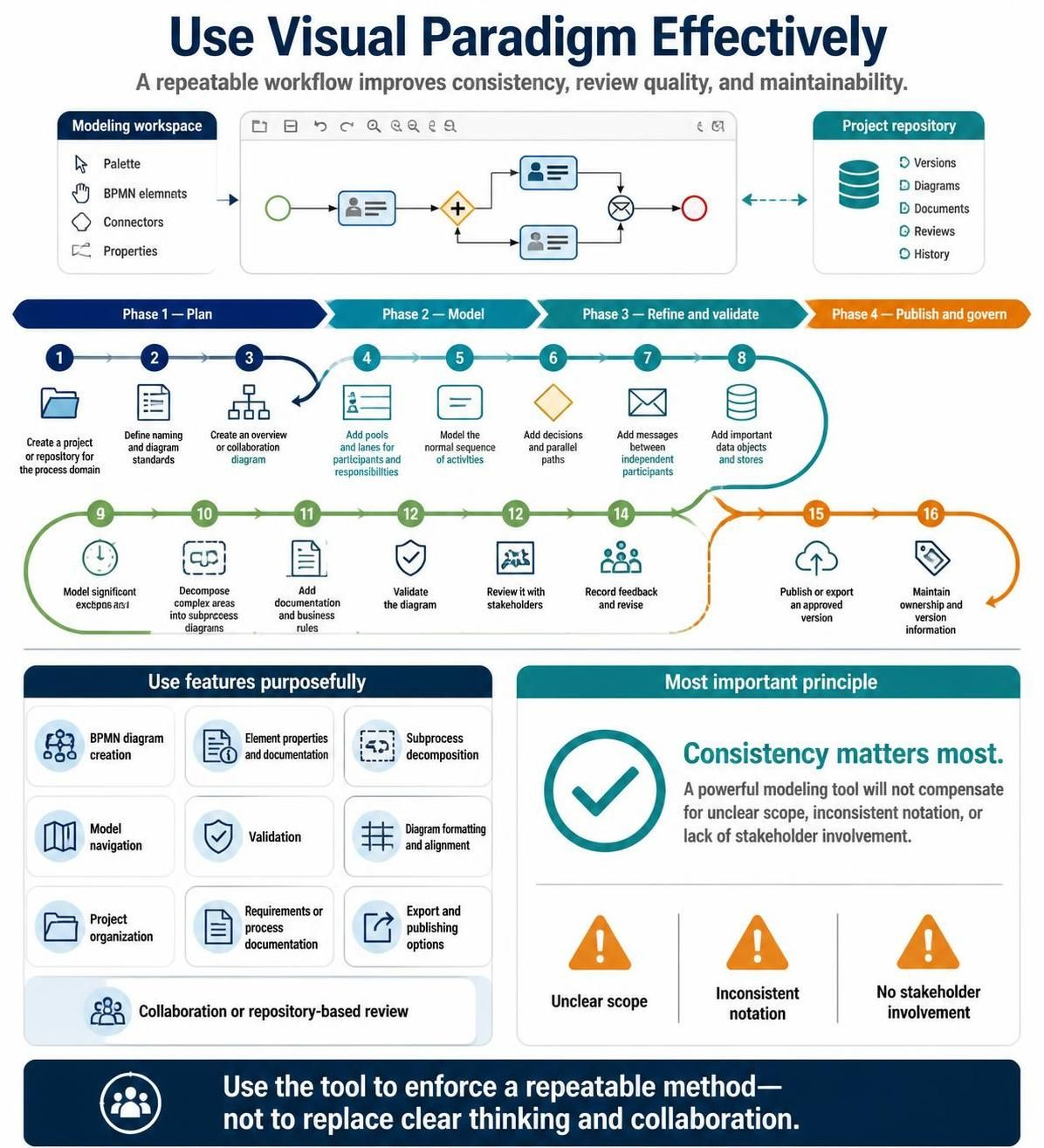
Recommended workflow
-
Create a project or repository for the process domain.
-
Define naming and diagram standards.
-
Create an overview or collaboration diagram.
-
Add pools and lanes for participants and responsibilities.
-
Model the normal sequence of activities.
-
Add decisions and parallel paths.
-
Add messages between independent participants.
-
Add important data objects and stores.
-
Model significant exceptions and timeouts.
-
Decompose complex areas into subprocess diagrams.
-
Add documentation and business rules.
-
Validate the diagram.
-
Review it with stakeholders.
-
Record feedback and revise.
-
Publish or export an approved version.
-
Maintain ownership and version information.
Features to use purposefully
Depending on the edition and configuration, useful capabilities may include:
-
BPMN diagram creation
-
Element properties and documentation
-
Subprocess decomposition
-
Model navigation
-
Validation
-
Diagram formatting and alignment
-
Project organization
-
Requirements or process documentation
-
Export and publishing options
-
Collaboration or repository-based review
The most important tooling principle is consistency. A powerful modeling tool will not compensate for unclear scope, inconsistent notation, or lack of stakeholder involvement.
24. Create a BPMN quality checklist
Use this checklist before approving a diagram.
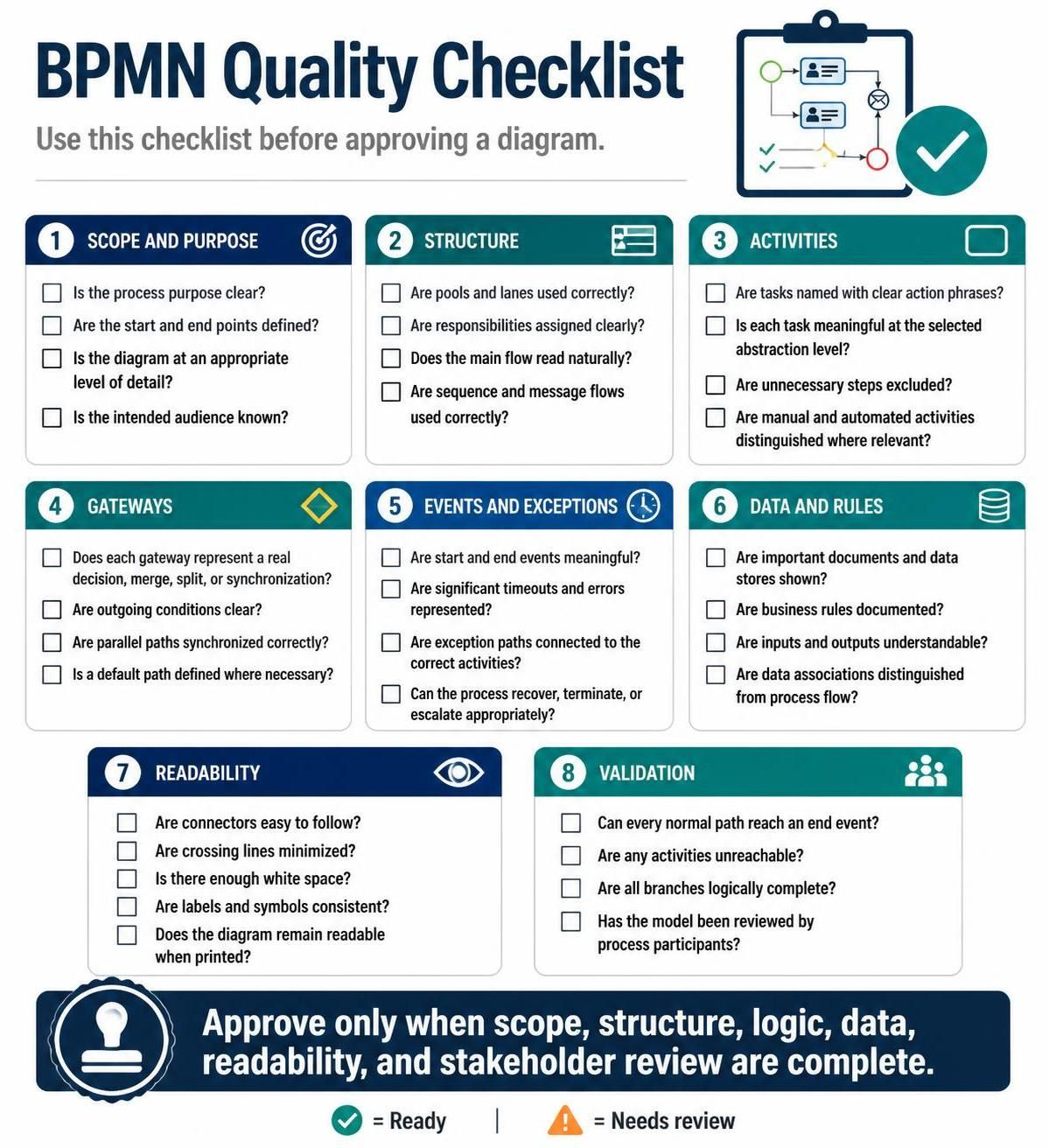
Scope and purpose
-
Is the process purpose clear?
-
Are the start and end points defined?
-
Is the diagram at an appropriate level of detail?
-
Is the intended audience known?
Structure
-
Are pools and lanes used correctly?
-
Are responsibilities assigned clearly?
-
Does the main flow read naturally?
-
Are sequence and message flows used correctly?
Activities
-
Are tasks named with clear action phrases?
-
Is each task meaningful at the selected abstraction level?
-
Are unnecessary steps excluded?
-
Are manual and automated activities distinguished where relevant?
Gateways
-
Does each gateway represent a real decision, merge, split, or synchronization?
-
Are outgoing conditions clear?
-
Are parallel paths synchronized correctly?
-
Is a default path defined where necessary?
Events and exceptions
-
Are start and end events meaningful?
-
Are significant timeouts and errors represented?
-
Are exception paths connected to the correct activities?
-
Can the process recover, terminate, or escalate appropriately?
Data and rules
-
Are important documents and data stores shown?
-
Are business rules documented?
-
Are inputs and outputs understandable?
-
Are data associations distinguished from process flow?
Readability
-
Are connectors easy to follow?
-
Are crossing lines minimized?
-
Is there enough white space?
-
Are labels and symbols consistent?
-
Does the diagram remain readable when printed?
Validation
-
Can every normal path reach an end event?
-
Are any activities unreachable?
-
Are all branches logically complete?
-
Has the model been reviewed by process participants?
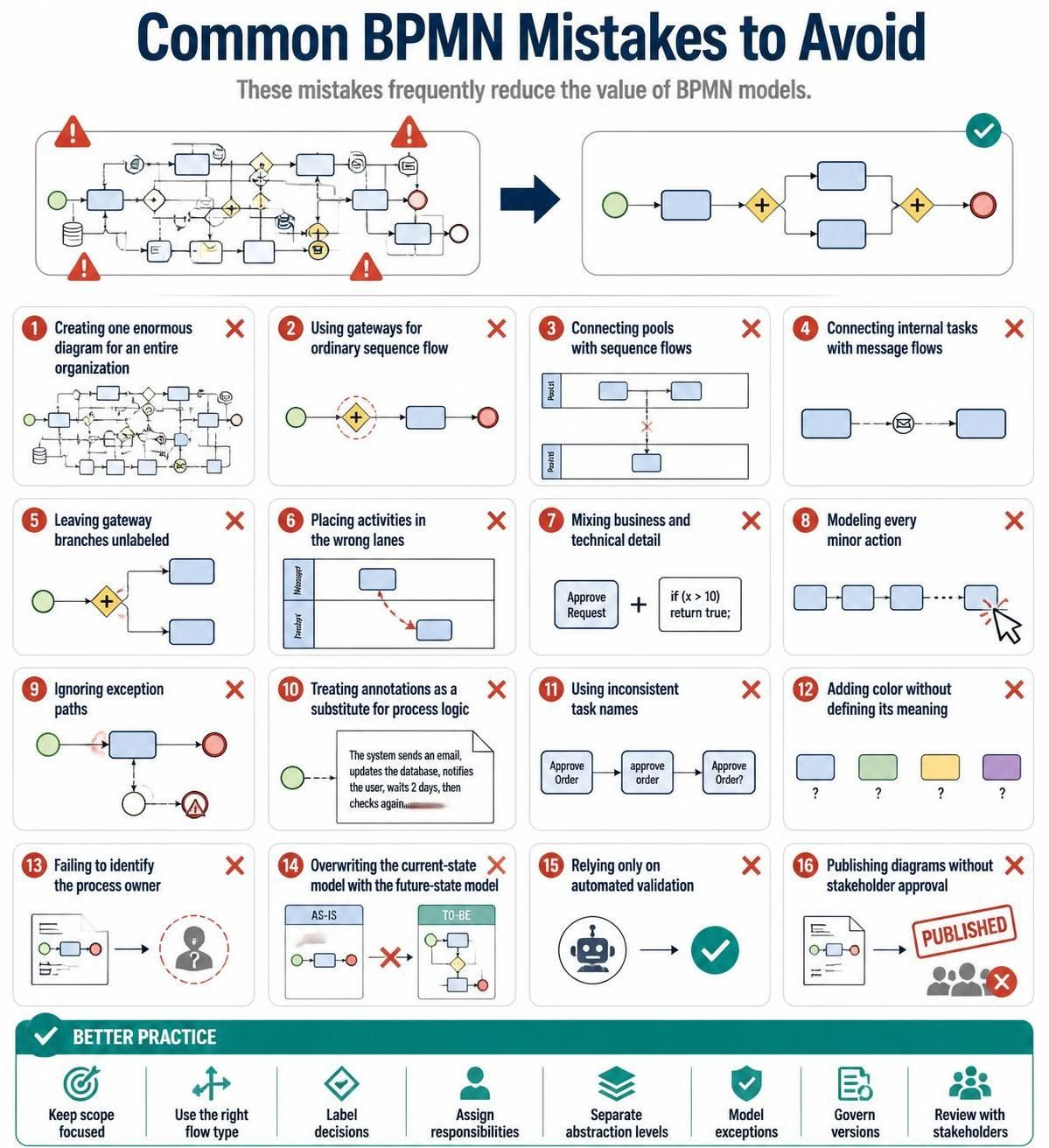
25. Common mistakes to avoid
The following mistakes frequently reduce the value of BPMN models:
-
Creating one enormous diagram for an entire organization
-
Using gateways for ordinary sequence flow
-
Connecting pools with sequence flows
-
Connecting internal tasks with message flows
-
Leaving gateway branches unlabeled
-
Placing activities in the wrong lanes
-
Mixing business and technical detail
-
Modeling every minor action
-
Ignoring exception paths
-
Treating annotations as a substitute for process logic
-
Using inconsistent task names
-
Adding color without defining its meaning
-
Failing to identify the process owner
-
Overwriting the current-state model with the future-state model
-
Relying only on automated validation
-
Publishing diagrams without stakeholder approval
Conclusion
Effective BPMN modeling depends more on clarity, consistency, and stakeholder validation than on the number of symbols used. Start with a clear process scope, assign responsibilities through pools and lanes, use gateways and events accurately, separate normal and exception flows, and decompose complex processes into manageable subprocesses.
Visual Paradigm BPMN can provide the environment for creating, organizing, validating, documenting, and maintaining these models. To get the most value from the tool, combine its modeling capabilities with strong naming standards, a consistent level of detail, formal review practices, and clear ownership of the process models.